Keepass2android: ChromeOS support
Hi
tl;dr; there is a workaround by @jeffmcneill - turn off the anti-screenshot feature in the app setting.
ChromeOS now support opening Android apps.
I can open Keepass2Android on my laptop screen (google pixelbook), however if I open the app on my external monitor (4k monitor) - I get a blank screen and I need to drag it to my laptop.
Since I'm working in a docking station mode (i.e., screen closed) it is very annoying.
Google has a special page for android apps on ChromeOS - https://developer.android.com/chrome-os/intro.html
The solution to the screen size issue is here - https://developer.android.com/topic/arc/screen-size-comp.html
Thanks!
 eggsterino
All 21 comments
So.. does Keepass2Android offically support the Chrome OS on any Chromebook that has access to the Google Play Store? It sounds like it does, but want to be sure before switching from a Nexus 9 to a new Acer Chromebook Tab 10 that comes out in April. https://www.anandtech.com/show/12583/acer-announces-chromebook-tab-10-a-tablet-running-googles-chrome-os
 df03438
on 29 Mar 2018
df03438
on 29 Mar 2018
Ah ah, I was sure that was related to Chromebook tab :D
I'm interested in the answer too, but there's another solution : Keeweb is running on Chromebook. However, I don't know how it behaves with file syncing... But that's another matter.
 Karreg
on 29 Mar 2018
Karreg
on 29 Mar 2018
I think it does, however it has issues on non-native monitors with a high resolution.
By the way, as long as I need read only access - I use Tusk. For the rare occasion that I need to change a password or create a new entry - I disconnect the chromebook from the docking station and use K2A.
eggsterino
on 29 Mar 2018
Hi Everyone,
I'm also experiencing this problem.
Keepass2Android was working on a Samsung Chromebook Pro in standalone portable "notebook mode" - internal screen only for a 4-5 days without any problems. I was using Dropbox to store .kdbx database, and sync'ing plus a locally stored ket file. Using Keepass2Android from the Samsung Chromebook, and Keepass on "old" Windows desktop PC to open & edit the database worked great !!!
Then started to create "docked desktop" environment with 2x external 2K monitors, wireless keyboard & mouse for the Samsung Chromebook Pro - constantly suffered "blank screen" problem in Keepass2Android window on external monitors (have tried many re-install options). But can drag window to / from internal screen where Keepass2Android app operates correctly, to "faulty" external monitors. I too am seeking to dock / close internal screen on Samsung Chromebook Pro for 80% of time.
An Acer Chromebook 14 for Business notebook was also tried in this "docked desktop" environment - exactly the same problem.
Unfortunately I don't have any app programming skills. But I am happy to provide any detailed information required, and test any code fix for this problem - both on the Samsung & Acer chromebooks.
Thanks, Cam Lynch.
 RoamingAussie
on 23 May 2018
RoamingAussie
on 23 May 2018
Same problem on an Asus Chromebook Flip C101PA running Version 66.0.3359.137 (Official Build) (32-bit), which has an ARM processor, if that matters.
When connected to an external 1080p monitor via hdmi, even if I am using two screens (chromebook and external) as soon as I connect the monitor, Keepass2Android app display turns completely black. I have to disconnect the monitor, and then restart K2A to get the screen to appear. Note that the initial login screen for selecting a database works fine on the external monitor, it is the display of the list of entries and individual entries that are black and therefore illegible.
From reading the link in the initial issue report above, it appears that different calls need to be made to draw the screens in a way that is supported by ChromeOS's implementation of Android Apps.
- P.S., I've donated a large beer via [email protected] to help with thirst-quenching needs.
 jeffmcneill
on 3 Jun 2018
jeffmcneill
on 3 Jun 2018
Hi folks, looks like it is the anti-screenshot feature that is causing the issue. I disabled that setting and no longer have a black screen on the external/extended monitor configuration.
jeffmcneill
on 26 Jul 2018
@jeffmcneill this solved the issue for me too!
 derBroBro
on 4 Sep 2018
derBroBro
on 4 Sep 2018
@jeffmcneill solved here as well, thanks!
eggsterino
on 26 Sep 2018
Hi folks, looks like it is the anti-screenshot feature that is causing the issue. I disabled that setting and no longer have a black screen on the external/extended monitor configuration.
I'm also affected by this issue on ChromeOS. Unfortunately I'm not able to use the workaround because I have no way of ever accessing app settings to change it! As soon as you select a database, the anti-screenshot feature takes over and I can't then interact with the app to be able to disable it. Device is the ASUS Chromebox 3 (I can probably add a screen capture if the behaviour I'm describing isn't clear).
Is there any other way to turn it off? Perhaps it should even default to off if it's not possible to reliably detect when the user won't be able to interact with the app with it on?
 lloydhazlett
on 25 Jan 2019
lloydhazlett
on 25 Jan 2019
Just change the screen to a lower resolution.
On Sat, Jan 26, 2019, 00:34 Lloyd Hazlett <[email protected] wrote:
Hi folks, looks like it is the anti-screenshot feature that is causing the
issue. I disabled that setting and no longer have a black screen on the
external/extended monitor configuration.I'm also affected by this issue on ChromeOS. Unfortunately I'm not able to
use the workaround because I have no way of ever accessing app settings to
change it! As soon as you select a database, the anti-screenshot feature
takes over and I can't then interact with the app to be able to disable it.
Device is the ASUS Chromebox 3
https://www.asus.com/us/Chrome-Devices/ASUS-Chromebox-3/ (I can
probably add a screen capture if the behaviour I'm describing isn't clear).Is there any other way to turn it off? Perhaps it should even default to
off if it's not possible to reliably detect when the user won't be able to
interact with the app with it on?—
You are receiving this because you authored the thread.
Reply to this email directly, view it on GitHub
https://github.com/PhilippC/keepass2android/issues/272#issuecomment-457756134,
or mute the thread
https://github.com/notifications/unsubscribe-auth/AJlFyzwUeJ-44yvAm8-0hSAzXdAztJ0Cks5vG4ZmgaJpZM4SSP-4
.
eggsterino
on 26 Jan 2019
Just change the screen to a lower resolution.
@eggsterino Thanks. I thought I tried that already, but if you know that it works I'll check again. Don't suppose you happen to know exactly what resolution the anti-screenshot feature takes effect from?
lloydhazlett
on 26 Jan 2019
I think that I pressed the ctrl+shift+- twice but I'm not sure...
Also, if I remember correctly, I opened the app after changing the resolution...
On Sat, Jan 26, 2019 at 11:18 PM Lloyd Hazlett notifications@github.com
wrote:
Just change the screen to a lower resolution.
@eggsterino https://github.com/eggsterino Thanks. I thought I tried
that already, but if you know that it works I'll check again. Don't suppose
you happen to know exactly what resolution the anti-screenshot feature
takes effect from?—
You are receiving this because you were mentioned.
Reply to this email directly, view it on GitHub
https://github.com/PhilippC/keepass2android/issues/272#issuecomment-457866868,
or mute the thread
https://github.com/notifications/unsubscribe-auth/AJlFy8au63ttlNOXH6J9XQIVbURvDyWAks5vHMY1gaJpZM4SSP-4
.
eggsterino
on 26 Jan 2019
@eggsterino I still don't see way to work around this. I have tested changing resolution to 720x400, which is as low as ChromeOS will allow you to set it. There is no change, the application window is still blacked out. Given it is an application setting rather than a database setting, I don't see a way for ChromeOS users with external displays only to disable the feature.
lloydhazlett
on 31 Jan 2019
Hmm, I changed it on my native screen (and now it works on external as
well).
A wild experiment - try remote controlling your chrome os from a mobile
phone.
Another option - change the setting on your phone and copy the setting file
of the application to chrome os (I have no idea if it is possible)...
On Thu, Jan 31, 2019, 06:20 Lloyd Hazlett <[email protected] wrote:
@eggsterino https://github.com/eggsterino I still don't see way to work
around this. I have tested changing resolution to 720x400, which is as low
as ChromeOS will allow you to set it. There is no change, the application
window is still blacked out. Given it is an application setting rather than
a database setting, I don't see a way for ChromeOS users with external
displays only to disable the feature.—
You are receiving this because you were mentioned.
Reply to this email directly, view it on GitHub
https://github.com/PhilippC/keepass2android/issues/272#issuecomment-459209531,
or mute the thread
https://github.com/notifications/unsubscribe-auth/AJlFy8Qr6GEJYZvWNoDJCwrvxbSQWxYSks5vIm8bgaJpZM4SSP-4
.
eggsterino
on 31 Jan 2019
@PhilippC I'm still very much stuck with this issue, could I ask for your input? With a device like a chromebox where there is only ever a high resolution display, it doesn't seem possible to work around the anti-screenshot feature being enabled by default to be able to then turn it off. Would really like to be able use keepass2android on ChromeOS since it's a great fit with Google Drive support otherwise.
lloydhazlett
on 27 Jul 2019
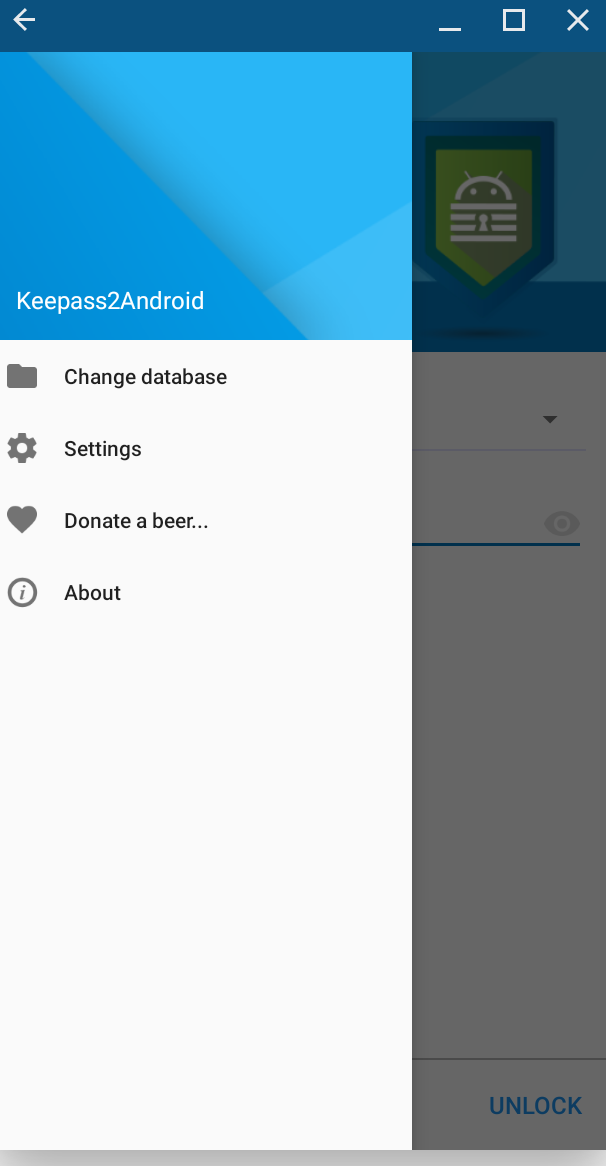
I have managed to get keepass2android to work on my pixelbook. I had the app open on my phone as a guide and clicked where I thought the menu button was, then settings. This then allowed the settings screen to pop up and turn off the anti-screen shot option. Back out of settings and it works correctly.
 davebuk
on 31 Jul 2019
davebuk
on 31 Jul 2019
@davebuk Thanks very much for this suggestion, I really thought it would do the trick. Sadly, had a chance to try it today, and I just could not manage to get to settings. Multiple attempts, blindly unlocking the database, clicking where dots menu and then settings should be. Nothing. No idea how you managed it, but I was not as lucky.
Also tried chrome remote desktop and could not get the chromebox to show up in the Android app's list or any other way to connect from an Android phone. No idea how that is supposed to work, docs indicate it's possible but it seems to me like Android client to chromeos host flat out doesn't work.
So, I'm back to being all out of ideas short of diving in to the source to try and find a way to ignore the setting on chromeos devices.
lloydhazlett
on 3 Aug 2019
Are you using the dev channel by any chance? My pixelbook is second hand and didn't realise it was on the dev channel. I had issues with netflix and google play movies. They would only show a black screen, a bit like keepass2android. I have changed to the stable channel and all these apps work as they should with no need to modify anything.
I used the app in a small window mode rather than full screen if that helps? See screen capture below as a guide. I was first able to go through the load database option then the app would go black. Clicking where I thought the menu button should be then watching the hand icon appear, I guessed again where settings were.
davebuk
on 3 Aug 2019
I suggest I will try to detect if ChromeOS is running and disable screen protection by default there. Also, maybe there should be a way to access settings from the File selection screen.
 PhilippC
on 27 Aug 2019
PhilippC
on 27 Aug 2019
Without turning off the anti-screenshot option under security, if the Keepass app opens on the connected monitor for more than a few seconds, it will crash ChromeOS. This has been happening for a few months now. For those without any built-in display (ChromeBox, ChromeBit), my guess is Keepass2Android is unusable. It might be better to have the anti-screenshot option turned off by default and a warning next to it for ChromeOS Android users.
jeffmcneill
on 21 Oct 2019
the upcoming 1.08 preview (https://play.google.com/apps/testing/keepass2android.keepass2android) will detect whether a secure display is a available, and if not, suggest to disable the feature.
PhilippC
on 21 Oct 2019
Related issues
 GuillaumeCz
·
5Comments
GuillaumeCz
·
5Comments
 andschwa
·
3Comments
andschwa
·
3Comments
 ghost
·
3Comments
ghost
·
3Comments
 spocko
·
4Comments
spocko
·
4Comments
 Sveninndh
·
6Comments
Sveninndh
·
6Comments
Most helpful comment
Hi folks, looks like it is the anti-screenshot feature that is causing the issue. I disabled that setting and no longer have a black screen on the external/extended monitor configuration.