Keepass2android: Keepass2android not seeing full android file system
I installed the product on my phone then copied my kdbx to my phone. Imagine my surprise when KP2A didn't let you wander the file system but only lets you look in Images, Audio, Recent and Downloads. I don't keep a database in any of those places.
Is the author of KP2A planning on fixing the code or is there another Android app that actually works?
 ithinktfiam
All 6 comments
You are so kind I can't refuse to help you. KeePass is a too crappy app for you. You should use LastPass or Dashlane instead.
You're welcome.
 Karreg
on 16 Jan 2018
Karreg
on 16 Jan 2018
It took me a while to figure out what your problem was. I never had the issue you complain about, and keep my database in Documents, so I tried to open a new database. And, wow, there is an issue. You are given 3 options, - System File picker, Get from third party app and Get more storage types. If you use the system file picker, it will use whatever your phone has inherited from the manufacturer. In other words, crap, and you get no real options and severe limitations.
If you choose Get from third party, and then choose the hamburger menu on the LEFT, you'll be able to choose another file manager to use instead of the crippled system file manager. Those options are at the bottom below the standard options of your phone.
I use the wonderful Solid Explorer, which let's me wifi into my windows computer and copy the latest keepass. It is also a great file manager. However, you'll also have the option of choosing the Keepass2Android file manager which is perfectly good and will do what you want. The problem is that your phone defaults you to a limited file manager, but the option to change is presented.
This will only occur once, since Keepass2Android will remember where your database is, and will bring it up automatically after the first time, like in Windows.
 Mortimersnodgrass
on 17 Jan 2018
Mortimersnodgrass
on 17 Jan 2018
I'm not seeing "Get from third party" or similar option on your "open from" menu. I'm also new to Android, having just lost my ancient Windows phone (better UI but MS, as you no doubt noticed, completely missed the market timing).
Oh, nice. While trying to find anything, this time there was an icon for the phone model. Clicked on it, saw the full folders, went into the right one and opened the kdbx and can see the files.
Of course, then another problem. I tried to sync my desktop kdbx to the phone's, pointing the sync at the phone database. The path looks weird. Rather than the phone being an external drive and going directly there, KP is somehow resolving it as something in AppData\Local...
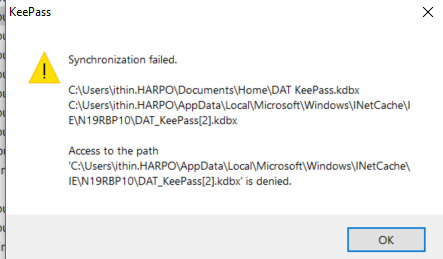
Are you familiar with how W10 is resolving access to an Android phone and what I have to do so sync; or do I just need to copy new versions out to the phone rather than synchronizing?
ithinktfiam
on 17 Jan 2018
@ithinktfiam This is the default behavior of the Android system file picker. On most devices, you can open the menu (on the top left) and there should be an option like "Show SD Card" or similar which allows to access all files. If this does not exist, please do a search for your phone which might help or check the system settings. Or use Solid Explorer as suggested by @Mortimersnodgrass . (If you click "Open database" on the start screen, there's Third party app.)
 PhilippC
on 17 Jan 2018
PhilippC
on 17 Jan 2018
This is an issue of the desktop KP not accessing the Android path, so I don't think the local system file picker can be chosen by me. I think I'll post something on the main KP site with a pointer to this thread, in case there's something the developers can do to improve their sync to Android.
thanks again for your help.
ithinktfiam
on 17 Jan 2018
In general, most people don't need to sync. If you update from your windows machine you can just copy the file over. If you actually updated and or added items from both, I copy the android database onto the Windows machine, run the file / sync and copy back.
Synchronization is complex (for example changes to a record from both devices in different time zones), so it is best to do what you can to reduce the possible issues.
Mortimersnodgrass
on 17 Jan 2018
Related issues
 Zhaph
·
4Comments
Zhaph
·
4Comments
 jyf007
·
6Comments
jyf007
·
6Comments
 tgp1994
·
4Comments
tgp1994
·
4Comments
 spocko
·
4Comments
spocko
·
4Comments
 andschwa
·
3Comments
andschwa
·
3Comments
Most helpful comment
It took me a while to figure out what your problem was. I never had the issue you complain about, and keep my database in Documents, so I tried to open a new database. And, wow, there is an issue. You are given 3 options, - System File picker, Get from third party app and Get more storage types. If you use the system file picker, it will use whatever your phone has inherited from the manufacturer. In other words, crap, and you get no real options and severe limitations.
If you choose Get from third party, and then choose the hamburger menu on the LEFT, you'll be able to choose another file manager to use instead of the crippled system file manager. Those options are at the bottom below the standard options of your phone.
I use the wonderful Solid Explorer, which let's me wifi into my windows computer and copy the latest keepass. It is also a great file manager. However, you'll also have the option of choosing the Keepass2Android file manager which is perfectly good and will do what you want. The problem is that your phone defaults you to a limited file manager, but the option to change is presented.
This will only occur once, since Keepass2Android will remember where your database is, and will bring it up automatically after the first time, like in Windows.