Keda: Azure Log Analytics Scaler: Scaled object is defined on http requests but the hpa is scaling on resource cpu on pods (as a percentage of request)
Report
The configured Log analytics Scaler is based on a count metric
apiVersion: keda.sh/v1alpha1
kind: TriggerAuthentication
metadata:
  name: trigger-auth-kedaloganalytics
  namespace: default
spec:
  podIdentity:
    provider: azure
---
apiVersion: keda.sh/v1alpha1
kind: ScaledObject
metadata:
  name: kedaloganalytics-dev-us-server-scaled-object
  namespace: default
  labels:
    deploymentName: dev-us-server
spec:
  scaleTargetRef:
    kind: Deployment
    name: dev-us-server
  pollingInterval: 10
  cooldownPeriod: 60
  minReplicaCount: 8
  maxReplicaCount: 20
  triggers:
  - type: azure-log-analytics
    metadata:
      workspaceId: "f39f2e7d-f20f-425d-b84c-4a09ce102d64"
      query: |
        let AvgDuration = ago(2m);
        let ThresholdCoefficient = 0.8;
        AppTraces
          |where TimeGenerated > AvgDuration
          |search "INFO"
          |summarize MetricValue = count() by AppRoleName
          |project MetricValue, Threshold = MetricValue* ThresholdCoefficient
      threshold: "2"
    authenticationRef:
      name: trigger-auth-kedaloganalytics
But when I describe the hpa it gives
kubectl describe hpa keda-hpa-kedaloganalytics-dev-us-server-scaled-object
Name:                                                  keda-hpa-kedaloganalytics-dev-us-server-scaled-object
Namespace:                                             default
Labels:                                                app.kubernetes.io/managed-by=keda-operator
                                                       app.kubernetes.io/name=keda-hpa-kedaloganalytics-dev-us-server-scaled-object
                                                       app.kubernetes.io/part-of=kedaloganalytics-dev-us-server-scaled-object
                                                       app.kubernetes.io/version=2.1.0
                                                       deploymentName=dev-us-server
                                                       scaledObjectName=kedaloganalytics-dev-us-server-scaled-object
Annotations:                                           <none>
CreationTimestamp:                                     Mon, 22 Feb 2021 14:30:11 +0530
Reference:                                             Deployment/dev-us-server
Metrics:                                               ( current / target )
  resource cpu on pods  (as a percentage of request):  0% (1m) / 80%
Min replicas:                                          8
Max replicas:                                          20
Deployment pods:                                       8 current / 8 desired
Conditions:
  Type            Status  Reason            Message
  ----            ------  ------            -------
  AbleToScale     True    ReadyForNewScale  recommended size matches current size
  ScalingActive   True    ValidMetricFound  the HPA was able to successfully calculate a replica count from cpu resource utilization (percentage of request)
  ScalingLimited  True    TooFewReplicas    the desired replica count is less than the minimum replica count
Events:           <none>
Expected Behavior
Above the metrics should be as defined in the log analytics query which is a count not (resource cpu) .
kubectl get hpa
NAME                                                              REFERENCE                  TARGETS   MINPODS   MAXPODS   REPLICAS   AGE
keda-hpa-kedaloganalytics-dev-us-server-scaled-object   Deployment/dev-us-server   2/16    8         20        8          3h36m
Actual Behavior
NAME                                                    REFERENCE                  TARGETS   MINPODS   MAXPODS   REPLICAS   AGE
keda-hpa-kedaloganalytics-dev-us-server-scaled-object   Deployment/dev-us-server   0%/80%    8         20        8          3h36m
Steps to Reproduce the Problem
- Make an managed identity based aks cluster
- Follow this to enable managed identity authentication for log analytics scaler https://keda.sh/docs/2.1/scalers/azure-log-analytics/#guides
- Deploy triggers https://keda.sh/docs/2.1/scalers/azure-log-analytics/#managed-identity-based-authentication
- Reference the above yaml file for query.
Logs from KEDA operator
2021-02-22T09:55:39.462Z        INFO    controller-runtime.metrics      metrics server is starting to listen    {"addr": ":8080"}
2021-02-22T09:55:39.464Z        INFO    controllers.ScaledObject        Running on Kubernetes 1.18      {"version": "v1.18.14"}
2021-02-22T09:55:39.465Z        INFO    setup   Starting manager
2021-02-22T09:55:39.465Z        INFO    setup   KEDA Version: 2.1.0
2021-02-22T09:55:39.465Z        INFO    setup   Git Commit: 4866ce69c4897df532b43390bafe4477275bf65a
2021-02-22T09:55:39.465Z        INFO    setup   Go Version: go1.15.6
2021-02-22T09:55:39.465Z        INFO    setup   Go OS/Arch: linux/amd64
I0222 09:55:39.465426       1 leaderelection.go:243] attempting to acquire leader lease keda/operator.keda.sh...
2021-02-22T09:55:39.465Z        INFO    controller-runtime.manager      starting metrics server {"path": "/metrics"}
I0222 09:55:56.884437       1 leaderelection.go:253] successfully acquired lease keda/operator.keda.sh
2021-02-22T09:55:56.884Z        INFO    controller      Starting EventSource    {"reconcilerGroup": "keda.sh", "reconcilerKind": "ScaledJob", "controller": "scaledjob", "source": "kind source: /, Kind="}
2021-02-22T09:55:56.884Z        INFO    controller      Starting EventSource    {"reconcilerGroup": "keda.sh", "reconcilerKind": "ScaledObject", "controller": "scaledobject", "source": "kind source: /, Kind="}
2021-02-22T09:55:56.985Z        INFO    controller      Starting Controller     {"reconcilerGroup": "keda.sh", "reconcilerKind": "ScaledJob", "controller": "scaledjob"}
2021-02-22T09:55:56.985Z        INFO    controller      Starting EventSource    {"reconcilerGroup": "keda.sh", "reconcilerKind": "ScaledObject", "controller": "scaledobject", "source": "kind source: /, Kind="}
2021-02-22T09:55:56.985Z        INFO    controller      Starting workers        {"reconcilerGroup": "keda.sh", "reconcilerKind": "ScaledJob", "controller": "scaledjob", "worker count": 1}
2021-02-22T09:55:57.085Z        INFO    controller      Starting Controller     {"reconcilerGroup": "keda.sh", "reconcilerKind": "ScaledObject", "controller": "scaledobject"}
2021-02-22T09:55:57.085Z        INFO    controller      Starting workers        {"reconcilerGroup": "keda.sh", "reconcilerKind": "ScaledObject", "controller": "scaledobject", "worker count": 1}
2021-02-22T09:55:57.086Z        INFO    controllers.ScaledObject        Reconciling ScaledObject        {"ScaledObject.Namespace": "default", "ScaledObject.Name": "kedaloganalytics-dev-us-server-scaled-object"}
2021-02-22T09:55:57.898Z        INFO    controllers.ScaledObject        Initializing Scaling logic according to ScaledObject Specification      {"ScaledObject.Namespace": "default", "ScaledObject.Name": "kedaloganalytics-dev-us-server-scaled-object"}
2021-02-22T09:57:38.524Z        INFO    controllers.ScaledObject        Reconciling ScaledObject        {"ScaledObject.Namespace": "default", "ScaledObject.Name": "kedaloganalytics-dev-us-server-scaled-object"}
2021-02-22T10:02:29.018Z        INFO    controllers.ScaledObject        Reconciling ScaledObject        {"ScaledObject.Namespace": "default", "ScaledObject.Name": "kedaloganalytics-dev-us-server-scaled-object"}
2021-02-22T11:17:48.602Z        INFO    controllers.ScaledObject        Reconciling ScaledObject        {"ScaledObject.Namespace": "default", "ScaledObject.Name": "kedaloganalytics-dev-us-server-scaled-object"}
2021-02-22T11:18:49.776Z        INFO    controllers.ScaledObject        Reconciling ScaledObject        {"ScaledObject.Namespace": "default", "ScaledObject.Name": "kedaloganalytics-dev-us-server-scaled-object"}
2021-02-22T11:19:50.896Z        INFO    controllers.ScaledObject        Reconciling ScaledObject        {"ScaledObject.Namespace": "default", "ScaledObject.Name": "kedaloganalytics-dev-us-server-scaled-object"}
2021-02-22T11:20:52.138Z        INFO    controllers.ScaledObject        Reconciling ScaledObject        {"ScaledObject.Namespace": "default", "ScaledObject.Name": "kedaloganalytics-dev-us-server-scaled-object"}
2021-02-22T11:21:37.746Z        INFO    controllers.ScaledObject        Reconciling ScaledObject        {"ScaledObject.Namespace": "default", "ScaledObject.Name": "kedaloganalytics-dev-us-server-scaled-object"}
2021-02-22T11:22:39.411Z        INFO    controllers.ScaledObject        Reconciling ScaledObject        {"ScaledObject.Namespace": "default", "ScaledObject.Name": "kedaloganalytics-dev-us-server-scaled-object"}
2021-02-22T11:23:40.504Z        INFO    controllers.ScaledObject        Reconciling ScaledObject        {"ScaledObject.Namespace": "default", "ScaledObject.Name": "kedaloganalytics-dev-us-server-scaled-object"}
2021-02-22T11:24:41.646Z        INFO    controllers.ScaledObject        Reconciling ScaledObject        {"ScaledObject.Namespace": "default", "ScaledObject.Name": "kedaloganalytics-dev-us-server-scaled-object"}
2021-02-22T11:25:42.853Z        INFO    controllers.ScaledObject        Reconciling ScaledObject        {"ScaledObject.Namespace": "default", "ScaledObject.Name": "kedaloganalytics-dev-us-server-scaled-object"}
2021-02-22T11:26:43.531Z        INFO    controllers.ScaledObject        Reconciling ScaledObject        {"ScaledObject.Namespace": "default", "ScaledObject.Name": "kedaloganalytics-dev-us-server-scaled-object"}
2021-02-22T11:27:44.616Z        INFO    controllers.ScaledObject        Reconciling ScaledObject        {"ScaledObject.Namespace": "default", "ScaledObject.Name": "kedaloganalytics-dev-us-server-scaled-object"}
2021-02-22T11:28:45.845Z        INFO    controllers.ScaledObject        Reconciling ScaledObject        {"ScaledObject.Namespace": "default", "ScaledObject.Name": "kedaloganalytics-dev-us-server-scaled-object"}
2021-02-22T11:29:46.929Z        INFO    controllers.ScaledObject        Reconciling ScaledObject        {"ScaledObject.Namespace": "default", "ScaledObject.Name": "kedaloganalytics-dev-us-server-scaled-object"}
2021-02-22T11:30:48.051Z        INFO    controllers.ScaledObject        Reconciling ScaledObject        {"ScaledObject.Namespace": "default", "ScaledObject.Name": "kedaloganalytics-dev-us-server-scaled-object"}
2021-02-22T11:31:49.139Z        INFO    controllers.ScaledObject        Reconciling ScaledObject        {"ScaledObject.Namespace": "default", "ScaledObject.Name": "kedaloganalytics-dev-us-server-scaled-object"}
2021-02-22T11:32:50.245Z        INFO    controllers.ScaledObject        Reconciling ScaledObject        {"ScaledObject.Namespace": "default", "ScaledObject.Name": "kedaloganalytics-dev-us-server-scaled-object"}
2021-02-22T11:33:51.335Z        INFO    controllers.ScaledObject        Reconciling ScaledObject        {"ScaledObject.Namespace": "default", "ScaledObject.Name": "kedaloganalytics-dev-us-server-scaled-object"}
2021-02-22T11:34:52.504Z        INFO    controllers.ScaledObject        Reconciling ScaledObject        {"ScaledObject.Namespace": "default", "ScaledObject.Name": "kedaloganalytics-dev-us-server-scaled-object"}
2021-02-22T11:35:38.144Z        INFO    controllers.ScaledObject        Reconciling ScaledObject        {"ScaledObject.Namespace": "default", "ScaledObject.Name": "kedaloganalytics-dev-us-server-scaled-object"}
2021-02-22T11:36:39.728Z        INFO    controllers.ScaledObject        Reconciling ScaledObject        {"ScaledObject.Namespace": "default", "ScaledObject.Name": "kedaloganalytics-dev-us-server-scaled-object"}
2021-02-22T11:37:40.882Z        INFO    controllers.ScaledObject        Reconciling ScaledObject        {"ScaledObject.Namespace": "default", "ScaledObject.Name": "kedaloganalytics-dev-us-server-scaled-object"}
2021-02-22T11:38:42.020Z        INFO    controllers.ScaledObject        Reconciling ScaledObject        {"ScaledObject.Namespace": "default", "ScaledObject.Name": "kedaloganalytics-dev-us-server-scaled-object"}
2021-02-22T11:39:43.108Z        INFO    controllers.ScaledObject        Reconciling ScaledObject        {"ScaledObject.Namespace": "default", "ScaledObject.Name": "kedaloganalytics-dev-us-server-scaled-object"}
2021-02-22T11:40:43.537Z        INFO    controllers.ScaledObject        Reconciling ScaledObject        {"ScaledObject.Namespace": "default", "ScaledObject.Name": "kedaloganalytics-dev-us-server-scaled-object"}
2021-02-22T11:41:43.534Z        INFO    controllers.ScaledObject        Reconciling ScaledObject        {"ScaledObject.Namespace": "default", "ScaledObject.Name": "kedaloganalytics-dev-us-server-scaled-object"}
2021-02-22T11:42:43.535Z        INFO    controllers.ScaledObject        Reconciling ScaledObject        {"ScaledObject.Namespace": "default", "ScaledObject.Name": "kedaloganalytics-dev-us-server-scaled-object"}
2021-02-22T11:47:33.243Z        INFO    controllers.ScaledObject        Reconciling ScaledObject        {"ScaledObject.Namespace": "default", "ScaledObject.Name": "kedaloganalytics-dev-us-server-scaled-object"}
KEDA Version
2.1.0
Kubernetes Version
1.18
Platform
Microsoft Azure
Scaler Details
Azure Log Analytics
 enjlee
All 17 comments
Hey, same issue!
 honnyzo
on 22 Feb 2021
honnyzo
on 22 Feb 2021
We have the exact same issue trying to use Keda to scale applications based on Azure Log Analytics query result !
_Keda version = 2.0.0 and Kubernetes version = 1.18._
 kibnelbachyr
on 22 Feb 2021
kibnelbachyr
on 22 Feb 2021
Would you be able to help @spoplavskiy?
 tomkerkhove
on 22 Feb 2021
tomkerkhove
on 22 Feb 2021
Similar issue #1632 .
 sagar027
on 23 Feb 2021
sagar027
on 23 Feb 2021
@tomkerkhove, could you assign me on this issue. I will have a look this week.
 spoplavskiy
on 23 Feb 2021
spoplavskiy
on 23 Feb 2021
Thanks!
tomkerkhove
on 23 Feb 2021
@sagar027, @kibnelbachyr, @enjlee
It looks like there was some changes in keda version 2.1.0 that breaks LA scaler.
While I continue to investigate this issue, you can try to run previous version of keda with LA scaler (I have tested it, it works).
You can do it by running the following command: helm install keda kedacore/keda --version 2.0.1 --namespace keda
spoplavskiy
on 1 Mar 2021
Update for today:
The issue is happening because of this error during scaler initialisation (in GetMetricSpecForScaling function):
Post \"https://api.loganalytics.io/v1/workspaces/096b9a59-0c1c-412c-9bf2-61073d0f4309/query\": context deadline exceeded (Client.Timeout exceeded while awaiting headers)
Sometimes, GetMetricSpecForScaling function executed without error, and scaler initialising successfully, but errors still appear in log for IsActive function.
Here is a piece of log:
2021-03-01T13:32:29.042Z DEBUG scalehandler Error getting scale decision {"Error": "failed to execute IsActive function. Scaled object: demo-scaled-object-3. Namespace: default. Inner Error: error calling Log Analytics REST api. Inner Error: Post \"https://api.loganalytics.io/v1/workspaces/096b9a59-0c1c-412c-9bf2-61073d0f4309/query\": context deadline exceeded (Client.Timeout exceeded while awaiting headers)"}
2021-03-01T13:32:29.043Z DEBUG scaleexecutor ScaleTarget no change {"scaledobject.Name": "demo-scaled-object-3", "scaledObject.Namespace": "default", "scaleTarget.Name": "ubuntu"}
2021-03-01T13:32:59.282Z DEBUG azure_log_analytics_scaler Providing metric value {"metrics value": 4, "scaler name": "demo-scaled-object-3", "namespace": "default"}
2021-03-01T13:32:59.282Z DEBUG scalehandler Scaler for scaledObject is active {"Metrics Name": "azure-log-analytics-096b9a59-0c1c-412c-9bf2-61073d0f4309"}
2021-03-01T13:33:29.599Z DEBUG scalehandler Error getting scale decision {"Error": "failed to execute IsActive function. Scaled object: demo-scaled-object-3. Namespace: default. Inner Error: error calling Log Analytics REST api. Inner Error: Post \"https://api.loganalytics.io/v1/workspaces/096b9a59-0c1c-412c-9bf2-61073d0f4309/query\": context deadline exceeded (Client.Timeout exceeded while awaiting headers)"}
2021-03-01T13:33:29.600Z DEBUG scaleexecutor ScaleTarget no change {"scaledobject.Name": "demo-scaled-object-3", "scaledObject.Namespace": "default", "scaleTarget.Name": "ubuntu"}
The challenge here is that I can't reproduce this issue with latest sources from main branch.
I have cloned a repo, build a containers and deployed keda, and... everything works :)
But if I deploy from helm chart, it doesn't.
Here is an example of how I run deployment from helm chart:
helm install keda kedacore/keda --namespace keda --set logging.operator.level=debug --set logging.metricServer.level=4
I tried previous app version (2.0.0) - it also works.
So the only theory I have for now is the following:
There was a changes in a way http.client is initialised. Likely we need to change Http Transport setting to allow more connections from the host. The DefaultMaxIdleConnsPerHost is 2, which is not enough for Log Analytics, and probably for other scalers. For Log Analytics scaler it is even more critical because:
- It is calling Log Analytics REST Api in GetMetricSpecForScaling function, as it is needed to retrieve threshold from query result (other scalers takes this value from trigger spec).
- Query could be complex and it may take a time to get result.
- GetMetricSpecForScaling, IsActive and GetMetrics together may be called 5-7 times during scaler initialisation, and I think this is the root cause of the issue, taking to account a default limit (
DefaultMaxIdleConnsPerHost= 2)
@zroubalik , @ahmelsayed , @arschles maybe you will have some good ideas.
I will continue to test this week.
spoplavskiy
on 1 Mar 2021
@spoplavskiy @sagar027 Downgrading to keda version 2.0.0 worked.
Initially there were some errors regarding aadpodidentity when I redeployed keda pods.
The error was then patched using below commands.
 kubectl patch deployment keda-operator -n keda --type json -p='[{"op": "add", "path": "/spec/template/metadata/labels/aadpodidbinding", "value": "'${IDENTITY_NAME}'"}]'
kubectl patch deployment keda-operator-metrics-apiserver -n keda --type json -p='[{"op": "add", "path": "/spec/template/metadata/labels/aadpodidbinding", "value": "'${IDENTITY_NAME}'"}]'
Now we are getting the expected metrics in hpa
NAME                                                    REFERENCE                  TARGETS          MINPODS   MAXPODS   REPLICAS   AGE
keda-hpa-kedaloganalytics-dev-us-server-scaled-object   Deployment/dev-us-server   17750m/2 (avg)   8         20        20         37m
I'm facing the same issue and, unfortunately, downgrading to keda 2.0.0 didn't help.
HPA is trying to use the CPU as a metric.
Name:                                                  keda-hpa-cpfprocessorhost
Namespace:                                             default
Labels:                                                app.kubernetes.io/managed-by=Helm
                                                       app.kubernetes.io/name=keda-hpa-cpfprocessorhost
                                                       app.kubernetes.io/part-of=cpfprocessorhost
                                                       app.kubernetes.io/version=2.0.0
                                                       scaledObjectName=cpfprocessorhost
Annotations:                                           <none>
CreationTimestamp:                                     Fri, 05 Mar 2021 12:23:47 +0300
Reference:                                             Deployment/cpfprocessorhost
Metrics:                                               ( current / target )
  resource cpu on pods  (as a percentage of request):  0% (2m) / 80%
Min replicas:                                          1
Max replicas:                                          10
Deployment pods:                                       1 current / 1 desired
Conditions:
  Type            Status  Reason               Message
  ----            ------  ------               -------
  AbleToScale     True    ScaleDownStabilized  recent recommendations were higher than current one, applying the highest recent recommendation
  ScalingActive   True    ValidMetricFound     the HPA was able to successfully calculate a replica count from cpu resource utilization (percentage of request)
  ScalingLimited  False   DesiredWithinRange   the desired count is within the acceptable range
Events:
  Type     Reason                        Age                  From                       Message
  ----     ------                        ----                 ----                       -------
  Warning  FailedGetResourceMetric       107s (x2 over 2m3s)  horizontal-pod-autoscaler  unable to get metrics for resource cpu: no metrics returned from resource metrics API
  Warning  FailedComputeMetricsReplicas  107s (x2 over 2m3s)  horizontal-pod-autoscaler  invalid metrics (1 invalid out of 1), first error is: failed to get cpu utilization: unable to get metrics for resource cpu: no metrics returned from resource metrics APIA
ScaledObject:
apiVersion: keda.sh/v1alpha1
kind: ScaledObject
metadata:
  name: {{ template "chart.fullname" . }}
spec:
  scaleTargetRef:
    kind: Deployment
    name: {{ template "chart.fullname" . }}
  pollingInterval: 15                                # Optional. Default: 30 seconds
  cooldownPeriod:  300                               # Optional. Default: 300 seconds
  minReplicaCount: 1                                 # Optional. Default: 0
  maxReplicaCount: 10
  triggers:
    - type: azure-log-analytics
      metadata:
        query: |
          let AvgDuration = ago(10m);
          customMetrics
          | where name == "ManifestProcessingTime Ms"
          | where timestamp > AvgDuration
          | summarize MetricValue=round(avg(valueSum/valueCount)), Threshold=200
          | project MetricValue, Threshold
        threshold: "30000"
      authenticationRef:
        name: trigger-auth-kedaloganalytics
No any specific logs from Operator:
2021-03-05T09:21:47.431Z        INFO    controller-runtime.metrics      metrics server is starting to listen    {"addr": ":8080"}
2021-03-05T09:21:47.434Z        INFO    controllers.ScaledObject        Running on Kubernetes 1.18      {"version": "v1.18.10"}
2021-03-05T09:21:47.434Z        INFO    setup   Starting manager
2021-03-05T09:21:47.434Z        INFO    setup   KEDA Version: 2.0.0
2021-03-05T09:21:47.434Z        INFO    setup   Git Commit: 50bec808f8b4656922797e4bcb7c2b61fabd6d0e
2021-03-05T09:21:47.434Z        INFO    setup   Go Version: go1.15.3
2021-03-05T09:21:47.434Z        INFO    setup   Go OS/Arch: linux/amd64
I0305 09:21:47.434487       1 leaderelection.go:242] attempting to acquire leader lease  keda/operator.keda.sh...
2021-03-05T09:21:47.434Z        INFO    controller-runtime.manager      starting metrics server {"path": "/metrics"}
I0305 09:22:04.860898       1 leaderelection.go:252] successfully acquired lease keda/operator.keda.sh
2021-03-05T09:22:04.861Z        INFO    controller      Starting EventSource    {"reconcilerGroup": "keda.sh", "reconcilerKind": "ScaledJob", "controller": "scaledjob", "source": "kind source: /, Kind="}
2021-03-05T09:22:04.861Z        INFO    controller      Starting EventSource    {"reconcilerGroup": "keda.sh", "reconcilerKind": "ScaledObject", "controller": "scaledobject", "source": "kind source: /, Kind="}
2021-03-05T09:22:04.962Z        INFO    controller      Starting EventSource    {"reconcilerGroup": "keda.sh", "reconcilerKind": "ScaledObject", "controller": "scaledobject", "source": "kind source: /, Kind="}
2021-03-05T09:22:05.065Z        INFO    controller      Starting Controller     {"reconcilerGroup": "keda.sh", "reconcilerKind": "ScaledObject", "controller": "scaledobject"}
2021-03-05T09:22:05.161Z        INFO    controller      Starting Controller     {"reconcilerGroup": "keda.sh", "reconcilerKind": "ScaledJob", "controller": "scaledjob"}
2021-03-05T09:22:05.161Z        INFO    controller      Starting workers        {"reconcilerGroup": "keda.sh", "reconcilerKind": "ScaledJob", "controller": "scaledjob", "worker count": 1}
2021-03-05T09:22:05.165Z        INFO    controller      Starting workers        {"reconcilerGroup": "keda.sh", "reconcilerKind": "ScaledObject", "controller": "scaledobject", "worker count": 1}
2021-03-05T09:23:46.749Z        INFO    controllers.ScaledObject        Reconciling ScaledObject        {"ScaledObject.Namespace": "default", "ScaledObject.Name": "cpfprocessorhost"}
2021-03-05T09:23:46.749Z        INFO    controllers.ScaledObject        Adding Finalizer for the ScaledObject   {"ScaledObject.Namespace": "default", "ScaledObject.Name": "cpfprocessorhost"}
2021-03-05T09:23:46.803Z        INFO    controllers.ScaledObject        Detected resource targeted for scaling  {"ScaledObject.Namespace": "default", "ScaledObject.Name": "cpfprocessorhost", "resource": "apps/v1.Deployment", "name": "cpfprocessorhost"}
2021-03-05T09:23:46.803Z        INFO    controllers.ScaledObject        Creating a new HPA      {"ScaledObject.Namespace": "default", "ScaledObject.Name": "cpfprocessorhost", "HPA.Namespace": "default", "HPA.Name": "keda-hpa-cpfprocessorhost"}
2021-03-05T09:23:47.341Z        INFO    controllers.ScaledObject        Initializing Scaling logic according to ScaledObject Specification      {"ScaledObject.Namespace": "default", "ScaledObject.Name": "cpfprocessorhost"}
2021-03-05T09:23:47.351Z        INFO    controllers.ScaledObject        Reconciling ScaledObject        {"ScaledObject.Namespace": "default", "ScaledObject.Name": "cpfprocessorhost"}
2021-03-05T09:24:02.856Z        INFO    controllers.ScaledObject        Reconciling ScaledObject        {"ScaledObject.Namespace": "default", "ScaledObject.Name": "cpfprocessorhost"}
 EvgenyShv
on 5 Mar 2021
EvgenyShv
on 5 Mar 2021
We were able to discover issues after installing keda with verbose logging enabled and then fetching logs of the keda operator pods. I used this command :
helm install keda kedacore/keda --namespace keda --set logging.operator.level=debug --set logging.metricServer.level=4
If you can try and install keda using above commands, I hope you should be able to get better error messages in the keda operator logs
sagar027
on 5 Mar 2021
We were able to discover issues after installing keda with verbose logging enabled and then fetching logs of the keda operator pods. I used this command :
helm install keda kedacore/keda --namespace keda --set logging.operator.level=debug --set logging.metricServer.level=4
If you can try and install keda using above commands, I hope you should be able to get better error messages in the keda operator logs
Thanks @sagar027 !
With debug logs I was able to find the issue - there were problems with Service Principal. Now it works.
EvgenyShv
on 5 Mar 2021
Hey i did
helm install keda kedacore/keda --namespace keda --set logging.operator.level=debug --set logging.metricServer.level=4
KEDA INFO
CHART APP VERSION
keda-2.1.3 2.1.0
downgrading version does not do the work either
still no evolution here.
error that i get is that i don't have the required permissions
2021-03-16T12:58:18.260Z DEBUG controllers.ScaledObject All metric names are unique in ScaledObject {"ScaledObject.Namespace": "chili-sabdev", "ScaledObject.Name": "kedaloganalytics-consumer-scaled-object", "value": "kedaloganalytics-consumer-scaled-object"}
2021-03-16T12:58:18.561Z DEBUG azure_log_analytics_scaler failed to get metric spec. {"Scaled object": "kedaloganalytics-consumer-scaled-object", "Namespace": "chili-sabdev", "Inner Error": "error calling Log Analytics REST api. Inner Error: Post \"https://api.loganalytics.io/v1/workspaces/185800c6-35e2-49ee-bc0a-61889401dd3b/query\": context deadline exceeded (Client.Timeout exceeded while awaiting headers)"}
2021-03-16T12:58:18.570Z DEBUG controllers.ScaledObject ScaledObject is defined correctly and is ready for scaling {"ScaledObject.Namespace": "chili-sabdev", "ScaledObject.Name": "kedaloganalytics-consumer-scaled-object"}
2021-03-16T12:58:18.578Z DEBUG controller Successfully Reconciled {"reconcilerGroup": "keda.sh", "reconcilerKind": "ScaledObject", "controller": "scaledobject", "name": "kedaloganalytics-consumer-scaled-object", "namespace": "chili-sabdev"}
But Keda got Contributor role on the entire Azure Management group
can anyone help me here?
honnyzo
on 16 Mar 2021
Hi,
I am not sure what is exactly causing the error but ran into similar errors when the log analytics query was being sent using http and I realised that a newline (\n) character was getting encoded in the base64. It was getting copied when I was copying keys and then getting encoded too. Hence, I used the 'echo' with '-n' switch to encode the keys and it was good. Maybe you can try something similar :
$ echo -n
edit : paste the text to be encoded between '-n' switch and the '|' character in above echo command
sagar027
on 18 Mar 2021
Hey @sagar027 thanks for the advice but it is still not working.
Btw forgot to mention that when i installed the previous version of KEDA 2.0.0 i don't get this error message about authentication problem..
I get the info that I need.
ChiliMeta_Tenant\\":\\"sabdev\\",\\"ChiliMeta_Region\\":\\"westeurope\\"}\",\"\",\"\",\"\",\"\",\"\",\"\",\"\",\"\",\"1.0.0.0\",\"\",\"cronjob-sabdev-monitorqueue-1612164600-j7pmr\",\"PC\",\"\",\"\",\"0.0.0.0\",\"Amsterdam\",\"North Holland\",\"Netherlands\",\"\",\"xxxxxxxx-xxxx-xxxx-xxxx-xxxxxxxxxxxx\",\"xxxxxxxx-xxxx-xxxx-xxxx-xxxxxxxxxxxx\",\",\"Azure\",\"AppMetrics\",\"/subscriptions/xxxxxxxx-xxxx-xxxx-xxxx-xxxxxxxxxxxx/resourcegroups/test_rg/providers/microsoft.insights/components/workspacebased_ai_test\"],[\"xxxxxxxx-xxxx-xxxx-xxxx-xxxxxxxxxxxx\",\"2021-02-01T07:35:07Z\",\"OverdueTasks\",1,0,0,0,\"{\\"_MS.AggregationIntervalMs\\":\\"0\\",\\"ChiliMeta_TasksVersion\\":\\"0.12\\",\\"ChiliMeta_Environment\\":\\"dev\\",\\"ChiliMeta_Version\\":\\"6.2.0.1.2307\\",\\"ChiliMeta_Cluster\\":\\"chili-cluster-euwest-dev3\\",\\"ChiliMeta_Tenant\\":\\"sabdev\\",\\"ChiliMeta_Region\\":\\"westeurope\\"}\",\"\",\"\",\"\",\"\",\"\",\"\",\"\",\"\",\"1.0.0.0\",\"\",\"cronjob-sabdev-monitorqueue-1612164900-mjj9m\",\"PC\",\"\",\"\",\"0.0.0.0\",\"Amsterdam\",\"North Holland\",\"Netherlands\",\"\",\"xxxxxxxx-xxxx-xxxx-xxxx-xxxxxxxxxxxx\",\"xxxxxxxx-xxxx-xxxx-xxxx-xxxxxxxxxxxx\",\",\"Azure\",\"AppMetrics\",\"/subscriptions/xxxxxxxx-xxxx-xxxx-xxxx-xxxxxxxxxxxx/resourcegroups/test_rg/providers/microsoft.insights/components/workspacebased_ai_test\"]]}]}"}
2021-03-18T09:44:18.716Z DEBUG scaleexecutor ScaleTarget no change {"scaledobject.Name": "kedaloganalytics-consumer-scaled-object", "scaledObject.Namespace": "chili-sabdev", "scaleTarget.Name": "chiliservice-sabdev"}
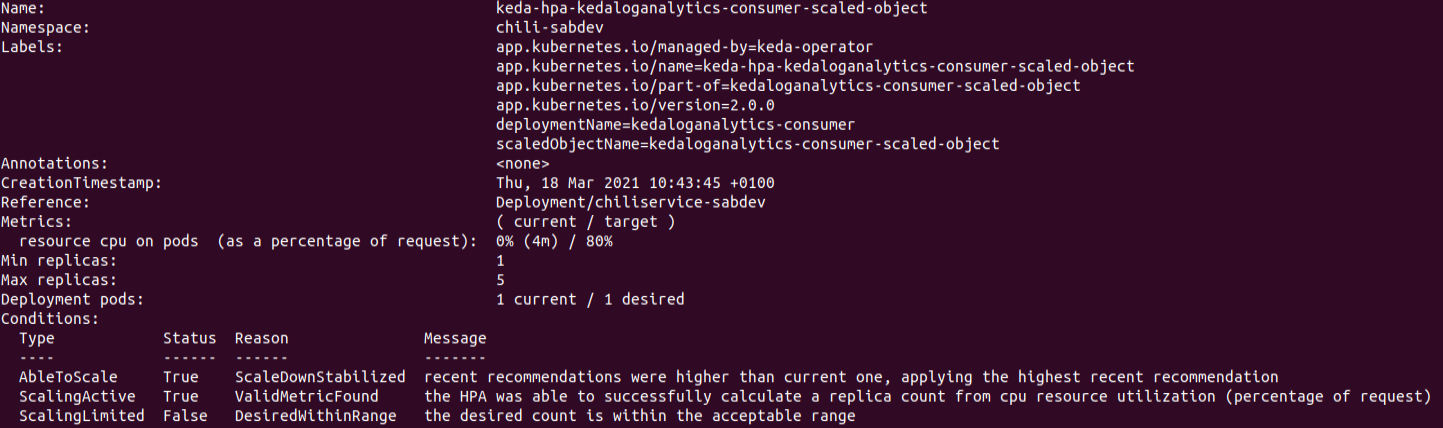
But my hpa is not doing what it is supposed to do
honnyzo
on 18 Mar 2021
Hi @honnyzo : sorry the previous reply didn't help. Not sure what could be wrong here. Sharing some additional thoughts : In my scenario, I was using AKS (Azure Kubernetes Service) with Managed Identity and keda was assigned an identity as well for 'Log Analytics Reader'. I see you have given KEDA an Contributor role, which would work if the Log Analytics workspace was in the same management group. But if the log analytics workspace is in different subscription, then keda may need to be given 'Log Analytics Reader' access to the workspace. One interesting thing which I noticed in the logs you shared was 'ScaleTarget no change' -- so I was wondering what happens when the value changes for your log analytics query? Maybe the scaler isn't receiving query results in expected format (threshold, metricvalue)? I guess, also checking the logs from kubernetes metric-server could help get some more info if other factors like identity, etc. could be possibly contributing to this resulting the hpa to fall back to cpu scaler ?
I will let keda community experts to chime in and share additional guidance if I am missing anything.
sagar027
on 26 Mar 2021
Hi, Is this still an issue in 2.2.0 ? I'm experincing this:
Inner Error: error calling Log Analytics REST api. Inner Error: Post "https://api.loganalytics.io/v1/workspaces/<REDUCTED>/query": context deadline exceeded (Client.Timeout exceeded while awaiting headers)
from 10 "so" objects the exists together.
The so status is flapping between True and False for activity.
Status:
Conditions:
Message: ScaledObject is defined correctly and is ready for scaling
Reason: ScaledObjectReady
Status: True
Type: Ready
Message: Scaling is not performed because triggers are not active
Reason: ScalerNotActive
Status: False
Type: Active
 davesave
on 1 Apr 2021
davesave
on 1 Apr 2021
Related issues
 audunsol
·
4Comments
audunsol
·
4Comments
 cwhfa
·
4Comments
cwhfa
·
4Comments
 jeffhollan
·
3Comments
jeffhollan
·
3Comments
 aman-bansal
·
4Comments
tomkerkhove
·
4Comments
aman-bansal
·
4Comments
tomkerkhove
·
4Comments
Most helpful comment
Update for today:
The issue is happening because of this error during scaler initialisation (in GetMetricSpecForScaling function):
Post \"https://api.loganalytics.io/v1/workspaces/096b9a59-0c1c-412c-9bf2-61073d0f4309/query\": context deadline exceeded (Client.Timeout exceeded while awaiting headers)Sometimes, GetMetricSpecForScaling function executed without error, and scaler initialising successfully, but errors still appear in log for IsActive function.
Here is a piece of log:
2021-03-01T13:32:29.042Z DEBUG scalehandler Error getting scale decision {"Error": "failed to execute IsActive function. Scaled object: demo-scaled-object-3. Namespace: default. Inner Error: error calling Log Analytics REST api. Inner Error: Post \"https://api.loganalytics.io/v1/workspaces/096b9a59-0c1c-412c-9bf2-61073d0f4309/query\": context deadline exceeded (Client.Timeout exceeded while awaiting headers)"}
2021-03-01T13:32:29.043Z DEBUG scaleexecutor ScaleTarget no change {"scaledobject.Name": "demo-scaled-object-3", "scaledObject.Namespace": "default", "scaleTarget.Name": "ubuntu"}
2021-03-01T13:32:59.282Z DEBUG azure_log_analytics_scaler Providing metric value {"metrics value": 4, "scaler name": "demo-scaled-object-3", "namespace": "default"}
2021-03-01T13:32:59.282Z DEBUG scalehandler Scaler for scaledObject is active {"Metrics Name": "azure-log-analytics-096b9a59-0c1c-412c-9bf2-61073d0f4309"}
2021-03-01T13:33:29.599Z DEBUG scalehandler Error getting scale decision {"Error": "failed to execute IsActive function. Scaled object: demo-scaled-object-3. Namespace: default. Inner Error: error calling Log Analytics REST api. Inner Error: Post \"https://api.loganalytics.io/v1/workspaces/096b9a59-0c1c-412c-9bf2-61073d0f4309/query\": context deadline exceeded (Client.Timeout exceeded while awaiting headers)"}
2021-03-01T13:33:29.600Z DEBUG scaleexecutor ScaleTarget no change {"scaledobject.Name": "demo-scaled-object-3", "scaledObject.Namespace": "default", "scaleTarget.Name": "ubuntu"}
The challenge here is that I can't reproduce this issue with latest sources from main branch.
I have cloned a repo, build a containers and deployed keda, and... everything works :)
But if I deploy from helm chart, it doesn't.
Here is an example of how I run deployment from helm chart:
helm install keda kedacore/keda --namespace keda --set logging.operator.level=debug --set logging.metricServer.level=4I tried previous app version (2.0.0) - it also works.
So the only theory I have for now is the following:
There was a changes in a way http.client is initialised. Likely we need to change Http Transport setting to allow more connections from the host. The
DefaultMaxIdleConnsPerHostis 2, which is not enough for Log Analytics, and probably for other scalers. For Log Analytics scaler it is even more critical because:DefaultMaxIdleConnsPerHost= 2)@zroubalik , @ahmelsayed , @arschles maybe you will have some good ideas.
I will continue to test this week.