kernel too old。是不是不支持2.6内核了?
 zyworkshop
All 87 comments
支持啊
 xtaci
on 10 Jul 2019
xtaci
on 10 Jul 2019
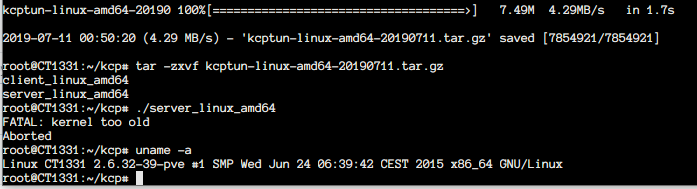
支持啊
 kobe229
on 11 Jul 2019
kobe229
on 11 Jul 2019
我查下原因,pre-release,肯定会有问题,但一定会兼容2.6.32
xtaci
on 11 Jul 2019
我查下原因,pre-release,肯定会有问题,但一定会兼容2.6.32
这就放心了,慢慢等release。
kobe229
on 11 Jul 2019
可以再试一下0711的pre-release,重新上传了
xtaci
on 11 Jul 2019
放弃用CGO了,应该能兼容低版本的了
xtaci
on 11 Jul 2019
我之前在4.x版本内核直接编译的话在centos 6.10的 2.6.32上运行就会出现kernel too old,后来我就改用centos 7的3.x上编译或者ubuntu 16降级内核到3.19编译 出来的 运行就ok了
 wxlg1117
on 11 Jul 2019
wxlg1117
on 11 Jul 2019
可以再试一下0711的pre-release,重新上传了
新0711已经支持2.6.32了。
但尝试加参数 -tcp 后,发现网络不通(Client有日志打出来,Server无反应)。
不使用-tcp则一切正常,再尝试外加udp2raw-tunnel,网络也正常。
不知道是不是内核的问题?(使用服务器VPS=OpenVZ+debian-8.0)
等有空到其他机器用高版本内核再试试看。
kobe229
on 12 Jul 2019
应该不是内核问题,是mips特有的问题,arm,x86都测试过,没问题
xtaci
on 12 Jul 2019
2.6.32内核,0711版本,还是提示不支持:
root@sjovz256:/root# ./server_linux_amd64 -v
FATAL: kernel too old
Aborted
root@sjovz256:/opt/kcptun# uname -a
Linux sjovz256 2.6.32-042stab127.2 #1 SMP Thu Jan 4 16:41:44 MSK 2018 x86_64 GNU/Linux
root@sjovz256:/root#
 PHCSJC
on 12 Jul 2019
PHCSJC
on 12 Jul 2019
重新下载0711
xtaci
on 12 Jul 2019
重新下载0711
可以是可以,但是不通(两边都重新下载的0711),跟之前那个帖子反馈的问题一样。
PHCSJC
on 12 Jul 2019
重新下载0711
可以是可以,但是不通(两边都重新下载的0711),跟之前那个帖子反馈的问题一样。
在查问题
xtaci
on 12 Jul 2019
重新下载0711
可以是可以,但是不通(两边都重新下载的0711),跟之前那个帖子反馈的问题一样。
在查问题
大佬辛苦了
PHCSJC
on 12 Jul 2019
xtaci
on 12 Jul 2019
反馈:已经可以通了,暂时没有发现其它问题,大佬威武!!!
PHCSJC
on 13 Jul 2019
嗯,linux所有平台都可以了么?
xtaci
on 13 Jul 2019
我这服务器端是debian9 x64,客户端是debian9 x64和armbin9,现在都是正常的。
PHCSJC
on 13 Jul 2019
服务端 centos7 x64
2019/07/13 13:10:43 target: 127.0.0.1:443
2019/07/13 13:10:43 encryption: salsa20
2019/07/13 13:10:43 nodelay parameters: 1 10 2 1
2019/07/13 13:10:43 sndwnd: 1024 rcvwnd: 1024
2019/07/13 13:10:43 compression: true
2019/07/13 13:10:43 mtu: 1350
2019/07/13 13:10:43 datashard: 10 parityshard: 3
2019/07/13 13:10:43 acknodelay: false
2019/07/13 13:10:43 dscp: 0
2019/07/13 13:10:43 sockbuf: 4194304
2019/07/13 13:10:43 smuxbuf: 4194304
2019/07/13 13:10:43 keepalive: 10
2019/07/13 13:10:43 snmplog:
2019/07/13 13:10:43 snmpperiod: 60
2019/07/13 13:10:43 pprof: false
2019/07/13 13:10:43 quiet: false
2019/07/13 13:10:43 tcp: true
2019/07/13 13:10:43 SetDSCP: invalid operation
2019/07/13 13:10:43 SetReadBuffer: invalid operation
2019/07/13 13:10:43 SetWriteBuffer: invalid operation
 unwenliu
on 13 Jul 2019
unwenliu
on 13 Jul 2019
我这服务器端是debian9 x64,客户端是debian9 x64和armbin9,现在都是正常的。
linux能全部通就是一大里程碑, darwin和bsd,win后面再考虑,平台差异巨大。
对于socket raw编程的问题,记录于下:
Linux:
- AF_PACKET+RAW不支持mips系统, 只能使用AF_INET+RAW,mips内核差异
- TCP PseudoHeader Checksum: net.DialIP() 可以获取LocalAddr(),相当于能Routing, 内核帮忙填充IP Header,所以不需要用udpconn预Routing。
Darwin:
- 不能使用AF_INET,只能使用AF_PACKET
- 不支持iptables
xtaci
on 13 Jul 2019
Linux mips 启动遇到问题
2019/07/13 05:34:36 re-connecting: dial(): tcpraw.Dial(): dial tcp 192.168.8.129:57381->my-vps-ip:12987: connect: no route to host
2019/07/13 05:34:37 re-connecting: dial(): tcpraw.Dial(): dial tcp 192.168.8.129:45426->my-vps-ip:12987: connect: no route to host
```txt
Linux router 4.9.120 #0 Thu Aug 16 07:51:15 2018 mips GNU/Linux
启动命令:
```bash
ss-local -s my-vps-ip -p 12987 -l 10000 --no-delay -m aes-256-gcm -k test-password-ss --plugin kcptun --plugin-opts 'key=test-password-kcptun$HOME%PATH%;crypt=aes-192;mode=fast2;tcp'
日志里面打印都时间好像是UTF+0的,貌似是golang的默认时区,不过这个不影响使用,应该都看得懂。
 zhanhb
on 13 Jul 2019
zhanhb
on 13 Jul 2019
这个是我的系统默认使用了AF_PACKET么?
zhanhb
on 13 Jul 2019
这个是我的系统默认使用了AF_PACKET么?
不是,是你66那个机器没有开启-tcp
xtaci
on 13 Jul 2019
服务器端启动貌似有点问题
2019/07/13 13:51:08 SetDSCP: invalid operation
2019/07/13 13:51:08 SetReadBuffer: invalid operation
2019/07/13 13:51:08 SetWriteBuffer: invalid operation
这个不影响,只是锦上添花
服务器端启动貌似有点问题
2019/07/13 13:51:08 SetDSCP: invalid operation
2019/07/13 13:51:08 SetReadBuffer: invalid operation
2019/07/13 13:51:08 SetWriteBuffer: invalid operation
xtaci
on 13 Jul 2019
那不应该啊,服务器端已经成功监听了这个端口的,telnet可以连的上,确认已经打开了tcp的。
zhanhb
on 13 Jul 2019
确保在 192.168.8.129 上,能telnet到目标端口
xtaci
on 13 Jul 2019
从日志打印上看,可能是服务器端监听的问题
/root/server_linux_amd64 --listen 0.0.0.0:12987
2019/07/13 02:07:09 listening on: [::]:12987
我启动命令指定了IP为0.0.0.0,但是监听的是IPv6的端口
zhanhb
on 13 Jul 2019
从日志打印上看,可能是服务器端监听的问题
/root/server_linux_amd64 --listen 0.0.0.0:129872019/07/13 02:07:09 listening on: [::]:12987我启动命令指定了IP为0.0.0.0,但是监听的是IPv6的端口
这个没关系的,主要是程序无法正常链接TCP端口
xtaci
on 13 Jul 2019
我指定了实际监听IP,但是从另一台机器telnet,还是得到No route to host这个结果
从该服务器本机telnet是可以通的。
zhanhb
on 13 Jul 2019
我指定了实际监听IP,但是从另一台机器telnet,还是得到No route to host这个结果
从该服务器本机telnet是可以通的。
对,说明是防火墙配置这类的问题,自己检查了
xtaci
on 13 Jul 2019
我这里开启监听,也打开了防火墙端口,使用别的服务器telnet也能通,但是就是不行,使用udp模式都没什么问题
netstat -tunpl | grep server_linux_a
tcp6       0      0 :::30001                :::*                    LISTEN      2499/server_linux_a


telnet 185.22.*.* 30001
Trying 185.22.*.*...
Connected to 185.22.*.*.
Escape character is '^]'.
我这里开启监听,也打开了防火墙端口,使用别的服务器telnet也能通,但是就是不行,使用udp模式都没什么问题
netstat -tunpl | grep server_linux_a
tcp6       0      0 :::30001                :::*                    LISTEN      2499/server_linux_a


telnet 185.22.*.* 30001
Trying 185.22.*.*...
Connected to 185.22.*.*.
Escape character is '^]'.
请给出两端的启动后输出日志
xtaci
on 13 Jul 2019
我这里开启监听,也打开了防火墙端口,使用别的服务器telnet也能通,但是就是不行,使用udp模式都没什么问题
netstat -tunpl | grep server_linux_a
tcp6       0      0 :::30001                :::*                    LISTEN      2499/server_linux_a


telnet 185.22.*.* 30001
Trying 185.22.*.*...
Connected to 185.22.*.*.
Escape character is '^]'.
请给出两端的启动后输出日志
服务端日志
2019/07/13 14:41:26 target: 127.0.0.1:443
2019/07/13 14:41:26 encryption: salsa20
2019/07/13 14:41:26 nodelay parameters: 1 10 2 1
2019/07/13 14:41:26 sndwnd: 1024 rcvwnd: 1024
2019/07/13 14:41:26 compression: true
2019/07/13 14:41:26 mtu: 1350
2019/07/13 14:41:26 datashard: 10 parityshard: 3
2019/07/13 14:41:26 acknodelay: false
2019/07/13 14:41:26 dscp: 0
2019/07/13 14:41:26 sockbuf: 4194304
2019/07/13 14:41:26 smuxbuf: 4194304
2019/07/13 14:41:26 keepalive: 10
2019/07/13 14:41:26 snmplog:
2019/07/13 14:41:26 snmpperiod: 60
2019/07/13 14:41:26 pprof: false
2019/07/13 14:41:26 quiet: false
2019/07/13 14:41:26 tcp: true
2019/07/13 14:41:26 SetDSCP: invalid operation
2019/07/13 14:41:26 SetReadBuffer: invalid operation
2019/07/13 14:41:26 SetWriteBuffer: invalid operation
客户端日志
2019/07/13 14:45:08 version: 20190712
2019/07/13 14:45:08 initiating key derivation
2019/07/13 14:45:08 listening on: [::]:443
2019/07/13 14:45:08 encryption: salsa20
2019/07/13 14:45:08 nodelay parameters: 1 10 2 1
2019/07/13 14:45:08 remote address: 185.22.*.*:30001
2019/07/13 14:45:08 sndwnd: 1024 rcvwnd: 1024
2019/07/13 14:45:08 compression: true
2019/07/13 14:45:08 mtu: 1350
2019/07/13 14:45:08 datashard: 10 parityshard: 3
2019/07/13 14:45:08 acknodelay: false
2019/07/13 14:45:08 dscp: 0
2019/07/13 14:45:08 sockbuf: 4194304
2019/07/13 14:45:08 smuxbuf: 4194304
2019/07/13 14:45:08 keepalive: 10
2019/07/13 14:45:08 conn: 1
2019/07/13 14:45:08 autoexpire: 0
2019/07/13 14:45:08 scavengettl: 600
2019/07/13 14:45:08 snmplog:
2019/07/13 14:45:08 snmpperiod: 60
2019/07/13 14:45:08 quiet: false
2019/07/13 14:45:08 tcp: true
2019/07/13 14:45:08 SetDSCP: invalid operation
2019/07/13 14:45:08 SetReadBuffer: invalid operation
2019/07/13 14:45:08 SetWriteBuffer: invalid operation
2019/07/13 14:45:08 connection: 192.168.18.13:51708 -> 185.22.*.*:30001
2019/07/13 14:45:12 stream opened in: 127.0.0.1:54218 out: 185.22.*.*:30001(3)
2019/07/13 14:45:14 stream opened in: 127.0.0.1:54220 out: 185.22.*.*:30001(5)
2019/07/13 14:45:25 stream opened in: 127.0.0.1:54222 out: 185.22.*.*:30001(7)
2019/07/13 14:45:38 stream closed in: 127.0.0.1:54218 out: 185.22.*.*:30001(3)
2019/07/13 14:45:38 stream closed in: 127.0.0.1:54222 out: 185.22.*.*:30001(7)
2019/07/13 14:45:38 stream closed in: 127.0.0.1:54220 out: 185.22.*.*:30001(5)
2019/07/13 14:45:38 session marked as expired 185.22.*.*:30001
2019/07/13 14:45:38 SetDSCP: invalid operation
2019/07/13 14:45:38 SetReadBuffer: invalid operation
2019/07/13 14:45:38 SetWriteBuffer: invalid operation
2019/07/13 14:45:38 connection: 192.168.18.13:52345 -> 185.22.*.*:30001
2019/07/13 14:45:38 stream opened in: 127.0.0.1:54224 out: 185.22.*.*:30001(3)
2019/07/13 14:45:38 stream opened in: 127.0.0.1:54226 out: 185.22.*.*:30001(5)
2019/07/13 14:45:39 session normally closed 185.22.*.*:30001
2019/07/13 14:46:08 stream closed in: 127.0.0.1:54224 out: 185.22.*.*:30001(3)
2019/07/13 14:46:08 stream closed in: 127.0.0.1:54226 out: 185.22.*.*:30001(5)
2019/07/13 14:46:08 stream opened in: 127.0.0.1:54228 out: 185.22.*.*:30001(7)
2019/07/13 14:46:08 stream closed in: 127.0.0.1:54228 out: 185.22.*.*:30001(7)
2019/07/13 14:46:08 session marked as expired 185.22.*.*:30001
2019/07/13 14:46:09 SetDSCP: invalid operation
2019/07/13 14:46:09 SetReadBuffer: invalid operation
2019/07/13 14:46:09 SetWriteBuffer: invalid operation
2019/07/13 14:46:09 connection: 192.168.18.13:57033 -> 185.22.*.*:30001
2019/07/13 14:46:09 stream opened in: 127.0.0.1:54230 out: 185.22.*.*:30001(3)
2019/07/13 14:46:09 session normally closed 185.22.*.*:30001
2019/07/13 14:46:38 stream closed in: 127.0.0.1:54230 out: 185.22.*.*:30001(3)
看着像是在连接了,但是打不开网页
unwenliu
on 13 Jul 2019
我这里开启监听,也打开了防火墙端口,使用别的服务器telnet也能通,但是就是不行,使用udp模式都没什么问题
貌似是端口不太对吧,也有可能是密码不一致
zhanhb
on 13 Jul 2019
我这里开启监听,也打开了防火墙端口,使用别的服务器telnet也能通,但是就是不行,使用udp模式都没什么问题
貌似是端口不太对吧,也有可能是密码不一致
端口我都没变动过,直接在服务端和客户端上加了-tcp选项,使用udp模式没有问题
unwenliu
on 13 Jul 2019
我这里开启监听,也打开了防火墙端口,使用别的服务器telnet也能通,但是就是不行,使用udp模式都没什么问题
貌似是端口不太对吧,也有可能是密码不一致
端口我都没变动过,直接在服务端和客户端上加了
-tcp选项,使用udp模式没有问题
可能是race问题,稍等我重新上传
xtaci
on 13 Jul 2019
xtaci
on 13 Jul 2019
support for darwin will continue to develop if linux version proved stability
xtaci
on 13 Jul 2019
xtaci
on 14 Jul 2019
client也是linux唯一吗?
 yjd
on 14 Jul 2019
yjd
on 14 Jul 2019
client也是linux唯一吗?
暂时是只支持linux
xtaci
on 14 Jul 2019
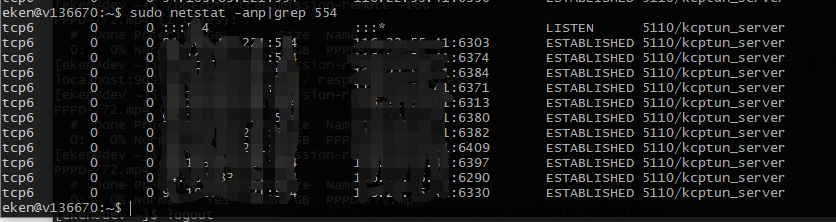
-tcp模式会产生很多没有释放的tcp连接
 maskedeken
on 15 Jul 2019
maskedeken
on 15 Jul 2019
-tcp模式会产生很多没有释放的tcp连接
嗯,应该是有个地方忘了
xtaci
on 15 Jul 2019
xtaci
on 15 Jul 2019
-tcp模式会产生很多没有释放的tcp连接
try 0715
似乎没什么改善,客户端已经退出的情况下,服务端还是有很多tcp连接没有释放
maskedeken
on 15 Jul 2019
-tcp模式会产生很多没有释放的tcp连接
try 0715
https://github.com/xtaci/kcptun/releases/tag/v20190715似乎没什么改善,客户端已经退出的情况下,服务端还是有很多tcp连接没有释放
最终会释放的, -autoexpire也不是立即释放
xtaci
on 15 Jul 2019
When I run kcptun client on win10 X64, the software has the following error:
2019/07/16 20:21:51 version: 20190716
2019/07/16 20:21:51 initiating key derivation
2019/07/16 20:21:51 listening on: [::]:XXXX
2019/07/16 20:21:51 encryption: salsa20
2019/07/16 20:21:51 nodelay parameters: 0 30 2 1
2019/07/16 20:21:51 remote address: XXX.XXX.XXX.XX:XXXX
2019/07/16 20:21:51 sndwnd: 128 rcvwnd: 512
2019/07/16 20:21:51 compression: true
2019/07/16 20:21:51 mtu: 1350
2019/07/16 20:21:51 datashard: 10 parityshard: 3
2019/07/16 20:21:51 acknodelay: false
2019/07/16 20:21:51 dscp: 0
2019/07/16 20:21:51 sockbuf: 4194304
2019/07/16 20:21:51 smuxbuf: 4194304
2019/07/16 20:21:51 keepalive: 10
2019/07/16 20:21:51 conn: 1
2019/07/16 20:21:51 autoexpire: 0
2019/07/16 20:21:51 scavengettl: 600
2019/07/16 20:21:51 snmplog:
2019/07/16 20:21:51 snmpperiod: 60
2019/07/16 20:21:51 quiet: false
2019/07/16 20:21:51 tcp: true
2019/07/16 20:21:51 re-connecting: dial(): tcpraw.Dial(): os not supported
2019/07/16 20:21:52 re-connecting: dial(): tcpraw.Dial(): os not supported
2019/07/16 20:21:53 re-connecting: dial(): tcpraw.Dial(): os not supported
2019/07/16 20:21:54 re-connecting: dial(): tcpraw.Dial(): os not supported
2019/07/16 20:21:55 re-connecting: dial(): tcpraw.Dial(): os not supported
2019/07/16 20:21:56 re-connecting: dial(): tcpraw.Dial(): os not supported
2019/07/16 20:21:57 re-connecting: dial(): tcpraw.Dial(): os not supported
2019/07/16 20:21:58 re-connecting: dial(): tcpraw.Dial(): os not supported
2019/07/16 20:21:59 re-connecting: dial(): tcpraw.Dial(): os not supported
2019/07/16 20:22:00 re-connecting: dial(): tcpraw.Dial(): os not supported
2019/07/16 20:22:01 re-connecting: dial(): tcpraw.Dial(): os not supported
2019/07/16 20:22:02 re-connecting: dial(): tcpraw.Dial(): os not supported
2019/07/16 20:22:03 re-connecting: dial(): tcpraw.Dial(): os not supported
2019/07/16 20:22:04 re-connecting: dial(): tcpraw.Dial(): os not supported
2019/07/16 20:22:05 re-connecting: dial(): tcpraw.Dial(): os not supported
2019/07/16 20:22:06 re-connecting: dial(): tcpraw.Dial(): os not supported
2019/07/16 20:22:07 re-connecting: dial(): tcpraw.Dial(): os not supported
2019/07/16 20:22:08 re-connecting: dial(): tcpraw.Dial(): os not supported
2019/07/16 20:22:09 re-connecting: dial(): tcpraw.Dial(): os not supported
2019/07/16 20:22:10 re-connecting: dial(): tcpraw.Dial(): os not supported
2019/07/16 20:22:11 re-connecting: dial(): tcpraw.Dial(): os not supported
2019/07/16 20:22:12 re-connecting: dial(): tcpraw.Dial(): os not supported
2019/07/16 20:22:13 re-connecting: dial(): tcpraw.Dial(): os not supported
2019/07/16 20:22:14 re-connecting: dial(): tcpraw.Dial(): os not supported
2019/07/16 20:22:15 re-connecting: dial(): tcpraw.Dial(): os not supported
2019/07/16 20:22:16 re-connecting: dial(): tcpraw.Dial(): os not supported
2019/07/16 20:22:17 re-connecting: dial(): tcpraw.Dial(): os not supported
2019/07/16 20:22:18 re-connecting: dial(): tcpraw.Dial(): os not supported
...
 jttqbc
on 16 Jul 2019
jttqbc
on 16 Jul 2019
2019/07/16 20:22:18 re-connecting: dial(): tcpraw.Dial(): os not supported
别慌别慌,现在还只有linux系统能用,其它操作系统的作者还在努力开发呢
zhanhb
on 16 Jul 2019
小白請教,同一套參數和設置,ipv4正常,ipv6完全不通,是有什麼需要注意的地方嗎?
最好贴一下配置(ip记得隐藏)和server client的系统
 maxwellzh
on 17 Jul 2019
maxwellzh
on 17 Jul 2019
不知道有人试过没有,在docker中跑,-tcp是否能正常运行
xtaci
on 19 Jul 2019
不知道有人试过没有,在docker中跑,-tcp是否能正常运行
Synology(cup: intel) + docker + kcptun v20190718 on -tcp running normally
jttqbc
on 19 Jul 2019
没开-tcp可以达到8M/s 开-tcp只能到3M/s
server_linux_arm5 -t "127.0.0.1:12180" -l ":4001" -key 1 -mtu 1400 -sndwnd 2048 -rcvwnd 2048 -crypt none -mode fast3 -dscp 0 -datashard 0 -parityshard 0 -nocomp -quiet -tcp &
client_linux_arm5 -r ".com:4001" -l ":8388" -key 1 -mtu 1400 -sndwnd 2048 -rcvwnd 2048 -crypt none -mode fast3 -dscp 0 -datashard 0 -parityshard 0 -autoexpire 0 -nocomp -quiet -tcp &
 56965779
on 20 Jul 2019
56965779
on 20 Jul 2019
@xtaci 服务端系统centos7
kcp服务端版本是20190725
服务端config文件增加一行:
"tcp" : true
后无法启动,日志如下:
2019/07/29 13:53:34 version: 20190725
2019/07/29 13:53:34 initiating key derivation
2019/07/29 13:53:34 listening on: [::]:37
2019/07/29 13:53:34 target: 0.0.0.0:18
2019/07/29 13:53:34 encryption: salsa20
2019/07/29 13:53:34 nodelay parameters: 1 10 2 1
2019/07/29 13:53:34 sndwnd: 4096 rcvwnd: 512
2019/07/29 13:53:34 compression: true
2019/07/29 13:53:34 mtu: 1350
2019/07/29 13:53:34 datashard: 10 parityshard: 3
2019/07/29 13:53:34 acknodelay: false
2019/07/29 13:53:34 dscp: 0
2019/07/29 13:53:34 sockbuf: 4194304
2019/07/29 13:53:34 smuxbuf: 4194304
2019/07/29 13:53:34 keepalive: 10
2019/07/29 13:53:34 snmplog:
2019/07/29 13:53:34 snmpperiod: 60
2019/07/29 13:53:34 pprof: false
2019/07/29 13:53:34 quiet: false
2019/07/29 13:53:34 tcp: true
2019/07/29 13:53:34 SetDSCP: invalid operation
提示“SetDSCP: invalid operation” ,不知是什么意思
 pigpigabc123
on 29 Jul 2019
pigpigabc123
on 29 Jul 2019
我也同样遇到这个问题,在原来的配置末尾加了 --tcp就用不了,版本是20190725,配置如下:
服务端:./server_linux_amd64 -l ":6302" -r "127.0.0.1:6317" --key 00000000 --crypt none --mode fast2 --nocomp --mtu 1350 --sndwnd 2048 --rcvwnd 2048 --sockbuf 16777217 --dscp 46 --autoexpire 300 --conn 20 --tcp
客户端:./client_linux_arm64 -l ":9526" -r "IP:6302" --key 00000000 --crypt none --mode fast2 --nocomp --mtu 1200 --sndwnd 307 --rcvwnd 1024 --sockbuf 16777217 --dscp 46 --autoexpire 300 --conn 20 --tcp
服务端运行环境:Centos-7-x86_64-minimal
客户端运行环境:DietPi_NanoPCT4-ARMv8-Stretch(Debian9.0)
 keeno1982
on 1 Aug 2019
keeno1982
on 1 Aug 2019
报告问题的时候,请提供运行环境
xtaci
on 1 Aug 2019
@xtaci 已在原回复加上运行环境。防火墙也同时开放了tcp端口,貌似也不管用,但是远程telnet是可以连接的。
keeno1982
on 1 Aug 2019
只能用排除法,先排除centos的防火墙问题
xtaci
on 2 Aug 2019
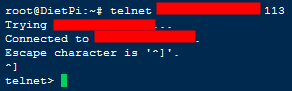
@xtaci 防火墙已经开放,我从客户端机器可以用Telnet连接上kcptun开放的113端口,应该表示端口是通的,但是kcptun就是通讯不了,完全没有数据
keeno1982
on 2 Aug 2019
首先确保client有输出,只要有任何app连上client,必定会输出
xtaci
on 2 Aug 2019
@xtaci 有输出,日志如下
2019/08/02 16:19:38 SetDSCP: invalid operation
2019/08/02 16:19:38 connection: 192.168.196.80:53156 -> IP:113
2019/08/02 16:20:35 session marked as expired IP:113
2019/08/02 16:20:35 session normally closed IP:113
2019/08/02 16:20:35 SetDSCP: invalid operation
2019/08/02 16:20:35 connection: 192.168.196.80:53170 -> IP:113
2019/08/02 16:20:35 stream opened in: 120.36.249.105:57007 out: IP:113(3)
2019/08/02 16:20:35 stream opened in: 120.36.249.105:56997 out: IP:113(3)
2019/08/02 16:20:55 stream opened in: 120.36.249.105:57903 out: IP:113(3)
2019/08/02 16:21:02 stream closed in: 120.36.249.105:57903 out: IP:113(3)
2019/08/02 16:21:03 stream opened in: 120.36.249.105:58299 out: IP:113(3)
2019/08/02 16:21:03 session marked as expired IP:113
2019/08/02 16:21:03 SetDSCP: invalid operation
2019/08/02 16:21:03 connection: 192.168.196.80:53174 -> IP:113
2019/08/02 16:21:03 stream opened in: 120.36.249.105:58301 out: IP:113(3)
2019/08/02 16:21:03 session normally closed IP:113
2019/08/02 16:21:05 stream closed in: 120.36.249.105:56997 out: IP:113(3)
2019/08/02 16:21:32 stream closed in: 120.36.249.105:57007 out: IP:113(3)
2019/08/02 16:21:33 stream closed in: 120.36.249.105:58299 out: IP:113(3)
2019/08/02 16:21:33 stream closed in: 120.36.249.105:58301 out: IP:113(3)
现在是只要加上-tcp就挂掉,拿掉-tcp立马恢复
keeno1982
on 2 Aug 2019
@keeno1982 暂时无法判断原因
xtaci
on 7 Aug 2019
@xtaci 突然想到我这个VPS是NAT的,会不会跟这个有关系?回头我试下另一台独立IP的
keeno1982
on 7 Aug 2019
有人用-tcp 和iptables nat做动态端口切换时出现中断吗?我貌似autoexpire固定间隔就会中断十几秒,不明就里
 laikitleung
on 8 Aug 2019
laikitleung
on 8 Aug 2019
@xtaci 换了一台独立IP的也是不行,配置一样,环境也是Centos-7-x86_64-minimal,没招了
keeno1982
on 8 Aug 2019
kcptun-darwin-amd64-20190808.tar.gz
kcptun-freebsd-amd64-20190808.tar.gz
kcptun-linux-386-20190808.tar.gz
kcptun-linux-amd64-20190808.tar.gz
kcptun-linux-arm5-20190808.tar.gz
kcptun-linux-arm6-20190808.tar.gz
kcptun-linux-arm7-20190808.tar.gz
kcptun-linux-arm64-20190808.tar.gz
kcptun-linux-mips-20190808.tar.gz
kcptun-linux-mipsle-20190808.tar.gz
kcptun-windows-386-20190808.tar.gz
kcptun-windows-amd64-20190808.tar.gz
@keeno1982 那就不知道了,但你可以试下这个,随便猜了
xtaci
on 8 Aug 2019
kcptun-darwin-amd64-20190808.tar.gz
kcptun-freebsd-amd64-20190808.tar.gz
kcptun-linux-386-20190808.tar.gz
kcptun-linux-amd64-20190808.tar.gz
kcptun-linux-arm5-20190808.tar.gz
kcptun-linux-arm6-20190808.tar.gz
kcptun-linux-arm7-20190808.tar.gz
kcptun-linux-arm64-20190808.tar.gz
kcptun-linux-mips-20190808.tar.gz
kcptun-linux-mipsle-20190808.tar.gz
kcptun-windows-386-20190808.tar.gz
kcptun-windows-amd64-20190808.tar.gz@keeno1982 那就不知道了,但你可以试下这个,随便猜了
服务端centos7 x64
更新了可以用tcp模式了
但是日志输出中仍有提示:SetDSCP: invalid operation
客户端openwrt 也有SetDSCP: invalid operation
服务端、客户端配置文件dscp: 0(默认值),不知有没有影响 @xtaci
pigpigabc123
on 8 Aug 2019
@pigpigabc123 哦?
SetDSCP不影响,那个是锦上添花的,后面会支持,这个只做了两个小调整:
- windows随机,但一定大于32768。
- 包发送使能不强制依赖SYN的接收成功。
xtaci
on 8 Aug 2019
kcptun-windows-amd64-20190808.tar.gz
kcptun-darwin-amd64-20190808.tar.gz
kcptun-freebsd-amd64-20190808.tar.gz
kcptun-linux-386-20190808.tar.gz
kcptun-linux-amd64-20190808.tar.gz
kcptun-linux-arm5-20190808.tar.gz
kcptun-linux-arm6-20190808.tar.gz
kcptun-linux-arm7-20190808.tar.gz
kcptun-linux-arm64-20190808.tar.gz
kcptun-linux-mips-20190808.tar.gz
kcptun-linux-mipsle-20190808.tar.gz
kcptun-windows-386-20190808.tar.gz
@pigpigabc123 这个应该不会报SetDSCP问题了,修正了一下。
xtaci
on 8 Aug 2019
@xtaci 杯具杯具,我的还是不行,client到server应该是握手成功了,不过数据始终传不了
客户端配置:
./client_linux_arm7 -l ":9528" -r "IP:113" --key 00000000 --crypt none --mode fast2 --nocomp --mtu 1200 --sndwnd 307 --rcvwnd 1024 --sockbuf 16777217 --dscp 46 --autoexpire 300 --conn 20 --keepalive 5 --tcp
服务端配置:
./server_linux_amd64 -l ":113" -t "127.0.0.1:443" --key 00000000 --crypt none --mode fast2 --nocomp --mtu 1200 --sndwnd 2048 --rcvwnd 2048 --sockbuf 16777217 --dscp 46 --keepalive 5 --tcp
客户端Log:
2019/08/08 20:46:29 connection: 192.168.196.81:45378 -> ServerIP:113
2019/08/08 20:46:29 stream opened in: 192.168.196.75:12619 out: ServerIP:113(3)
2019/08/08 20:46:32 stream closed in: 192.168.196.75:12584 out: ServerIP:113(3)
2019/08/08 20:46:40 session marked as expired ServerIP:113
2019/08/08 20:46:40 session normally closed ServerIP:113
2019/08/08 20:46:45 SetDSCP: invalid operation
2019/08/08 20:46:45 connection: 192.168.196.81:45380 -> ServerIP:113
2019/08/08 20:46:45 stream opened in: 192.168.196.75:12634 out: ServerIP:113(3)
2019/08/08 20:46:51 session marked as expired ServerIP:113
2019/08/08 20:46:52 session normally closed ServerIP:113
2019/08/08 20:46:53 SetDSCP: invalid operation
2019/08/08 20:46:53 connection: 192.168.196.81:45382 -> ServerIP:113
2019/08/08 20:46:53 stream opened in: 192.168.196.75:12649 out: ServerIP:113(3)
2019/08/08 20:46:56 session marked as expired ServerIP:113
2019/08/08 20:46:57 stream closed in: 192.168.196.75:12634 out: ServerIP:113(3)
2019/08/08 20:46:57 SetDSCP: invalid operation
服务端Log:
2019/08/08 20:45:49 stream closed in: 127.0.0.1:44638(3) out: 127.0.0.1:443
2019/08/08 20:46:12 io: read/write on closed pipe
2019/08/08 20:46:28 remote address: 127.0.0.1:47504
2019/08/08 20:46:28 stream opened in: 127.0.0.1:47504(3) out: 127.0.0.1:443
2019/08/08 20:46:29 remote address: 127.0.0.1:47652
2019/08/08 20:46:29 stream opened in: 127.0.0.1:47652(3) out: 127.0.0.1:443
2019/08/08 20:46:29 remote address: 127.0.0.1:47712
2019/08/08 20:46:29 stream opened in: 127.0.0.1:47712(3) out: 127.0.0.1:443
2019/08/08 20:46:39 io: read/write on closed pipe
2019/08/08 20:46:39 stream closed in: 127.0.0.1:47652(3) out: 127.0.0.1:443
2019/08/08 20:46:39 stream closed in: 127.0.0.1:47712(3) out: 127.0.0.1:443
2019/08/08 20:46:43 stream closed in: 127.0.0.1:47504(3) out: 127.0.0.1:443
2019/08/08 20:46:45 remote address: 127.0.0.1:48510
2019/08/08 20:46:45 stream opened in: 127.0.0.1:48510(3) out: 127.0.0.1:443
2019/08/08 20:46:53 remote address: 127.0.0.1:49106
2019/08/08 20:46:53 stream opened in: 127.0.0.1:49106(3) out: 127.0.0.1:443
2019/08/08 20:46:55 stream closed in: 127.0.0.1:48510(3) out: 127.0.0.1:443
2019/08/08 20:46:57 remote address: 127.0.0.1:49302
2019/08/08 20:46:57 stream opened in: 127.0.0.1:49302(3) out: 127.0.0.1:443
2019/08/08 20:46:58 remote address: 127.0.0.1:49378
2019/08/08 20:46:58 stream opened in: 127.0.0.1:49378(3) out: 127.0.0.1:443
2019/08/08 20:46:58 remote address: 127.0.0.1:49402
2019/08/08 20:46:58 stream opened in: 127.0.0.1:49402(3) out: 127.0.0.1:443
2019/08/08 20:47:03 stream closed in: 127.0.0.1:49106(3) out: 127.0.0.1:443
2019/08/08 20:47:07 stream closed in: 127.0.0.1:49302(3) out: 127.0.0.1:443
2019/08/08 20:47:08 stream closed in: 127.0.0.1:49378(3) out: 127.0.0.1:443
2019/08/08 20:47:08 stream closed in: 127.0.0.1:49402(3) out: 127.0.0.1:443
2019/08/08 20:47:14 remote address: 127.0.0.1:50308
2019/08/08 20:47:14 stream opened in: 127.0.0.1:50308(3) out: 127.0.0.1:443
2019/08/08 20:47:17 remote address: 127.0.0.1:50488
2019/08/08 20:47:17 stream opened in: 127.0.0.1:50488(3) out: 127.0.0.1:443
2019/08/08 20:47:24 stream closed in: 127.0.0.1:50308(3) out: 127.0.0.1:443
2019/08/08 20:47:27 stream closed in: 127.0.0.1:50488(3) out: 127.0.0.1:443
keeno1982
on 8 Aug 2019
你这conn=20?有问题吧
xtaci
on 8 Aug 2019
@xtaci 去掉conn也是一样获取不到数据,之前一直按默认conn=1设置,这样会导致一个终端在看油管或者下载,其它终端想看个FB都不行,由于终端比较多,就索性设成20,还挺好用的,不过不知道这个conn是不是这样用,反正有效果哈
keeno1982
on 8 Aug 2019
不是这样用的,你终端多,设置-smuxbuf到16M即可
--smuxbuf value the overall de-mux buffer in bytes (default: 4194304)
xtaci
on 8 Aug 2019
@xtaci OK, 按你说的配置试段时间看看效果,就是这个tcp无解,先这样了我再多找几台机子看看,辛苦啦
keeno1982
on 8 Aug 2019
kcptun-windows-amd64-20190808.tar.gz
kcptun-darwin-amd64-20190808.tar.gz
kcptun-freebsd-amd64-20190808.tar.gz
kcptun-linux-386-20190808.tar.gz
kcptun-linux-amd64-20190808.tar.gz
kcptun-linux-arm5-20190808.tar.gz
kcptun-linux-arm6-20190808.tar.gz
kcptun-linux-arm7-20190808.tar.gz
kcptun-linux-arm64-20190808.tar.gz
kcptun-linux-mips-20190808.tar.gz
kcptun-linux-mipsle-20190808.tar.gz
kcptun-windows-386-20190808.tar.gz@pigpigabc123 这个应该不会报SetDSCP问题了,修正了一下。
@xtaci SetDSCP报错问题解决。
pigpigabc123
on 8 Aug 2019
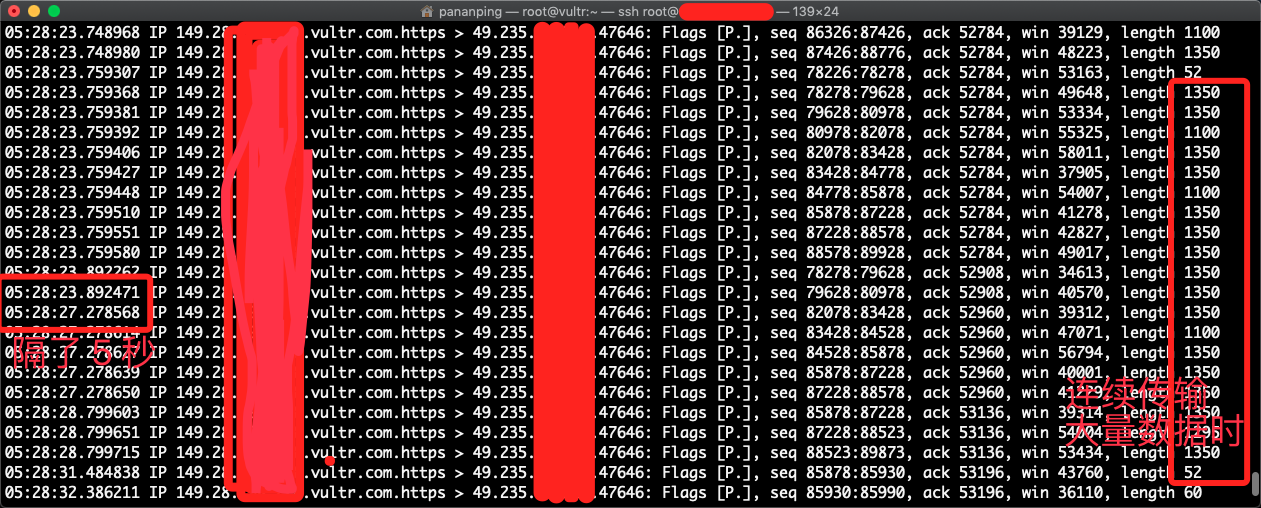
@xtaci 最新版本,--tcp 模式下,连续运行一段时间(半天左右)后,大概率出现传输速度下降(非逐渐变慢),抓包看到传输出现断断续续的现象,贴的图是在服务器上抓的出方向的包,可以看到在连续的数据传输时有好几秒的停顿(这是比较夸张的情况),重启客户端或服务端均可恢复正常。和网络情况无关,故障发生后,如果不重启任意一端程序,哪怕在进入深夜,网络情况极佳时,依旧如此。
服务端参数:
ExecStart=/usr/local/bin/kcptun_server -t "127.0.0.1:339" -l ":443" -mode manual -nodelay 0 -interval 10 -resend 2 -nc 1 --sndwnd 4000 --rcvwnd 4000 --datashard 4 --parityshard 1 --nocomp --crypt xor --key "密码" --tcp --dscp 46
客户端参数:
ExecStart=/usr/local/bin/kcptun_client -r "服务端 IP 地址:443" -l ":443" -mode manual -nodelay 0 -interval 10 -resend 2 -nc 1 --sndwnd 4000 --rcvwnd 4000 --datashard 4 --parityshard 1 --nocomp --crypt xor --key "密码" --tcp --dscp 46
 nganbienPhuan
on 3 Sep 2019
nganbienPhuan
on 3 Sep 2019
@xtaci 最新版本,--tcp 模式下,连续运行一段时间(半天左右)后,大概率出现传输速度下降(非逐渐变慢),抓包看到传输出现断断续续的现象,贴的图是在服务器上抓的出方向的包,可以看到在连续的数据传输时有好几秒的停顿(这是比较夸张的情况),重启客户端或服务端均可恢复正常。和网络情况无关,故障发生后,如果不重启任意一端程序,哪怕在进入深夜,网络情况极佳时,依旧如此。
服务端参数:
ExecStart=/usr/local/bin/kcptun_server -t "127.0.0.1:339" -l ":443" -mode manual -nodelay 0 -interval 10 -resend 2 -nc 1 --sndwnd 4000 --rcvwnd 4000 --datashard 4 --parityshard 1 --nocomp --crypt xor --key "密码" --tcp --dscp 46客户端参数:
ExecStart=/usr/local/bin/kcptun_client -r "服务端 IP 地址:443" -l ":443" -mode manual -nodelay 0 -interval 10 -resend 2 -nc 1 --sndwnd 4000 --rcvwnd 4000 --datashard 4 --parityshard 1 --nocomp --crypt xor --key "密码" --tcp --dscp 46
一般会加上 -autoexpire 1800
xtaci
on 3 Sep 2019
@xtaci 请教下,造成这种现象的原因是什么呢
nganbienPhuan
on 3 Sep 2019
@xtaci 请教下,造成这种现象的原因是什么呢
估计isp限速。最近一段时间用最新版本挺稳定。但是看y2b连续看视频看很久就会突然降速严重,从原2-3w降到2k-4k,然后稍微停一会。又恢复正常速度。
yjd
on 12 Sep 2019
不是专业人士 使用一键脚本安装的 开启tcp t路由器客服端也开启tcp 不能用?
关闭tcp才正常。怎么使用tcp??? 设置参数只是增加tcp true或false?还需要什么?
 sxml
on 16 Sep 2019
sxml
on 16 Sep 2019
@xtaci 服务端会疯狂发 RST,是不是可以像 udp2raw 那样启动时添加 iptables 规则解决一下
nganbienPhuan
on 18 Sep 2019
实在不解加了-tcp就是不能用,去掉-tcp参数就是正常的只是被qos了(证明配置参数应该是没错的),目前只能套udp2raw才可以用。
 BH4WHN
on 25 Sep 2019
BH4WHN
on 25 Sep 2019
原理什么的太复杂了,搞不懂啊,就是想问下BBR对kcptun的tcp模式是否有助力?有我就搞下,没有就算了。
感谢大佬指点!
PHCSJC
on 29 Sep 2019
原理什么的太复杂了,搞不懂啊,就是想问下BBR对kcptun的tcp模式是否有助力?有我就搞下,没有就算了。
感谢大佬指点!
rawsocket收发数据包,和TCP无关,仅用于规避UDP恶意劣化只用。
 EXSERENS
on 17 Nov 2019
EXSERENS
on 17 Nov 2019
同样遇到tcp,过一段时间中断连接的问题。。。
 ghugolang
on 3 Jan 2020
ghugolang
on 3 Jan 2020
使用 docker 后
kcpc_1  | 2020/02/14 14:18:41 snmplog:
kcpc_1  | 2020/02/14 14:18:41 snmpperiod: 60
kcpc_1  | 2020/02/14 14:18:41 quiet: false
kcpc_1  | 2020/02/14 14:18:41 tcp: true
kcpc_1  | 2020/02/14 14:18:41 initiating key derivation
kcpc_1  | 2020/02/14 14:18:41 key derivation done
kcpc_1  | 2020/02/14 14:19:56 re-connecting: dial(): tcpraw.Dial(): dial tcp xx.xx.xx.xx:8488: connect: connection refused
kcpc_1  | 2020/02/14 14:21:13 re-connecting: dial(): tcpraw.Dial(): dial tcp xx.xx.xx.xx:8488:: connect: connection refused
kcpc_1  | 2020/02/14 14:22:29 re-connecting: dial(): tcpraw.Dial(): dial tcp xx.xx.xx.xx:8488:: connect: connection refused
kcpc_1  | 2020/02/14 14:23:46 re-connecting: dial(): tcpraw.Dial(): dial tcp xx.xx.xx.xx:8488:: connect: connection refused
kcpc_1  | 2020/02/14 14:25:02 re-connecting: dial(): tcpraw.Dial(): dial tcp xx.xx.xx.xx:8488:: connect: connection refused
kcpc_1  | 2020/02/14 14:26:18 re-connecting: dial(): tcpraw.Dial(): dial tcp xx.xx.xx.xx:8488:: connect: connection refused
docker 客户端配置如下
version: "3"

services:
  ssc:
    image: shadowsocks/shadowsocks-libev:v3.3.4
    depends_on:
    - kcpc
    ports:
    - "${SS_LOCAL_PORT}:1080"
    command:
    - ss-local
    - -s
    - kcpc
    - -p
    - "12948"
    - -b
    - "0.0.0.0"
    - -l
    - "1080"
    - -m
    - aes-256-cfb
    - -k
    - "${SS_PASSWORD}"
    - --fast-open
    - --no-delay

  kcpc:
    image: xtaci/kcptun:v20200201
    command:
    - /bin/client
    - -r
    - "${KCPTUN_SERVER}:${KCPTUN_PORT}"
    - -l
    - "${KCPTUN_LOCAL_SERVER}:${KCPTUN_LOCAL_PORT}"
    - --mode
    - fast2
    - --mtu
    - "1400"
    - --key
    - "${KCPTUN_KEY}"
    - --crypt
    - "${KCPTUN_CRYPT}"
    - --sndwnd
    - "2048"
    - --rcvwnd
    - "2048"
    - --datashard
    - "70"
    - --parityshard
    - "30"
    - --dscp
    - "46"
    - --nodelay
    - "0"
    - --interval
    - "40"
    - --sockbuf
    - "4194304"
    - --keepalive
    - "10"
    - --tcp
服务端配置类似, 开放端口是UDP, 不确认这个有没有问题。有个问题是 enable --tcp 后是不是协议就是 TCP 了?那 kcptun 的加速功能是不是会大打折扣?
PS.,
另外一个workaround... udp2raw, 但是不知道这样的话是不是 kcptun就失去了意义?网络 traffic 都是走udp2raw的TCP了?
 damonYuan
on 14 Feb 2020
damonYuan
on 14 Feb 2020
请问需要配置 iptables 吗?应如何配置呢?
 brglng
on 31 Mar 2020
brglng
on 31 Mar 2020
Related issues
 sosmygirl
·
6Comments
sosmygirl
·
6Comments
 becapital
·
8Comments
becapital
·
8Comments
 ghost
·
7Comments
ghost
·
7Comments
 ng-life
·
5Comments
ng-life
·
5Comments
 flyer5200
·
5Comments
flyer5200
·
5Comments