Katex: \not (and \neq) broken in ~~Chrome 72~~ Safari
$\neq$ or $\not =$ doesn't work correctly. Please take a look into the documentation too.
 joergklein
All 32 comments
@joergklein What environment are you using KaTeX in? The $` ... `$ notation looks like Gitlab. Perhaps you should be asking your question in a Gitlab forum.
Does any math expression work for you? I'm guessing not, and that it's something about your configuration.
\neq and \not= are definitely supported by KaTeX; see the demo page. They are also documented in the list of supported features.
 edemaine
on 4 Feb 2019
edemaine
on 4 Feb 2019
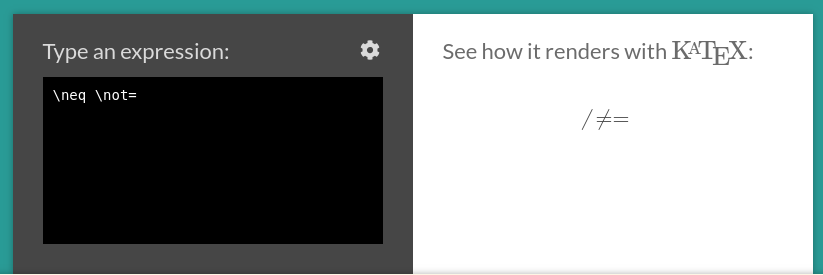
Yes it is Gitlab. When I type on the demo page neq then I see / =.
When I type not= then I see also / =.
You wrote neq not= . Please take a look at the screen shot
joergklein
on 4 Feb 2019
@joelburget What web browser are you using? Safari perhaps?
Here's what I see on Chrome on Windows:

edemaine
on 4 Feb 2019
The OS is CentOS 7. The browser Chrome displays the wrong charakter. Firefox displays the correct character.
Google Chrome | 72.0.3626.81 (Official Build) (64-bit)
Revision | ac8b982e05014492d1bd7d317628a4f22a97ffa0-refs/branch-heads/3626@{#796}
OS | Linux
joergklein
on 4 Feb 2019
What version of Chrome? I'm using 71.0.3578.98.
edemaine
on 4 Feb 2019
Having the same issue with Chrome 72.0.3626.96 on Windows.
 q234rty
on 7 Feb 2019
q234rty
on 7 Feb 2019
OK, I updated to Chrome 72, and that seems to be the issue. I can now reproduce the problem. Chrome must have changed how it works with accents. ☹️
edemaine
on 8 Feb 2019
I believe there's a problem with the (sorry, this was the wrong glyph)\not character in the font that we need to fix. I find this view (from opentype.js.org) confusing, but in particular the advanceWidth of 1289 seems way too big:

@kevinbarabash Do you remember any outstanding issues here, e.g., plans to regularize this character? I think we already switched away from combining characters (https://github.com/KaTeX/katex-fonts/issues/3 lists some other accents where this still needs to happen).
edemaine
on 8 Feb 2019
Got the same problem in Chrome 72, as a workaround I replaced "not =" with "=not\," and it shows the symbol correctly (see demo).
 matteo-ronchetti
on 9 Feb 2019
matteo-ronchetti
on 9 Feb 2019
Actually, I think the glyph is fine -- it has no negative leading space. My current theory is that, because we use U+0338 for the glyph, which is a combining character (which we did because there is no non-combining LONG SOLIDUS Unicode slot), Chrome forces it to the left. Why Chrome 72 changed this, I'm not sure (nor have I found documentation). I'll have to try mapping it to a different slot, and see if that fixes the problem...
edemaine
on 9 Feb 2019
https://github.com/KaTeX/katex-fonts/pull/58 is (most of) a fix to this bug.
edemaine
on 9 Feb 2019
This is ridiculous. First Safari can't handle negative advance so we get rid of it and then Chrome decides to add negative advance to combining characters that don't have it. 😞
@edemaine thanks for coming up with a fix for this. 🙂
 kevinbarabash
on 9 Feb 2019
kevinbarabash
on 9 Feb 2019
Can confirm this problem with \neq on OSX and newest Chrome 72.0.3626.109
 infusion
on 17 Feb 2019
infusion
on 17 Feb 2019
I'm having the same issue with Chrome 72.0.3626.109 on my Mac and also Chrome 72.0.3626.105 on Android.
Freakin' hell.
 robbienohra
on 18 Feb 2019
robbienohra
on 18 Feb 2019
@kevinbarabash Could you review the fix in https://github.com/KaTeX/katex-fonts/pull/58?
edemaine
on 18 Feb 2019
Same issue with Chrome 72
 eneso
on 18 Feb 2019
eneso
on 18 Feb 2019
@eneso On which platform? Chrome 71 worked fine for me on Windows.
edemaine
on 18 Feb 2019
Actually, it is appearing correctly on my laptop which is using Chrome 71. Yesterday I was having this issue on my desktop which is using Chrome 72.
eneso
on 18 Feb 2019
Anything I can do to help speed up the fix? @edemaine do you need us to test your fix? I'm currently on GatsbyJS using the css dependency require(katex/dist/katex.min.css)
robbienohra
on 19 Feb 2019
For those in a rush to deploy this fix (as I was) and using KaTeX via npm, you can use
npm install https://github.com/edemaine/KaTeX/tarball/fixnot-dist
to get a release with this bug fixed -- but also with potentially dangerous unprotected \includegraphics support, so beware!
edemaine
on 20 Feb 2019
Thanks, dude!
robbienohra
on 21 Feb 2019
v0.10.1 is released, which includes a hotfix to this bug!
 ylemkimon
on 22 Feb 2019
ylemkimon
on 22 Feb 2019
After v0.10.1 release neq broken in Safari:

 d00mw01f
on 27 Feb 2019
d00mw01f
on 27 Feb 2019
That's unfortunate... I unfortunately do not have easy access to Safari, so it would be nice to get confirmation, and some analysis as to what's going on. How does the \not accent differ from other accent characters?
edemaine
on 27 Feb 2019
Reproduced both on real mac in Safari and in browserstack.
Also reproduced on iPhone in Safari, Chrome and Firefox (do they have same engine?)
I tried to investigate the problem and managed to find that Safari doesn't render @not symbol (\ue020). But it will render symbol if it has border. Hope this will help.
d00mw01f
on 28 Feb 2019
[D]o they have same engine?
Non-Safari browsers use the same engine, WebKit.
ylemkimon
on 28 Feb 2019
Am I the only one seeing a not filled square after the update on Chrome 72 & Safari?
 congxinUSC
on 16 Mar 2019
congxinUSC
on 16 Mar 2019
FWIW, a colleague suggested a workaround which appears to work on Safari with 0.10.1: use cancel= instead of neq. Granted the display is different for these two commands, but maybe others will find this is a useful workaround until the issue is fixed.
 jhugon61
on 21 Apr 2019
jhugon61
on 21 Apr 2019
same issue on firefox 66.
 nrailgun
on 6 May 2019
nrailgun
on 6 May 2019
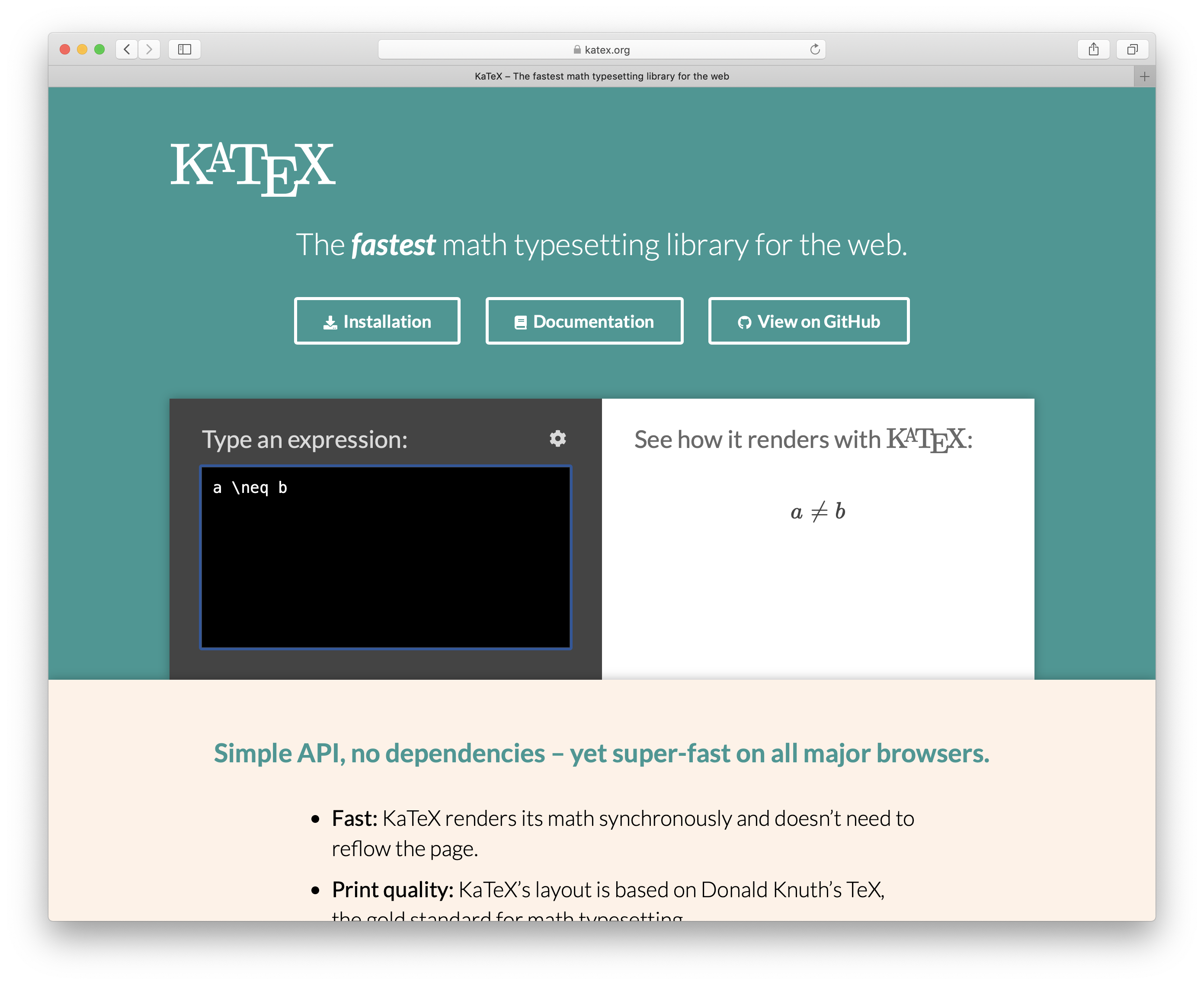
I've published 0.10.2 with a fix for this on Safari.
kevinbarabash
on 13 May 2019
Thank you very much, Kevin.
~~~~~
Jacques Hugon
jacques.[email protected]
~~~~~
On May 13, 2019, at 5:09 AM, Kevin Barabash notifications@github.com wrote:
I've published 0.10.2 with a fix for this on Safari.
https://user-images.githubusercontent.com/1044413/57593755-e1cde280-750a-11e9-9b4a-7eedb27116bc.png
—
You are receiving this because you commented.
Reply to this email directly, view it on GitHub https://github.com/KaTeX/KaTeX/issues/1842#issuecomment-491661216, or mute the thread https://github.com/notifications/unsubscribe-auth/AAJW2JOCGS46OXAWFCI746LPVDLVPANCNFSM4GUC5GGQ.
jhugon61
on 13 May 2019
@jhugon61 it was @ylemkimon who actually fixed the issue. I just did the publish.
kevinbarabash
on 13 May 2019
Related issues
 sophiebits
·
3Comments
sophiebits
·
3Comments
 msridhar
·
3Comments
msridhar
·
3Comments
 hagenw
·
3Comments
hagenw
·
3Comments
 StaloneLab
·
3Comments
StaloneLab
·
3Comments
 mpolyak
·
3Comments
mpolyak
·
3Comments
Most helpful comment
This is ridiculous. First Safari can't handle negative advance so we get rid of it and then Chrome decides to add negative advance to combining characters that don't have it. 😞
@edemaine thanks for coming up with a fix for this. 🙂