Katex: \sqrt doesn't scale properly when browser is zoomed in or out on Safari
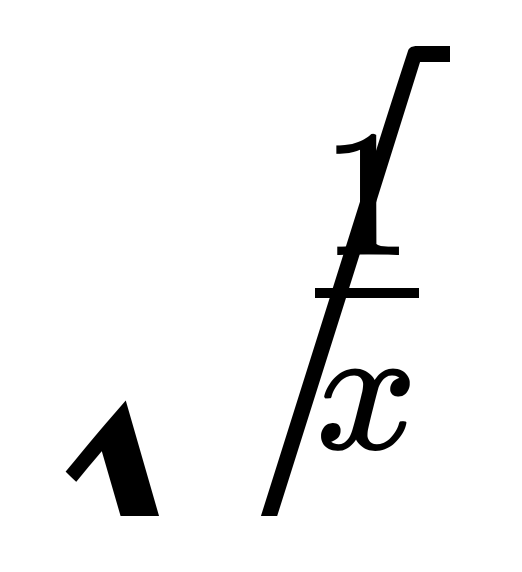
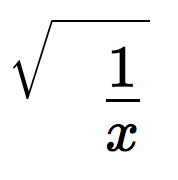
\sqrt{\frac{1}{x}} produces the following output when zoom in:
and out:
 kevinbarabash
All 8 comments
It works fine in Chrome and Firefox.
kevinbarabash
on 15 Sep 2017
I'll look into it.
 ronkok
on 15 Sep 2017
ronkok
on 15 Sep 2017
It seems to be a problem with all the nested SVGs. The non-nested SVGs (\cancel, \widehat, etc) seem to be working okay. But in nested SVGs, the inner SVG is scaling taller than the outer SVG. The bottom of each one is being cut off and what can be seen is too large. I'll keep looking and report as I learn more.
ronkok
on 15 Sep 2017
I think it probably is possible to re-write all the nested SVGs and instead use two or three single-level SVGs placed side by side. The variable-length arrow shafts will require CSS calc(...) if this scheme is to work.
During very early drafts of PR #670, I tried this approach and had it working, sort of. I ended up using nested SVGs because I was getting better quality images. Maybe the side-by-side, CSS-controlled approach can succeed if I work it a little smarter.
This will take time. I'll make a progress report in a couple of days. I sure wish that Safari was better.
ronkok
on 15 Sep 2017
I'll try this out in the nightly webkit build and see if there's any info on the status of this bug anywhere. If the bug's being fixed in Safari, no need to rework things.
kevinbarabash
on 15 Sep 2017
@kevinbarabash PR #890 fixes sqrt and single-ended arrows, but it does not fix double-ended arrows or horizontal braces. It may be a couple of weeks before I can address them.
ronkok
on 18 Sep 2017
@ronkok sounds good. We can close this issue when #980 is merged and open another issue just for double-ended arrow and horizontal braces.
kevinbarabash
on 18 Sep 2017
I believe that this issue is now resolved.
ronkok
on 17 Oct 2017
Related issues
 ylemkimon
·
3Comments
ylemkimon
·
3Comments
 mbourne
·
3Comments
mbourne
·
3Comments
 StaloneLab
·
3Comments
StaloneLab
·
3Comments
 hagenw
·
3Comments
hagenw
·
3Comments
 trollanfer
·
5Comments
trollanfer
·
5Comments