Karma: [object ErrorEvent] thrown in angular app, Debug window.
Expected behaviour
Passing tests in the command line should match passing tests in the karma debugger.
Actual behaviour
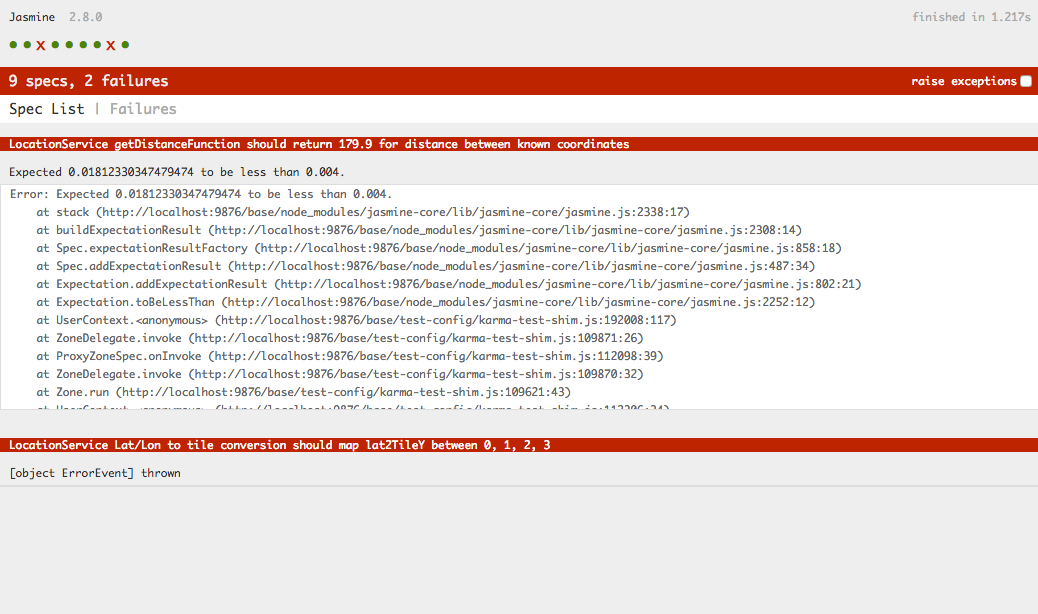
In debug browser, a test that passes according to the command line fails in the debug browser with error message: [object ErrorEvent] thrown.
Environment Details
- Karma version (output of
karma --version): - Relevant part of your
karma.config.jsfile
There error itself is being thrown in zone.js/dist/zone.js: 195 , with zone.js version = 0.8.12.
From package.json
"devDependencies": {
        "@ionic/app-scripts": "2.1.4",
        "@types/jasmine": "^2.6.0",
        "@types/node": "^8.0.19",
        "angular2-template-loader": "^0.6.2",
        "html-loader": "^0.5.1",
        "istanbul-instrumenter-loader": "^3.0.0",
        "jasmine": "^2.8.0",
        "jasmine-spec-reporter": "^4.2.1",
        "karma": "^1.7.1",
        "karma-chrome-launcher": "^2.2.0",
        "karma-coverage-istanbul-reporter": "^1.3.0",
        "karma-jasmine": "^1.1.0",
        "karma-jasmine-html-reporter": "^0.2.2",
        "karma-sourcemap-loader": "^0.3.7",
        "karma-webpack": "^2.0.5",
        "null-loader": "^0.1.1",
        "protractor": "^5.2.0",
        "ts-loader": "^3.0.3",
        "ts-node": "^3.3.0",
        "typescript": "~2.4.0"
    },
karma.conf.js
var webpackConfig = require('./webpack.test.js');

module.exports = function(config) {
  var _config = {
    basePath: '../',

    frameworks: ['jasmine'],

    files: [
      {
        pattern: './test-config/karma-test-shim.js',
        watched: true
      },
      {
        pattern: './src/assets/**/*',
        watched: false,
        included: false,
        served: true,
        nocache: false
      }
    ],

    proxies: {
      '/assets/': '/base/src/assets/'
    },

    preprocessors: {
      './test-config/karma-test-shim.js': ['webpack', 'sourcemap']
    },

    webpack: webpackConfig,

    webpackMiddleware: {
      stats: 'errors-only'
    },

    webpackServer: {
      noInfo: true
    },

    browserConsoleLogOptions: {
      level: 'log',
      format: '%b %T: %m',
      terminal: true
    },

    coverageIstanbulReporter: {
      reports: [ 'html', 'lcovonly' ],
      fixWebpackSourcePaths: true
    },

    reporters: config.coverage ? ['kjhtml', 'dots', 'coverage-istanbul'] : ['kjhtml', 'dots'],
    port: 9876,
    colors: true,
    logLevel: config.LOG_INFO,
    autoWatch: true,
    browsers: ['Chrome'],
    singleRun: false
  };

  config.set(_config);
};
karma-test-shim.js
```Error.stackTraceLimit = Infinity;
require('core-js/es6');
require('core-js/es7/reflect');
require('zone.js/dist/zone');
require('zone.js/dist/long-stack-trace-zone');
require('zone.js/dist/proxy');
require('zone.js/dist/sync-test');
require('zone.js/dist/jasmine-patch');
require('zone.js/dist/async-test');
require('zone.js/dist/fake-async-test');
var appContext = require.context('../src', true, /.spec.ts/);
appContext.keys().forEach(appContext);
var testing = require('@angular/core/testing');
var browser = require('@angular/platform-browser-dynamic/testing');
testing.TestBed.initTestEnvironment(browser.BrowserDynamicTestingModule, browser.platformBrowserDynamicTesting());
## The test itself:

I removed the @Injectable tag in the hopes that it would isolate angular from the issue.  The test **"LocationService Lat/Lon to tile conversion should match for the two lat2TileY functions"**  (the last test) is the one that passes in the command line but fails in the debugger.

Also, I can get the test to pass if I comment out the two tests preceding the last test, but not if I comment out the second-to-last test or the third-to-last test only.  Kind of puzzled as to how that's happening.
import { Coordinates, Geolocation } from '@ionic-native/geolocation';
import { LocationNoAngular } from './location-no-angular';
import { LocationService } from './location.service';
import * as LocationTestData from './location-spec-data';
describe('LocationService', () => {
let locationService: LocationNoAngular;
const epsilon = .004;
beforeAll(() => {
locationService = new LocationNoAngular(new Geolocation());
});
describe('getDistanceFunction', () => {
it('should return zero for identical locations', () => {
const distance: number = locationService.getDistance(
LocationTestData.zeroDistanceTestPoint,
LocationTestData.zeroDistanceTestPoint
);
  expect(Math.abs(distance)).toBeLessThan(epsilon);
});

it('should return 179.9 for distance between known coordinates', () => {
  const distance: number = locationService.getDistance(
    LocationTestData.knownDistanceTestPoint1,
    LocationTestData.knownDistanceTestPoint2
  );

  expect(Math.abs(distance - LocationTestData.knownDistance)).toBeLessThan(epsilon);
});
});
describe('Lat/Lon to tile conversion', () => {
it('should map longitude to x tiles 0, 1, 2, 3 on lower bound', () => {
expect(locationService.lon2TileX(-180, 2)).toEqual(0);
expect(locationService.lon2TileX(-90, 2)).toEqual(1);
expect(locationService.lon2TileX(0, 2)).toEqual(2);
expect(locationService.lon2TileX(90, 2)).toEqual(3);
});
it('should map longitude to x tiles 0, 1, 2, 3 on upper boundbound', () => {
  expect(locationService.lon2TileX(-91, 2)).toEqual(0);
  expect(locationService.lon2TileX(-1, 2)).toEqual(1);
  expect(locationService.lon2TileX(89, 2)).toEqual(2);
  expect(locationService.lon2TileX(179, 2)).toEqual(3);
});

it('should match the alternative lat/lon to tile function', () => {
  expect(locationService.lon2TileX(-91, 2)).toEqual(locationService.lon2TileXVerify(-91, 2));
  expect(locationService.lon2TileX(-1, 2)).toEqual(locationService.lon2TileXVerify(-1, 2));
  expect(locationService.lon2TileX(89, 2)).toEqual(locationService.lon2TileXVerify(89, 2));
  expect(locationService.lon2TileX(179, 2)).toEqual(locationService.lon2TileXVerify(179, 2));
});

it('should map lat2TileY between 0, 1, 2, 3', () => {
  expect(locationService.lat2TileY(-85, 2)).toEqual(3);
  expect(locationService.lat2TileY(-66, 2)).toEqual(2);
  expect(locationService.lat2TileY(1, 2)).toEqual(1);
  expect(locationService.lat2TileY(67, 2)).toEqual(0);
  expect(true).toBe(true);
});

it('should map lat2TileY between 0, 1, 2, 3', () => {
  expect(locationService.lat2TileY(-85, 2)).toEqual(3);
  expect(locationService.lat2TileY(-66, 2)).toEqual(2);
  expect(locationService.lat2TileY(1, 2)).toEqual(1);
  expect(locationService.lat2TileY(67, 2)).toEqual(0);
});

it('should match for the two lat2TileY functions', function() {
  expect(locationService.lat2TileY(-85, 2)).toEqual(locationService.lat2TileYVerify(-85, 2));
  expect(locationService.lat2TileY(-60, 2)).toEqual(locationService.lat2TileYVerify(-60, 2));
  expect(locationService.lat2TileY(1, 2)).toEqual(locationService.lat2TileYVerify(1, 2));
  expect(locationService.lat2TileY(67, 2)).toEqual(locationService.lat2TileYVerify(67, 2));
});
});
})
## The LocationNoAngular class (abbreviated)
export class LocationNoAngular {
private locationSubscription: Subscription;
private currentLocation: Geoposition
public locationData: Subject
public readonly metersPerDegreeLat: number = 111111;
constructor(private geolocation: Geolocation) {
this.locationData = new Subject
}
...skipping some methods...
lon2TileXVerify(lon, zoom) {
return (Math.floor((lon + 180) / 360 * Math.pow(2, zoom)));
}
lat2TileYVerify(lat, zoom) {
return (Math.floor((1-Math.log(Math.tan(latMath.PI/180) + 1/Math.cos(latMath.PI/180))/Math.PI)/2 *Math.pow(2,zoom)));
}
// https://msdn.microsoft.com/en-us/library/bb259689.aspx
lon2TileX(lon, zoom) {
return Math.floor(((lon + 180) / 360) * Math.pow(2, zoom));
}
lat2TileY(lat, zoom) {
const sinLatitude: number = Math.sin(this.degreesToRadians(lat));
return Math.floor((.5 - Math.log((1 + sinLatitude) / (1 - sinLatitude)) / (4 * Math.PI)) * Math.pow(2, zoom));
}
```
Steps to reproduce the behaviour
Hopefully the above information is enough, but happy to setup more detail if necessary. It's an ionic3 project.
 ZenPylon
All 49 comments
Where does your error message appear? In the browser?
 johnjbarton
on 23 Oct 2017
johnjbarton
on 23 Oct 2017
Yeah, it occurs in the browser. Just for clarity, here's a screenshot:
ZenPylon
on 23 Oct 2017
My guess is that you have a race or an async test that isn't set up quite right. I would just assume that the debug case needs to be fixed and ignore that the command line passes.
This is probably not a karma-runner bug but reopen if you find more info suggesting it is. Esp. if you find that there is a better way to report that error.
johnjbarton
on 23 Oct 2017
I'm not doing anything async, but I'll see if I can reproduce the error in a simpler environment that you (or someone) could clone. Thanks for the response!
ZenPylon
on 23 Oct 2017
For anyone else who might be having this issue, I have a feeling it is likely related to: https://stackoverflow.com/questions/45722256/how-do-i-debug-a-object-errorevent-thrown-error-in-my-karma-jasmine-tests. I haven't been able to identify the exact place in my code that's triggering the error, but when porting most of the code over to an angular-cli-generated project and when using the default karma.conf.js, the problem goes away.
ZenPylon
on 24 Oct 2017
I changed the title to help others find your hint.
johnjbarton
on 24 Oct 2017
TL;DR: It may be related to testing routing.
I'm getting [object ErrorEvent] thrown too.
I traced it to one line of code.
Here's my code snippet.
this.username = this.userService.getUser(this.route.snapshot.paramMap.get('id'))[0];
The problem lies with the test environment attempting to evaluate the this.route.snapshot.paramMap.get('id') part.
If I replace it with 0, [object ErrorEvent] thrown goes away.
My userService has a user like so: public users = [ ["admin", "First name", "Surname", etc... ] ].
So 0 just gets this user, at index 0.
Otherwise when normally running my app, this.route.snapshot.paramMap.get('id') is evaluated when the user selects a user to edit from my table of users.
So in my HTML, *ngFor="let user of users; index as i" loops to display all the users and routerLink="/edit/{{i}}" so you can click on edit buttons for each user, which when clicked go to e.g. http://localhost:4200/edit/0 to edit the aforementioned admin user's details.
 leotm
on 4 Dec 2017
leotm
on 4 Dec 2017
I may be a bit late on this topic, but I agree with @leotm : the routing is in cause of those issues.
Like him, I commented this line this.route.snapshot.params.versionId and my error magically appeared (with source mapping disabled).
I thought I should post a message, if it could help ...
 ghost
on 16 Apr 2018
ghost
on 16 Apr 2018
If someone would post a small (non-angular) example we may be able to improve the error message.
johnjbarton
on 16 Apr 2018
In my case the error was thrown using angular 5 when testing using karma, jasmine, protractor and TestBed. I was having in the template something like this
...
template:
        <h2 class="text-center">Delete course</h2>
        <p>Do you want to delete the course <strong>{{course.description}}</strong>?</p>
...
export class DeleteComponent {
course : Course;
...
}
So the course was undefined, the solution is either initialize the course inline like this
course: Course = new Course();
or in the constructor;
 fagainv
on 13 May 2018
fagainv
on 13 May 2018
What fixed it for me was taking this:
beforeEach(() => {
    fixture = TestBed.createComponent(ConversationComponent);
    component = fixture.componentInstance;
     fixture.detectChanges();
  });
and removingfixture.detectChanges();
Still not sure why this fixed it bu I had [object ErrorEvent] thrown on just about all my specs until I removed it
 JonahElbaz
on 19 May 2018
JonahElbaz
on 19 May 2018
In case anyone else comes across this in the future, I had the same issue as the one reported and the fix from @JonahElbaz worked for me. My project is currently using the Angular framework (v5.x.x).
 th3n3wguy
on 31 May 2018
th3n3wguy
on 31 May 2018
If we look at the definition given in the docs for dixture.detectChanges(). I don't think the solution given by @JonahElbaz is viable.
You must tell the TestBed to perform data binding by calling fixture.detectChanges(). Only then does the <h1> have the expected title.
 Earthii
on 11 Jun 2018
Earthii
on 11 Jun 2018
In case anyone still has this issue, I found the easiest way to see the real error : simply open your browser running the tests, and open the console. The error will be there.
ghost
on 11 Jun 2018
@trichetriche => That is fine if you are running the tests locally, but my problem is that the tests were working 100% correctly whenever I was using the browser on my local machine (no errors either in the browser or in the browser's console), but they were failing on our CI/CD environment when it was running the Chrome Headless browser via Puppeteer.
th3n3wguy
on 11 Jun 2018
I got this error running Karma tests when a variable used in the HTML template did not exist in the .ts controller
 danday74
on 14 Jun 2018
danday74
on 14 Jun 2018
Till I used TemplateDriven forms, all worked fine but the moment I switched to ReactiveFormsModule, I started getting "object ErrorEvent] thrown".
After commenting/removing line "fixture.detectChanges();" it started working again
 nskshared
on 20 Jun 2018
nskshared
on 20 Jun 2018
I found the solution but I don't remember link to it.
The problem was caused by using "this.router.navigate(['/login']);" in ngOnInit method in completely other component.
In your tests you need to specify:
                RouterTestingModule.withRoutes([
                    { path: 'login', component: LoginComponent }
                ]),
and put this formula into "imports", and also "LoginComponent" into "declarations".
 harpcio
on 29 Jun 2018
harpcio
on 29 Jun 2018
In my case it was caused by the default spec.ts angular generates when running ng g service. Every spec after those specs failed as well :/
 pieterdb4477
on 10 Jul 2018
pieterdb4477
on 10 Jul 2018
I had the same issue and found the cause is this.router.navigate used in ngOnInit.
Solution: Add below code in spec.ts
_const mockRoute = {
navigate: jasmine.createSpy('navigate')
};_
Likewise mock others nested function call.
 mksoni01
on 13 Jul 2018
mksoni01
on 13 Jul 2018
When I get these, it's usually because there is something wrong in an error that I'm catching or throwing. For me it was using setTimeout(function(){}, 100) instead of setTimeout(() =>{}, 100), but I've also gotten it trying to implement a global error handler, etc... but it always tends to be b/c of something going awry in a catch block.
 rabbitfighter81
on 17 Jul 2018
rabbitfighter81
on 17 Jul 2018
Running tests with ng test --source-map=false let me see what the actual error message was, instead of the cryptic [object ErrorEvent] thrown. So I could narrow it down to exactly where the problem was.
 vibrunazo
on 18 Jul 2018
vibrunazo
on 18 Jul 2018
I have the same issue. Could anyone reopen.
My dev dependencies:
  "devDependencies": {
    "@angular/compiler-cli": "6.1.0",
    "@angular-devkit/build-ng-packagr": "0.7.2",
    "@angular-devkit/build-angular": "0.7.2",
    "ng-packagr": "3.0.6",
    "tsickle": "0.32.1",
    "tslib": "1.9.3",
    "typescript": "2.9.2",
    "@angular-devkit/core": "0.7.2",
    "@angular/cli": "6.1.2",
    "@angular/language-service": "6.1.0",
    "@types/jasmine": "2.8.8",
    "@types/jasminewd2": "2.0.3",
    "@types/node": "10.5.5",
    "codelyzer": "4.4.2",
    "jasmine-core": "3.1.0",
    "jasmine-spec-reporter": "4.2.1",
    "karma": "2.0.5",
    "karma-chrome-launcher": "2.2.0",
    "karma-cli": "1.0.1",
    "karma-coverage-istanbul-reporter": "2.0.1",
    "karma-jasmine": "1.1.2",
    "karma-jasmine-html-reporter": "1.2.0",
    "karma-phantomjs-launcher": "1.0.4",
    "phantomjs-prebuilt": "2.1.16",
    "replace": "1.0.0",
    "ts-node": "7.0.0",
    "tslint": "5.11.0"
  }
 dawidrylko
on 7 Aug 2018
dawidrylko
on 7 Aug 2018
We have had this issue for more than a year now. We have to switch between --source-map=true and --source-map=false all the time. Can this issue be reopened?
 dirkluijk
on 17 Aug 2018
dirkluijk
on 17 Aug 2018
Reopen doesn't matter if nothing happens. The steps to reproduce this issue are too complicated and potentially won't repro anyway.
If someone wants to create a github project that reproduces this issue with npm install plus one karma cmd line I'll reopen.
johnjbarton
on 17 Aug 2018
I have found the cause! It has nothing to do with karma, but the issue is caused by the source-map-support package which is installed by @angular/angular-cli.
The Angular source maps refer to paths like ng:///DynamicTestModule/YourComponent.ngfactory.js which triggers CORS errors.
Should be fixed by https://github.com/evanw/node-source-map-support/pull/222 and/or by the Angular CLI.
dirkluijk
on 17 Aug 2018
Confirmed @dirkluijk ! Thanks for this. I have been scouring for a way to get the correct line numbers to debug an issue and this ended up helping. You can see that the CORS errors still happen, but they are caught and handled with the actual stack trace showing up in the Karma HTML result that's generated.
FWIW, what I did in my own projects is remove the source-map-support transitive dep in my Angular 5 project. In my case, this was a matter of:
rm -fR ./node_modules/@angular/cli/node_modules/source-map-support/
And I also installed the latest source-map-support (0.5.9), so that @angular/cli (1.6.8) could pick up the new version:
npm i source-map-support
Then re-ran ng test --config karma.conf.js and was able to see a valid stack trace without --source-map=false or anything like that. It doesn't appear that newer versions of @angular/cli (e.g. 6.0.X+) even use this module though?, so not sure if this will be relevant for folks that have already migrated.
Note: I've submitted a request to get an @angular/cli 1.7.X update with this change here, so we'll see if that's do-able.
 arimus
on 22 Aug 2018
arimus
on 22 Aug 2018
The newest version of @angular/cli depends on source-map-support@^0.5.6. So if you rerun yarn or npm install it should be automatically fixed.
dirkluijk
on 22 Aug 2018
@dirkluijk ...I'm a bit confused about your "cli depends on source-map-support" statement as I can't see this anywhere in the @angular/cli dependencies but in all cases...I've deleted my node_modules and installed it again with yarn and after running the tests, I still have the same issue:
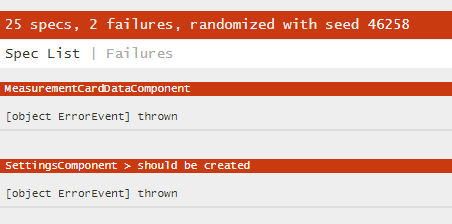
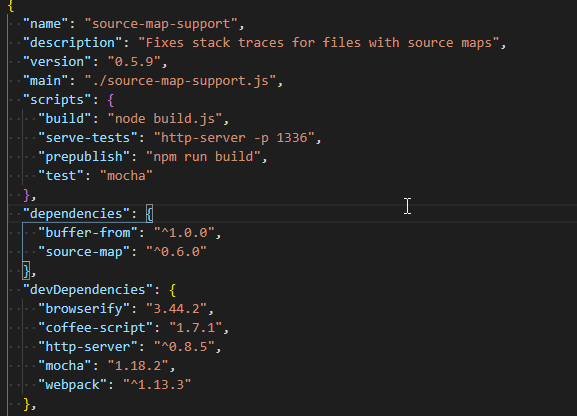
And I've checked of course that I have the last version of source-map-support
 TitaneBoy
on 22 Aug 2018
TitaneBoy
on 22 Aug 2018
Please post your package.json of your Angular CLI project. Which version of @angular/cli are you using?
dirkluijk
on 22 Aug 2018
@dirkluijk .. Yes, of course...But it should be all up to date (except for typescript)
"dependencies": {
    "@angular/animations": "6.1.3",
    "@angular/cdk": "6.4.6",
    "@angular/common": "6.1.3",
    "@angular/compiler": "6.1.3",
    "@angular/core": "6.1.3",
    "@angular/flex-layout": "6.0.0-beta.17",
    "@angular/forms": "6.1.3",
    "@angular/http": "6.1.3",
    "@angular/material": "6.4.6",
    "@angular/platform-browser": "6.1.3",
    "@angular/platform-browser-dynamic": "6.1.3",
    "@angular/router": "6.1.3",
    "@ngx-translate/core": "10.0.2",
    "@ngx-translate/http-loader": "3.0.1",
    "@types/chart.js": "2.7.31",
    "bootstrap": "4.1.3",
    "chart.js": "2.7.2",
    "chartjs-plugin-zoom": "0.6.4",
    "core-js": "2.5.7",
    "font-awesome": "4.7.0",
    "hammerjs": "2.0.8",
    "material-design-icons": "3.0.1",
    "ng-event-source": "1.0.11",
    "rxjs": "6.2.2",
    "typedoc": "0.12.0",
    "typescript": "2.9.2",
    "zone.js": "0.8.26"
  },
  "devDependencies": {
    "@angular-devkit/build-angular": "0.7.4",
    "@angular/cli": "6.1.4",
    "@angular/compiler-cli": "6.1.3",
    "@angular/language-service": "6.1.3",
    "@types/jasmine": "2.8.8",
    "@types/jasminewd2": "2.0.3",
    "@types/node": "10.7.1",
    "codelyzer": "4.4.4",
    "jasmine-core": "3.2.1",
    "jasmine-spec-reporter": "4.2.1",
    "karma": "3.0.0",
    "karma-chrome-launcher": "2.2.0",
    "karma-cli": "1.0.1",
    "karma-coverage": "1.1.2",
    "karma-coverage-istanbul-reporter": "2.0.1",
    "karma-firefox-launcher": "1.1.0",
    "karma-jasmine": "1.1.2",
    "karma-jasmine-html-reporter": "1.3.1",
    "karma-json-reporter": "1.2.1",
    "karma-junit-reporter": "1.2.0",
    "ngx-i18nsupport": "0.17.0",
    "protractor": "5.4.0",
    "ts-node": "7.0.1",
    "tslint": "5.11.0"
  }
Weird, I got everything fixed here. Can you check your yarn.lock (or package-lock.json) to double check that you have source-map-support with version 0.5.9?
If yes, this must be another issue.
dirkluijk
on 22 Aug 2018
I guess the picture below tells us the 0.5.9 is used for all these tags

TitaneBoy
on 22 Aug 2018
Yes. Looks good IMHO. Can you share the Javascript tracktrace or find out what the shadowed (real) error is? Maybe it's not CORS that is triggering the "object ErrorEvent thrown" thing in your case.
dirkluijk
on 22 Aug 2018
@dirkluijk If I was using the latest version of the CLI, you'd be correct. Unfortunately, I'm temporarily stuck with the 1.X series (1.7.4) until we migrate. My solution allows folks in a similar situation to move forward in the short term. Thanks.
@TitaneBoy Just for kicks, I'd actually check your node_modules/@angular/cli/node_modules/source-map-support/package.json version to verify that there isn't an older version still there. If there is, manually remove node_modules/@angular/cli/node_modules/source-map-support and npm i again.
arimus
on 22 Aug 2018
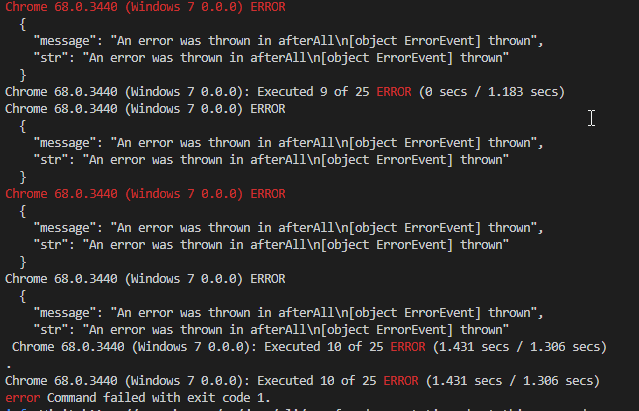
The only trace I have when executing tests is this:
TitaneBoy
on 22 Aug 2018
@arimus .. As you can see below, there is no source-map-support package under angular/cli node modules. It was a nice idea to check for this package but as you can see, there is no such package under angular/cli
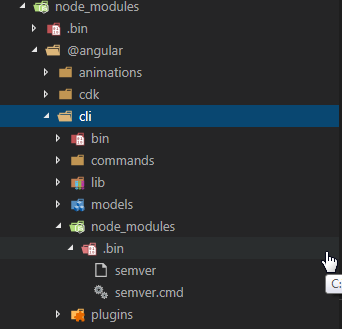
TitaneBoy
on 22 Aug 2018
This stackoverflow issue solved the error for me:
https://stackoverflow.com/questions/46037328/angular-4-karma-component-test-fail-due-to-cors-issue
Had to do with one of my Inputs on the component I was testing.
 edodso2
on 24 Aug 2018
edodso2
on 24 Aug 2018
@edodso2 yes, this will partially help. However, then you have broken source maps and getting to the root of the problem without good stack traces can be challenging in many cases.
arimus
on 27 Aug 2018
any fix for this issue?
 nkimaina
on 29 Aug 2018
nkimaina
on 29 Aug 2018
For me the error appeared 4 times and I noticed that I had 4 tests on a method where a service call was added... stubbing that service method in each test fixed it for me.
For reference, that service method makes a GET request on httpClient, so that is ultimately where the errors originated.
 iblank
on 6 Sep 2018
iblank
on 6 Sep 2018
This works for me
Just comment this line
// fixture.detectChanges();
 Georgehatouts
on 13 Sep 2018
Georgehatouts
on 13 Sep 2018
This might seem off the wall, but it very much seems to be the reason this was happening to me.
I have a mat-card-header element displaying a title. I put a dynamic value in it (pulled from environment), so wanted to test it was appearing.
I went about this two ways:
- Ran a querySelector on the compiled debugElement, got the element. (This returned exactly what you'd expect).
- Made the mat-card-element a viewChild. Again, this traced out etc. exactly what you'd expect.
Both cases, I could trace out the innerText of the nativeElement, everything was there. The test was very simple and should have no problem passing. But this unrelated error kept popping up. The debugger showed the error as being in another test that always ran successfully and had not changed in any way.
So I removed the implementation of the new test (leaving it empty). Same problem, erroring out (in the debugger) in the same place.
I removed the now-empty test completely, and the problem went away. Adding any other test of any kind, including "expect ( true ).toBeTruthy ()" resulted in the ObjectError. There are only a handful of tests in this spec, I knew it couldn't be some kind of obvious "too many tests" thing.
Finally I figured, "maybe you shouldn't run selectors on, or make ViewChilds out of, mat-card-headers (or any mat-card-element at all?). It was the only change I made to the component, and I had read elsewhere that this problem could be related to an error in the template (unclosed tag or something). I was certain my tags were correct but...hmm...Angular Material...it has caused me some grief here and there...
So I made a span inside the mat-card-header and used that as the target element for the test, and tried it all over again.
Both querySelector, and ViewChild, worked. The ObjectError issue went away.
 tcoz
on 21 Nov 2018
tcoz
on 21 Nov 2018
Why can't Karma make the error useful?
I've got this issue where the preview shows all specs were successful but on terminal I this useless error...
I don't understand why Karma have not fixed or at least made it easier to fix this as SO many users have this annoying issue.
I have 500+ tests, how am I meant to figure out where this error is? I see the log says the last to succeed was 320, but how do I figure out which test is No. 321...
Chrome 70.0.3538 (Mac OS X 10.14.1): Executed 321 of 532 (skipped 15) SUCCESS (0 secs / 5.473 secs)
Chrome 70.0.3538 (Mac OS X 10.14.1) ERROR
  {
    "message": "An error was thrown in afterAll\n[object ErrorEvent] thrown",
    "str": "An error was thrown in afterAll\n[object ErrorEvent] thrown"
Chrome 70.0.3538 (Mac OS X 10.14.1) ERROR
  {
    "message": "An error was thrown in afterAll\n[object ErrorEvent] thrown",
    "str": "An error was thrown in afterAll\n[object ErrorEvent] thrown"
  }
Chrome 70.0.3538 (Mac OS X 10.14.1): Executed 321 of 532 (skipped 15) ERROR (0 secs / 5.473 secs)
Chrome 70.0.3538 (Mac OS X 10.14.1) ERROR
  {
    "message": "An error was thrown in afterAll\n[object ErrorEvent] thrown",
    "str": "An error was thrown in afterAll\n[object ErrorEvent] thrown"
Chrome 70.0.3538 (Mac OS X 10.14.1): Executed 321 of 532 (skipped 15) ERROR (5.614 secs / 5.473 secs)
TO DEBUG
ng test --source-map=false
Open console and your real error will be there.
 michael-letcher
on 7 Dec 2018
michael-letcher
on 7 Dec 2018
karma code is here:
It is just passing along what it was sent.
I guess you are using karma-jasmine adapter, and the function handleGlobalErrors is called:
https://github.com/karma-runner/karma-jasmine/blob/d0b980db3cb363b7fb0cd48dcd7d529aac83fbca/src/adapter.js#L167
So I guess the issue then is that jasmine itself does not provide very good info.
Please try the new troubleshooting guide: https://github.com/karma-runner/karma/blob/2682bff15888cd88cc7e97be2e276cf1cb7f39be/docs/intro/05-troubleshooting.md
You should be able to use the devtools to find the error quickly by setting break on exceptions. You might also be able sort out how jasmine could be improved.
johnjbarton
on 7 Dec 2018
In my case it was because I forgot to provide a mock for ActivatedRoute.
I have a listener in ngOnInit:
this.shops$ = this.route.data.pipe(
  takeUntil(this.destroy$),
  map(data => data.shops),
  tap(shops => this.totalPages = shops.length / this.itemPerPage)
);
Solved by providing a route with shops: [] as its data.
 tzachov
on 12 Dec 2018
tzachov
on 12 Dec 2018
Disable source maps by running: ng test --source-map=false
 juanarbol
on 29 Dec 2018
juanarbol
on 29 Dec 2018
For me, it helped to wrap the test-function with async(...).
Then I get the correct error instead of [object ErrorEvent] thrown
import { async } from '@angular/core/testing';

it(`does anything`, async(() => {
    ...
}));
 kekru
on 6 Aug 2019
kekru
on 6 Aug 2019
It happens to me when I create a spy with a returnValue(throwError(new HttpErrorResponse(...))), which makes another test failing o.O'
 Donovantxy
on 13 Jan 2021
Donovantxy
on 13 Jan 2021
Related issues
 ORESoftware
·
4Comments
ORESoftware
·
4Comments
 schippie
·
5Comments
schippie
·
5Comments
 mgol
·
3Comments
mgol
·
3Comments
 jhildenbiddle
·
4Comments
jhildenbiddle
·
4Comments
 jambonrose
·
5Comments
jambonrose
·
5Comments
Most helpful comment
In case anyone still has this issue, I found the easiest way to see the real error : simply open your browser running the tests, and open the console. The error will be there.