Karabiner-elements: Unable to modify keys for Microsoft Ergonomic Keyboard LXM-00001
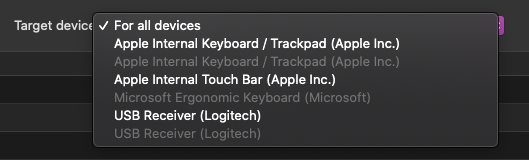
I'm currently observing an issue with the new ergonomic keyboard from Microsoft where it isn't possible to edit the keys through Karabiner Elements. The keyboard shows up but is unselectable. I searched through recent issues to see if anyone else has encountered this but was unable to find anything specific to this keyboard. The wireless version of the ergonomic I was using before was recognized fine.
Here are some screenshots to show the behavior.
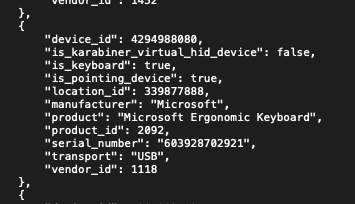
And here is the eventviewer showing details of the keyboard.
Thanks.
 alexpersian
All 3 comments
Is modifications enabled for this device in Preferences > Devices > Basic configuration?
 MuhammedZakir
on 15 Oct 2020
MuhammedZakir
on 15 Oct 2020
🤦 thanks, that is what I was missing. Closing this issue.
alexpersian
on 15 Oct 2020
@alexpersian out of interest, I presume you referred to this keyboard right?
Where you able to map all of its extra keys? (media, search, office, emoji, etc) I'm about to buy this keyboard and I'm curious if I'll be able to map all those extra keys with karabiner.
 LunaticoCR
on 18 Nov 2020
LunaticoCR
on 18 Nov 2020
Related issues
 Joilence
·
3Comments
Joilence
·
3Comments
 willisworley
·
3Comments
willisworley
·
3Comments
 krasnovpro
·
3Comments
krasnovpro
·
3Comments
 surfingoz
·
3Comments
surfingoz
·
3Comments
 chaucy
·
3Comments
chaucy
·
3Comments
Most helpful comment
🤦 thanks, that is what I was missing. Closing this issue.