Karabiner-elements: Menu key cannot be remapped
Hi,
I have a MacBook pro and a GK61 keyboard.
I have managed to remap successfully all the keys I wanted, except for the 'Menu' key of that keyboard.
I want to remap it to down arrow but that does not work.
Can you help me with that?
Thanks a lot
OS 10.15.3 (19D76)
MacBook Pro (Retina, 13-inch, Mid 2014)
Keyboard GK61 Mechanical Gaming Keyboard - 61 Keys Multi Color RGB Illuminated LED Backlit
 mtlberri
👍1
All 2 comments
From the Karabiner-Elements icon in the menu bar, open the EventViewer:
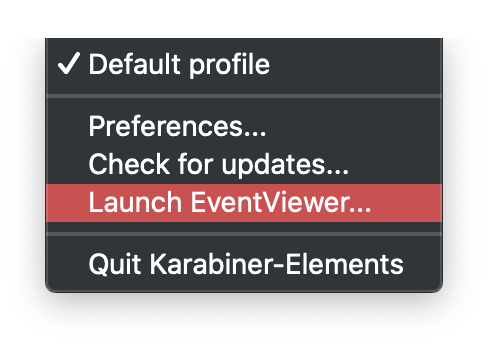
With the EventViewer open, press your Menu key. What "Name" does it show? That's the one you need to remap. For the Menu key, it usually is "application".
 marlonrichert
on 17 Apr 2020
marlonrichert
on 17 Apr 2020
👍2
Thank you it helped me a lot and it works now. It was indeed the application key.
Thanks a lot, all good for me.
mtlberri
on 19 Apr 2020
👍1
Was this page helpful?
0 / 5 - 0 ratings
Related issues
 baurmatt
·
3Comments
baurmatt
·
3Comments
 Joilence
·
3Comments
Joilence
·
3Comments
 jason0342
·
3Comments
jason0342
·
3Comments
 PSalant726
·
3Comments
PSalant726
·
3Comments
 ghost
·
3Comments
ghost
·
3Comments
Most helpful comment
From the Karabiner-Elements icon in the menu bar, open the EventViewer:

With the EventViewer open, press your Menu key. What "Name" does it show? That's the one you need to remap. For the Menu key, it usually is "application".