Karabiner-elements: Apps don't recognize modifiers for F1..F12
I just started getting used to my new Macbook Pro 16" and have noticed, that PhpStorm doesn't recognize shortcuts any modifier + Function key (F1...F12). It behaves like I pressed a Function key without any modifiers. I quit any other keyboard or automation tools (like BetterTouchTool and Hammerspoon) and turned out the problem disappears when I quit Karabiner. When I open it again, PhpStorm doesn't see Option+F1, Ctrl+F12, etc. If I open IDE settings (Settings - Keymap) and try to assign any shortcut with modifier (one or any combination of Cmd, Ctrl, Option), the IDE sees only Fxx key. The same happens with empty settings (no ~/.config/karabiner folder). I've also tried to add PhpStorm to "always show function keys" in system (System settings - Keyboard - Shortcuts - Function Keys), but behavior is the same.
Another JetBrains product, WebStorm, have same problem. Adobe Photoshop and MS Excel too.
Karabiner-EventViewer shows keys and modifiers correctly regardless running Karabiner. No errors in logs. I see the issue only on MBP 16" with touchbar. On my old MBP 15" with physical keys and same IDE, Karabiner and OS versions everything works perfectly.
MacOS: 10.15.3
Karabiner: 12.9.2 & 12.9.0
PhpStorm: 2019.3.4
WebStorm: 2020.1 EAP
Adobe Photoshop: 21.0.1
Excel: 16.29.1
 unnamed777
All 5 comments
Hi have the same problem. The checkboxes to use the function key does not have any effect, in the karabiner-settings such as in the system preferences.
I restarted the system, the service (also with killall), installed everything new, but nothing works:
MacOS: 10.15.3
Karabiner: 12.9.2 (beta) & 12.9.0
I just want to disable the special functions on the f-keys.
 kochn
on 27 Mar 2020
kochn
on 27 Mar 2020
Same issue. Shift+F6 in IntelliJ IDEA only records F6. Turns out it was Karabiner :(
Nvm, you need to enable the "Touch bar keyboard" here:
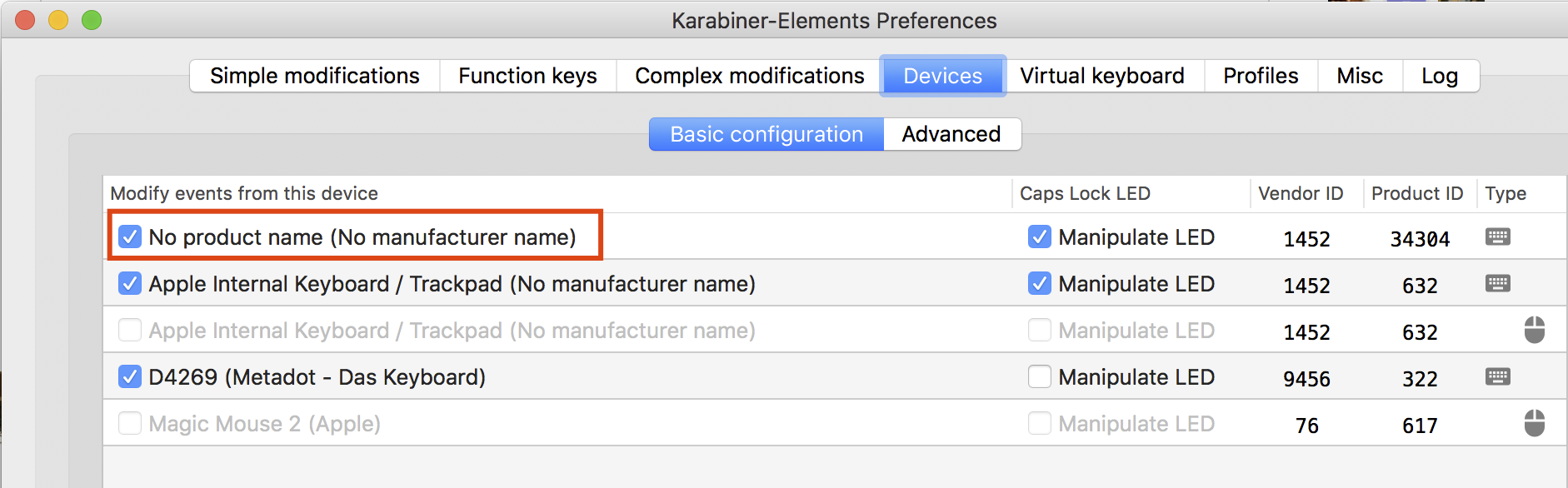
Edit: Since people are referring to this comment, I found the original answer to this issue here.
 huylv
on 8 Apr 2020
huylv
on 8 Apr 2020
@huylv Thank you very very very much , you are a great man.
 chozee
on 26 May 2020
chozee
on 26 May 2020
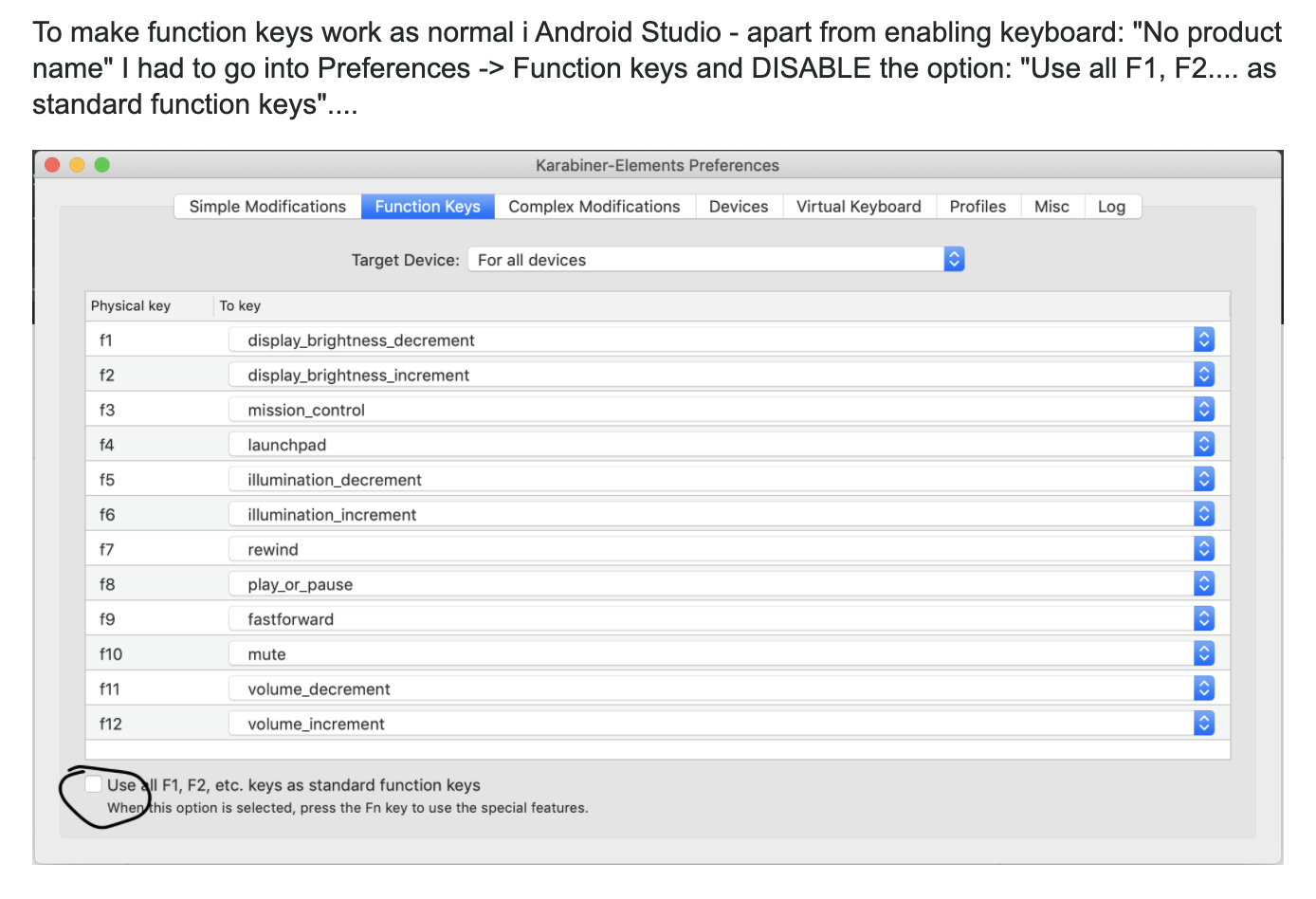
need more configuration this https://apple.stackexchange.com/a/363436/380751
 shallwefootball
on 28 Jun 2020
shallwefootball
on 28 Jun 2020
This issue has been automatically marked as stale because it has not had recent activity. It will be closed if no further activity occurs. Thank you for your contributions.
![stale[bot] picture](https://avatars3.githubusercontent.com/in/1724?v=4&s=40) stale[bot]
on 29 Aug 2020
stale[bot]
on 29 Aug 2020
Related issues
 Joilence
·
3Comments
Joilence
·
3Comments
 cajhin
·
3Comments
cajhin
·
3Comments
 Farzy
·
3Comments
Farzy
·
3Comments
 impala75
·
3Comments
impala75
·
3Comments
 chaucy
·
3Comments
chaucy
·
3Comments
Most helpful comment
Same issue. Shift+F6 in IntelliJ IDEA only records F6. Turns out it was Karabiner :(
Nvm, you need to enable the "Touch bar keyboard" here:

Edit: Since people are referring to this comment, I found the original answer to this issue here.