Karabiner-elements: MacOS 10.15.4 warning: Legacy extensions need to be updated
https://support.apple.com/en-us/HT210999
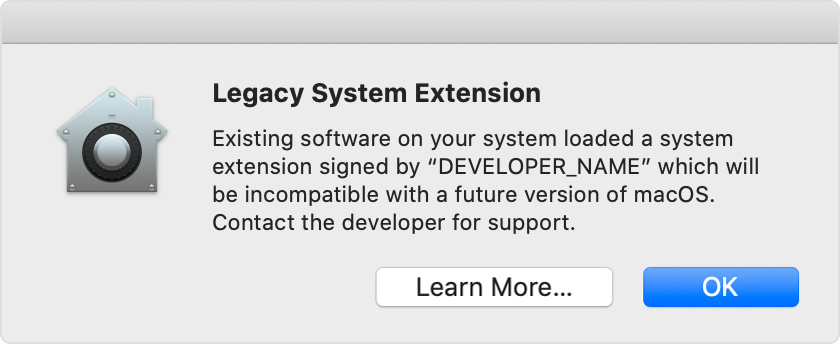
Appreciate your help. Thanks.
 lvnilesh
All 30 comments
Same. This is because Apple is planning to deprecate kernel extensions and move to a new framework called DriverKit.
 sdaitzman
on 24 Mar 2020
sdaitzman
on 24 Mar 2020
document from apple about how to migrate it to new API https://developer.apple.com/support/kernel-extensions/
 jnozsc
on 24 Mar 2020
jnozsc
on 24 Mar 2020
This quite reminds me when Keyremap4macbook (was it renamed to Karabiner already at that time?) stopped working on the latest macOSes, and had to wait for several years 😖 to see complete-comeback of the Karabiner Elements with ThumbSense.
Which heavily lowered my productivity and took a while to get used to do workflows without it.
So this is it, yet again.
Do you have any thoughts or plans with this currently, @tekezo ?
 aerobounce
on 25 Mar 2020
aerobounce
on 25 Mar 2020
😭
sdaitzman
on 25 Mar 2020
Just as a PSA: macOS has built-in support for doing simple keyboard remapping (since version 10.12 Sierra). For example, to remap Right Option key to Delete Forward key, create a text file named local.RemapRightOptionToDeleteForward.plist with the following content:
<?xml version="1.0" encoding="UTF-8"?>
<!DOCTYPE plist PUBLIC "-//Apple//DTD PLIST 1.0//EN" "http://www.apple.com/DTDs/PropertyList-1.0.dtd">
<plist version="1.0">
<dict>
    <key>Label</key>
    <string>local.RemapRightOptionToDeleteForward</string>
    <key>ProgramArguments</key>
    <array>
        <string>/usr/bin/hidutil</string>
        <string>property</string>
        <string>--set</string>
        <string>{"UserKeyMapping":[{"HIDKeyboardModifierMappingSrc":0x7000000E6,"HIDKeyboardModifierMappingDst":0x70000004C}]}</string>
    </array>
    <key>RunAtLoad</key>
    <true/>
</dict>
</plist>
Then copy the file to:
~/Library/LaunchAgents/
...and log out & back in.
See Apple's Technical Note TN2450 in order to figure out how to configure other remappings and then replace the "UserKeyMapping" key-value pairs in the aforementioned plist file accordingly.
 ghost
on 25 Mar 2020
ghost
on 25 Mar 2020
For sure gonna have to stay with Catalina as long as the migration is not complete.
 ruohola
on 25 Mar 2020
ruohola
on 25 Mar 2020
Just as a PSA: macOS has built-in support for doing simple keyboard remapping (since version 10.12 Sierra). For example, to remap Right Option key to Delete Forward key, create a text file named local.RemapRightOptionToDeleteForward.plist with the following content:
<?xml version="1.0" encoding="UTF-8"?>
<!DOCTYPE plist PUBLIC "-//Apple//DTD PLIST 1.0//EN" "http://www.apple.com/DTDs/PropertyList-1.0.dtd">
<plist version="1.0">
<dict>
    <key>Label</key>
    <string>local.RemapRightOptionToDeleteForward</string>
    <key>ProgramArguments</key>
    <array>
        <string>/usr/bin/hidutil</string>
        <string>property</string>
        <string>--set</string>
        <string>{"UserKeyMapping":[{"HIDKeyboardModifierMappingSrc":0x7000000E6,"HIDKeyboardModifierMappingDst":0x70000004C}]}</string>
    </array>
    <key>RunAtLoad</key>
    <true/>
</dict>
</plist>
Then copy the file to:
~/Library/LaunchAgents/...and log out & back in.
See Apple's Technical Note TN2450 in order to figure out how to configure other remappings and then replace the "UserKeyMapping" key-value pairs in the aforementioned plist file accordingly.
This seems interesting, but not a replacement. For example, I want to switch around left alt with left gui (option and command) only on my external keyboard, which Karabiner allows me to do. This procedure applies the mapping to all keyboards, unless in the UserKeyMapping you can specify a device too, but I don't know.
Anyway, I'm hopeful that this app can continue to provide its features for future versions of macOS.
 mcdado
on 25 Mar 2020
mcdado
on 25 Mar 2020
Just as a PSA: macOS has built-in support for doing simple keyboard remapping (since version 10.12 Sierra). For example, to remap Right Option key to Delete Forward key, create a text file named local.RemapRightOptionToDeleteForward.plist with the following content:
See Apple's Technical Note TN2450 in order to figure out how to configure other remappings and then replace the "UserKeyMapping" key-value pairs in the aforementioned plist file accordingly.
Interesting approach! One question: I want to replace CAPS_LOCK with _DOUBLE__QUOTES.
With the plist file I can replace caps-lock with a single-quote.
{"UserKeyMapping":[{"HIDKeyboardModifierMappingSrc":0x700000039,"HIDKeyboardModifierMappingDst":0x700000034}]}
Is there a way to replace caps-lock with shift+ single-quote (= double quote)?
DJ
 DJF3
on 26 Mar 2020
DJF3
on 26 Mar 2020
This seems interesting, but not a replacement. For example, I want to switch around
left altwithleft gui(option and command) only on my external keyboard
@mcdado Option-click the Apple menu and choose System Information. Find your external keyboard in the Hardware section, either under Bluetooth or USB (depending on how it's connected). For example, information for my wired keyboard appears under Hardware > USB > Apple Keyboard and for my wireless keyboard under Hardware > Bluetooth > Magic Keyboard. Under your keyboard's section, find the value for its Product ID and replace the value 0x1234 in the following with it:
<?xml version="1.0" encoding="UTF-8"?>
<!DOCTYPE plist PUBLIC "-//Apple//DTD PLIST 1.0//EN" "http://www.apple.com/DTDs/PropertyList-1.0.dtd">
<plist version="1.0">
<dict>
    <key>Label</key>
    <string>local.SwapLeftOptionAndLeftCommand</string>
    <key>ProgramArguments</key>
    <array>
        <string>/usr/bin/hidutil</string>
        <string>property</string>
        <string>--matching</string>
        <string>{"ProductID":0x1234}</string>
        <string>--set</string>
        <string>
            {"UserKeyMapping":[
                {"HIDKeyboardModifierMappingSrc":0x7000000E2,"HIDKeyboardModifierMappingDst":0x7000000E3},
                {"HIDKeyboardModifierMappingSrc":0x7000000E3,"HIDKeyboardModifierMappingDst":0x7000000E2}
            ]}
        </string>
    </array>
    <key>RunAtLoad</key>
    <true/>
</dict>
</plist>
Save it as this text file: ~/Library/LaunchAgents/local.SwapLeftOptionAndLeftCommand.plist
And finally, either log out or execute the following in Terminal:
launchctl load ~/Library/LaunchAgents/local.SwapLeftOptionAndLeftCommand.plist
Is there a way to replace caps-lock with shift+ single-quote (= double quote)?
@DJF3 It doesn't seem to be possible to do that with hidutil. But I could very well be wrong.
ghost
on 26 Mar 2020
I'm working to migration from the old kext.
Please wait!
 tekezo
on 26 Mar 2020
tekezo
on 26 Mar 2020
How cool! Hearing that, I can wait forever until then.
BTW, this is one interesting case that is also trying to migrate: blog.obdev.at/little-snitch-and-the-deprecation-of-kernel-extensions
Targeting API is different and it's paid software though, just fyi.
aerobounce
on 26 Mar 2020
Just as a PSA: macOS has built-in support for doing simple keyboard remapping
I don't see any mention of modifier keys -- is this only for 1-to-1 key remapping? Or is there a way to support e.g. Caps Lock -> shift + ctrl + option + cmd ?
 n8henrie
on 29 Mar 2020
n8henrie
on 29 Mar 2020
one of the big benefits out of the box is the ability to press shift one keyboard and another key on another. such as hold ⇧ on keyboard A while pressing 1 on keyboard B would produce !.
this does not work on the Mac without this extension. the biggest use case for this is gaming mice that have side buttons. being able to press shift on your keyboard and a side button vs just pushing the side button.
 chadhs
on 31 Mar 2020
chadhs
on 31 Mar 2020
Does anybody or @tommit know how to also remap the right Option and Command key? I tried using this, but it doesn't work:
{"UserKeyMapping":[
                {"HIDKeyboardModifierMappingSrc":0x7000000E2,"HIDKeyboardModifierMappingDst":0x7000000E3},
                {"HIDKeyboardModifierMappingSrc":0x7000000E3,"HIDKeyboardModifierMappingDst":0x7000000E2},
                {"HIDKeyboardModifierMappingSrc":0x7000000E6,"HIDKeyboardModifierMappingDst":0x7000000E7},
                {"HIDKeyboardModifierMappingSrc":0x7000000E7,"HIDKeyboardModifierMappingDst":0x7000000E6}
            ]}
Btw, why is the hex starting with 7?
Thanks
 herrernst
on 2 Apr 2020
herrernst
on 2 Apr 2020
Does anybody or @tommit know how to also remap the right Option and Command key? I tried using this, but it doesn't work:
{"UserKeyMapping":[
                {"HIDKeyboardModifierMappingSrc":0x7000000E2,"HIDKeyboardModifierMappingDst":0x7000000E3},
                {"HIDKeyboardModifierMappingSrc":0x7000000E3,"HIDKeyboardModifierMappingDst":0x7000000E2},
                {"HIDKeyboardModifierMappingSrc":0x7000000E6,"HIDKeyboardModifierMappingDst":0x7000000E7},
                {"HIDKeyboardModifierMappingSrc":0x7000000E7,"HIDKeyboardModifierMappingDst":0x7000000E6}
            ]}
@herrernst Your snippet is correct. So I don't know why it doesn't work on your end. On my mac, executing the following command on Terminal swaps left Option with left Command, and right Option with right Command:
hidutil property --set '{"UserKeyMapping":[{"HIDKeyboardModifierMappingSrc":0x7000000E2,"HIDKeyboardModifierMappingDst":0x7000000E3},{"HIDKeyboardModifierMappingSrc":0x7000000E3,"HIDKeyboardModifierMappingDst":0x7000000E2},{"HIDKeyboardModifierMappingSrc":0x7000000E6,"HIDKeyboardModifierMappingDst":0x7000000E7},{"HIDKeyboardModifierMappingSrc":0x7000000E7,"HIDKeyboardModifierMappingDst":0x7000000E6}]}'
This seems interesting, but not a replacement. For example, I want to switch around
left altwithleft gui(option and command) only on my external keyboard@mcdado Option-click the Apple menu and choose System Information. Find your external keyboard in the Hardware section, either under Bluetooth or USB (depending on how it's connected). For example, information for my wired keyboard appears under Hardware > USB > Apple Keyboard and for my wireless keyboard under Hardware > Bluetooth > Magic Keyboard. Under your keyboard's section, find the value for its Product ID and replace the value
0x1234in the following with it:<?xml version="1.0" encoding="UTF-8"?> <!DOCTYPE plist PUBLIC "-//Apple//DTD PLIST 1.0//EN" "http://www.apple.com/DTDs/PropertyList-1.0.dtd"> <plist version="1.0"> <dict> <key>Label</key> <string>local.SwapLeftOptionAndLeftCommand</string> <key>ProgramArguments</key> <array> <string>/usr/bin/hidutil</string> <string>property</string> <string>--matching</string> <string>{"ProductID":0x1234}</string> <string>--set</string> <string> {"UserKeyMapping":[ {"HIDKeyboardModifierMappingSrc":0x7000000E2,"HIDKeyboardModifierMappingDst":0x7000000E3}, {"HIDKeyboardModifierMappingSrc":0x7000000E3,"HIDKeyboardModifierMappingDst":0x7000000E2} ]} </string> </array> <key>RunAtLoad</key> <true/> </dict> </plist>Save it as this text file: ~/Library/LaunchAgents/local.SwapLeftOptionAndLeftCommand.plist
And finally, either log out or execute the following in Terminal:
launchctl load ~/Library/LaunchAgents/local.SwapLeftOptionAndLeftCommand.plistIs there a way to replace caps-lock with shift+ single-quote (= double quote)?
@DJF3 It doesn't seem to be possible to do that with hidutil. But I could very well be wrong.
Is it possible to disable a key or all keys of the built-in keyboard?
Edit: Tried wth "HIDKeyboardModifierMappingDst":0, works fine.
Seems like launchctl unload doesn't restore them immediately so I had another plist to map them back.
 chanw9
on 4 Apr 2020
chanw9
on 4 Apr 2020
This seems interesting, but not a replacement. For example, I want to switch around
left altwithleft gui(option and command) only on my external keyboard@mcdado Option-click the Apple menu and choose System Information. Find your external keyboard in the Hardware section, either under Bluetooth or USB (depending on how it's connected). For example, information for my wired keyboard appears under Hardware > USB > Apple Keyboard and for my wireless keyboard under Hardware > Bluetooth > Magic Keyboard. Under your keyboard's section, find the value for its Product ID and replace the value
0x1234in the following with it:
[...]
That's actually awesome! For me that's all I needed from this.
mcdado
on 4 Apr 2020
@tommit from https://developer.apple.com/library/archive/technotes/tn2450/_index.html :
The scope of the key remapping function applies to all users and will remain in effect so long as there is an active keyboard service.
In practice, this means until you disconnect an external keyboard. Often that translate to each time you login, if you're using a laptop and it goes to sleep. I did some googling and found out that launchd has the concept of triggering jobs in response to events:
https://stackoverflow.com/a/12259762/1092853
https://stackoverflow.com/q/55025065/1092853 => http://technologeeks.com/docs/launchd.pdf
I made these modification so that the launchd job that you shared here can be retriggered each time the keyboard is plugged in:
<?xml version="1.0" encoding="utf-8"?>
<!DOCTYPE plist PUBLIC "-//Apple//DTD PLIST 1.0//EN"
   "http://www.apple.com/DTDs/PropertyList-1.0.dtd">
<plist version="1.0">
  <dict>
    <key>Label</key>
    <string>local.SwapLeftOptionAndLeftCommand</string>
    <key>LaunchEvents</key>
    <dict>
      <key>com.apple.iokit.matching</key>
      <dict>
        <key>com.apple.usb.device</key>
        <dict>
          <key>IOMatchLaunchStream</key>
          <true />
          <key>IOProviderClass</key>
          <string>IOUSBDevice</string>
          <key>idProduct</key>
          <string>*</string>
          <key>idVendor</key>
          <string>*</string>
        </dict>
      </dict>
    </dict>
    <key>ProgramArguments</key>
    <array>
      <string>/usr/bin/hidutil</string>
      <string>property</string>
      <string>--matching</string>
      <string>{"ProductID":0xc33a}</string>
      <string>--set</string>
      <string>
      {"UserKeyMapping":[{"HIDKeyboardModifierMappingSrc":0x7000000E2,"HIDKeyboardModifierMappingDst":0x7000000E3},{"HIDKeyboardModifierMappingSrc":0x7000000E3,"HIDKeyboardModifierMappingDst":0x7000000E2}]}</string>
    </array>
    <key>RunAtLoad</key>
    <true />
  </dict>
</plist>
Of course 0xc33a is the product id of my keyboard, anybody else reading this should find out about their keyboard as indicated here: https://github.com/pqrs-org/Karabiner-Elements/issues/2196#issuecomment-604411758
mcdado
on 30 Apr 2020
@mcdado By evidence of <key>com.apple.usb.device</key>, I'm assuming you're using a USB keyboard. How would I adapt your plist for a Bluetooth keyboard? Great stuff, btw. :)
 matthewadams
on 5 May 2020
matthewadams
on 5 May 2020
https://stackoverflow.com/q/55025065/1092853 => http://technologeeks.com/docs/launchd.pdf
In the pdf linked above there is some informations about Bluetooth devices; check page 26 and... good luck!
mcdado
on 5 May 2020
@mcdado After searching around, I took a little bit from https://stackoverflow.com/questions/44546021/mac-launch-command-when-device-connected-by-bluetooth and came up with this:
<?xml version="1.0" encoding="utf-8"?>
<!DOCTYPE plist PUBLIC "-//Apple//DTD PLIST 1.0//EN"
   "http://www.apple.com/DTDs/PropertyList-1.0.dtd">
<plist version="1.0">
  <dict>
    <key>Label</key>
    <string>local.AutoSwapOptionAndCommandOnBluetoothChange</string>

    <key>WatchPaths</key>
    <array>
        <string>/Library/Preferences/com.apple.Bluetooth.plist</string>
    </array>

    <key>ProgramArguments</key>
    <array>
      <string>/usr/bin/hidutil</string>
      <string>property</string>
      <string>--matching</string>
      <string>{"ProductID":0x0817}</string>
      <string>--set</string>
      <string>
        {"UserKeyMapping":[
          {"HIDKeyboardModifierMappingSrc":0x7000000E2,"HIDKeyboardModifierMappingDst":0x7000000E3},
          {"HIDKeyboardModifierMappingSrc":0x7000000E3,"HIDKeyboardModifierMappingDst":0x7000000E2},
          {"HIDKeyboardModifierMappingSrc":0x7000000E6,"HIDKeyboardModifierMappingDst":0x7000000E7},
          {"HIDKeyboardModifierMappingSrc":0x7000000E7,"HIDKeyboardModifierMappingDst":0x7000000E6}
        ]}
      </string>
    </array>
    <key>RunAtLoad</key>
    <true />
  </dict>
</plist>
Close enough, I'd say. :)
Bonus content: Bash script for key remapping:
#!/usr/bin/env bash
usage() {
cat <<EOF
usage:
$0 -p productId remappings
options:
-p,--product-id: productId The keyboard product id (from Menu Bar\\⌥\SystemInformation...\Hardware)
remappings: one or more colon-separated source/destination HID keyboard/keypad ID pairs; if restoring mapping, you may omit the colon & second ID
Example: swap left-gui to left-option & right-gui to right-option
$0 -p 0x0817 E2:E3 E3:E2 E6:E7 E7:E6
Example: restore mapping above
$0 -p 0x0817 E2 E3 E6 E7
EOF
}
if echo "$@" | grep -q help; then
usage
exit 0
fi
shift
HIDUTIL_PRODUCT_ID=$1
if [ -z "$HIDUTIL_PRODUCT_ID" ]; then
usage
exit 1
fi
shift
if [ -z "$@" ]; then # no mappings
exit 0
fi
sep=
mappings='{"UserKeyMapping:['
for mapping in $@; do
sd=(${mapping//:/ })
src=${sd[0]}
dst=${sd[1]}
if [ -z "$src" ]; then
usage
exit 2
fi
if [ -z "$dst" ]; then
dst=$src
fi
src="$(echo -n $src | tr '[:lower:]' '[:upper:]')"
dst="$(echo -n $dst | tr '[:lower:]' '[:upper:]')"
mappings="$mappings$sep{"HIDKeyboardModifierMappingSrc":0x7000000$src,"HIDKeyboardModifierMappingDst":0x7000000$dst}"
if [ -z "$sep" ]; then
sep=,
fi
done
mappings="$mappings]}"
hidutil property --matching "{\"ProductID\":$HIDUTIL_PRODUCT_ID}" --set "$mappings"
This seems interesting, but not a replacement. For example, I want to switch around
left altwithleft gui(option and command) only on my external keyboard
Does anybody or tommit know how to also remap the right Option and Command key?
If I'm understanding the goal here (e.g. use a Windows keyboard with a Mac), macOS has us covered and no hidutil or Karabiner is necessary. System Preferences → Keyboard → Modifier Keys... can swap Option and Command and it remembers settings for each keyboard separately. (Something more powerful is still needed if you want to swap _only_ the left pair.)
 neb
on 30 May 2020
neb
on 30 May 2020
The problem is that it also affects the right side option key, which is Alt Gr in many locales. And on my particular keyboard there's no Windows key on the right side. hidutil allows for the single left option key to be remapped.
mcdado
on 30 May 2020
how can i disable left-shift?
 Mirsameer
on 18 Jun 2020
Mirsameer
on 18 Jun 2020
This issue has been automatically marked as stale because it has not had recent activity. It will be closed if no further activity occurs. Thank you for your contributions.
![stale[bot] picture](https://avatars3.githubusercontent.com/in/1724?v=4&s=40) stale[bot]
on 19 Aug 2020
stale[bot]
on 19 Aug 2020
@tekezo
Any word on an expected resolution to this issue?
Is there active development on this issue?
 gabrielnorton
on 19 Aug 2020
gabrielnorton
on 19 Aug 2020
Is there active development on this issue?
Yes, I'm working to switch DriverKit from kext at https://github.com/pqrs-org/Karabiner-DriverKit-VirtualHIDDevice.
(Note: Do not install the distributed DriverKit extension at the moment unless you are familiar with DriverKit because Catalina has an issue about DriverKit extension upgrade.)
The DriverKit extension has been completed and I want to release new Karabiner-Elements release before macOS Big Sur is shipped.
tekezo
on 19 Aug 2020
Thank you for the update and the work you do on this great piece of software, the comment was largely because the bot had marked the issue as stale. I feel a little bad about ping someone on software when I am not willing or able to offer assistance but CPP is not one of the languages I am familiar with and by all accounts not something one can pick up in quick order in a useful fashion.
I am happy to offer testing or other assistance if that would be useful.
gabrielnorton
on 19 Aug 2020
Next Karabiner-Elements replaced the legacy system extension with DriverKit.
https://karabiner-elements.pqrs.org/docs/macos-big-sur/
tekezo
on 16 Sep 2020
Thank you for your work @tekezo!
 holtjohnson
on 17 Sep 2020
holtjohnson
on 17 Sep 2020
Related issues
 krasnovpro
·
3Comments
ghost
·
3Comments
krasnovpro
·
3Comments
ghost
·
3Comments
 surfingoz
·
3Comments
surfingoz
·
3Comments
 cajhin
·
3Comments
cajhin
·
3Comments
 rcaputo
·
3Comments
rcaputo
·
3Comments
Most helpful comment
I'm working to migration from the old kext.
Please wait!