Karabiner-elements: Keyboard freezing forcing a restart
Simplest way to reproduce:
Press any modifier key, then hit caps_lock. This will randomly freeze the keyboard no keys work until I restart the computer again. Sometimes it freezes on the first try, other times take 10+ tries.
Here's the simplest config I could reproduce with:
{:layers {:homerow {:key :caps_lock :alone {:key :escape}}}
 :main [{:des "bug" :rules [:homerow [:a :a]]}]}
or
 "rules" : [ {
        "description" : "Auto generated layer conditions",
        "manipulators" : [ {
          "type" : "basic",
          "to" : [ {
            "set_variable" : {
              "name" : "homerow",
              "value" : 1
            }
          } ],
          "from" : {
            "key_code" : "caps_lock"
          },
          "to_after_key_up" : [ {
            "set_variable" : {
              "name" : "homerow",
              "value" : 0
            }
          } ],
          "to_if_alone" : [ {
            "key_code" : "escape"
          } ]
        } ]
      }, {
        "description" : "bug",
        "manipulators" : [ {
          "from" : {
            "key_code" : "a"
          },
          "to" : [ {
            "key_code" : "a"
          } ],
          "conditions" : [ {
            "name" : "homerow",
            "value" : 1,
            "type" : "variable_if"
          } ],
          "type" : "basic"
        } ]
      } ]
 johnlindquist
All 70 comments
I have the same problem. When writing the code, the keyboard freezes randomly. The built-in keyboard capitalization button is always on. All keyboard keys are out of order. The USB keyboard works normally after plugging and unplugging. However, the key mapping fails, and the built-in keyboard can only be restarted to recover. My system is 10.15.
[2019-10-23 12:15:21.601] [error] [observer] grabber_client error: No buffer space available
[2019-10-23 12:15:22.808] [error] [console_user_server] grabber_client error: No buffer space available
[2019-10-23 12:15:23.254] [error] [observer] grabber_client error: No buffer space available
[2019-10-23 12:15:24.326] [error] [console_user_server] grabber_client error: No buffer space available
[2019-10-23 12:15:24.759] [error] [observer] grabber_client error: No buffer space available
[2019-10-23 12:15:26.001] [error] [console_user_server] grabber_client error: No buffer space available
[2019-10-23 12:15:26.501] [error] [observer] grabber_client error: No buffer space available
[2019-10-23 12:15:27.676] [error] [console_user_server] grabber_client error: No buffer space available
[2019-10-23 12:15:28.073] [error] [observer] grabber_client error: No buffer space available
[2019-10-23 12:15:29.279] [error] [console_user_server] grabber_client error: No buffer space available
[2019-10-23 12:15:29.726] [error] [observer] grabber_client error: No buffer space available
[2019-10-23 12:15:30.872] [error] [console_user_server] grabber_client error: No buffer space available
[2019-10-23 12:15:31.301] [error] [observer] grabber_client error: No buffer space available
 yukunyi
on 23 Oct 2019
yukunyi
on 23 Oct 2019
Having the EXACT same issue. Can reproduce exactly the way @johnlindquist states, by holding the control button and hitting the caps lock key repeatedly. Eventually the caps lock light stays on, and the keyboard stops responding.
I uninstalled Karibiner Elements and reinstalled, and it appears to have corrected the problem. Of course, I ensured that elements and grabber were selected in the Input Monitoring section of the Security and Privacy System Preferences after reinstall. I will update this post if the problem returns. This is definitely related to installation of Catalina.
 tylertechgraves
on 30 Oct 2019
tylertechgraves
on 30 Oct 2019
Also ran into this issue twice this week. Re-plugging my USB keyboard brought back usability for that kb, but the integrated kb on my Mackbook Pro remained stuck with control pressed, which made the mouse unusable as I could only right click. Force-killing KE didn't resolve the issue; only a full reboot restored normal functioning.
 b33rcity
on 14 Nov 2019
b33rcity
on 14 Nov 2019
I appear to be experiencing the same issue. I'm attaching a screenshot of my Log UI. It's possible I triggered it the same way as well, since it started after I accidentally hit my caps lock key.
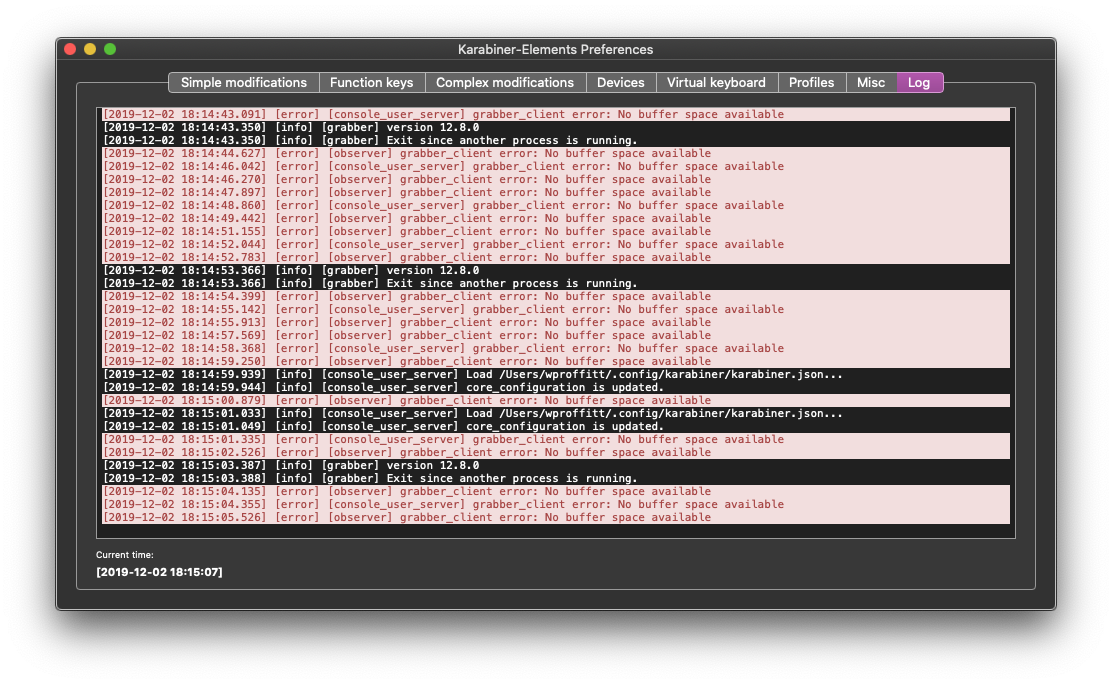
I'm not in a good place to try restarting my machine, but I'll revisit here if a restart doesn't do the job. Am disabling caps lock completely for the time being so it doesn't happen again. :)
UPDATE: So a restart did fix the issue, which is good. But when I tried disabling caps lock, I wasn't able to do so until I manually edited karabiner.json. The GUI seemed incapable of modifying the key, which seems like it could be an important detail. Fortunately I didn't have to physically remove the key to disable caps lock. :)
 doogiecode
on 3 Dec 2019
doogiecode
on 3 Dec 2019
Suffering from the same problem. It started happening to me after upgrading from High Sierra to Catalina.
 zffx
on 15 Jan 2020
zffx
on 15 Jan 2020
I have the same issue. I think I will resort to disabling my caps lock key. I didn't use it much anyway so I don't mind. Hopefully that fixes the issue. I had this accidentally happen to me without me realizing how, twice, so I'd give up caps lock over the inconvenience.
Edit:
Interesting... So i disabled the caps lock key-modifier within the keyboard settings on my mac. The caps-lock light on my keyboard now does not appear, but I still can use caps-lock, it's still functional. Perhaps it was some bug with overlapping caps lock keypresses or actions? Seems to be an easy fix, cant recreate the issue ... I will edit if it somehow happens again
Yeah that didn't fix it :(
 pryan-x
on 15 Jan 2020
pryan-x
on 15 Jan 2020
I have exact the same issue after accidentally pressing caps lock :(
 PatrykDampc
on 19 Jan 2020
PatrykDampc
on 19 Jan 2020
This is also happening to me regularly when I accidentally hit caps lock while typing. It started with my old MBP after the upgrade to Catalina. The new MBP I recently got at work also has the issue. There's no really consistent way to reproduce it, but mashing Caps Lock for a while seems to do the trick. I've stopped using Karabiner for now, having to reboot every 2 hours kills whatever productivity it gains me personally.
 ElteHupkes
on 31 Jan 2020
ElteHupkes
on 31 Jan 2020
I get something like this too. Brb restarting
 qaisjp
on 3 Feb 2020
qaisjp
on 3 Feb 2020
yeah can't reproduce the mod key and caps lock thing, but definitely happens when clicking caps lock and it randomly gets stuck on
qaisjp
on 3 Feb 2020
Hi, I'm experiencing the same issue. After a while using my Mac with KE on, when I turn on caps lock, the keyboard will completely freeze and only a reboot solves the problem...
 max-santiago
on 13 Feb 2020
max-santiago
on 13 Feb 2020
yeah i've just rebound caps to escape now, i never use caps anyway
qaisjp
on 13 Feb 2020
To avoid having to restart, you can use an external keyboard or show the Keyboard Viewer from the Input menu and run:
$ sudo pkill karabiner
(although I haven't tested this in a while)
This will terminate Karabiner and restore keyboard function. Wasn't able to get Karabiner restarted correctly after this, though, so did need a restart in order to restore mappings.
 teddywing
on 14 Feb 2020
teddywing
on 14 Feb 2020
still no feedback about this issue? :(
PatrykDampc
on 9 Mar 2020
To avoid having to restart, you can use an external keyboard or show the Keyboard Viewer from the Input menu and run:
@teddywing In my tries Keyboard Viewer suffers from caps-lock-always-keydown too, and there's no easy way to input password 😹
 hytor-yang
on 14 Mar 2020
hytor-yang
on 14 Mar 2020
Thanks to qaisjp, giving up caps lock entirely do the trick for me. I only used caps lock for IME switching, which can be worked around by a shortcut preference at macOS preference ➤ keyboard ➤ shortcuts ➤ 'Select the previous input source'.
If your favorite shortcut is not ordinary, e.g. Left⇧ + Right⇧, do it with an extra step.
- In Karabiner map your favorite combination to F19
- Bind 'Select the previous input source' to F19
hytor-yang
on 14 Mar 2020
Have the same issue on my MacBook Air. Found no workaround. Have to reboot to recover.
 clarkwang
on 16 Mar 2020
clarkwang
on 16 Mar 2020
I'm getting the same issue on my 2017 MacBook Pro. Both my external Logitech keyboard (K750) and the MacBook keyboard freeze, and can only be recovered with a reboot. The caps lock key remains illuminated until reboot.
 cyberskier
on 1 Apr 2020
cyberskier
on 1 Apr 2020
I've been suffering this for the last 4 months, maybe more. I am unable to replicate it using the capslock key, but I get a keyboard freeze once a day on average. Happens on two different macbook pros and an imac. Only a reboot seems to fix the issue. Any help will be greatly appreciated. Thanks!
 neodoubleo
on 10 Apr 2020
neodoubleo
on 10 Apr 2020
@neodoubleo I've disabled Capslock and no more keyboard freeze. It's not perfect but it works.
clarkwang
on 11 Apr 2020
@neodoubleo I've disabled Capslock and no more keyboard freeze. It's not perfect but it works.
Thanks, but I was hoping there'd be another way, because I rely on my capslock key a lot. Has anybody figured out how to kill all KE processes and restart, so we don't need to reboot every time this happens? Thanks, -oo
neodoubleo
on 14 Apr 2020
Issue is still present
 AbhishekVel
on 15 Apr 2020
AbhishekVel
on 15 Apr 2020
Has anybody figured out how to kill all KE processes and restart, so we don't need to reboot every time this happens? Thanks, -oo
Not sure if you can write a script to kill all KE processes (you can find all (?) KE processes with ps or pgrep). For me when the keyboard freezes the mouse still works so you can click the script to run it.
clarkwang
on 15 Apr 2020
I ran into this issue around once per week (sometimes even multiple times a day) and had to restart my Mac. I thought it was a stupid Catalina bug, but turns out it was a Karabiner bug?! Also for some reason this issue is opened from October and still no fix?
Uninstalling it immediately.
 planecore
on 17 Apr 2020
planecore
on 17 Apr 2020
I've experienced this problem a lot. Holding a modifier key and hitting capslock sporadically would cause the issue.
Temporary workaround until this issue gets fixed
I disabled caps lock as the only time I really used it was for writing constant names and disabling it when I accidentally had pressed it. It's really easy to get used to and I haven't had this issue since.
- Open System Preferences
- Click "Keyboard", then "Modifier Keys…"
- Pick "No action" in the "Caps Lock Key" dropdown
Oh and instead of complaining about a bug which is less than 0,001 % of the software, you could choose to be grateful for the remaining working 99,999 % which developers put in time and effort to make available for free. I absolutely love Karabiner despite of this small (but annoying) bug.
 rasmusdencker
on 17 Apr 2020
rasmusdencker
on 17 Apr 2020
This isn't a "small bug" in my experience. It's a bug that required me to stop everything I did and do the following: Save everything, restart my Mac, log in, start opening everything again and get back to work.
Doing that every week (and sometimes multiple times a day) for about 6 month is insane.
It's even more insane that there's an open issue for around half a year with no fix.
Also, I know this is a free software and it's great, but it doesn't mean that I can't complain about a major bug that slows down my workflow significantly and requires me to restart my computer a lot.
I used Karabiner for 2 small things that I can live without, and that's why I stop using it.
planecore
on 17 Apr 2020
I agree. Anything that causes a system freeze is not a small bug. Let me add that I LOVE Karabiner Elements, and rely on it daily. That's why I want this bug to be fixed so badly. Just keep in mind that not everybody is a coder, and disabling the caps lock key is not an option for someone like a designer or a writer.
neodoubleo
on 17 Apr 2020
@teddywing In my tries Keyboard Viewer suffers from caps-lock-always-keydown too, and there's no easy way to input password 😹
Darn, I was able to turn off caps lock by clicking the key in the Keyboard Viewer, but maybe that's not always possible?
teddywing
on 19 Apr 2020
Temporary workaround until this issue gets fixed
Thank you for temporal workaround.
I too absolutely love Karabiner. But keyboard crashing in the middle of a hefty chat discussion (that's when you accidentally hit the caps) is quite annoying.
 FatCash
on 24 Apr 2020
FatCash
on 24 Apr 2020
Here are some logs from a recent occurrence, apparently at 10:10.
Combined logs copied from Karabiner-Elements' "Logs" tab:
[2020-04-23 10:06:18.618] [info] [observer] Apple Internal Keyboard / Trackpad (device_id:4295068450) is observed.
[2020-04-23 10:06:18.786] [info] [observer] Apple Internal Keyboard / Trackpad (device_id:4295068457) is observed.
[2020-04-23 10:06:18.890] [info] [grabber] Apple Internal Keyboard / Trackpad (device_id:4295068450) is grabbed.
[2020-04-23 10:09:51.167] [error] [grabber] console_user_server_client error: Connection reset by peer
[2020-04-23 10:09:51.169] [info] [grabber] console_user_server_client is closed. (uid:501)
[2020-04-23 10:09:51.186] [info] [grabber] event_tap_monitor terminated
[2020-04-23 10:09:51.290] [info] [grabber] virtual_hid_device_client is closed.
[2020-04-23 10:09:51.294] [info] [grabber] device_grabber is stopped.
[2020-04-23 10:10:01.382] [info] [observer] device_id:4295037654 is terminated.
[2020-04-23 10:10:02.663] [info] [console_user_server] receiver is terminated
[2020-04-23 10:10:07.120] [info] [session_monitor] on_console_changed: false
[2020-04-23 10:10:07.660] [info] [grabber] current_console_user_id: none
[2020-04-23 10:10:07.666] [info] [grabber] receiver is terminated
[2020-04-23 10:10:07.666] [info] [grabber] receiver is initialized
[2020-04-23 10:10:07.667] [info] [grabber] receiver: bound
[2020-04-23 10:10:07.667] [info] [grabber] receiver: chown socket: 0
[2020-04-23 10:10:08.023] [info] [console_user_server] grabber_client is stopped.
[2020-04-23 10:10:10.323] [info] [observer] rescan devices...
[2020-04-23 10:10:10.447] [error] [observer] grabber_client error: Connection reset by peer
[2020-04-23 10:10:10.447] [error] [observer] grabber_client error: Destination address required
[2020-04-23 10:10:10.447] [error] [observer] grabber_client error: Destination address required
[2020-04-23 10:10:10.447] [error] [observer] grabber_client error: Destination address required
[2020-04-23 10:10:10.458] [error] [observer] grabber_client error: Destination address required
[2020-04-23 10:10:10.458] [error] [observer] grabber_client error: Destination address required
[2020-04-23 10:10:10.458] [error] [observer] grabber_client error: Destination address required
[2020-04-23 10:10:10.458] [error] [observer] grabber_client error: Destination address required
[2020-04-23 10:10:10.458] [error] [observer] grabber_client error: Destination address required
[2020-04-23 10:10:10.458] [error] [observer] grabber_client error: Destination address required
[2020-04-23 10:10:10.458] [error] [observer] grabber_client error: Destination address required
[2020-04-23 10:10:10.458] [error] [observer] grabber_client error: Destination address required
[2020-04-23 10:10:10.458] [error] [observer] grabber_client error: Destination address required
[2020-04-23 10:10:10.458] [error] [observer] grabber_client error: Destination address required
[2020-04-23 10:10:10.469] [error] [observer] grabber_client error: Destination address required
[2020-04-23 10:10:10.469] [error] [observer] grabber_client error: Destination address required
[2020-04-23 10:10:10.469] [error] [observer] grabber_client error: Destination address required
[2020-04-23 10:10:10.469] [error] [observer] grabber_client error: Destination address required
[2020-04-23 10:10:10.469] [error] [observer] grabber_client error: Destination address required
[2020-04-23 10:10:10.469] [error] [observer] grabber_client error: Destination address required
[2020-04-23 10:10:10.469] [error] [observer] grabber_client error: Destination address required
[2020-04-23 10:10:10.469] [error] [observer] grabber_client error: Destination address required
[2020-04-23 10:10:10.469] [error] [observer] grabber_client error: Destination address required
[2020-04-23 10:10:10.469] [error] [observer] grabber_client error: Destination address required
[2020-04-23 10:10:10.480] [error] [observer] grabber_client error: Destination address required
[2020-04-23 10:10:10.480] [error] [observer] grabber_client error: Destination address required
[2020-04-23 10:10:10.480] [error] [observer] grabber_client error: Destination address required
[2020-04-23 10:10:10.480] [error] [observer] grabber_client error: Destination address required
[2020-04-23 10:10:10.480] [error] [observer] grabber_client error: Destination address required
[2020-04-23 10:10:10.480] [error] [observer] grabber_client error: Destination address required
[2020-04-23 10:10:10.480] [error] [observer] grabber_client error: Destination address required
[2020-04-23 10:10:10.480] [error] [observer] grabber_client error: Destination address required
[2020-04-23 10:10:10.480] [error] [observer] grabber_client error: Destination address required
[2020-04-23 10:10:10.480] [error] [observer] grabber_client error: Destination address required
[2020-04-23 10:10:10.520] [error] [observer] grabber_client error: Destination address required
[2020-04-23 10:10:10.520] [error] [observer] grabber_client error: Destination address required
[2020-04-23 10:10:10.520] [info] [observer] grabber_client is closed.
[2020-04-23 10:10:10.521] [info] [observer] grabber_client is connected.
[2020-04-23 10:10:10.521] [info] [observer] rescan devices...
[2020-04-23 10:10:12.892] [info] [grabber] session_monitor_client is closed (uid:501)
[2020-04-23 10:11:22.053] [info] [console_user_server] version 12.9.0
[2020-04-23 10:11:22.076] [info] [session_monitor] version 12.9.0
[2020-04-23 10:11:22.688] [info] [session_monitor] receiver is initialized
[2020-04-23 10:11:22.776] [info] [session_monitor] session_monitor_receiver_client is started.
[2020-04-23 10:11:22.785] [info] [session_monitor] on_console_changed: true
[2020-04-23 10:11:22.785] [info] [session_monitor] receiver: bound
[2020-04-23 10:11:22.788] [info] [session_monitor] session_monitor_receiver_client is connected.
[2020-04-23 10:11:22.789] [info] [grabber] current_console_user_id: 501
[2020-04-23 10:11:22.789] [info] [grabber] receiver is terminated
[2020-04-23 10:11:22.789] [info] [grabber] receiver is initialized
[2020-04-23 10:11:22.790] [info] [grabber] receiver: bound
[2020-04-23 10:11:22.790] [info] [grabber] receiver: chown socket: 501
[2020-04-23 10:11:23.886] [error] [observer] grabber_client error: Connection reset by peer
[2020-04-23 10:11:23.886] [info] [observer] grabber_client is closed.
[2020-04-23 10:11:24.796] [info] [observer] grabber_client is connected.
[2020-04-23 10:11:24.797] [info] [observer] rescan devices...
[2020-04-23 10:11:31.031] [info] [console_user_server] receiver is initialized
[2020-04-23 10:11:31.195] [info] [console_user_server] receiver: bound
[2020-04-23 10:11:31.199] [info] [console_user_server] grabber_client is started.
[2020-04-23 10:11:31.210] [info] [console_user_server] grabber_client is connected.
[2020-04-23 10:11:37.947] [info] [grabber] karabiner_console_user_server is connected.
[2020-04-23 10:11:37.948] [info] [grabber] console_user_server_client is connected. (uid:501)
[2020-04-23 10:11:37.956] [info] [grabber] device_grabber is started.
[2020-04-23 10:11:37.981] [info] [grabber] event_tap_monitor initialized
[2020-04-23 10:11:37.981] [info] [grabber] virtual_hid_device_client is started.
[2020-04-23 10:11:37.982] [info] [grabber] virtual_hid_device_client is opened.
[2020-04-23 10:11:37.982] [info] [grabber] virtual_hid_device_client_ is connected
[2020-04-23 10:11:37.982] [info] [grabber] initialize_virtual_hid_keyboard
[2020-04-23 10:11:37.982] [info] [grabber]   country_code:0
[2020-04-23 10:11:38.257] [info] [observer] matching device:
[2020-04-23 10:11:38.257] [info] [observer]   registry_entry_id: 4295068864
[2020-04-23 10:11:38.257] [info] [observer]   manufacturer: pqrs.org
[2020-04-23 10:11:38.257] [info] [observer]   product: Karabiner VirtualHIDKeyboard
[2020-04-23 10:11:38.258] [info] [observer]   vendor_id: 5824
[2020-04-23 10:11:38.258] [info] [observer]   product_id: 10203
[2020-04-23 10:11:38.258] [info] [observer]   location_id: 0x0
[2020-04-23 10:11:38.258] [info] [observer]   serial_number: pqrs.org:org_pqrs_driver_Karabiner_VirtualHIDDevice_VirtualHIDKeyboard_v061000
[2020-04-23 10:11:38.273] [info] [grabber] Load /Users/u/.config/karabiner/karabiner.json...
[2020-04-23 10:11:38.302] [info] [console_user_server] Load /Users/u/.config/karabiner/karabiner.json...
[2020-04-23 10:11:38.461] [info] [grabber] core_configuration is updated.
[2020-04-23 10:11:38.465] [info] [grabber] `system_preferences` is updated.
[2020-04-23 10:11:38.516] [info] [observer]   is_keyboard: true
[2020-04-23 10:11:38.522] [info] [observer]   is_pointing_device: false
[2020-04-23 10:11:38.532] [info] [observer] rescan devices...
[2020-04-23 10:11:38.546] [info] [observer] Karabiner VirtualHIDKeyboard (device_id:4295068864) is observed.
[2020-04-23 10:11:38.765] [info] [console_user_server] core_configuration is updated.
[2020-04-23 10:11:39.486] [info] [grabber] Apple Internal Keyboard / Trackpad (device_id:4295068450) is grabbed.
[2020-04-23 10:11:39.494] [info] [console_user_server] Check for updates...
...
From /var/log/karabiner/grabber.log:
...
[2020-04-23 10:05:24.369] [info] [grabber] Apple Internal Keyboard / Trackpad (device_id:4295045376) is terminated.
[2020-04-23 10:05:26.304] [info] [grabber] Apple Internal Keyboard / Trackpad (device_id:4295045369) is ungrabbed.
[2020-04-23 10:05:26.311] [info] [grabber] Apple Internal Keyboard / Trackpad (device_id:4295045369) is terminated.
[2020-04-23 10:05:27.335] [warning] [grabber] Apple Internal Keyboard / Trackpad (device_id:4295068450) is not observed yet. Please wait for a while.
[2020-04-23 10:06:18.890] [info] [grabber] Apple Internal Keyboard / Trackpad (device_id:4295068450) is grabbed.
[2020-04-23 10:09:51.167] [error] [grabber] console_user_server_client error: Connection reset by peer
[2020-04-23 10:09:51.169] [info] [grabber] console_user_server_client is closed. (uid:501)
[2020-04-23 10:09:51.186] [info] [grabber] event_tap_monitor terminated
[2020-04-23 10:09:51.290] [info] [grabber] virtual_hid_device_client is closed.
[2020-04-23 10:09:51.294] [info] [grabber] device_grabber is stopped.
[2020-04-23 10:10:07.660] [info] [grabber] current_console_user_id: none
[2020-04-23 10:10:07.666] [info] [grabber] receiver is terminated
[2020-04-23 10:10:07.666] [info] [grabber] receiver is initialized
[2020-04-23 10:10:07.667] [info] [grabber] receiver: bound
[2020-04-23 10:10:07.667] [info] [grabber] receiver: chown socket: 0
[2020-04-23 10:10:12.892] [info] [grabber] session_monitor_client is closed (uid:501)
[2020-04-23 10:11:22.789] [info] [grabber] current_console_user_id: 501
[2020-04-23 10:11:22.789] [info] [grabber] receiver is terminated
[2020-04-23 10:11:22.789] [info] [grabber] receiver is initialized
[2020-04-23 10:11:22.790] [info] [grabber] receiver: bound
[2020-04-23 10:11:22.790] [info] [grabber] receiver: chown socket: 501
[2020-04-23 10:11:37.947] [info] [grabber] karabiner_console_user_server is connected.
[2020-04-23 10:11:37.948] [info] [grabber] console_user_server_client is connected. (uid:501)
[2020-04-23 10:11:37.956] [info] [grabber] device_grabber is started.
[2020-04-23 10:11:37.981] [info] [grabber] event_tap_monitor initialized
[2020-04-23 10:11:37.981] [info] [grabber] virtual_hid_device_client is started.
[2020-04-23 10:11:37.982] [info] [grabber] virtual_hid_device_client is opened.
[2020-04-23 10:11:37.982] [info] [grabber] virtual_hid_device_client_ is connected
[2020-04-23 10:11:37.982] [info] [grabber] initialize_virtual_hid_keyboard
[2020-04-23 10:11:37.982] [info] [grabber]   country_code:0
[2020-04-23 10:11:38.273] [info] [grabber] Load /Users/u/.config/karabiner/karabiner.json...
[2020-04-23 10:11:38.461] [info] [grabber] core_configuration is updated.
[2020-04-23 10:11:38.465] [info] [grabber] `system_preferences` is updated.
[2020-04-23 10:11:39.486] [info] [grabber] Apple Internal Keyboard / Trackpad (device_id:4295068450) is grabbed.
...
Processes:
$ sudo pkill karabiner
$ ps aux | grep karabiner
u                 4370   7.6  0.2  4343492   9500   ??  R    11:51AM   0:00.06 /Library/Application Support/org.pqrs/Karabiner-Elements/bin/karabiner_console_user_server
root              4369   2.5  0.2  4317272   8068   ??  Ss   11:51AM   0:00.08 /Library/Application Support/org.pqrs/Karabiner-Elements/bin/karabiner_observer
u                 4399   1.5  0.0  4285688    692 s004  S+   11:51AM   0:00.01 grep karabiner
u                 4363   1.0  0.2  4313304   6848   ??  S    11:51AM   0:00.04 /Library/Application Support/org.pqrs/Karabiner-Elements/bin/karabiner_grabber
root              4368   0.7  0.2  4312152   6628   ??  S    11:51AM   0:00.03 /Library/Application Support/org.pqrs/Karabiner-Elements/bin/karabiner_session_monitor
u                 4367   0.7  0.1  4311860   6012   ??  S    11:51AM   0:00.03 /Library/Application Support/org.pqrs/Karabiner-Elements/bin/karabiner_observer
root              4365   0.6  0.2  4310736   6308   ??  Ss   11:51AM   0:00.03 /Library/Application Support/org.pqrs/Karabiner-Elements/bin/karabiner_kextd
root                72   0.0  0.0        0      0   ??  ?Es  10:16AM   0:00.00 (karabiner_grabbe)
This has been driving me nuts the past month or so ever since I got my first Mac (MacBook Pro 16-inch, 2019, Catalina 10.15.4). I was only using an external keyboard, mouse and screen on my first day, but ever since then the only thing that was connected to my Mac was the power cable.
The only mention of the caps-lock in my karabiner.json file is manipulate_caps_lock_led:
            "devices": [
                {
                    "disable_built_in_keyboard_if_exists": false,
                    "fn_function_keys": [],
                    "identifiers": {
                        "is_keyboard": true,
                        "is_pointing_device": false,
                        "product_id": 34304,
                        "vendor_id": 1452
                    },
                    "ignore": false,
                    "manipulate_caps_lock_led": true,
                    "simple_modifications": []
                },
                {
                    "disable_built_in_keyboard_if_exists": false,
                    "fn_function_keys": [],
                    "identifiers": {
                        "is_keyboard": true,
                        "is_pointing_device": false,
                        "product_id": 832,
                        "vendor_id": 1452
                    },
                    "ignore": false,
                    "manipulate_caps_lock_led": true,
                    "simple_modifications": [
                        {
                            "from": {
                                "key_code": "fn"
                            },
                            "to": {
                                "key_code": "left_control"
                            }
                        },
                        {
                            "from": {
                                "key_code": "left_control"
                            },
                            "to": {
                                "key_code": "fn"
                            }
                        }
                    ]
                }
            ],
I could live with the workaround of disabling the caps-lock; the mapping that this application provides are so much more worth it (like, who the hell thought of placing the function key to the _left_ of the control?).
 eyalroth
on 27 Apr 2020
eyalroth
on 27 Apr 2020
I'm having a similar problem.
I have an external keyboard and hitting the CAPS LOCK key can sometime freeze the keyboard.
If I disconnect the keyboard and reattach it the keyboard starts working again but without any of the karabiner modifications.
Also the light of the CAPS LOCK on the macbook stays lit...
 Reuenthal767
on 30 Apr 2020
Reuenthal767
on 30 Apr 2020
Confirm this issue on my hackintosh with 10.15.3 onboard while pressing Caps Lock. Reproduced with external keyboard Microsoft Digital Media Keyboard 3000.
@rasmusdencker , unfortunately your workaround doesn't work. Seems like it works at the first attempt after Caps Lock being disabled in the system preferences, but after reboot the problem happens again.
 CheeryLee
on 10 May 2020
CheeryLee
on 10 May 2020
I have the same issue on my MacBook pro 13, year 2015.
 vivanov879
on 11 May 2020
vivanov879
on 11 May 2020
Have exactly the same issue on Catalina and Karabiner 12.9.0.
@tekezo, any chance we'll see the fix soon?
 MrMrRobat
on 12 May 2020
MrMrRobat
on 12 May 2020
Is there a point in posting these findings here? I think it is pretty clear that there is a bug that affects a lot of us. And we have properly documented the issue, along with the steps to reproduce. If nobody is doing anything about it though, what is the point of posting more of these messages? Thanks, -oo
neodoubleo
on 12 May 2020
If nobody is doing anything about it though, what is the point of posting more of these messages?
I just saw that no one mentioned the developer here so far. This issue is quite old and could just get lost under new ones. So I gave it a try.
MrMrRobat
on 13 May 2020
Well if there would be at least one person not too busy to check the maintainers list and then realize that Takayama Fumihiko is currently -The Developer- and also occupied with Apple's I/O HID sys, I would say the way out of this situation is to continue to complain or maybe ask @tekezo (and maybe other maintainers who could fix that) how we can help in fixing bugs or maybe help with spreading the word for developers communities to attract more devs who know what to do.
✌️ :)
 o1dnik
on 13 May 2020
o1dnik
on 13 May 2020
I also have same issue, really annoying.
 dyarfaradj
on 19 May 2020
dyarfaradj
on 19 May 2020
remove Karabiner's ctrl config and use mac osx self function modifier keys May be better

 sdvdxl
on 25 May 2020
sdvdxl
on 25 May 2020
This issue drives me nuts! Always happen when it is really inconvenient to have a complete system reboot!
 iRonin
on 25 May 2020
iRonin
on 25 May 2020
Oh and instead of complaining about a bug which is less than 0,001 % of the software, you could choose to be grateful for the remaining working 99,999 % which developers put in time and effort to make available _for free_. I absolutely love Karabiner despite of this small (but annoying) bug.
I'd rather pay someone to fix this bug + if no one complains that what motivation there is to fix this issue?
iRonin
on 25 May 2020
For now I'm using the hidutil solution (no plugins required) in this stackexchange question. I only need to map the <Right-Alt> to <Right-Control> (and <F10> to <Insert> for Windows Remote Desktop). Those who have very simple requirement can take a look.
To make it work automatically I also created an Automator app and added it to my account's Login Items (System Preferences > Users & Groups).
clarkwang
on 25 May 2020
For now I'm using the hidutil
@clarkwang oh my gosh, oh my gosh, maaan!!1
everything I need in a single hidutil command! Thank you, thank you thank you!!!
P.S.: my itches were to remap right option to control and to swap grave accent and tilde and non us backslash. Ooohhh, what a relief!
 aol-nnov
on 25 May 2020
aol-nnov
on 25 May 2020
I'm also facing this issue regularly. I'm not able to reproduce it, but it's mostly happening when accidentally pressing the caps lock button when using shortcuts. Using Karabiner version 12.10.0, even running sudo pkill karabiner or closing the lid (as was suggested by some) didn't help. The only way I can fix it is by a reboot, which is very annoying.
I see the following logs, if it helps anyone:
[2020-07-10 09:39:24.645] [info] [grabber] Apple Internal Keyboard / Trackpad (device_id:4295002738) is terminated.
[2020-07-10 09:39:24.645] [info] [observer] device_id:4295002743 is terminated.
[2020-07-10 09:39:24.646] [info] [grabber] Apple Internal Keyboard / Trackpad (device_id:4295002743) is terminated.
[2020-07-10 09:39:24.649] [info] [observer] device_id:4295002738 is terminated.
[2020-07-10 09:39:24.651] [info] [observer] rescan devices...
[2020-07-10 09:39:24.651] [info] [observer] rescan devices...
[2020-07-10 09:39:25.055] [info] [grabber] (vendor_id:0x5ac, product_id:0x8600) (device_id:4295002794) is terminated.
[2020-07-10 09:39:25.055] [info] [observer] device_id:4295002794 is terminated.
[2020-07-10 09:39:25.056] [info] [observer] rescan devices...
[2020-07-10 09:39:25.056] [info] [observer] matching device:
[2020-07-10 09:39:25.056] [info] [observer]   registry_entry_id: 4295002867
[2020-07-10 09:39:25.057] [info] [observer]   vendor_id: 1452
[2020-07-10 09:39:25.057] [info] [observer]   product_id: 34304
[2020-07-10 09:39:25.062] [info] [observer]   is_keyboard: true
[2020-07-10 09:39:25.063] [info] [observer]   is_pointing_device: false
[2020-07-10 09:39:25.063] [info] [observer] rescan devices...
[2020-07-10 09:39:25.065] [info] [observer] (vendor_id:0x5ac, product_id:0x8600) (device_id:4295002867) is observed.
[2020-07-10 09:39:33.349] [info] [observer] matching device:
[2020-07-10 09:39:33.349] [info] [observer]   registry_entry_id: 4295002924
[2020-07-10 09:39:33.349] [info] [observer]   manufacturer: Logitech
[2020-07-10 09:39:33.349] [info] [observer]   product: MX Master 3
[2020-07-10 09:39:33.349] [info] [observer]   vendor_id: 1133
[2020-07-10 09:39:33.349] [info] [observer]   product_id: 45091
[2020-07-10 09:39:33.349] [info] [observer]   location_id: 0xcfebb066
[2020-07-10 09:39:33.349] [info] [observer]   serial_number: 67FD76A7121B3473
[2020-07-10 09:39:33.350] [info] [observer]   is_keyboard: true
[2020-07-10 09:39:33.350] [info] [observer]   is_pointing_device: true
[2020-07-10 09:39:33.352] [info] [observer] rescan devices...
[2020-07-10 09:39:33.354] [info] [observer] MX Master 3 (device_id:4295002924) is observed.
[2020-07-10 09:39:33.719] [info] [observer] matching device:
[2020-07-10 09:39:33.719] [info] [observer]   registry_entry_id: 4295002859
[2020-07-10 09:39:33.719] [info] [observer]   manufacturer: Apple Inc.
[2020-07-10 09:39:33.719] [info] [observer]   product: Apple Internal Keyboard / Trackpad
[2020-07-10 09:39:33.719] [info] [observer]   vendor_id: 1452
[2020-07-10 09:39:33.719] [info] [observer]   product_id: 635
[2020-07-10 09:39:33.722] [info] [observer]   location_id: 0xffffffff80500000
[2020-07-10 09:39:33.722] [info] [observer]   serial_number: FM7851202S5J3VXAZ+TUJ
[2020-07-10 09:39:33.727] [info] [observer]   is_keyboard: false
[2020-07-10 09:39:33.728] [info] [observer]   is_pointing_device: true
[2020-07-10 09:39:33.729] [info] [observer] rescan devices...
[2020-07-10 09:39:33.729] [info] [observer] matching device:
[2020-07-10 09:39:33.729] [info] [observer]   registry_entry_id: 4295002854
[2020-07-10 09:39:33.729] [info] [observer]   manufacturer: Apple Inc.
[2020-07-10 09:39:33.729] [info] [observer]   product: Apple Internal Keyboard / Trackpad
[2020-07-10 09:39:33.729] [info] [observer]   vendor_id: 1452
[2020-07-10 09:39:33.729] [info] [observer]   product_id: 635
[2020-07-10 09:39:33.729] [info] [observer]   location_id: 0xffffffff80500000
[2020-07-10 09:39:33.729] [info] [observer]   serial_number: FM7851202S5J3VXAZ+TUJ
[2020-07-10 09:39:33.731] [info] [observer]   is_keyboard: true
[2020-07-10 09:39:33.732] [info] [observer]   is_pointing_device: false
[2020-07-10 09:39:33.732] [info] [observer] rescan devices...
[2020-07-10 09:39:33.732] [info] [observer] matching device:
[2020-07-10 09:39:33.732] [info] [observer]   registry_entry_id: 4295002894
[2020-07-10 09:39:33.733] [info] [observer]   manufacturer: qmkbuilder
[2020-07-10 09:39:33.733] [info] [observer]   product: keyboard
[2020-07-10 09:39:33.733] [info] [observer]   vendor_id: 65261
[2020-07-10 09:39:33.733] [info] [observer]   product_id: 24672
[2020-07-10 09:39:33.733] [info] [observer]   location_id: 0x2100000
[2020-07-10 09:39:33.734] [info] [observer]   is_keyboard: true
[2020-07-10 09:39:33.734] [info] [observer]   is_pointing_device: false
[2020-07-10 09:39:33.735] [info] [observer] Apple Internal Keyboard / Trackpad (device_id:4295002854) is observed.
[2020-07-10 09:39:33.735] [info] [observer] rescan devices...
[2020-07-10 09:39:33.735] [info] [observer] matching device:
[2020-07-10 09:39:33.735] [info] [observer]   registry_entry_id: 4295002899
[2020-07-10 09:39:33.735] [info] [observer]   manufacturer: qmkbuilder
[2020-07-10 09:39:33.735] [info] [observer]   product: keyboard
[2020-07-10 09:39:33.735] [info] [observer]   vendor_id: 65261
[2020-07-10 09:39:33.735] [info] [observer]   product_id: 24672
[2020-07-10 09:39:33.735] [info] [observer]   location_id: 0x2100000
[2020-07-10 09:39:33.739] [info] [observer]   is_keyboard: false
[2020-07-10 09:39:33.739] [info] [observer]   is_pointing_device: true
[2020-07-10 09:39:33.739] [info] [observer] rescan devices...
[2020-07-10 09:39:33.739] [info] [observer] keyboard (device_id:4295002899) is observed.
[2020-07-10 09:39:33.740] [info] [observer] keyboard (device_id:4295002894) is observed.
[2020-07-10 09:39:33.741] [info] [observer] Apple Internal Keyboard / Trackpad (device_id:4295002859) is observed.
[2020-07-10 09:39:33.764] [info] [grabber] (vendor_id:0x5ac, product_id:0x8600) (device_id:4295002867) is terminated.
[2020-07-10 09:39:33.779] [info] [observer] device_id:4295002867 is terminated.
[2020-07-10 09:39:33.783] [info] [observer] rescan devices...
[2020-07-10 09:39:33.783] [info] [observer] matching device:
[2020-07-10 09:39:33.783] [info] [observer]   registry_entry_id: 4295003007
[2020-07-10 09:39:33.783] [info] [observer]   vendor_id: 1452
[2020-07-10 09:39:33.783] [info] [observer]   product_id: 34304
[2020-07-10 09:39:33.788] [info] [observer]   is_keyboard: true
[2020-07-10 09:39:33.790] [info] [observer]   is_pointing_device: false
[2020-07-10 09:39:33.790] [info] [observer] rescan devices...
[2020-07-10 09:39:33.790] [info] [observer] matching device:
[2020-07-10 09:39:33.790] [info] [observer]   registry_entry_id: 4295002904
[2020-07-10 09:39:33.790] [info] [observer]   manufacturer: qmkbuilder
[2020-07-10 09:39:33.790] [info] [observer]   product: keyboard
[2020-07-10 09:39:33.790] [info] [observer]   vendor_id: 65261
[2020-07-10 09:39:33.790] [info] [observer]   product_id: 24672
[2020-07-10 09:39:33.790] [info] [observer]   location_id: 0x2100000
[2020-07-10 09:39:33.791] [info] [observer]   is_keyboard: true
[2020-07-10 09:39:33.792] [info] [observer]   is_pointing_device: false
[2020-07-10 09:39:33.793] [info] [observer] rescan devices...
[2020-07-10 09:39:33.894] [info] [observer] keyboard (device_id:4295002904) is observed.
[2020-07-10 09:39:33.899] [info] [observer] (vendor_id:0x5ac, product_id:0x8600) (device_id:4295003007) is observed.
[2020-07-10 09:39:34.717] [info] [grabber] caps lock is found on Apple Internal Keyboard / Trackpad
[2020-07-10 09:39:34.718] [info] [grabber] Apple Internal Keyboard / Trackpad (device_id:4295002854) is grabbed.
[2020-07-10 09:39:34.728] [info] [grabber] caps lock is found on keyboard
[2020-07-10 09:39:34.729] [info] [grabber] keyboard (device_id:4295002894) is grabbed.
[2020-07-10 09:39:34.764] [info] [grabber] caps lock is found on keyboard
[2020-07-10 09:39:34.769] [info] [grabber] keyboard (device_id:4295002904) is grabbed.
 martinfrancois
on 10 Jul 2020
martinfrancois
on 10 Jul 2020
Again, I don’t understand the point of adding all these findings here, if nothing has been done since October. Is @tekezo reviewing any of this? -oo
neodoubleo
on 10 Jul 2020
There are too many duplicated issues.
Is this resolve the issue?
https://github.com/pqrs-org/Karabiner-Elements/issues/2114#issuecomment-576489172
 tekezo
on 10 Jul 2020
tekezo
on 10 Jul 2020
@tekezo no, it doesn’t look like manipulate LED changes anything. I also run into the issue on a macbook pro, not just the iMac with external keyboard. Thanks, -oo
neodoubleo
on 11 Jul 2020
I'm having the same issue here as well. Pressed caps lock on an external keyboard, froze the LED on both the external and built-in keyboard. Unplugging and replugging in the external keyboard fixed the issue for that keyboard, yet the built-in keyboard remained unresponsive, with the caps lock LED still on. Restarting karabiner, disabling built-in keyboard lock and disabling LED manipulation all did nothing, and only a restart fixed it. Looking forward to a fix for this soon.
 SamuelMereau
on 11 Jul 2020
SamuelMereau
on 11 Jul 2020
Just had this problem. Really frustrating!
 minsohng
on 14 Jul 2020
minsohng
on 14 Jul 2020
Just encountered this again, again by pressing capslock (perhaps in a combination with another key, but I am not sure). After unplugging and plugging in external keyboard (connected via a dongle):
- internal keyboard is locked up completely with caps light on
- external keyboard is almost working (typing on it now), command is not working, but I believe it's acting as another modifier (cmd+w gives ∑ character for instance, cmd+t gives †, cmd+v √)
 radaczynski
on 22 Jul 2020
radaczynski
on 22 Jul 2020
ck (perhaps in a combination with another key, but I am not sure). After unplugging and plugging in external keyboard (connected via a dongle):
- internal keyboard is locked up completely with caps light on
This describes exactly my problem as well. I am on Catalina 10.15.5 Macbook Pro 13inch 2015. Karabiner-Elements 12.10.0
minsohng
on 22 Jul 2020
This issue has been automatically marked as stale because it has not had recent activity. It will be closed if no further activity occurs. Thank you for your contributions.
![stale[bot] picture](https://avatars3.githubusercontent.com/in/1724?v=4&s=40) stale[bot]
on 20 Sep 2020
stale[bot]
on 20 Sep 2020
Here's an activity for stale-bot: The bug is still present.
 vszakats
on 20 Sep 2020
vszakats
on 20 Sep 2020
Most likely, although I have not experienced it for a while now (maybe three weeks).
radaczynski
on 20 Sep 2020
Me neither, though I keep the the Caps-Lock cover removed and ReiKey.app uninstalled in an attempt to mitigate this. Was there a Karabiner update to address this? (can't see a reference here, or in recent ChangeLogs)
[ My machine is also suffering from what it looks like kernel resource exhaustion. Happens every few days to every few hours, when suddenly a list of low-level macOS services prompt for the user account password, while some user apps (like Safari) are killed by the system. Only a reboot solves it. Started _roughly_ around the time I've installed Karabiner, but couldn't find any evidence that they are related — so take this just as a FYI. UPDATE: Problem still present with Karabiner 13, which no longer uses .kexts, so it's definitely unrelated. ]
vszakats
on 20 Sep 2020
In case it’s helpful to anyone, disabling caps lock in Apple settings has
completely eliminated the problem for me. Of course this is only useful if
you have no use for caps lock (which I don’t).
On Sun, Sep 20 2020 at 1:46 PM, Viktor Szakats notifications@github.com
wrote:
Me neither, though I keep the the Caps-Lock cover removed and ReiKey.app
https://objective-see.com/products/reikey.html uninstalled in an
attempt to mitigate this. Was there a Karabiner update to address this?
(can't see a reference here, or in recent ChangeLogs)[ My machine is also suffering from what it looks like kernel resource
exhaustion. Happens every few days to every few hours, when suddenly a list
of low-level macOS services prompt for the user account password, while
some user apps are (like Safari) killed by the system. Only a reboot solves
it. Started roughly around the time I've installed Karabiner, but
couldn't find any evidence that they are related — so take this just as a
FYI. ]—
You are receiving this because you are subscribed to this thread.
Reply to this email directly, view it on GitHub
https://github.com/pqrs-org/Karabiner-Elements/issues/2035#issuecomment-695834248,
or unsubscribe
https://github.com/notifications/unsubscribe-auth/AAEVNJ45BWTJM4MG24H4LDDSGZSY5ANCNFSM4JDKR23Q
.
 tedd4u
on 20 Sep 2020
tedd4u
on 20 Sep 2020
Just to add another case, same issue here with the same symptoms as already described (Karabiner-Elements 12.10.0).
Glad I found this issue as I thought it was another problem with macbook's newer keyboards, but that's only because I switched to Catalina with the new laptop.
Will also resort to disabling caps lock for now then.
 rbr
on 4 Oct 2020
rbr
on 4 Oct 2020
Has anyone had the issue since intalling version 13.0.0?
neodoubleo
on 6 Oct 2020
@neodoubleo I upgraded to 13.0.0 a few days ago, re-enabled my Caps Lock, and no freezes so far :)
eyalroth
on 15 Oct 2020
@eyalroth I also installed 13.0.0 last week, and had just one freeze the next day. But it was actually worse than my normal Karabiner freezes in that the whole computer froze, and even turning the bluetooth keyboard off and on didn't "unfreeze" like usual. The mouse was frozen etc. I had to do a hard restart.
So I'm hoping that was something else, not Karabiner. Hasn't happened since. Also, I'm still on Catalina, not Big Sur Beta.
neodoubleo
on 15 Oct 2020
@neodoubleo Yeah, I would give it a few more days before I can safely confirm that I'm not experiencing any freezes. Before the CapsLock workaround the prevalence of the problem was about once a week.
I'm on Catalina as well (10.15.6). I'm somewhat reluctant when it comes to upgrading my Mac.
eyalroth
on 15 Oct 2020
Just came here to say that it took me a while to realise that the issue was actually caused by Karabiner and that it involved modifier keys. Occasionally, after accidentally pressing caps lock, my keyboard would freeze until I restart the machine. I disabled caps lock for now, so let's hope it fixes the issue. Would be great to get this fixed properly though
 ivan-rivera
on 18 Oct 2020
ivan-rivera
on 18 Oct 2020
Sorry guys. This happened to me twice since I installed 13.0.0. The second time it happened, when I re-started Karabiner (not reboot), it kept saying Karabiner_grabber and Karabiner_observer requires input monitoring permission in Security & Privacy System Preferences, even though those are already enabled of course for Karabiner to work.
So now I'm wondering, maybe the reason restarting Karabiner doesnt' fix anything (and you have to reboot), is for some reason the connection to input monitoring is lost, and that you have to reboot to reinitialize it.
I'm on Catalina 10.15.7
neodoubleo
on 26 Oct 2020
@neodoubleo Still hasn't happened to me, but I'm on Catalina 10.15.6, so maybe there's some incompatibility with 7.
eyalroth
on 27 Oct 2020
It happened everyday at least once for me. Pressing caps lock key occasionally will kill the keyboard. Now at least I know it's not my actual machine malfunctioning 🤣
It's happening on Catalina 10.5.5 for me
 joeltay17
on 28 Oct 2020
joeltay17
on 28 Oct 2020
I suspect that it's not happening to me again because I'm not using the built-in keyboard, but rather only use an external one. When I was experiencing the problem I was mostly working from home and was only using the built-in keyboard, and nowadays I rarely work from home.
eyalroth
on 29 Oct 2020
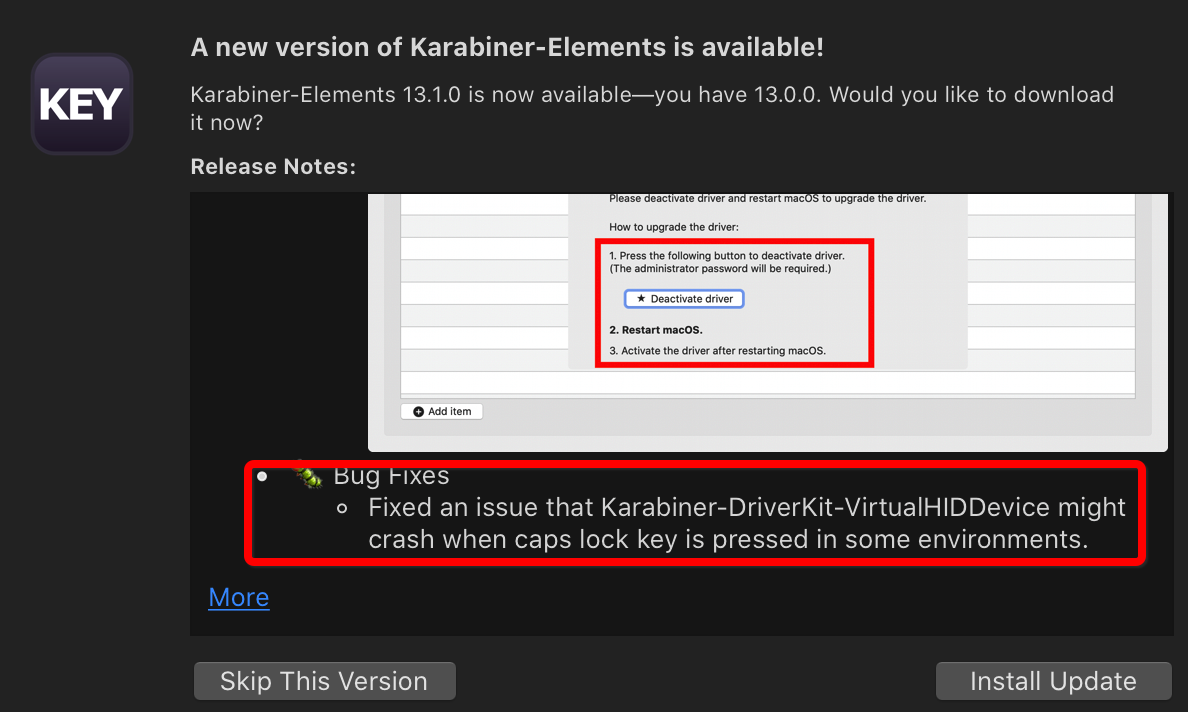
Is this really happening??? 🕺 💃
neodoubleo
on 31 Oct 2020
man its weird, when i manually check for updates, its telling me that i'm on the most updated version already. have to resort downloading the newest one from the main site like a caveman
Edit: ah it seems i need to upgrade my macos first cuz minimum version is 10.15.6 and im on 10.15.5
joeltay17
on 5 Nov 2020
Is this really happening??? 🕺 💃
It might be that this just made my Mac completely stuck.
Yesterday I upgraded to this version (did the reactivation of the driver + restart), and about 2-3 hours later my Mac got completely stuck. Keyboard and mouse click were unresponsive, while only the cursor was moving. I tried disconnecting my Mac from my KVM (Gold Touch) but that didn't help. I had to force shutdown (long press on the start button).
I'm not 100% sure it's Karabiner's fault, but for now I'm disabling the Caps Lock again.
eyalroth
on 9 Nov 2020
Related issues
 Ox0400
·
3Comments
Ox0400
·
3Comments
 cajhin
·
3Comments
cajhin
·
3Comments
 jason0342
·
3Comments
jason0342
·
3Comments
 chaucy
·
3Comments
chaucy
·
3Comments
 rcaputo
·
3Comments
rcaputo
·
3Comments
Most helpful comment
This isn't a "small bug" in my experience. It's a bug that required me to stop everything I did and do the following: Save everything, restart my Mac, log in, start opening everything again and get back to work.
Doing that every week (and sometimes multiple times a day) for about 6 month is insane.
It's even more insane that there's an open issue for around half a year with no fix.
Also, I know this is a free software and it's great, but it doesn't mean that I can't complain about a major bug that slows down my workflow significantly and requires me to restart my computer a lot.
I used Karabiner for 2 small things that I can live without, and that's why I stop using it.