Karabiner-elements: Not detecting fn Key in Logitech MX Keys keyboard
I have a newest Logitech MX Keys keyboard and I am unable to remap fn button with Karabiner.
This button is used for some gesture feature of Logitech that I don't need. I would really want to map it to right_option, but I can't :(
The event viewer is not printing anything when fn is pressed.
 wilczarzgit
All 43 comments
The screen brightness up/down keys are also not detected.
 paour
on 9 Oct 2019
paour
on 9 Oct 2019
I confirm the problem with the fn button.
 th3neken
on 14 Oct 2019
th3neken
on 14 Oct 2019
Just to add but my Xplorer Go! 300BT has the same issue. Probably a third party keyboard issue not specifically Logitech MX Keys keyboards.
 yougotwill
on 23 Oct 2019
yougotwill
on 23 Oct 2019
Any chances for this getting fixed any time soon?
wilczarzgit
on 25 Oct 2019
This issue has been automatically marked as stale because it has not had recent activity. It will be closed if no further activity occurs. Thank you for your contributions.
![stale[bot] picture](https://avatars3.githubusercontent.com/in/1724?v=4&s=40) stale[bot]
on 24 Dec 2019
stale[bot]
on 24 Dec 2019
This is still an issue, please don't close.
paour
on 24 Dec 2019
This issue has been automatically marked as stale because it has not had recent activity. It will be closed if no further activity occurs. Thank you for your contributions.
stale[bot]
on 22 Feb 2020
This is still an issue, please don't close.
yougotwill
on 23 Feb 2020
Is possible to resolve this?
 WerVa
on 25 Feb 2020
WerVa
on 25 Feb 2020
I have the same issue.
 Gamec
on 13 Mar 2020
Gamec
on 13 Mar 2020
Here the same
 SarahThomsen
on 19 Mar 2020
SarahThomsen
on 19 Mar 2020
I have the same issue.
 oshriPP
on 29 Mar 2020
oshriPP
on 29 Mar 2020
Lenovo Black Silk USB Keyboard. Same issue.
The Fn button is the leftmost button in the bottom row. It's a modifier for certain F keys. For example, Fn+F3 is meant to put the computer to sleep.
In EventViewer, when pressing Fn nothing is detected. While pressing F3 is detected, pressing Fn+F3 is not detected.
 this-is-rafa
on 3 Apr 2020
this-is-rafa
on 3 Apr 2020
Same issue here
 joobaa
on 9 Apr 2020
joobaa
on 9 Apr 2020
For people who have the same issue, unless you have a different keyboard make would you mind adding a 👍 to the first comment instead of commenting just to minimize spam. Thanks :)
yougotwill
on 10 Apr 2020
I have a generic keyboard, and I'm experiencing the same issue. However ControllerMate does recognize the key as "Keypad 00" which I looked up has a decimal code of 176 and hexadecimal code of B0. If I recall correctly there's a way to use complex modification jsons to affect a key identified by its numeric code rather than just by its name, so perhaps we can solve this issue that way. Unfortunately I can't recall if it was decimal or hexadecimal, nor what the parameter was (I believe it was different from "key_code").
 Sweek9
on 3 May 2020
Sweek9
on 3 May 2020
Hmm the Fn Key on the mx isn't seen on the event viewer at all so I'm not sure if it's even possible to remap it? Same goes for all the special keys on the mx keys like the screenshot button that i'd love to remap.
 Helmi
on 6 May 2020
Helmi
on 6 May 2020
 zecanard
on 6 May 2020
zecanard
on 6 May 2020
@zecanard, the fn and FN keys are two different keys. That post is related to the fn key, not the FN key (Keypad 00). Which is not programmed into Karabiner.
That's why it doesn't show up in Elements nor Event Viewer. It's getting the signal, but it doesn't have a programmed response for that signal. That doesn't mean the signal doesn't exist at all, and I think if programmed properly using the numeric identifier a json could still modify keys that Karabiner isn't programmed to recognize.
However I'm a web designer and a game modder, not a computer programmer. So I'm not sure how to properly program a json. I did read up on it a year ago, and just recently searched through all the examples to see if I could find one similar to what I'm looking for, but I've had no luck so far. I wish Karabiner would just update their software to recognize Keypad 00 (FN) and other common non standard keys.
Sweek9
on 7 May 2020
This issue has been automatically marked as stale because it has not had recent activity. It will be closed if no further activity occurs. Thank you for your contributions.
stale[bot]
on 6 Jul 2020
This is still an issue. Please don’t close
yougotwill
on 7 Jul 2020
Has anyone been able to fix this?
 fischerscode
on 13 Jul 2020
fischerscode
on 13 Jul 2020
@tekezo Is there any debug info or anything else we can provide to help with this issue?
 gwww
on 6 Aug 2020
gwww
on 6 Aug 2020
I retied it today in order to collect more information and I think I found the problem.
The "Logi Options" software maps the fn keys to actions like "open the launchpad" and forwards the real keystroke (like "F4") as soon as the fn Key is pressed as an modifier.
Then Karabiner seems to receive this Fn4 press an maps it accordingly to "Function keys"-mapping.
As I have changed my "Function keys"-mappings to map f1 to f1 and so on, my fn keys worked as expected. In my case it has been kind a usererror.
TL;DR
Change this

To this
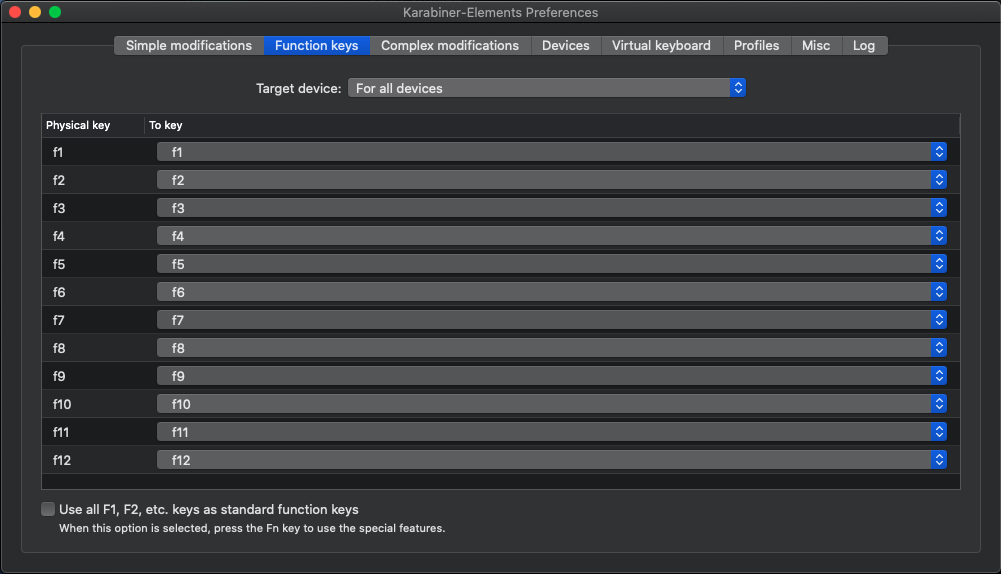
This seems to fix it.
fischerscode
on 7 Aug 2020
Thx @maaeps, I wish that helped me, but it didn't. I wonder if the problem we are have is different.
Using F4/Launchpad as an example and Karabiner turned on, no matter how I setup Logi Options or Karabiner when pressing the F4 key I ONLY never receive key press events when the Fn key is being pressed. I can modify what event is sent, so that part works. It's like the entire function key row is dead unless the Fn key is pressed.
With Karabiner turned off and out of the picture the F4 key works as expected sending F4 or Launchpad appropriately when Fn is held or not held. I put this here as reference, really to say the keyboard does the right thing without Karabiner.
gwww
on 7 Aug 2020
@gwww
So do you mean you can't receive a event for the press of the fn key or you won't get an event for pressing F4 without the fn key?
For me (lock open with fn + ESC) pressing just f4 opens the launchpad (as set up in Logi Options) pressing f4 + fn sends f4 to the system (as setup in Karabiner at Function keys).
Pressing fn + ESC (closing the lock) reverses the behavior.
Pressing just fn is never send to the system, but I think this is as intended (Windows behaves similar).
fischerscode
on 7 Aug 2020
The second one. When I press F4 alone I get nothing (using Karabiner Event Viewer). When I press Fn+F4 I get either F4 or Launchpad, depending upon how I've configured the keyboard. Here's a complete table of all the combos I can think of (again, using just the F4 key for the example):
Both Logi Options and Karabiner element has a check box when configuring the keyboard for "Use all F1, F2, etc. keys as standard function keys" (the text on the checkbox is identical on both programs). In all cases I'm using the unmodified function key table in Karabiner. "Nothing happens" in the table means I see nothing in Karabiner Event Viewer and the key does not appear to do anything with any application.
Logi Options | Karabiner | Press F4 alone | Press Fn+F4
------------ | ---------- | --------------- | -------------
Unchecked | Unchecked | Nothing happens | Launchpad works
Checked | Unchecked | Nothing happens | Launchpad works
Unchecked | Checked | Nothing happens | Get F4
Checked | Checked | Nothing happens | Get F4
Now, I modify F4 to map to F4 in Karabiner Elements, as shown in your picture. I do this for "For all device" rather than just for the MX Keys Keyboard. Not sure if that make a difference.
Logi Options | Karabiner | Press F4 alone | Press Fn+F4
------------ | ---------- | --------------- | -------------
Unchecked | Unchecked | Nothing happens | Get F4
Checked | Unchecked | Nothing happens | Get F4
Unchecked | Checked | Nothing happens | Get F4
Checked | Checked | Nothing happens | Get F4
Can you think of anything else I could try?
gwww
on 7 Aug 2020
I have unchecked this "Use all F1, F2, etc. keys as standard function keys" in both programs.
And in Karabiner I have the mapping set as shown above (second screenshot).
I suggest you uncheck the option in both programs, set the Function keys like this and then try F4. If nothing happens, Fn+F4 should open launchpad and just f4 should be send to the system (try this to check if this is the case).
If you want to swap the behavior (fn+F4 should open launchpad), you should be able to do this by pressing fn+ESC.
fischerscode
on 8 Aug 2020
I've unchecked the "Use all..." in both Logi Options and Karabiner. I have mapped F4 to F4 on the Function Keys tab in Karabiner.
Pressing F4 does nothing. Pressing Fn+F4 generates a F4 key (as would be expected).
What else could be different? I'm running MacOS 10.15.5, Karabiner Elements 12.10.0, I have disabled Hammerspoon just in case, I'm not running any other keyboard mapping software that I'm aware of.
gwww
on 8 Aug 2020
The only difference I see to my system is the OS version (I am running 10.15.3) but this should not make any difference.
Apart from the classic reinstall I am out of ideas.
fischerscode
on 9 Aug 2020
Hey @maaeps I appreciate your help. I also cannot think of anything else to try. I did stumble across one more place where there's a "Use all..." in the Keyboard settings for an external keyboard. Flipping that did not do anything. I had already tried a reinstall, with a fresh config as well. So, I have the classic checkmark too ;)
gwww
on 10 Aug 2020
Progress! Amazing what a reboot will do. Most keys work now. Key alone or with Fn works. Two exceptions so far.
F16 works with Fn pressed, correctly. Without Fn pressed it should open calculator and nothing happens when pressed. No big deal.
F4 key is puzzling. I must have done something somewhere along the line. Pressing the F4 key without the Fn key yields F12. Fn+F4 yields F4, correctly. So I am now really puzzled by the F4 key generating a F12. This happens even without Karabiner running. As such I done commenting here. Reboot ended up being my final solution. If anyone has thoughts on why F4 is wonky... I have not solved that one yet.
gwww
on 10 Aug 2020
Last update (really!). EVERYTHING works now. I am a little worried as I did not do anything. Last night I went to bed and the F4 key was acting up. This morning I come back to my computer and F4 is working perfectly. When I say I didn't do anything, really I didn't (not just the dumb user saying "I didn't touch anything"). I literately walked away from my computer with F4 broken and literately the first thing I did was test it again this morning and it worked. Shrug.
By the way, the instructions in https://github.com/pqrs-org/Karabiner-Elements/issues/2012#issuecomment-670465361 are what is working for me.
gwww
on 10 Aug 2020
Hey @gwww @maaeps , not sure you guys will be able assist me since your setup is fully detailed and I have already rebooted my computer and keyboard several times, but I would just like to report that I have not been able to get the FN key on my Logitech MX Keys to show up in EventViewer. Function keys are configured in Carabiner as per the screenshots and "Use default F1, F2, etc" is unchecked accross the board. Any suggestions? =/
If it bears any relevance, my need for the FN key to be recognize is to use it with my BetterTouchTool setup. Currently BTT does not register the key+combos that include it. Thanks.
 proactivematter
on 24 Aug 2020
proactivematter
on 24 Aug 2020
So you meen the Fn key (just the Fn Key with no additional F1, F2, etc.) is not recognized?
Just the Fn key isn't working for me eighter, but for me they do not work on windows, eighter.
I have not testet Fn in combination with a not F_x key, and unfortunally I currently can't test this.
fischerscode
on 24 Aug 2020
I've given up on Karabiner. There are just too many weird interactions with the MX Keys keyboard. Sometimes it works, sometimes not -- all with respect to the F1-F12 keys, as described in some of my previous comments on this thread.
Since my only use case is to get a Hyper/Escape key when using Hammerspoon I rewrote that logic in Lua as part of my Hammerspoon config. See my dotfiles repo if you are interested.
gwww
on 24 Aug 2020
@maaeps Yes, that is what I meant, but yeah, guess I'm not going to be able to get it to work then. FN is not recognized by itself, nor in combination with anything other than function keys. I wonder why Logitech opted for this artificial behavior.
@gwww Well, though you brought no good news in relation to MX Keys, I got to learn about Hammerspoon and that in itself looks like it will turn out to be more valuable than solving my issue with the FN key. Thanks!
proactivematter
on 24 Aug 2020
Nothing is show when pressing my external keyboard's fn in EventViewer. However, what's weird is that I am able to use fn in complex modifications.
 MuhammedZakir
on 25 Aug 2020
MuhammedZakir
on 25 Aug 2020
Just wanted to mention as reference to any others having issues with this keyboard's function keys:
Beyond detecting the FN key, understand that Karabiner DOES NOT play nice with this keyboard, especially when trying to configure it when operating through a bluetooth connection (but also via dongle). The function keys will change to multiple non-sense states seemingly at random and you will go mad trying to figure out what is happening.
Though I understand they are completely different in nature, I just wanted to mention that I have experienced no issues configuring this keyboard using BetterTouchTool, so if you can find a workaround to your use case using that amazing piece of software, opt for that.
proactivematter
on 28 Aug 2020
@proactivematter I don't want to go off-topic but I must ask how were you able to remap the fn key using BetterTouchTool?
 LeonardoGentile
on 18 Dec 2020
LeonardoGentile
on 18 Dec 2020
@proactivematter I don't want to go off-topic but I must ask how were you able to remap the fn key using BetterTouchTool?
@LeonardoGentile I wasn't. I used BTT to remap every media key as well as others, and then put those remaps in the Logi app. So now the FN key still appears to functional as normal, altering between F keys and media keys, but in BTT I have set conditional triggers so that the keys functions change depending on what my audio output/external monitor is. That was part of my use case.
Originally I also wanted to switch the FN key to another part of the keyboard (both the key signal and the actual physical key), but that was not possible since I couldn't remap it.
proactivematter
on 18 Dec 2020
Apparently it's written in the Karabiner Features page:
Karabiner-Elements cannot modify the fn key on non-Apple keyboards such as Logitech keyboards.
That sucks, as I really like this keyboard but I also don't like that useless fn Key there 🙄
LeonardoGentile
on 22 Dec 2020
Apparently it's written in the Karabiner Features page:
Karabiner-Elements cannot modify the fn key on non-Apple keyboards such as Logitech keyboards.
That sucks, as I really like this keyboard but I also don't like that useless fn Key there 🙄
Just want to mention that you can modify fn key if the keyboard emits it when you press it alone. However, generally, non-apple keyboard does not do that. That's why the doc mention KE can not modify other keyboards' fn key.
MuhammedZakir
on 22 Dec 2020
Related issues
 krasnovpro
·
3Comments
krasnovpro
·
3Comments
 Joilence
·
3Comments
Joilence
·
3Comments
 baurmatt
·
3Comments
baurmatt
·
3Comments
 DanweDE
·
3Comments
DanweDE
·
3Comments
 KyleAtDND
·
3Comments
KyleAtDND
·
3Comments
Most helpful comment
This is still an issue, please don't close.