Karabiner-elements: Holding letter vs tapping it
I'm trying to achieve something I had with the old Karabiner, if I held the letter 'e', it would press enter.
I tried doing the same with the following json but I keep losing the letter 'e' when typing, the hold action works beautifully though :)
{
    "type": "basic",
    "from": {
        "key_code": "e"
    },
    "parameters": {
        "basic.to_if_alone_timeout_milliseconds": 200,
        "basic.to_if_held_down_threshold_milliseconds": 200
    },
    "to_if_alone": [
        {
            "key_code": "e"
        }
    ],
    "to_if_held_down": [
        {
            "key_code": "return_or_enter"
        }
    ]
}
I tried playing with the timeouts, but nothing I did with basic.to_if_alone_timeout_milliseconds solved the problem, I tried a really small number and I tried removing it completely, nothing solved the problem. If I typed slowly sometimes the letter would come out, but not always so I don't really understand how it works.
 Madd0g
All 23 comments
Your code seems to work with me – while I would add a ,"repeat": false after your …_enter", as with me it invokes several "enters" in fast succession.
The reason why it does not do as planned isn't obvious to me. I'd have guessed, though, that rather a _higher_ value for milliseconds might help.
Maybe "e" is called somewhere earlier in your karabiner.json?
Did you test now and then if there are other faults in your json? (By freshly opening Karabiner-Elements: it should display your remappings in "Simple" and/or "Complex Modifications" tabs.)
Sometimes a missing comma (or accidentally typed "e") incapacitates the whole app…
Then, most unlikely, a stuck (dirty?) key "e" may cause trouble…
 clemsam
on 15 Dec 2018
clemsam
on 15 Dec 2018
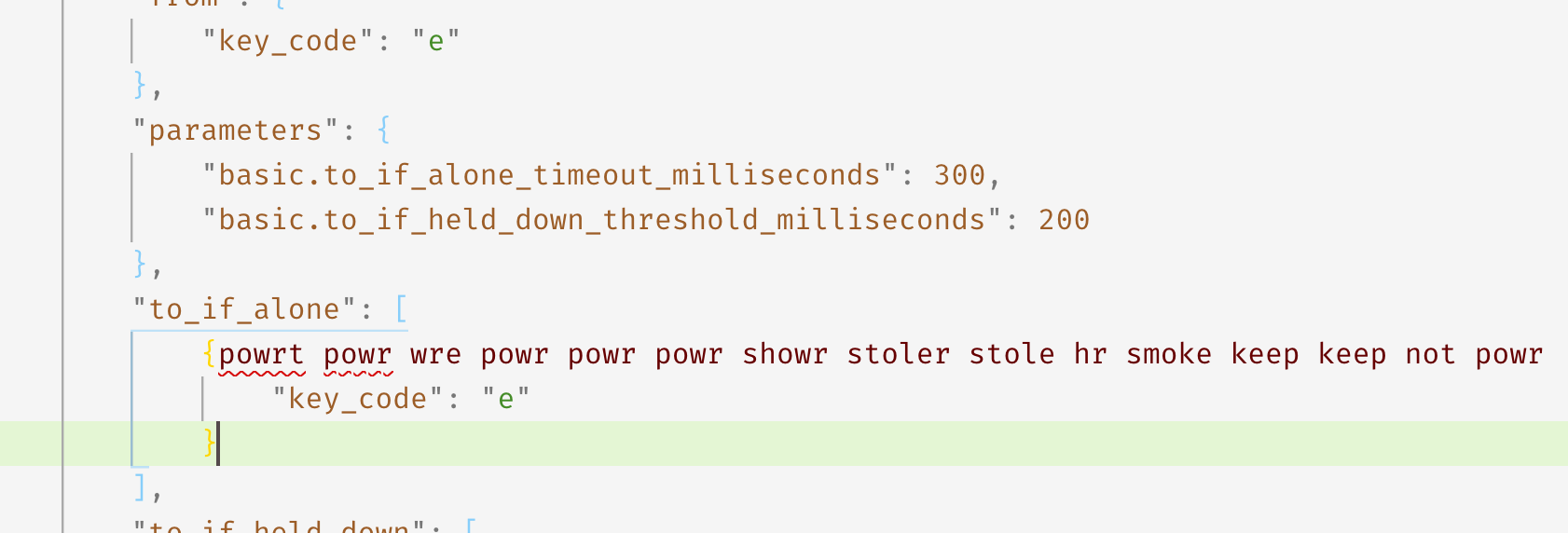
If I type slowly, it does print, but if I type at my regular pace I lose the letter, I tried making the first timeout larger, but it doesn't help:
Madd0g
on 16 Dec 2018
Okay, I got an idea what's wrong:
If you press "e" and _LESS_ than 200ms later press the next key this might _NOT BE ALONE_.
Try this: "from": {"key_code": "e", "modifiers": { "optional":["any"]} }
This is used habitually in Karabiner's Reference Manual…
clemsam
on 16 Dec 2018
I agree with you conclusion about the timeout, but not sure what the optimal value there should be. In fact I _really_ don't see why 2 timeouts are needed.
Adding the modifiers to the from did not help. I still cannot type power or shower :)
Madd0g
on 16 Dec 2018
Did you assign any "from"s to key_code "w" – or rather "r" ?
This may be purely speculative, but it's suspicious that "stole smoke keep" work and "powr wre hr" do NOT. … seems like an "e" directly _IN FRONT_ of "r" is swallowed while a succeeding one is not.
clemsam
on 16 Dec 2018
I do not have anything on 'w' or 'r'.
I forgot to mention this, but I have the same problem with the quote, which I assigned to make a backtick on long press, whenever I write it's, it turns out as its, unless I do it slowly.
I know it's something about the timeouts, but I pulled these numbers from some example, I'm a new user :)
Madd0g
on 17 Dec 2018
Sounds all rather mysterious …
Please close Karabiner via its menu bar icon and try to write some text with "e"s and " ' "s. Same problems?
Actually some time ago I had difficulties with my "e" key, too, and could repair it by cautiously pulling of the key cap and blowing some dust/dirt away from under it.
So, if these "e"-" ' " problems occur with Karabiner turned off there _might(!)_ be a hardware issue.
clemsam
on 17 Dec 2018
it's not a hardware problem, it's definitely these rules I'm trying to create, if I turn these rules off the letters work properly.
Madd0g
on 17 Dec 2018
Well, some clarification at least. AfaI see there remain 3 possible explanations:
- Some application or system shortcuts interfering outside of K-E: not very likely IMHO.
_Which macOS system are you using?_ - A bug in K-E: always possible but also unlikely – your code works with me
- Some other manipulators in your json file: you should perhaps post your entire json file, either as text or as zipped file, so I/we can have a look at it.
_(I am not sure that I would like to do this.)_
clemsam
on 18 Dec 2018
your code works with me
That's strange, I tried to run it on a separate profile with no other rules and it still didn't work.
I just upgraded to Mojave a few days ago. I did change the default key repeat rate on OSX with something like this when I was back on El Cap, I think it's still in effect after the upgrade.
Madd0g
on 18 Dec 2018
Yeah, I read here and there of things no longer "knowing" what they are good for, once they run on Mojave. (I will wait at least another half year with Mojave – my Hackintosh is more sensible than other Notebooks.)
clemsam
on 18 Dec 2018
Can confirm the same issue with no other manipulators in my file, it is a bit uncomfortable to write, given that it makes you to go slower on purpose.
 NickSeagull
on 15 Feb 2019
NickSeagull
on 15 Feb 2019
This issue has been automatically marked as stale because it has not had recent activity. It will be closed if no further activity occurs. Thank you for your contributions.
![stale[bot] picture](https://avatars3.githubusercontent.com/in/1724?v=4&s=40) stale[bot]
on 17 Apr 2019
stale[bot]
on 17 Apr 2019
I'd like to confirm this problem. I'm trying hard to re-implement a behavior, I was using in the old Karabiner/Seil: "Hold down "h" to invoke "cmd+h" (hide the active app by holding "h" for some milliseconds). My rule is very similar to Madd0g's in the OP.
Basically, it works, BUT ONLY IF I type slowly. It fails at normal typing speed, resulting e.g. "the" coming out as "teh". This happens in every app and it goes away as soon as I delete the rule. So this problem has it's source definitely in Karabiner. As Madd0g, I had no luck changing the parameters up and down.
Unfortunately, currentyl there seems to be no way to use "to_if_alone" without compromising the default functionality of the affected key - at least, I have not found a way to do it ...
 medienmeister
on 20 Apr 2019
medienmeister
on 20 Apr 2019
I forgot to include the JSON for my code. Please note, that it makes no difference if I use "to_after_key_up" or a simple "to".
{
"description": "Hold H for cmd+h",
"from": {
"key_code": "h",
"modifiers": {
"optional": [
"any"
]
}
},
"parameters": {
"basic.to_if_alone_timeout_milliseconds": 250,
"basic.to_if_held_down_threshold_milliseconds": 250
},
"to_after_key_up": [
{
"key_code": "h"
}
],
"to_if_held_down": [
{
"halt": true,
"key_code": "h",
"modifiers": [
"left_command"
]
}
],
"type": "basic"
}
medienmeister
on 20 Apr 2019
Holding keys is the only feature I desperately miss from the old karabiner, it was perfect there, I only use it now for non-letters because otherwise typing is a real pain.
I opted to use simultaneous keys for some features previously done with holding, it's not great but unlike the hold feature it has no typing performance penalty. Instead of holding e for enter, my gesture is now q+w, I can still easily hit it with the left hand only.
Madd0g
on 20 Apr 2019
That is my workaround, too (some of my favorites: j+k=return, u+i=escpe or d+f=tab). My hope was, that the "hold issue" was just a question of some secret combination of timeout settings that someone might have figured out. But I'll wait and hope (and have nothing but praise for Karabiner otherwise - I feel kind of lost on a computer without it)
medienmeister
on 20 Apr 2019
I've never been able to get it to work satisfactorily. i don't know whether to be happy or sad about that after reading this.
 reconstructed
on 24 May 2019
reconstructed
on 24 May 2019
I am a little bit "out" of this topic (having made all my "old ones" work) but looked into my json file and found that _MY WORKING_ "if_alone" and "if_held" parameters work with:
"basic.to_if_alone_timeout_milliseconds": 200,
"basic.to_if_held_down_threshold_milliseconds": 500
So I use a much _higher_ value for "if_held".
(I use it for an otherwise un-usable WINDOWS key, though, to do some special actions in various apps, _NOT_ for a key's original value…)
clemsam
on 26 May 2019
I'm trying to achieve something I had with the old Karabiner, if I held the letter 'e', it would press enter.
@Madd0g: I think I may have a solution for this:
{
    "description": "Hold 'e' for enter",
    "manipulators": [
        {
            "from": {
                "key_code": "e",
                "modifiers": {
                    "mandatory": [],
                    "optional": [
                        "caps_lock"
                    ]
                }
            },
            "parameters": {
                "basic.to_delayed_action_delay_milliseconds": 200,
                "basic.to_if_held_down_threshold_milliseconds": 200
            },
            "to_delayed_action": {
                "to_if_canceled": [
                    {
                        "key_code": "e",
                        "modifiers": []
                    }
                ]
            },
            "to_if_alone": [
                {
                    "key_code": "e",
                    "modifiers": [],
                    "halt": true
                }
            ],
            "to_if_held_down": [
                {
                    "key_code": "return_or_enter",
                    "modifiers": [],
                    "halt": true,
                    "repeat": false
                }
            ],
            "type": "basic"
        }
    ]
},
(big props to @elasticdog for figuring out this technique)
 handcoding
on 27 May 2019
handcoding
on 27 May 2019
@handcoding - it still doesn't work for me :(
Which part of this is supposed to be the "answer" for the problem? The identical 200 timeout? Or the halt/repeat in the right places? I think I tried all the possible combinations before without success.
I tried copying the above into my profile just now and it still swallows the letter when typing quickly.
Maybe I'm missing something...
EDIT: actually this works, the key is indeed sending the key as delayed action (in addition to the hold action) and put halts in the right places, it's verbose but not eating/duplicating letters:
{
"to_if_alone" : [ {
"key_code" : "e",
"halt" : true
} ],
"to_if_held_down" : [ {
"key_code" : "return_or_enter",
"repeat" : false,
"halt" : true
} ],
"to_delayed_action" : {
"to_if_canceled" : [ {
"key_code" : "e",
"halt" : true
} ]
},
"parameters" : {
"basic.to_if_alone_timeout_milliseconds" : 150,
"basic.to_if_held_down_threshold_milliseconds" : 150
},
"from" : {
"key_code" : "e"
},
"type" : "basic"
}
This issue has been automatically marked as stale because it has not had recent activity. It will be closed if no further activity occurs. Thank you for your contributions.
stale[bot]
on 27 Jul 2019
I'm trying to achieve something I had with the old Karabiner, if I held the letter 'e', it would press enter.
@Madd0g: I think I may have a solution for this:
{
    "description": "Hold 'e' for enter",
    "manipulators": [
        {
            "from": {
                "key_code": "e",
                "modifiers": {
                    "mandatory": [],
                    "optional": [
                        "caps_lock"
                    ]
                }
            },
            "parameters": {
                "basic.to_delayed_action_delay_milliseconds": 200,
                "basic.to_if_held_down_threshold_milliseconds": 200
            },
            "to_delayed_action": {
                "to_if_canceled": [
                    {
                        "key_code": "e",
                        "modifiers": []
                    }
                ]
            },
            "to_if_alone": [
                {
                    "key_code": "e",
                    "modifiers": [],
                    "halt": true
                }
            ],
            "to_if_held_down": [
                {
                    "key_code": "return_or_enter",
                    "modifiers": [],
                    "halt": true,
                    "repeat": false
                }
            ],
            "type": "basic"
        }
    ]
},
(big props to @elasticdog for figuring out this technique)
It works for me :)
 ruucm
on 20 Mar 2020
ruucm
on 20 Mar 2020
Related issues
 DanweDE
·
3Comments
DanweDE
·
3Comments
 Fengur
·
3Comments
Fengur
·
3Comments
 rkusa
·
3Comments
rkusa
·
3Comments
 willisworley
·
3Comments
willisworley
·
3Comments
 Joilence
·
3Comments
Joilence
·
3Comments
Most helpful comment
@Madd0g: I think I may have a solution for this:
(big props to @elasticdog for figuring out this technique)