Karabiner-elements: remapping FN to left command works but the the F keys are still shown on the touch bar when pressed
When I set up the remapping for the first time, it worked flawlessly. After going to standby, it still worked but all the F keys were shown on the touchbar when the remapped FN key was pressed.
Edit: After restarting Karabiner, it works again. But breaks as soon as it goes to standy.
How to solve this?
 MHX792
All 33 comments
@MHX792 don't use karabiner elements just use system preferences for that
 limeb
on 25 Nov 2018
limeb
on 25 Nov 2018
I can confirm - after sleep, the physical Fn key that is remapped to something else, triggers the Touch Bar to change icons. It should not. For clarity, below is the config we're talking about.
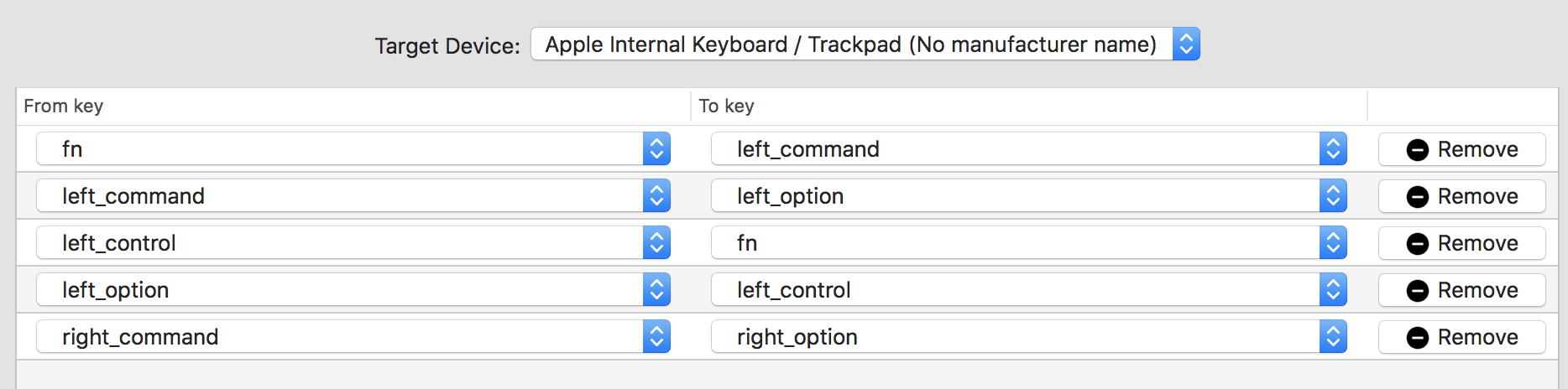
For completeness, this is the standard system keyboard configuration:

@tekezo Here's a very simple unit-test like description of the bug:
- When physical Fn is pressed, Touch Bar does not change icons.
- Before sleep: success.
- After sleep: FAILURE, Touch Bar changes icons.
- After restart of Karabiner: success
- When physical Control is pressed, Touch Bar changes icons.
- Before sleep: success.
- After sleep: success.
And here's a video that shows the problem after a sleep. karabiner-fn-remap-touch-bar-compressed.mp4.zip (This is zipped because GitHub does not allow direct MP4 uploads)
A fix, or a true workaround for this would be appreciated. Thanks a lot!
I'm not an OSX app developer but I guess Karabiner would need to receive a trigger after sleep, and reload the remaps.
 Nowaker
on 14 Dec 2018
Nowaker
on 14 Dec 2018
@tekezo Would you please have a look at the report above? Unlike most bug reports here on this repo, this one is very clear, concise, 100% reproducible, and accompanied by a video showing the problem. Thanks in advance!
Nowaker
on 4 Jan 2019
I have exactly the same issue (I switched fn and left_control). I also tried the system one, but it is even worse than Karabiner - the mapping works (fn works as control key), but the touch bar would show as if fn pressed all the time. (Karabiner would act like that after sleep)
Some additional information I found - when I press the physical fn key after sleep (mapping is set in Karabiner not system), it shows 0xe0 left_control is pressed in Karabiner-EventViewer (no other keystroke). Feels like Karabiner lost some control during sleep.
This is really annoying to me since I have no way to press shortcuts like ^F3. I really like to help and get this fixed. Let me know if you need more information.
 ResolverJay
on 9 Feb 2019
ResolverJay
on 9 Feb 2019
Just found that not only sleep but also lock screen can cause the issue.
ResolverJay
on 10 Feb 2019
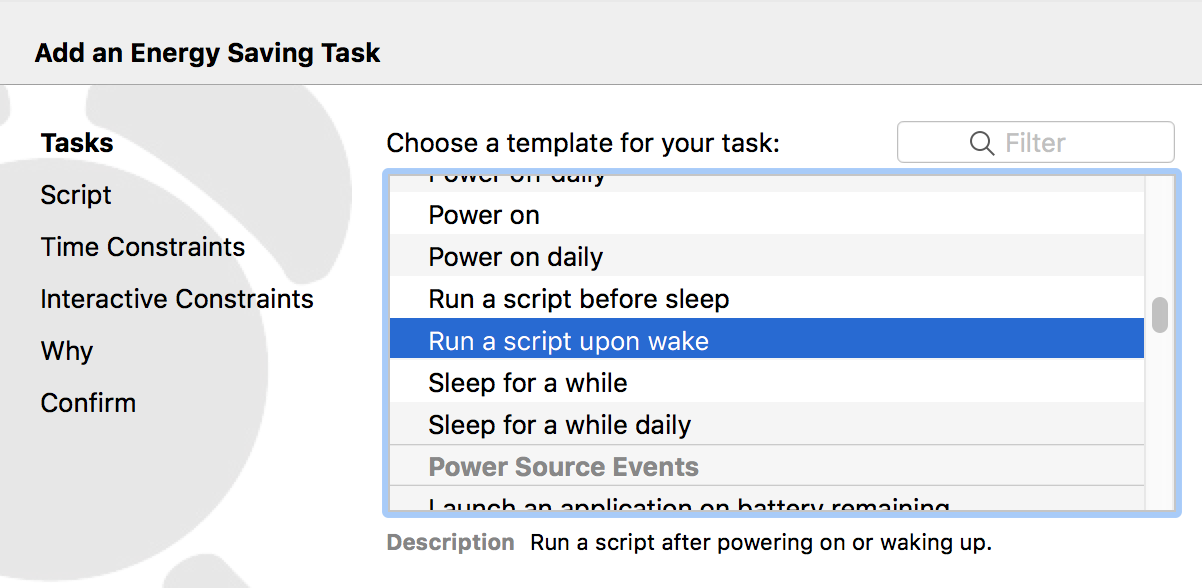
I've found an application that executes a requested script on power wake. If I figure out how to trigger "Restart Karabiner-Elements" from console on wake, we'll have our problem solved.
Nowaker
on 14 Feb 2019
I discovered karabiner_cli toolkit but unfortunately, it does not offer an option to restart Karabiner. Also, trying to switch between profiles back and forth doesn't fix the Fn either (karabiner_cli --select-profile Default; sleep 1; karabiner_cli --select-profile RemappedFn).
1 nowaker@nwkr-newmbp ~ % /Library/Application\ Support/org.pqrs/Karabiner-Elements/bin/karabiner_cli
A command line utility of Karabiner-Elements.
Usage:
  karabiner_cli [OPTION...]

      --select-profile arg      Select a profile by name.
      --copy-current-profile-to-system-default-profile
                                Copy the current profile to system default
                                profile.
      --remove-system-default-profile
                                Remove the system default profile.
      --help                    Print help.

Examples:
  karabiner_cli --select-profile 'Default profile'
@tekezo Any tips on how to trigger Karabiner restart from console?
Nowaker
on 14 Feb 2019
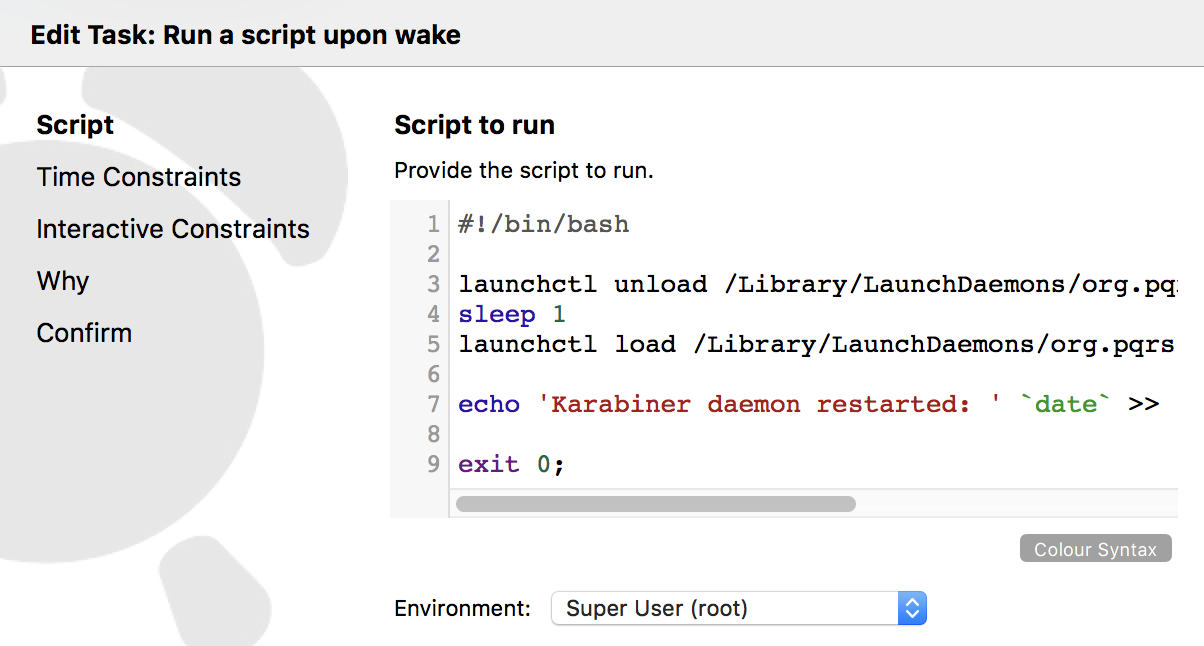
I've found a workaround! It takes around 5 seconds before a physical Fn picks up the desired mapping. Better this than nothing,
#!/bin/bash

launchctl unload /Library/LaunchDaemons/org.pqrs.karabiner.karabiner_grabber.plist
sleep 1
launchctl load /Library/LaunchDaemons/org.pqrs.karabiner.karabiner_grabber.plist

echo 'Karabiner daemon restarted: ' `date` >> /tmp/karabiner-restart.log

exit 0;
Important parts:
Run a script upon wakeEnvironment: Suoer User (root)- launchctl won't run from a regular user, at least in Karabiner's case
Nowaker
on 14 Feb 2019
This issue has been automatically marked as stale because it has not had recent activity. It will be closed if no further activity occurs. Thank you for your contributions.
![stale[bot] picture](https://avatars3.githubusercontent.com/in/1724?v=4&s=40) stale[bot]
on 16 Apr 2019
stale[bot]
on 16 Apr 2019
This issue is valid, has reliable reproduction instructions, as well as a workaround included. Please do not close. CC @tekezo.
Nowaker
on 16 Apr 2019
This issue has been automatically marked as stale because it has not had recent activity. It will be closed if no further activity occurs. Thank you for your contributions.
stale[bot]
on 15 Jun 2019
This issue is valid, has reliable reproduction instructions, as well as a workaround included. Please do not close. CC @tekezo.
Nowaker
on 15 Jun 2019
This issue has been automatically marked as stale because it has not had recent activity. It will be closed if no further activity occurs. Thank you for your contributions.
stale[bot]
on 15 Aug 2019
This issue is valid, has reliable reproduction instructions, as well as a workaround included. Please do not close. CC @tekezo.
Nowaker
on 15 Aug 2019
@tekezo The issue is still happening on the latest version - 12.7.0. Any chance you could look into it? Unlike most bug reports here on this repo, this one is very clear, concise, 100% reproducible, and accompanied by a video showing the problem. Hope you'll find some time. Thanks in advance!
Nowaker
on 15 Sep 2019
This issue has been automatically marked as stale because it has not had recent activity. It will be closed if no further activity occurs. Thank you for your contributions.
stale[bot]
on 14 Nov 2019
:-(
Nowaker
on 14 Nov 2019
I can confirm the issue.
 fahu
on 10 Dec 2019
fahu
on 10 Dec 2019
This issue has been automatically marked as stale because it has not had recent activity. It will be closed if no further activity occurs. Thank you for your contributions.
stale[bot]
on 8 Feb 2020
NOT stale. A lot of us are keen on getting this bug fixed.
 moltenice
on 8 Feb 2020
moltenice
on 8 Feb 2020
I wonder if all tickets here have the same fate of being marked as stale and closed if nobody responds in time...
Nowaker
on 9 Feb 2020
This issue has been automatically marked as stale because it has not had recent activity. It will be closed if no further activity occurs. Thank you for your contributions.
stale[bot]
on 9 Apr 2020
No stale man.
Nowaker
on 9 Apr 2020
I worked around this by writing a small program to run in the background which would restart Karabiner-Elements every time the MacBook unlocks. Not a great solution, but it works for me.
https://github.com/pqrs-org/Karabiner-Elements/issues/2095#issuecomment-600518202
It would be ideal if this functionality could be ported into the program itself. I haven't had a chance to look at doing this myself.
It looks like Karabiner-MultitouchExtension already has similar functionality, as discussed in that linked issue.
 Shingyx
on 24 May 2020
Shingyx
on 24 May 2020
If you're interested in trying out my hacky workaround while this issue is still active, try set up the script as described in the GitHub repository https://github.com/Shingyx/restart-karabiner-on-wake.
Shingyx
on 25 May 2020
This issue has been automatically marked as stale because it has not had recent activity. It will be closed if no further activity occurs. Thank you for your contributions.
stale[bot]
on 25 Jul 2020
no
Nowaker
on 25 Jul 2020
Not stale, I'm having the issue as well. When I remap the Fn key to Left Control, and Left Control to the Fn Key. The Fn key still displays the F1-F12 in the touch bar. Left Control also displays the F1-F12 in the touch bar upon pressing. But I would've expected only now that the Left Control would do this!? Thanks for keeping this issue open Nowaker. It's a valid bug and I hope somebody can look into it.
 eckseller
on 26 Jul 2020
eckseller
on 26 Jul 2020
One thing I noticed- quitting Karibiner-Elements and then starting the App again fixes it.. but when you close the macbook lid, and then open the lid again, both pressing either Fn and Left Control turns the touch bar into F1-F12 again.
eckseller
on 26 Jul 2020
To fix this issue, 1st download sleepwatcher.
brew install sleepwatcher
Create this file in your home dir
touch ~/.wakeup
Make it executable:
chmod 770 ~/.wakeup
Add below lines to the file, then save it. (This stops and then starts the Karabiner)
#!/bin/bash
launchctl stop org.pqrs.karabiner.karabiner_console_user_server && \
launchctl start org.pqrs.karabiner.karabiner_console_user_server
Test your wakeup script by typing following command. (It will look like it hangs, but sleep your mac and awaken it and it will run the script. You should see the correct behaviour with Fn and Left Control keys :) )
/usr/local/sbin/sleepwatcher --verbose --wakeup ~/.wakeup
The press Ctrl+C to exit this process once you see it fixes the Fn key reverting to Mac defaults.
Link the plist file that homebrew installed to you LaunchAgents folder by running below command.
ln -sfv /usr/local/Cellar/sleepwatcher/2.2/de.bernhard-baehr.sleepwatcher-20compatibility-localuser.plist ~/Library/LaunchAgents/
Lastly, we tell launchd to load the configuration:
launchctl load ~/Library/LaunchAgents/de.bernhard-baehr.sleepwatcher-20compatibility-localuser.plist
Hopefully, I didn't miss any steps. Let me know if it worked for you. It worked for me :)
Best regards,
eckseller
on 26 Jul 2020
This issue has been automatically marked as stale because it has not had recent activity. It will be closed if no further activity occurs. Thank you for your contributions.
stale[bot]
on 4 Oct 2020
Not stale, this problem still exists.
This is a real reproducible bug and we should not rely on workarounds that are in the end of the day hacky.
moltenice
on 4 Oct 2020
Any update?
 Barricade
on 2 Dec 2020
Barricade
on 2 Dec 2020
Related issues
 rkusa
·
3Comments
rkusa
·
3Comments
 Fengur
·
3Comments
Fengur
·
3Comments
 cajhin
·
3Comments
cajhin
·
3Comments
 KyleAtDND
·
3Comments
KyleAtDND
·
3Comments
 LittleNewton
·
3Comments
LittleNewton
·
3Comments
Most helpful comment
No stale man.