Karabiner-elements: Mouse Button 4 to Back/Forward
Hi,
I'm trying to replica the set up I had with the old Karabiner, namely:
Mouse Button 4 > CMD + [
Alt + Mouse Button 4 > CMD + ]
So far I was only able to get the first one working. Could anyone help me get the second one down?
Here's what I've got:
{
  "rules": [
    {
      "description": "Mouse button4 → command + [",
      "manipulators": [
        {
          "from": {
            "pointing_button": "button4"
          },
          "to": [
            {
              "key_code": "open_bracket",
              "modifiers": [
                "command"
              ]
            }
          ],
          "type": "basic"
        }
      ]
    },
    {
      "description": "Alt + Mouse Button 4 → command + ]",
      "manipulators": [
        {
          "from": {
            "pointing_button": "button4",
            "modifiers": {
              "optional": [
                "left_option"
              ]
            }
          },
          "to": [
            {
              "key_code": "close_bracket",
              "modifiers": [
                "command"
              ]
            }
          ],
          "type": "basic"
        }
      ]
    }
  ]
}
I'm using Microsoft Sculpt Comfort Mouse.
 ArtemGordinsky
All 5 comments
@ArtemGordinsky I don't have my Mac with me to test the theory but I believe the issue is your "Optional" left_option. The "Optional" modifier condition states that events are manipulated even IF the modifier is pressed; meaning that the event would manipulate without the modifier pressed. I would try changing the Optional condition to Mandatory. That would limit the second event to manipulate ONLY if left_option is pressed. I think Karabiner is getting confused as you are essentially binding two different events to the same button press.
 jthedwalker
on 1 Feb 2018
jthedwalker
on 1 Feb 2018
@jthedwalker Thanks! I already gave up and switched to USB Overdrive though.
I still can't set up this shortcut there but at least I don't get repeating keys and sluggish cursor as I did with Karabiner.
ArtemGordinsky
on 1 Feb 2018
@jthedwalker Thanks a lot for the suggestion, it actually works!
ArtemGordinsky
on 4 Feb 2018
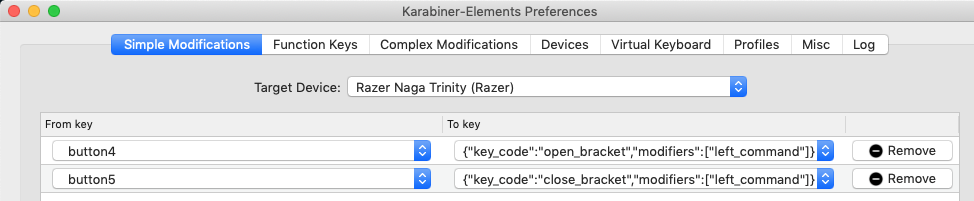
Just put in under Simple Modifications and add modifiers list:
"simple_modifications": [
{
    "from":
    {
        "pointing_button": "button4"
    },
    "to":
    {
        "key_code": "open_bracket",
        "modifiers": [
            "left_command"
        ]
    }
},
{
    "from":
    {
        "pointing_button": "button5"
    },
    "to":
    {
        "key_code": "close_bracket",
        "modifiers": [
            "left_command"
        ]
    }
}]
Ends up looking this:
 JoeFerrucci
on 20 May 2019
JoeFerrucci
on 20 May 2019
@JoeFerrucci It works for me. Thanks a lot!
 shyr
on 10 Jun 2019
shyr
on 10 Jun 2019
Related issues
 ghost
·
3Comments
ghost
·
3Comments
 KyleAtDND
·
3Comments
KyleAtDND
·
3Comments
 cajhin
·
3Comments
cajhin
·
3Comments
 willisworley
·
3Comments
willisworley
·
3Comments
 surfingoz
·
3Comments
surfingoz
·
3Comments
Most helpful comment
Just put in under Simple Modifications and add
modifierslist:Ends up looking this:
