Karabiner-elements: Mouse button to scroll
This was one of the main things I used Karabiner for, but I don't seem to be able to find how to do it with elements, if you even can? I wish I'd never 'upgraded' my OS tbh.
Is there any way to map a mouse button to activate scroll in Elements?
 nathanhornby
All 38 comments
In latest Karabiner-Elements (11.2.0) you can map mouse buttons. I've just mapped button4 to page_down and button5 to page_up.
 v-yarotsky
on 10 Nov 2017
v-yarotsky
on 10 Nov 2017
My vendors mouse software can do that, what I really want to do is be able to hold a button and then have mouse movement translated into scrolling. In Karabiner this was __PointingRelativeToScroll__ but I'm not sure that is supported in Elements yet?
 rvesse
on 16 Nov 2017
rvesse
on 16 Nov 2017
@rvesse That's exactly what I'm after, push button + move mouse = scroll. Sorry I wasn't clear guys.
nathanhornby
on 18 Jan 2018
@v-yarotsky Not a bad hack – cheers!
I too would love the return of Karabiner's "button4/button5 + MouseDragged" to scroll.
Fingers crossed! 🤞
 furey
on 11 Feb 2018
furey
on 11 Feb 2018
This issue has been automatically marked as stale because it has not had recent activity. It will be closed if no further activity occurs. Thank you for your contributions.
![stale[bot] picture](https://avatars3.githubusercontent.com/in/1724?v=4&s=40) stale[bot]
on 12 Apr 2018
stale[bot]
on 12 Apr 2018
Still hoping this feature comes back to Karabiner Elements
rvesse
on 12 Apr 2018

Follow this procedure.
https://pqrs.org/osx/karabiner/help.html#mouse-button
 tekezo
on 12 Apr 2018
tekezo
on 12 Apr 2018
As mentioned what's being looked for here, and what's missed (but was previously available), is the ability to activate mouse scroll via a button. Not 'scroll with a button'.
i.e. while holding down a button, moving the mouse performs the scroll.
nathanhornby
on 12 Apr 2018
Exactly, we are after the old __PointingRelativeToScroll__ behaviour from Karabiner, we want to be able to hold down a button and have our mouse movements translated into scrolling.
Translating a button press to Scroll Up/Scroll Down is a poor substitute because it gives coarse grained movement as opposed to the old functionality that gave very fine grained movement.
rvesse
on 12 Apr 2018
We need this feature.
We wana "click + mouse drag" = mouse scroll
 mansoff
on 6 Jun 2018
mansoff
on 6 Jun 2018
I'm using USB Overdrive to solve this in the meantime.
 newduke
on 22 Jun 2018
newduke
on 22 Jun 2018
Hammerspoon works for this:
https://github.com/tekezo/Karabiner/issues/814
To enable natural scroll direction, negate the mouse movement:
local scroll = hs.eventtap.event.newScrollEvent({dx * scrollmult, dy * scrollmult},{},'pixel') to local scroll = hs.eventtap.event.newScrollEvent({-dx * scrollmult, -dy * scrollmult},{},'pixel')
 psychomugs
on 9 Jul 2018
psychomugs
on 9 Jul 2018
This issue has been automatically marked as stale because it has not had recent activity. It will be closed if no further activity occurs. Thank you for your contributions.
stale[bot]
on 7 Sep 2018
I still want this feature!!
 fogg4444
on 10 Nov 2018
fogg4444
on 10 Nov 2018
The latest beta starts to supporting it.
https://pqrs.org/osx/karabiner/complex_modifications/#mouse_motion_to_scroll
How to upgrade to the latest beta version:
https://pqrs.org/osx/karabiner/document.html#check-for-updates
TODO:
- [x] Momentum Scroll. (since 12.2.8)
- [x] Scroll speed configuration (since 12.2.9)

- [x] Ignore small horizontal motion when vertical scrolling. (since 12.2.8)
- [x] Tuning (almost done at 12.2.18)
tekezo
on 25 Mar 2019
@tekezo Thanks for getting to this, it's still the feature I miss most from the old Karabiner
I have tried out the Beta and couldn't get it to work currently although I may be hitting the TODOs you mention. I have verified in the Event Viewer that Karabiner Elements is registering the MouseDown on the relevant button and registering the MouseDragged events:
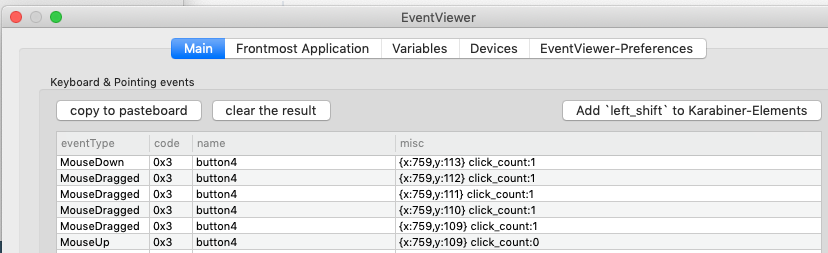
I use a Trackball (Logitech Trackman Marble) so there is likely inevitably some degree of horizontal scroll due to the nature of the physical device which may be why it doesn't work for me.
rvesse
on 4 Apr 2019
Exactly the same situation as @rvesse, a Logitech Trackman Marble. Had to revert to a regular mouse :-(
 leadpipe
on 12 Apr 2019
leadpipe
on 12 Apr 2019
Please choose a device in order to use mouse_motion_to_scroll.
https://pqrs.org/osx/karabiner/document.html#configuration-devices
tekezo
on 13 Apr 2019
@leadpipe One workaround I’ve been using for a while is to install the Logitech app which then allows you to customise the button functions one of which is called Cruise and allows you to configure a button to scroll up/down. It is unfortunately very coarse grained scrolling but is better than nothing
rvesse
on 13 Apr 2019
Thanks @tekezo for continuing to work on this issue!
Just upgraded to the latest beta and can happily confirm trackball scrolling via button 4/5 works.
very coarse grained scrolling but is better than nothing
The scrolling is a bit janky, so eagerly anticipating future updates RE: @tekezo's unfinished TODOs:
- [ ] Scroll speed configuration
- [ ] Tuning
Cheers!
furey
on 14 Apr 2019
@tekezo Just to confirm yes my device is enabled under Preferences:
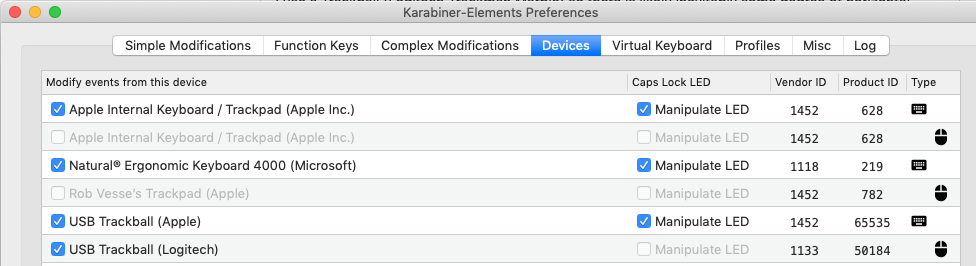
Updated to latest Beta (12.2.11) and still not working for me
rvesse
on 15 Apr 2019
And FYI it's still not working for me even after I enabled the device.
leadpipe
on 15 Apr 2019
Please confirm "Change mouse motion to scroll" is not conflicted in complex modifications.
(Please confirm button4 or button5 is not changed before this setting.)

tekezo
on 15 Apr 2019
It's the only complex modification.
Here's the event log:
eventType:MouseDown code:0x3 name:button4 misc:{x:749,y:139} click_count:1
eventType:MouseDragged code:0x3 name:button4 misc:{x:749,y:138} click_count:1
eventType:MouseDragged code:0x3 name:button4 misc:{x:749,y:137} click_count:1
eventType:MouseDragged code:0x3 name:button4 misc:{x:749,y:136} click_count:1
eventType:MouseDragged code:0x3 name:button4 misc:{x:749,y:136} click_count:1
eventType:MouseDragged code:0x3 name:button4 misc:{x:749,y:136} click_count:1
eventType:MouseDragged code:0x3 name:button4 misc:{x:749,y:135} click_count:1
eventType:MouseDragged code:0x3 name:button4 misc:{x:750,y:135} click_count:1
eventType:MouseDragged code:0x3 name:button4 misc:{x:750,y:135} click_count:1
eventType:MouseDragged code:0x3 name:button4 misc:{x:750,y:134} click_count:1
eventType:MouseDragged code:0x3 name:button4 misc:{x:750,y:134} click_count:1
eventType:MouseDragged code:0x3 name:button4 misc:{x:750,y:134} click_count:1
eventType:MouseDragged code:0x3 name:button4 misc:{x:750,y:133} click_count:1
eventType:MouseDragged code:0x3 name:button4 misc:{x:750,y:133} click_count:1
eventType:MouseDragged code:0x3 name:button4 misc:{x:750,y:132} click_count:1
eventType:MouseDragged code:0x3 name:button4 misc:{x:750,y:131} click_count:1
eventType:MouseDragged code:0x3 name:button4 misc:{x:750,y:131} click_count:1
eventType:MouseDragged code:0x3 name:button4 misc:{x:750,y:131} click_count:1
eventType:MouseDragged code:0x3 name:button4 misc:{x:751,y:130} click_count:1
eventType:MouseDragged code:0x3 name:button4 misc:{x:751,y:130} click_count:1
eventType:MouseDragged code:0x3 name:button4 misc:{x:751,y:129} click_count:1
eventType:MouseDragged code:0x3 name:button4 misc:{x:751,y:129} click_count:1
eventType:MouseDragged code:0x3 name:button4 misc:{x:751,y:130} click_count:1
eventType:MouseDragged code:0x3 name:button4 misc:{x:751,y:131} click_count:1
eventType:MouseDragged code:0x3 name:button4 misc:{x:752,y:131} click_count:1
eventType:MouseDragged code:0x3 name:button4 misc:{x:752,y:131} click_count:1
eventType:MouseDragged code:0x3 name:button4 misc:{x:752,y:132} click_count:1
eventType:MouseUp code:0x3 name:button4 misc:{x:752,y:133} click_count:0
leadpipe
on 15 Apr 2019
@leadpipe If you are using third vendor driver, it might be conflicted.
Please confirm log messages in Karabiner-Elements Preferences > Log tab.
tekezo
on 16 Apr 2019
Aha, that was it. I was using the Logitech driver. Removing that makes the mapping work. I now see "ScrollWheel" in the event log. Thank you!
On to the next problem :-) I want to map button 1 to button 4 and use that as the scroll wheel, because I'm left-handed. It won't let me choose button 1 in the left ("From key") column of the simple modifications tab, and I don't see a complex modification that does this.
leadpipe
on 16 Apr 2019
@tekezo @leadpipe Thanks for the driver tip, this does now make the buttons cause scroll
One oddity I've noticed is that button 4 scrolls up while button 5 scrolls down even without actually moving the mouse (moving the mouse increases the scroll speed) but each button only scrolls one direction. Not sure if that is intentional or not?
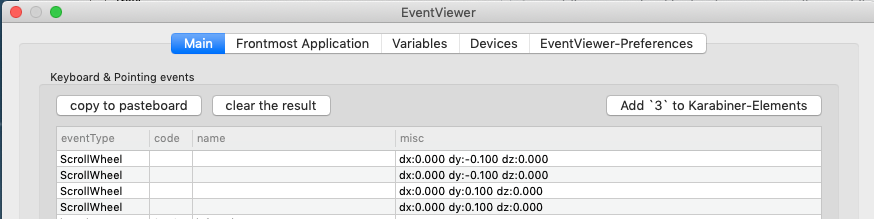
In the above you can see that one button creates a small scroll up and the other a small scroll down.
Ideally I'd like to press one button and have it scroll in the direction of the mouse motion
rvesse
on 17 Apr 2019
@leadpipe GUI does not provide button1 modification but you can change button1 by modify karabiner.json directly.
- Add following simple modifications
button5 -> button2button2 -> button1button32 -> button4
- Open TextEdit.
- Press Command-O on TextEdit. File choose dialog will be opened.
- Type
~/.config/karabineron the file choose dialog. - Open karabiner.json.
- Search
button32and replace withbutton1.
You can use button2 as left click and button1 as scroll button.
If you faced any trouble, disconnect your mouse once.
There are 3 seconds before Karabiner-Elements grabs device after the device connected.
Remove simple modifications in the 3 seconds after you connect your mouse again.
I also use Logitech Trackman Marble which DPI is not high.
You might prefer setting speed 150 or 200.
https://github.com/tekezo/Karabiner-Elements/issues/1074#issuecomment-476035020
tekezo
on 17 Apr 2019
@rvesse You enabled another setting that changes button4 and button5.
Please confirm the simple modifications for each devices.
https://pqrs.org/osx/karabiner/img/[email protected]
tekezo
on 17 Apr 2019
@tekezo Yes you are correct, my mistake. Thanks for all the help. Now got it working, looking forward to further improvements in this feature in the future
rvesse
on 17 Apr 2019
Thanks @tekezo, it's back to fully functional again!
leadpipe
on 18 Apr 2019
I finished tuning at v12.2.18!
tekezo
on 19 Apr 2019
And with the new version, it's back to working really nicely again. Thank you, @tekezo.
leadpipe
on 22 Apr 2019
@tekezo Yes latest Beta is much smoother. Thanks again for the awesome work!
rvesse
on 23 Apr 2019
I'm so glad KE have such a feature.
So If I need the mouse_motion_to_scroll to work properly, I have to uninstall Logitech Control Center or anything similar?
It didn't work for me with either button4/5/control. I'm using Logitech M570. I have enabled all mouse devices and no conflict logs seems to appear in KE log tab.
And even after I removed Logitech Control Center panel from System Preferences, it still not works.
But I find it working with my SteelSeries Rival 300. Any idea? @tekezo
 puttin
on 3 Jun 2019
puttin
on 3 Jun 2019
I'm so glad KE have such a feature.
So If I need the
mouse_motion_to_scrollto work properly, I have to uninstallLogitech Control Centeror anything similar?It didn't work for me with either button4/5/control. I'm using Logitech M570. I have enabled all mouse devices and no conflict logs seems to appear in KE log tab.
And even after I removed Logitech Control Center panel from System Preferences, it still not works.
But I find it working with my SteelSeries Rival 300. Any idea? @tekezo
I figured it out. Delete the panel from System Preferences does not delete the driver.
Use LCC Uninstaller instead which should be in /Applications/Utilities folder
puttin
on 3 Jun 2019
I found this karabiner configuration works well with Mos, which makes scroll smoother. I think the acceleration speed conflicts, but anyway it becomes much more natural.
 hgijeon
on 4 Jun 2019
hgijeon
on 4 Jun 2019
Is there any option to fine tune simulated scrolling for my taste? I'd like to disable acceleration at least
 wadimw
on 10 Oct 2019
wadimw
on 10 Oct 2019
Related issues
 baurmatt
·
3Comments
baurmatt
·
3Comments
 rkusa
·
3Comments
rkusa
·
3Comments
 DanweDE
·
3Comments
DanweDE
·
3Comments
 chaucy
·
3Comments
chaucy
·
3Comments
 surfingoz
·
3Comments
surfingoz
·
3Comments
Most helpful comment
Exactly, we are after the old
__PointingRelativeToScroll__behaviour from Karabiner, we want to be able to hold down a button and have our mouse movements translated into scrolling.Translating a button press to Scroll Up/Scroll Down is a poor substitute because it gives coarse grained movement as opposed to the old functionality that gave very fine grained movement.