Karabiner-elements: grave_accent_and_tilde and non_us_backslash are switched
I ran into a weird issue, as I was adding a left_control to what should be the grave_accent_and_tilde, but was surprised when the rule applied to non_us_backslash-key instead.
In the event-viewer, it still shows the correct keys, but it is only the rule that is switched.
    {
      "description": "Holding grave_accent_and_tilde produces left_control",
      "manipulators": [
        {
          "type": "basic",
          "from": {
            "key_code": "grave_accent_and_tilde",
            "modifiers": {
              "optional": [
                "any"
              ]
            }
          },
          "to": [
            {
              "key_code": "left_control"
            }
          ],
          "to_if_alone": [
            {
              "key_code": "grave_accent_and_tilde"
            }
          ]
        }
      ]
    },
To sum up, in the eventviewer, and any other program, pressing grave_accent_and_tilde and non_us_backslash shows up correctly. However, the rule above is applied to non_us_backslash. Even the to_if_alone produces non_us_backslash.
Is this an issue on my end? I have tried removing all other rules in case there was some interference, but the result is the same.
I am running macOS Sierra, with Karabiner-Elements 0.91.12
 runar-rkmedia
All 9 comments
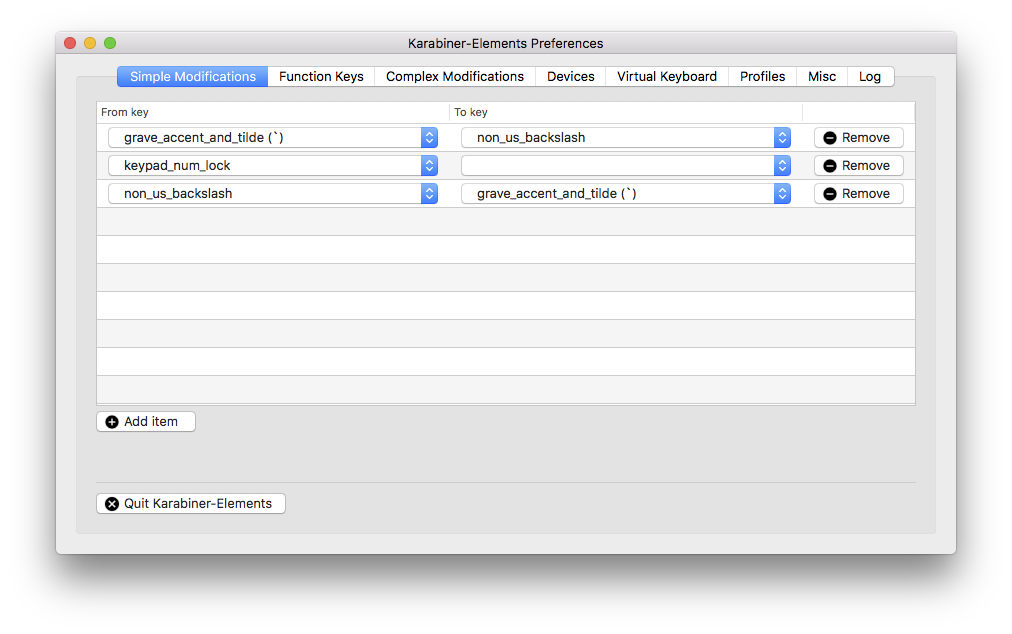
@runartrollet I have same issue here, I do need add key mapping rule to make them work correctly. In the eventviewer it is fine but actual they are reverted. Have to use setting to change these 2 keys.
 carrigmore
on 31 Jul 2017
carrigmore
on 31 Jul 2017
I have the same problem.
Even if I uncheck all keyboards in the preferences and connect a Mac keyboard the two keys are remapped.
It's an annoyance when you have to correct something which already was correct before installing KE.
 expiredemulsion
on 1 Aug 2017
expiredemulsion
on 1 Aug 2017
Ok. I've found the reason why this only happens some people and only some keyboards.
If you connect a new keyboard, launch K-E and set it up everything will work out ok.
But macOS also launches Keyboard Assistent as it detects a previous unknown keyboard.
If you simply close the Assistant and dont bother about it everything will work out ok.
But if you follow through with the Assistant and select that keyboards layout (ISO for me) - grave_accent_and_tilde and non_us_backslash will get switched!
So K-E and Apple seems to interfere with each other on this!
If you want to redo the process and get all back to what it was - working - you can delete the plist and reboot.
sudo rm /Library/Preferences/com.apple.keyboardtype.plist
expiredemulsion
on 3 Aug 2017
This issue has been automatically marked as stale because it has not had recent activity. It will be closed if no further activity occurs. Thank you for your contributions.
![stale[bot] picture](https://avatars3.githubusercontent.com/in/1724?v=4&s=40) stale[bot]
on 4 Mar 2018
stale[bot]
on 4 Mar 2018
I also ran into this. I was using the vanilla complex "PC-Style German Alt Gr (Backslash, @, pipe, tilde, brackets)" It all worked perfect, except for the vertical bar from grave_accent_and_tilde
"from": {
                                    "key_code": "grave_accent_and_tilde",
                                    "modifiers": {
                                        "mandatory": [
                                            "right_option"
                                        ],
                                        "optional": [
                                            "any"
                                        ]
                                    }
                                },
                                "to": [
                                    {
                                        "key_code": "7",
                                        "modifiers": [
                                            "left_option"
                                        ]
                                    }
                                ],
                                "type": "basic"
I then mapped the simple non_us_backslash to grave_accent_and_tilde and it started to work.
Seems a bug somewhere
 martinbarlow
on 4 Mar 2018
martinbarlow
on 4 Mar 2018
This issue has been automatically marked as stale because it has not had recent activity. It will be closed if no further activity occurs. Thank you for your contributions.
stale[bot]
on 4 May 2018
@petter-'s solution worked for me.
For some reason macOS started to pop up the keyboard assistant even though I'm using the builtin keyboard of my laptop. If I select a layout Karabiner swaps grave_accent_and_tilde and non_us_backslash.
 lionel-
on 10 May 2018
lionel-
on 10 May 2018
This has caused me some confusion too, would be nice if the developer took a look at this to avoid it confusing other users.
 FerretDave
on 3 Jul 2018
FerretDave
on 3 Jul 2018
This issue has been automatically marked as stale because it has not had recent activity. It will be closed if no further activity occurs. Thank you for your contributions.
stale[bot]
on 1 Sep 2018
Related issues
 Farzy
·
3Comments
Farzy
·
3Comments
 krasnovpro
·
3Comments
krasnovpro
·
3Comments
 aniude
·
3Comments
aniude
·
3Comments
 DanweDE
·
3Comments
DanweDE
·
3Comments
 LittleNewton
·
3Comments
LittleNewton
·
3Comments
Most helpful comment
Ok. I've found the reason why this only happens some people and only some keyboards.
If you connect a new keyboard, launch K-E and set it up everything will work out ok.
But macOS also launches Keyboard Assistent as it detects a previous unknown keyboard.
If you simply close the Assistant and dont bother about it everything will work out ok.
But if you follow through with the Assistant and select that keyboards layout (ISO for me) - grave_accent_and_tilde and non_us_backslash will get switched!
So K-E and Apple seems to interfere with each other on this!
If you want to redo the process and get all back to what it was - working - you can delete the plist and reboot.
sudo rm /Library/Preferences/com.apple.keyboardtype.plist