Karabiner-elements: Make fn key work as control key?
Do you plan to modify Karbiner Elements so that we can use the fn key as the left or right control key? I'm using Karbiner Elements 0.90.81 on macOS Sierra 10.12.2 and I'm not able to get that mapping to work. Thanks.
 flaugher
All 16 comments
It works on my machine. (MacBook Pro 2014)
 tekezo
on 20 Jan 2017
tekezo
on 20 Jan 2017
I agree with @flaugher
Since the latest update 0.90.82 it's not working anymore (it did before)
I also tried to compile an older version (0.90.76) resulting in the same issue.
 Wucasch
on 20 Jan 2017
Wucasch
on 20 Jan 2017
Attach the log messages in Preferences > Log tab.
tekezo
on 20 Jan 2017
This is so confusing!
I installed Karabiner Elements 0.90.82, then compiled 0.90.76 and now I'm back on 0.90.82 to attach the log messages.
Suprisingly everything works again as expected.
Don't know what fixed it, seems like my mac had a bad day or smth o_0
Anyway, thanks for the help and quick answer 👍
Wucasch
on 20 Jan 2017
Greetings,
Remapping fn appears to not work for me, _but only on my external keyboard_. It works fine on my built-in keyboard.
I'm using version 0.91.12 on a "MacBook Pro (13-inch, 2016, Four Thunderbolt 3 Ports)."
I did some experimenting and looked at the logs; the following shows up after I try to set the relevant map.
[2017-08-10 18:14:37.024] [info] [grabber] core_configuration is updated.
[2017-08-10 18:14:37.024] [info] [console_user_server] Load karabiner.json...
[2017-08-10 18:14:37.024] [info] [console_user_server] core_configuration is updated.
[2017-08-10 18:14:37.025] [info] [grabber] Isaac Joseph’s Mouse (device_id:6) is ignored.
[2017-08-10 18:14:37.025] [info] [grabber] Apple Internal Keyboard / Trackpad (device_id:5) is ignored.
[2017-08-10 18:14:37.025] [info] [grabber] Apple Internal Keyboard / Trackpad (device_id:3) is ignored.
[2017-08-10 18:14:37.025] [info] [grabber] (vendor_id:0x5ac, product_id:0x8600) (device_id:2) is ignored.
[2017-08-10 18:14:37.025] [info] [grabber] HP Link-5 Micro Receiver (device_id:1) is ignored.
However, this is exactly what shows up when I add a working map (one other than fn ↦ control), so this might not be informative.
I have the HP external keyboard selected: 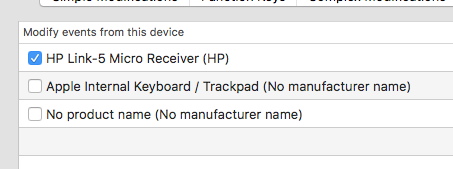
 ijoseph
on 11 Aug 2017
ijoseph
on 11 Aug 2017
This issue has been automatically marked as stale because it has not had recent activity. It will be closed if no further activity occurs. Thank you for your contributions.
![stale[bot] picture](https://avatars3.githubusercontent.com/in/1724?v=4&s=40) stale[bot]
on 4 Mar 2018
stale[bot]
on 4 Mar 2018
I'm experiencing the same issue as @ijoseph. Using an external keyboard, remapping the function key to something else has no effect. I'm using a Red Scarf keyboard and trying to map fn -> right_option
 GLosch
on 7 Mar 2018
GLosch
on 7 Mar 2018
This issue has been automatically marked as stale because it has not had recent activity. It will be closed if no further activity occurs. Thank you for your contributions.
stale[bot]
on 6 May 2018
Same issue here. Not able to remap fn as left ctrl key. I'm able to remap left ctrl key as fn key though.
I'm using version 12.1.0.
 lmsmartins
on 10 Sep 2018
lmsmartins
on 10 Sep 2018
the external keyboard's _fn_ key seems not to trigger _EventViewer_.
 Kejia
on 16 Dec 2018
Kejia
on 16 Dec 2018
also seeing this with fn keystrokes not showing in event viewer
 byrnedo
on 30 Jul 2019
byrnedo
on 30 Jul 2019
The function key is not triggering the EventViewer & thus, unable to remap it.
 tshrjn
on 30 Apr 2020
tshrjn
on 30 Apr 2020
Have you tried with a Simple Modification?
 zecanard
on 30 Apr 2020
zecanard
on 30 Apr 2020
@zecanard Would you please more details?
tshrjn
on 30 Apr 2020
If you just need to remap the fn key to another key, open Karabiner Elements Preferences → Simple Modifications. You can remap fn to another key there.
If that remap works and you need to assign fn to a more complex modification, according to my karabiner.json file the key_code for that key is just fn
zecanard
on 30 Apr 2020
@tshrjn
The reason is because "The operation can’t be completed because the item “Karabiner-EventViewer” is locked." (https://karabiner-elements.pqrs.org/docs/getting-started/features/)
 lchao1
on 13 May 2020
lchao1
on 13 May 2020
Related issues
 baurmatt
·
3Comments
baurmatt
·
3Comments
 Joilence
·
3Comments
Joilence
·
3Comments
 DanweDE
·
3Comments
DanweDE
·
3Comments
 LittleNewton
·
3Comments
LittleNewton
·
3Comments
 rcaputo
·
3Comments
rcaputo
·
3Comments
Most helpful comment
the external keyboard's _fn_ key seems not to trigger _EventViewer_.