Karabiner-elements: Can't use (cmd|shift|option|ctrl) + Fn with MacBook Pro 2016 with Touch Bar
For example, when pressing Shift + F6, my app (WebStorm) acts as if only F6 were pressed and Shift is ignored completely.
Below is my only configuration:

 we11adam
All 33 comments
I am seeing this behaviour with other modifiers too such as cmd. It breaks a lot of keyboard shortcuts in IntelliJ for me.
On the Function Keys tab, I tried mapping each fn key to fn1-12 and it didn't work. Toggling the Use standard function keys didn't work either.
 vjpr
on 12 Jan 2017
vjpr
on 12 Jan 2017
I have same problem. When will be this fixed?
 keith-han
on 28 Feb 2017
keith-han
on 28 Feb 2017
Checking the 'use all F keys as standard function keys' option seems to allow shift + F to work in programs like intellij. But touchbar functionality is in general broken when you try to use the standard function buttons like expose, brightness after expanding the standard touchbar.
 dstandish
on 10 May 2017
dstandish
on 10 May 2017
Same here. But https://medium.com/@geapi/permanent-function-keys-intellij-macbook-pro-w-touchbar-d6fc78781b90 worked for me.
 geoHeil
on 3 Jul 2017
geoHeil
on 3 Jul 2017
Having the same issue as OP with exactly the same configuration. Modifier keys don't work with function keys. Karabiner-Elements version is 0.91.8 macOS Sierra 10.12.5 (16F73) MacBook Pro (15-inch, 2016)
 chopachom
on 18 Jul 2017
chopachom
on 18 Jul 2017
Karabiner-Elements 0.91.8
macOS Sierra 10.12.5
Touch bar
- Cmd + f7
- Karabiner-Elements ON
- f7 + Fn
- Karabiner-Elements OFF
- f7 + Cmd + Fn
 kasecato
on 19 Jul 2017
kasecato
on 19 Jul 2017
Same. I tried the link @geoHeil provided, but it just showed the Fn 'keys', and their behaviour was the same, e.g. Shift+F6 causes the action F6 causes... Shift has no effect. Also tried what @dstandish said, but didn't change this.
Any solutions? I only use Karabiner to map my caps lock to back space.
 lindsaymarkward
on 20 Jul 2017
lindsaymarkward
on 20 Jul 2017
Same problem here :(
 viniciusmo
on 24 Jul 2017
viniciusmo
on 24 Jul 2017
:+1:
 subicura
on 29 Jul 2017
subicura
on 29 Jul 2017
Same issue here, shortcuts like Command + F1 acting like F1 when Karabiner-Elements is up.
 Kxrr
on 20 Sep 2017
Kxrr
on 20 Sep 2017
Following, cause I have the same issue. Modifiers don't work.
 mohammedri
on 17 Oct 2017
mohammedri
on 17 Oct 2017
@tekezo do you have any ETA to look at this?
 gAmUssA
on 17 Oct 2017
gAmUssA
on 17 Oct 2017
Same here. I have to go to Menu -> Edit -> Fill... in Photoshop instead of pressing Shift+F5. Most irritating. I had already done what @geoHeil suggested so it's not a fix - it only defines for which applications to show the function keys in the TouchBar by default.
 KaHa6uc
on 30 Oct 2017
KaHa6uc
on 30 Oct 2017
I searched (again) for an alternative solution and found a blog post about remapping keys with the hidutil. Since I only want to remap caps lock to delete/backspace for Colemak, I now have this working without additional software 👍
http://homeowmorphism.com/articles/17/Remap-CapsLock-Backspace-Sierra
lindsaymarkward
on 3 Nov 2017
Thank you very much! Now I don't need to choose between touchbar and Karabiner-Elements!
 kurguzov
on 3 Nov 2017
kurguzov
on 3 Nov 2017
+1 - hidutil fixed my problem as well. Thank you, @lindsaymarkward
KaHa6uc
on 3 Nov 2017
I might add that you should _not_ use macOS keyboard settings to change caps lock to do nothing, or this hidutil solution stops working. I guess the OS doesn't receive the key event or something.
lindsaymarkward
on 6 Nov 2017
👍 for hidutil, also solved my problem. Btw, here : https://opensource.apple.com/source/IOHIDFamily/IOHIDFamily-247/IOHIDFamily/IOHIDUsageTables.h , in section _KeyboardOrKeypad Page (0x07)_ can be found all valid usage ID’s. Helped me with _kHIDUsage_KeyboardNonUSBackslash_
 mbarczak
on 6 Nov 2017
mbarczak
on 6 Nov 2017
Yes, it took me some time debugging event to realise that I can't understand how § and ± qualify as 0x64, /* Non-US \ or | */
Not to mention that Karabiner's keylogger reported this key as 0xa ...
KaHa6uc
on 6 Nov 2017
I think, I've got this 'fixed' by enabling this keyboard in settings:
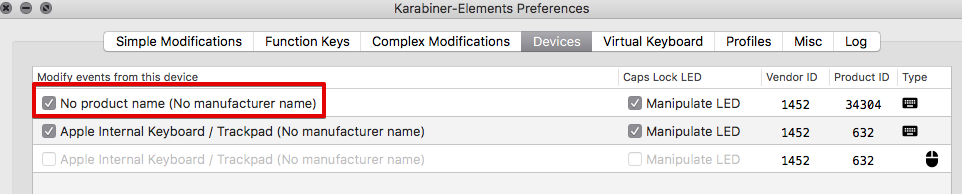
It's probably the touchbar "keyboard" which sends keys to Mac OS.
Can someone verify this?
 mutantcornholio
on 10 Dec 2017
mutantcornholio
on 10 Dec 2017
@mutantcornholio Plus, setting the function keys to the default Touch Bar display and use all Fn keys as as standard, it worked on my IntelliJ.
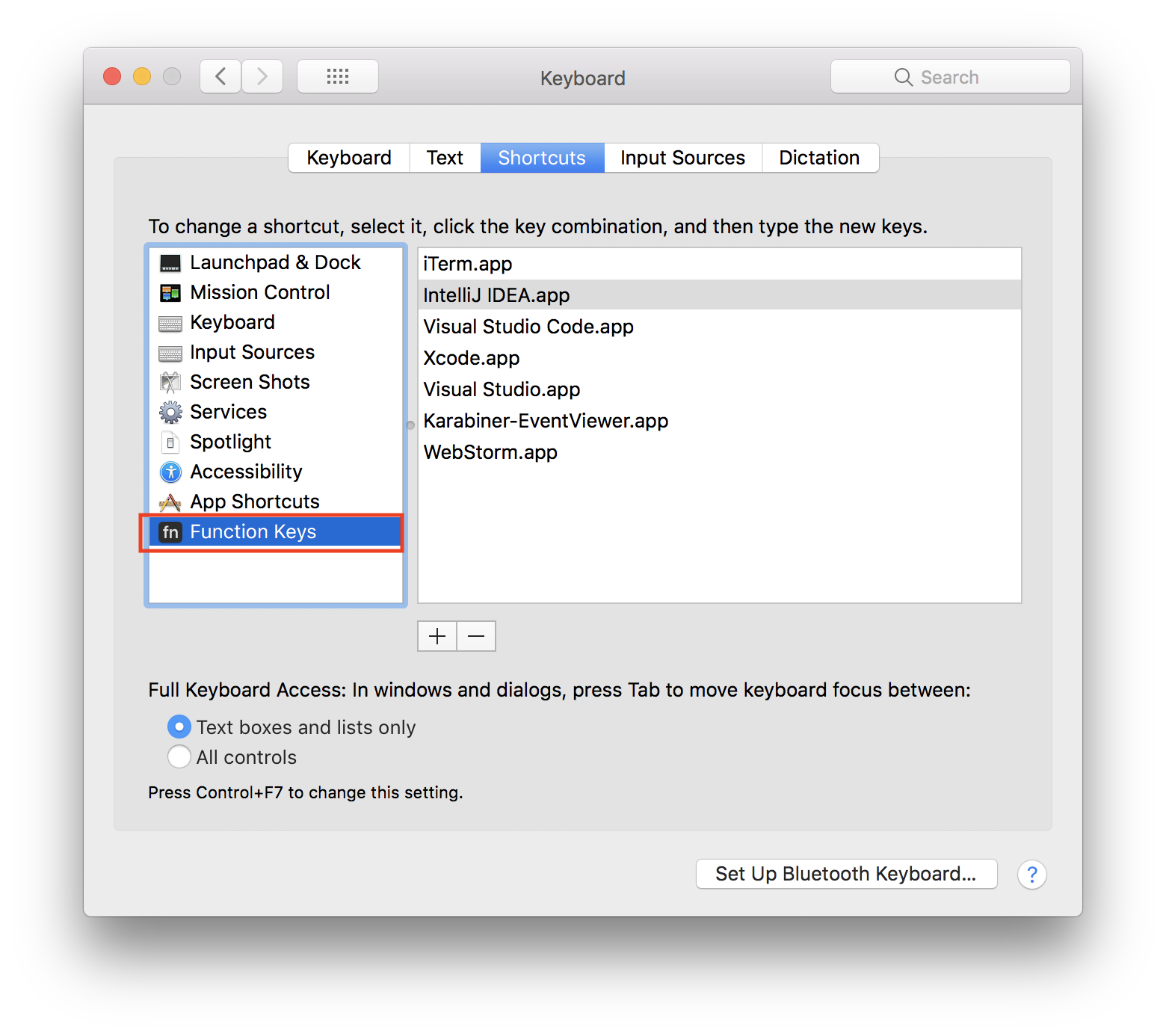
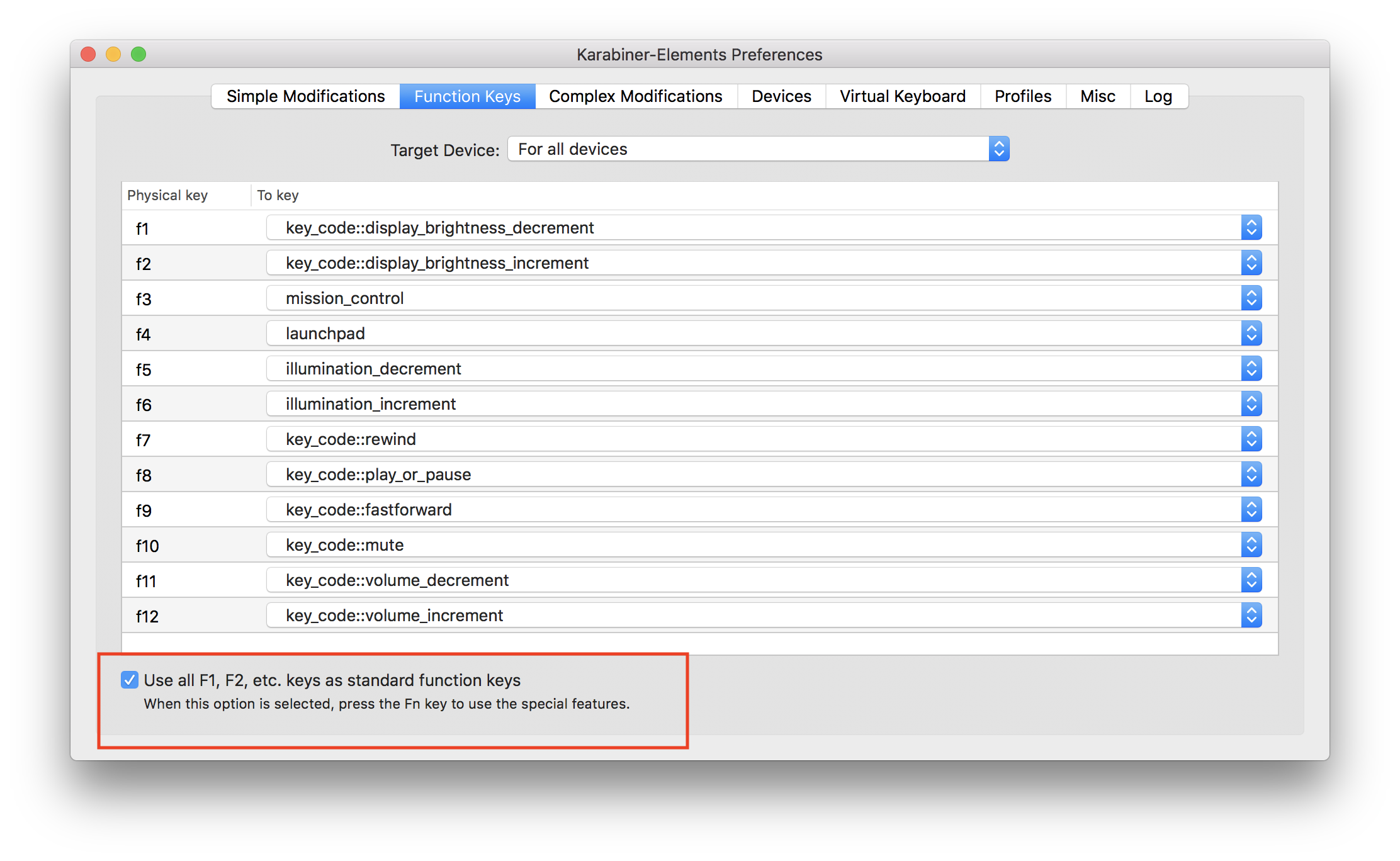
kasecato
on 11 Dec 2017
@kasecato @mutantcornholio doesn't work for me
gAmUssA
on 11 Dec 2017
@gAmUssA You can check Karabiner EventViewer like below images.
- No Product Name
ON👍 (Shift + Cmd + F7)
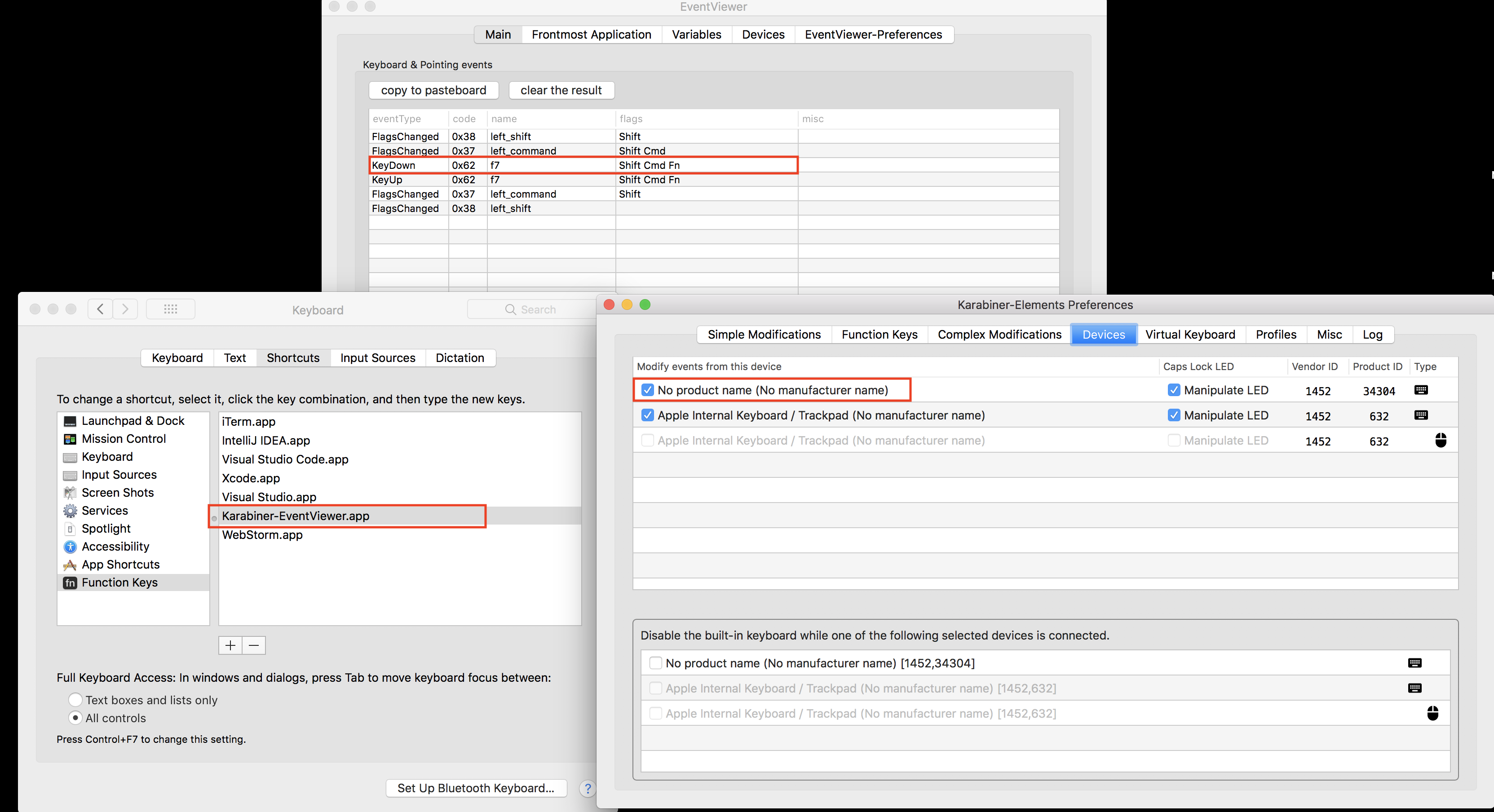
- No Product Name
OFF👎 (Shift + Cmd + F7)
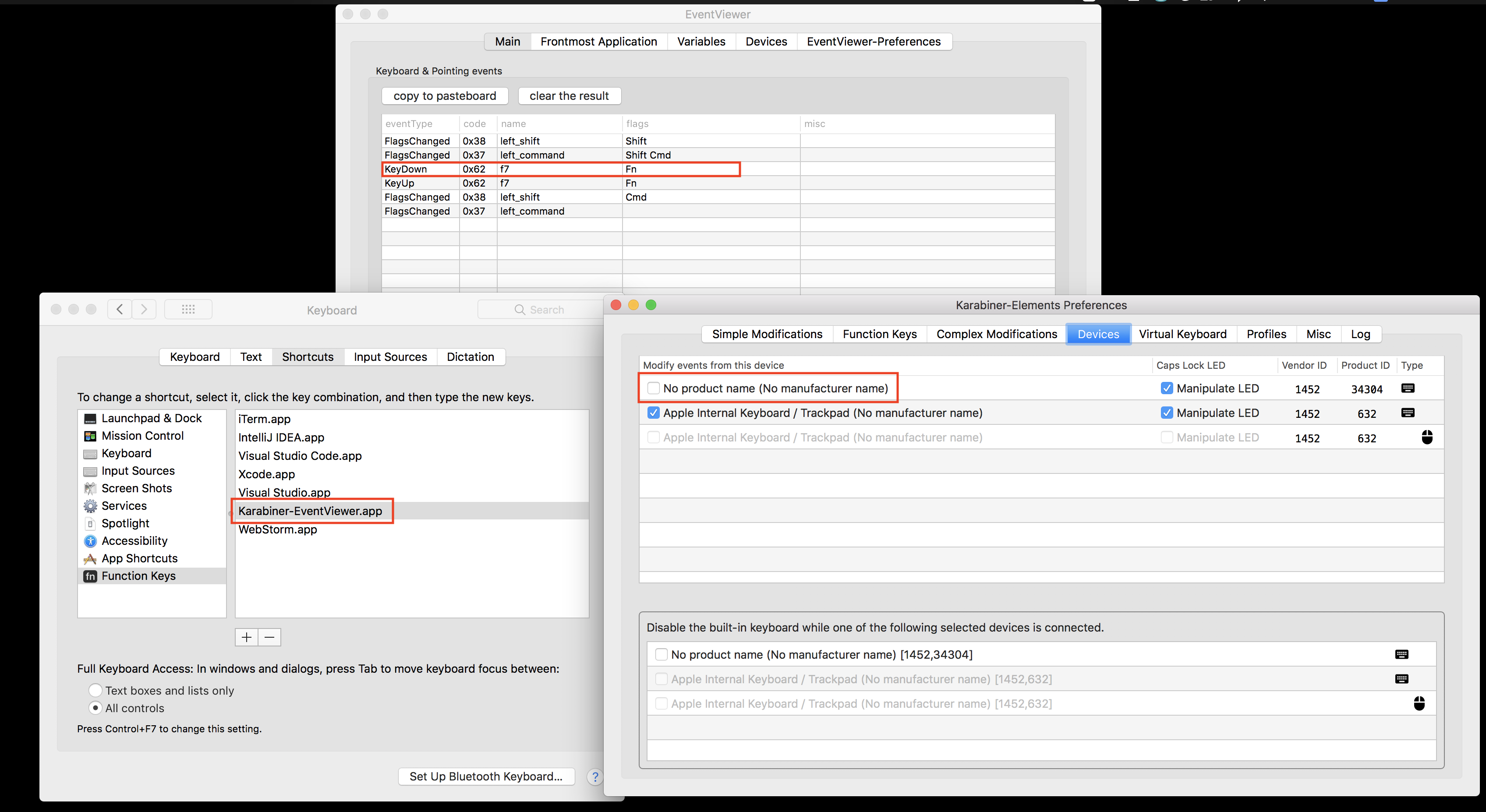
kasecato
on 12 Dec 2017
Here's a gist that does what I want in hidutil:
https://gist.github.com/zbstof/6cba7d54e105cc5148c8a943d1581cad
 zbstof
on 12 Dec 2017
zbstof
on 12 Dec 2017
Confirming @mutantcornholio suggestion worked great! Thanks! Have some TP.
 j-martin
on 18 Dec 2017
j-martin
on 18 Dec 2017
confirming @mutantcornholio's solution works as well
 dan-kez
on 19 Dec 2017
dan-kez
on 19 Dec 2017
Guys, I just found that @mutantcornholio's solution has a drawback: the two screen brightness buttons now don't work without pressing the Fn button. Are you guys experiencing the same problem?
Thanks!
we11adam
on 25 Dec 2017
Yep, nothing's appear at EventViewer when pressing those is Karabiner-Elements is launched. Otherwise, works okay.
mutantcornholio
on 25 Dec 2017
@welladamm actually yes, I just assumed it was broken for another reason. My workaround is to use the brightness slider instead.
j-martin
on 30 Dec 2017
This issue has been automatically marked as stale because it has not had recent activity. It will be closed if no further activity occurs. Thank you for your contributions.
![stale[bot] picture](https://avatars3.githubusercontent.com/in/1724?v=4&s=40) stale[bot]
on 3 Mar 2018
stale[bot]
on 3 Mar 2018
After enabling modification of the untitled keyboard as @mutantcornholio suggests, I had to do one more change for F1 to work as normal instead of lowering the brightness. I had to uncheck the “Use all F1, F2, etc. keys as standard function keys” checkbox at the bottom of the Function Keys tab (the opposite of @kasecato’s setting). This is with my “Touch Bar shows” setting at “App Controls with Control Strip”, so that the F1 key only shows when I am already holding Fn.
 roryokane
on 22 Sep 2018
roryokane
on 22 Sep 2018
While the hidutil approach works for some situations, I'm not sure it works for all. For example, I tend to remap the capslock key to a mouseclick. This is something I can do with Karabiner, but not with hidutil I think. Additionally, using hidutil is nowhere near as user-friendly as Karabiner.
In the not too distant future nearly all Macbook Pro users will have a touch bar. If Karabiner doesn't work with the touchbar and key modifiers, then nearly all users won't be able to use it any more...?
I would suggest to fix this issue in Karabiner, not just close it because of inactivity.
 bosschaert
on 25 Sep 2018
bosschaert
on 25 Sep 2018
I filed #1700 as a feature request to have that keyboard enabled by default.
 studgeek
on 10 Jan 2019
studgeek
on 10 Jan 2019
Related issues
 surfingoz
·
3Comments
surfingoz
·
3Comments
 Fengur
·
3Comments
Fengur
·
3Comments
 Ox0400
·
3Comments
Ox0400
·
3Comments
 willisworley
·
3Comments
willisworley
·
3Comments
 KyleAtDND
·
3Comments
KyleAtDND
·
3Comments
Most helpful comment
I think, I've got this 'fixed' by enabling this keyboard in settings:

It's probably the touchbar "keyboard" which sends keys to Mac OS.
Can someone verify this?