Karabiner-elements: Command/Apple Key getting stuck
Over the past week, I've had behavior where the command key seems to get stuck on. The only way to resolve the issue is to quit Karabiner Elements and restart. I have not been able to track down a pattern as to what causes it. Currently running 0.90.68.
 mjl135
All 137 comments
I have the same issue. It resolves itself by pressing the key a couple of times.
This has started to happen in one of the recent releases, unfortunately I don't know yet which one.
 RoyJacobs
on 3 Dec 2016
RoyJacobs
on 3 Dec 2016
I had the same problem a couple of times now, I tried to hit cmd a couple of times too, but the only solution for me was to kill Karabiner Elements.
 tisba
on 7 Dec 2016
tisba
on 7 Dec 2016
Seeing what I'm guessing is the same issue. Only seems to affect mouse clicks. Once, it seemed that it was the shift key that was stuck.
Using a 2015 Macbook Pro, running 0.90.68
Only modification is changing my JIS keyboard to an ANSI layout.
 PossibilityZero
on 8 Dec 2016
PossibilityZero
on 8 Dec 2016
This was just happening to me as well, I just updated the app this morning and that's when the issue started occurring...during a meeting with my CEO :-(.
Hope this gets fixed soon, I've had to uninstall completely for now
 krispayne
on 9 Dec 2016
krispayne
on 9 Dec 2016
Same issue here. For me it helps to quit the application and restarting it.
 oschrenk
on 3 Jan 2017
oschrenk
on 3 Jan 2017
too bad when you have locked your mac and cannot type in your password to unlock again because of this... happened to me a couple of times now already and has become a show stopper :-/
tisba
on 3 Jan 2017
This has only happened so far for me after waking up from sleep (i.e. opening my MBP after having it closed for a few hours).
 sijmn
on 10 Jan 2017
sijmn
on 10 Jan 2017
This has only happened so far for me after waking up from sleep (i.e. opening my MBP after having it closed for a few hours).
Same, it happens after waking from sleep for me as well.
 mutewinter
on 14 Jan 2017
mutewinter
on 14 Jan 2017
Happens over here too. Quick K-E and restart seems to fix it.
 g12r
on 15 Jan 2017
g12r
on 15 Jan 2017
Happens to me with 90.85. Shift flag is stuck for mouse click events only. Occurs after wakeup (opening lid) once or twice a month.
Keyboard events works ok: if I press shift key, Shift flag is used (capital letters, etc.); if I release shift key, no shift flag.
But for mouse clicks Shift flag is always set (with pressed or depressed shift key) rising text selection and shift-clicks in browser.
The moment I quit K-E, Shift flag is activated for keyboard events (but shift key is depressed); Pressing/releasing the shift key once after quitting K-E resets everything to normal behaviour.
Linking similar issues:
https://github.com/tekezo/Karabiner-Elements/issues/625
https://github.com/tekezo/Karabiner-Elements/issues/204
 berlic
on 17 Feb 2017
berlic
on 17 Feb 2017
Happens to me too and killing and restarting K-E fixes it for me. The problem occurs usually right after I wake from sleep.
 axsuul
on 17 Mar 2017
axsuul
on 17 Mar 2017
+1
 RoXuS
on 26 Mar 2017
RoXuS
on 26 Mar 2017
+1
 anzyxliao
on 30 Mar 2017
anzyxliao
on 30 Mar 2017
+1 with the shift key being stuck on. Seems to happen after I open the lid of my MBP (resume from sleep like @axsuul mentioned).
 lifesoccult
on 31 Mar 2017
lifesoccult
on 31 Mar 2017
+1. Happens to me randomly, only solution is to restart karabiner elements afaik.
 jerwre
on 3 Apr 2017
jerwre
on 3 Apr 2017
+1 on occurring only after sleep, seemingly randomly a few times a week
 MichaelHindley
on 6 Apr 2017
MichaelHindley
on 6 Apr 2017
@tekezo is there anything we can do, to provide you with information to debug this issue?
tisba
on 6 Apr 2017
Happened to me today using macOS 10.12.5 on a touchbar macbook pro using Karabiner-elements 0.90.92
I have only one entry defined in KE, mapping right_option to keypad_enter
Quitting karabiner elements fixed the issue
 YesThatAllen
on 24 May 2017
YesThatAllen
on 24 May 2017
Happened to me multiple times in the past 2 weeks after sleep/standby. Command key acting stuck affecting scrolling, link clicking etc.
Sierra 10.12.3
Karabiner 0.90.92
 javamatte
on 28 May 2017
javamatte
on 28 May 2017
Same here. Possibly related, also can't type in the password field in the lock screen some times.
 franciscolourenco
on 2 Jun 2017
franciscolourenco
on 2 Jun 2017
@aristidesfl I too have this issue, seems to be resolved by mashing a combination of control, option, cmd and both left + right shift, in order to get the keyboard working again
MichaelHindley
on 2 Jun 2017
Happens to me after coming back from sleep.
Unplugging and plugging back the keyboard's USB cable solves.
Or switching off/on the bluetooth keyboard.
 ashazar
on 9 Jun 2017
ashazar
on 9 Jun 2017
I reported a duplicate issue in #774 , for me the problem is the shift key.
I have now locally compiled and installed K-E 0.90.67 from 2016-11-28 and I will run that for a while to see if the error still occurs. If I still see it I'll step further back in the versions.
 DrChr
on 12 Jun 2017
DrChr
on 12 Jun 2017
I encountered what seemed like the "shift issue" with ver. 0.90.67 from 2016-11-28, so I'm now compiling ver. 0.90.64 from 2016-11-07 and will then try using that one.
Note: I got the shift key back to proper operation by quitting K-E and pressing down combinations of modifier keys (shift, ctrl, cmd, option) a few times, which fixed it.
DrChr
on 13 Jun 2017
Just experienced this after a reboot, close the lid and opened it a couple of hours later. The affected key is CMD and K-E version is 0.90.92, os x sierra on a mcb pro 2014. Works after restarting K-E.
 isodude
on 24 Jun 2017
isodude
on 24 Jun 2017
This also happens when you log out of an account, which is problematic for my as I constantly switch between work and private account. It happens less frequent when I use fast user switching.
Sierra 10.12.6 Beta (16G18a)
Karabiner 0.91.3
oschrenk
on 24 Jun 2017
With K-E ver. 0.90.64 I encountered a situation where the shift key didn't work when I attempted to login after the laptop was coming back from sleep mode. This actually prevented login, as the password field kept getting filled by (unknown) characters. I pressed shift/ctrl/cmd etc a bunch of time and got an operational shift key again. Anyway, 0.90.64 is not good either. So I'm now changing to ver. 0.90.63 from 2016-11-06.
Note: Here's what I do when switching version:
make gitclean; make cleanbefore I usegit logto see the hash of a previous version.- Then e.g.
git checkout 43456b3911e2717e7c8862da67ce41eeaf839176 makein order to compile this version.- use currently active K-E to launch uninstaller from the
misc-tab and uninstall K-E.
- Note: Older versions of K-E does not have an icon at the top, so then I manually start the GUI using the F4 key and typing "Karabiner-Elements"
- use e.g.
open Karabiner-Elements*.dmgto open the just generated .dmg - double-click the
.pkg-icon and install the version I just compiled.
DrChr
on 24 Jun 2017
This happens for me as well, but only on one of my machines--the one with an Evoluent VerticalMouse C. I have a VerticalMouse 4 on my other machine and it doesn't have this problem. I'll list a couple other components I have hooked up in case any one else has commonalities:
- Apple thunderbolt display
- Kinesis Advantage 2 Keyboard
- VerticalMouse C
- David Clark USB Headset
I've gone through 2 computers in this location w/ those peripherals and both have the issue. I've gone through 2 computers at another location w/ different peripherals and neither have the issue. I'm switching to a VerticalMouse C on the other location today so we'll see if it starts happening there.
This sticky key issue is the reason I keep going back to bending hammerspoon to my will. 😖
 aaronjensen
on 12 Jul 2017
aaronjensen
on 12 Jul 2017
I've now used K-E 0.90.63 for 18 days without this issue, so perhaps it appeared in K-E 0.90.64. Looking at the corresponding diff, "git diff 43456 67317", I didn't see anything obvious:
Readme has an added line saying:
* Karabiner-Elements ignores the System Preferences > Keyboard > Modifier Keys... configuration.constant.hpp now references
"/Library/Application Support/org.pqrs/tmp/karabiner_grabber_devices.json"instead of"/Library/Application Support/org.pqrs/tmp/devices.json".Some modifications to device_grabber.hpp
I don't know if it's relevant, but my "System Preferences > Keyboard > Modifier Keys... configuration" was set to ignore the CAPS LOCK key. As the README says, this is now ignored and the CAPS LOCK is operational.
I'll continue using K-E 0.90.63 for a another while, as maybe the error could've been introduced in an earlier version.
Update: While using v. 0.90.63 I just (2017-09-13) had problems logging in to the laptop after resuming from sleep. First time in a long time, so it's rare. At first I thought I wasn't typing the password correctly, but then I realised it's likely a stuck shift key. Mashing keys around for a while allowed me to login. Anyway, I'll try an even older version now, v. 0.90.60.
DrChr
on 13 Jul 2017
This was happening for me for a while and honestly, I was blaming Apple and their degrading quality standards. But now it seems like it's actually a software issue.
I don't remember it happening for maybe a week and I've just updated to 0.91.8
Will report here if it happens again with this or newer version
 bsod90
on 16 Jul 2017
bsod90
on 16 Jul 2017
Restarting K-E wasn't fixing it for me (on K-E 0.91.8). I installed 0.90.63 (download from https://github.com/tekezo/pqrs.org/tree/master/webroot/osx/karabiner/files if you don't fancy compiling it) and this seems to have worked.
On MacBook Pro 2016, Sierra 10.12.5.
 jmmcd
on 17 Jul 2017
jmmcd
on 17 Jul 2017
Currently having this after updating K-E to 0.91.9, have had multiple times on the lock screen preventing me from logging in.
Currently still ongoing even after killing and restarting K-E multiple times, only affecting mouse clicks on the trackpad, with the cmd key stuck for all mouse clicks. Tried cleaning keyboard, doesn't seem like a hardware issue.
EDIT: I have a screenshot I'd love tottach, but I can't drag it into this window due to the mouse problem described above, and I can't click the selecting them button below to open the upload dialog (because it just opens the right click dialog instead). 👎
EDIT2: Post reboot
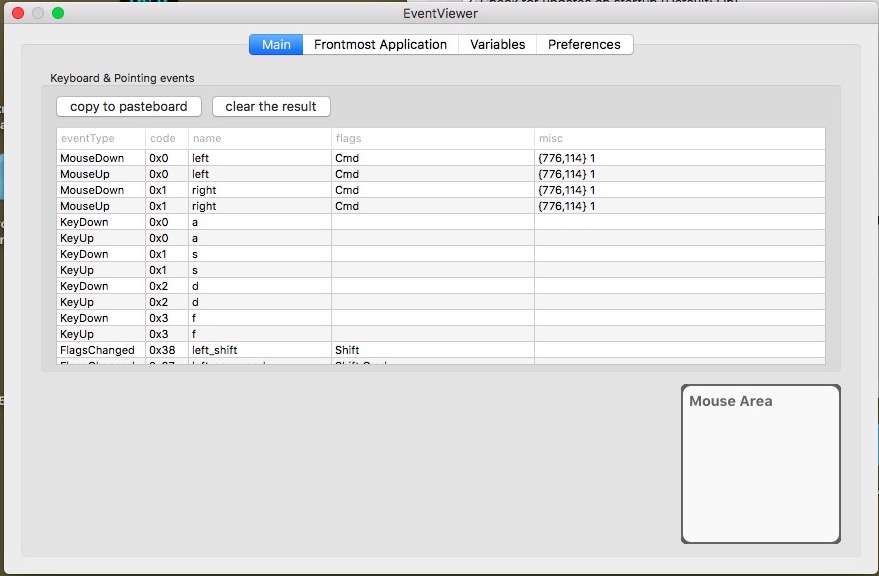
 n8henrie
on 21 Jul 2017
n8henrie
on 21 Jul 2017
@tekezo do you have any ideas on this one? It seems to be affecting many of us.
aaronjensen
on 21 Jul 2017
Happened again today (seems to be usually after my MBA is asleep and the lid closed -- I wonder about keys getting pushed while asleep?) -- today it was the Shift key.
Again, killing KE didn't fix the issue. sudo pkill -9 -f karabiner allowed me to log in and pull up the event viewer to figure out which key it was this time.
Interestingly, killing K-E through the GUI didn't fix the problem (every link I clicked in the browser was weird because the mouse actions were interpreted as shift-click). Looking through ps aux I still saw /Library/Application Support/org.pqrs/Karabiner-Elements/bin/karabiner_grabber running, even though I had started and stopped K-E through the GUI multiple times and it seemed to be stopped.
Killing the karabiner-grabber process didn't fix the issue either, it just re spawned under a different PID and the problem continued.
But then I killed it like a dozen times and it eventually stopped coming back (for a few seconds at least, whereas it was returning immediately before), and the problem was fixed. Weird.
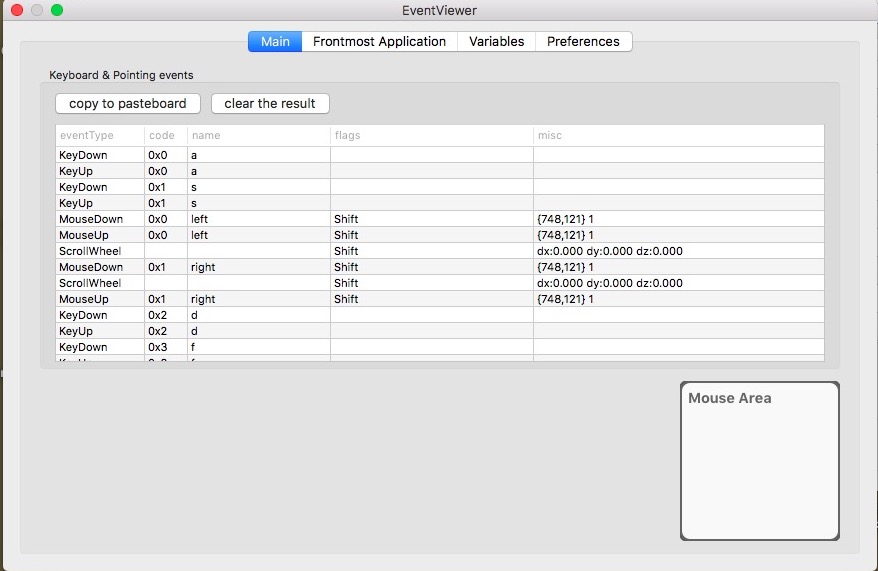
n8henrie
on 27 Jul 2017
Just experienced this (not for the first time) for Cmd stuck on mouse clicks, but not after waking up from sleep. Just logged in after a system upgrade.
Possibly my cat stepped on keyboard during login (maybe while KE was starting?).
Anyhow, I had to quit KE, hit Cmd several time and saw that it got unstuck (saw in EventViewr) and restarting KE was fine then.
 nomaed
on 28 Jul 2017
nomaed
on 28 Jul 2017
First, please confirm the latest Karabiner-Elements. I fixed an issue about modifier flag handling in v0.91.11.
There are several layers related with input events. (Hardware, macOS system, Karabiner-Elements)
If restarting KE does not solve your issue, the issue is caused by hardware or macOS.
 tekezo
on 29 Jul 2017
tekezo
on 29 Jul 2017
tekezo wrote:
First, please confirm the latest Karabiner-Elements.
I fixed an issue about modifier flag handling in v0.91.11.
I've now used K-E 0.90.63 for >30 days without this issue, so it seems likely the issue was introduced in 0.90.64. Was the issue that you fixed introduced in v0.90.64?
I've now done an update to the latest KE and ended up getting v0.91.12 which I'll run for a while to see how it goes.
tekezo wrote:
If restarting KE does not solve your issue,
the issue is caused by hardware or macOS.
Uhm... not sure how you can state that. Couldn't e.g. KE (still) fail to initialise/setup properly?
DrChr
on 29 Jul 2017
@tekezo thank you for responding. I just had it reproduce again with 0.91.12. Specifically cmd was locked for mouse clicks.
After about 8 pkill -f karabiner, the mouse click no longer had the cmd modifier.
For me it was like this after I rebooted.
aaronjensen
on 29 Jul 2017
@tekezo as I tried to show with the screenshots my issue is only with mouse clicks but not with keyboard presses which makes me think hardware less likely (e.g. not a stick key). Also the "not able to log in" (presumably due to a stuck modifier key) issue resolves with killing Karabiner, every time. My most recent issue was while updating to the latest version of K-E, during the quit and restart after installation phase. As noted, it seemed to go away after killing karabiner_grabber several times.
n8henrie
on 29 Jul 2017
If the issue is only with mouse clicks, it might be caused by you keep pressing modifiers before Karabiner-Elements start.
Unfortunetly, it is not avoidable by a limitation of macOS.
Please keep mind to do not keep keys pressing before Karabiner-Elements starts.
Why?
- macOS gathers all keyboard's modifier flags to mouse events.
- There are two keyboards when we are using Karabiner-Elements.
- Your original keyboard.
- A Karabiner-Elements' virtual keyboard.
- The virtual keyboard is used when Karabiner-Elements is working.
- Your original keyboard's modifier flags is keep unchanged when Karabiner-Elements begins.
If your original keyboard's modifer flags are pressed when Karabiner-Elements starts, it is kept while Karabiner-Elements is enabled.
macOS uses the original keyboard's states to mouse click.
Restarting Karabiner-Elements backs the control to your original keyboard and you release the modifier flag in original keyboard solves this issue.
tekezo
on 30 Jul 2017
@tekezo unfortunately this happens quite often for me at random times while Karabiner-Elements is already running. I will be using my computer as normal and then all of a sudden my mouse will start having the wrong modifiers.
Also, restarting Karabiner-Elements does not fix it on the first time always, it often takes multiple times of restarting it. The other way I have been able to fix it is by unplugging my keyboard and then plugging it back in.
Also, people in this thread have noted that it happens when waking from sleep. If one were to hit a modifier to wake up the computer from sleep is it possible that that modifier keydown would only go to the original keyboard and then Karabiner-Elements would become enabled again? Or should Karabiner-Element's virtual keyboard be enabled during sleep?
Is it possible for Karabiner-Elements to detect this state and warn or not switch to the virtual keyboard until there are no modifiers present? Thanks!
aaronjensen
on 30 Jul 2017
One other question, is there a command-line way to stop karabiner elements entirely? Every time I kill it it restarts itself automatically making it very hard to deal with the issue. Also, if I understand it correctly, I would actually need to stop karabiner elements and while it is stopped press and release the modifier key to convince the OS that that key has released. Is that right?
Normally I would quit Karabiner Elements with the mouse, but the mouse doesn't work when it thinks cmd is held down 😄
aaronjensen
on 30 Jul 2017
How about implementing a feature that when a button is clicked all modifier keys on the macOS keyboard is released? If that is possible.
isodude
on 1 Aug 2017
@tekezo wrote:
First, please confirm the latest Karabiner-Elements. I fixed an issue about
modifier flag handling in v0.91.11.
I experienced the issue today after using v0.91.12 for three days.
- It happened while I was using Safari with gmail's web page.
- It was not in connection with me having just started Karabiner-Elements.
- Nor directly after the laptop waking up from suspend.
- This is with macOS Sierra, 10.12.5, on an MBA with a built-in swedish keyboard.
- No external mouse nor external keyboard.
The symptom was that suddenly mouse clicks behaved as if I was pressing the shift key.
I confirmed this using the event viewer.
When I had quit Karabiner-Elements, the shift key was still stuck when typing in e.g. the terminal.
Pressing a bunch of combinations of modifier keys (I don't remember exactly what combination I used when it started working) removed the locked shift in the terminal.
When I then started Karabiner-Elements again, it behaved as it should.
I might decide to go back to v. 0.90.63 as I'd used that for >30 days without this issue, so it seems likely the issue was introduced in 0.90.64.
Was the issue that you @tekezo fixed introduced in v0.90.64?
@tekezo wrote:
If restarting KE does not solve your issue,
the issue is caused by hardware or macOS.
Uhm... not sure how you can state that. Couldn't e.g. Karabiner-Elements (still) fail to initialise/setup properly? Or perhaps when you quit it something is left behind?
Also, if the issue is caused by HW or macOS, how come I _don't_ have the problem with v. 0.90.63?
DrChr
on 2 Aug 2017
I have a complex modification that maps X key to some keycode with Cmd modifier, the flag Cmd stays after KeyUp of X.
Cmd flag stays with subsequent mouse clicks until any other normal keys are pressed, in which case the flag Cmd gets cleared.
So I would expect KE to release the modifier after the modded keys are released so it won't change mouse behavior.
 xiao-cheng
on 3 Aug 2017
xiao-cheng
on 3 Aug 2017
Same issue, trying to map "Home" to "Ctrl+A" but this just makes it unusable
 haimwaking
on 3 Aug 2017
haimwaking
on 3 Aug 2017
I've now tried v.0.91.12 and on average I get a stuck shift key every other day or so.
So I'm going back to v. 0.90.63 which during my previous test worked for >30 days without any problems.
To uninstall Karabiner-Elements:
- Open preferences
- Go the the misc tab
- Select uninstall.
Note that you will be asked for your password, so you have to get rid of the stuck key before you'll be able to do the uninstall.
I had an old compiled v.0.90.63, but @jmmcd wrote:
Restarting K-E wasn't fixing it for me (on K-E 0.91.8). I installed 0.90.63 (download from https://github.com/tekezo/pqrs.org/tree/master/webroot/osx/karabiner/files if you don't fancy compiling it) and this seems to have worked.
DrChr
on 5 Aug 2017
This happens to me at least a few times a week when I wake up my rMBP from sleep (and has persisted for the last few Karabiner-Elements versions — like others, I blamed macOS, only realized what it was earlier this week and went looking for this issue today). It is very frustrating. If this can't be worked around, is it possible Karabiner-Elements can notify you when this happens? Because it only affects mouse clicks, not typing, I only notice when all my link clicks in Safari end up in the Reading List, or because text gets selected accidentally, etc.
 nriley
on 5 Aug 2017
nriley
on 5 Aug 2017
I've had it happen where the shift key gets "stuck" only for mouse events twice in the past week or so, on version 0.91.12. Only happens when waking the macbook from sleep. My only mapping is from caps lock to ESC.
This might just be anecdotal, but it didn't seem to happen as much with 0.91.11.
Using Karabiner Elements UI to "Quit" then pressing ESC followed by shift once or twice seems to unstick the key, and I can re-open Karabiner and everything works as expected again.
 dhleong
on 9 Aug 2017
dhleong
on 9 Aug 2017
@dhleong How do you typically wake your mac up from sleep? Is it with the shift key?
aaronjensen
on 9 Aug 2017
@dhleong I've noticed that repeatedly pressing modifiers keys(CMD Option Shift Control) for a few seconds seems to get the keys unstuck when the mouse events issue occurs, without the need of restarting karabiner.
If it doesn't work, mash them a bit longer, I've been doing this for the past week and seems to work every time.
MichaelHindley
on 9 Aug 2017
@aaronjensen Nope, the fn key, if it doesn't wake from just opening the lid.
@MichaelHindley I'll try the mashing technique next time I encounter the issue, but Quit, ESC, shift, shift is the first thing that's worked reliably for me over all the past versions
dhleong
on 9 Aug 2017
@aaronjensen Nope, the fn key, if it doesn't wake from just opening the lid.
there goes that theory 😄 One more question, do you have an external keyboard plugged in when it happens?
For me it's often cmd that gets stuck, which prevents me from using the UI to quit.
aaronjensen
on 9 Aug 2017
One more question, do you have an external keyboard plugged in when it happens?
Nope, nothing plugged in.
For me it's often cmd that gets stuck, which prevents me from using the UI to quit.
Yikes! I believe it's always been shift for me. I'll try to be more deliberate when I wake it up in the future, and experiment with shift vs fn. It's entirely possible that I hit shift by accident since it's so close....
dhleong
on 9 Aug 2017
Also, since fn is a modifier as well, maybe try one of the arrow keys
aaronjensen
on 9 Aug 2017
Forgot to experiment with which key to wake, but I did try the key-mashing technique when it acted up again just now, and it didn't work for me. Quitting Karabiner, tapping ESC, followed by SHIFT worked perfectly, as usual, however.
EDIT: Odd! I had my first instance of CMD being stuck just now. I'm not sure whether it was already stuck when I first woke my laptop, but I had to quit Karabiner and hit the CMD key (possibly proceeded by ESC) before it released.
dhleong
on 11 Aug 2017
Same issue here as reported by many guys. The Cmd key gets stuck randomly when Mac (12-inch 2017 model) wakes up from sleep. According to @DrChr's experience, it seems using version <=0.90.63 helps fix the issue. I personally recommend to use v0.90.60 which seems more stable than v0.90.63 that adds many new features. I only use KE to swap Fn and Ctrl. Even such early version suits me well. My own build can be found here.
Edit: fix download at https://github.com/linusyang/Karabiner-Elements/releases
 linusyang
on 16 Aug 2017
linusyang
on 16 Aug 2017
I'm happy I found this thread. I use karabiner to map the stupid Dutch external keyboards' +- key to ~, so I can do CMD+~ to switch windows. I was always running K-E in the background, and every 2-3 days a key would become stuck. Today it was inputting 4 everywhere I could type. Sometimes, I can't even log in. Happy to know it's K-E, and not my MacBook.
Today, killing K-E worked. Will report back if killing it won't work. Also, I'm not complaining, this is Alpha software. Thanks, contributors, for this great piece of software. 👍
For debugging purposes, I have a MacBook Air early 2014. If you need any additional info/logs, let me know.
Can't wait for my uptime to climb again! 😄
 jeffhuys
on 16 Aug 2017
jeffhuys
on 16 Aug 2017
While this looks like an error on the os side, it's not like K-E can't do anything to help here. As the problem is solved by disabling K-E for a short time, it would be great if K-E did it automatically upon detecting the problem. Now, detecting it is a can of worms, but there's a few things that could be good signal:
- The first stroke incoming being a Cmd going up.
- User mashing Cmd furiously.
- Clicks to the K-E menu icon having the Cmd flag.
 lrem
on 20 Aug 2017
lrem
on 20 Aug 2017
I’m having the same problem with the shift key. I have mapped the pound symbol to ~ and wake my Mac by clicking the return key.
I have never started K-E with any of the modifier keys.
The issue usually occurs after waking my Mac up from sleep (in any way: lid open with shift + option/timeout, closing the lid).
Killing K-E and then pressing Shift a couple of times fixes this.
 Acrobot
on 21 Aug 2017
Acrobot
on 21 Aug 2017
In my case, the random key repeat happens on normal keys such as "a" or "m".
 enami
on 11 Sep 2017
enami
on 11 Sep 2017
@enami do you have any custom configurations that include "a" or "m"? I originally had this issue with shift key which I'd been using in Karabiner Elements to send parenthesis but that particular instance of this bug stopped when I disabled it.
 quintrino
on 11 Sep 2017
quintrino
on 11 Sep 2017
No, my configuration is quite simple:
            "simple_modifications": {
                "caps_lock": "left_control",
                "grave_accent_and_tilde": "return_or_enter",
                "return_or_enter": "grave_accent_and_tilde"
            },
I swap right command with right option, and left command with left option, and make capslock a ctrl. I get this error with stuck cmd once every few months, after waking up from suspend.
 dsvensson
on 11 Sep 2017
dsvensson
on 11 Sep 2017
While using v. 0.90.63 I just (2017-09-13) had problems logging in to the laptop after resuming from sleep. First time since 2017-08-05, so it's rare. At first I thought I actually wasn't typing the password correctly, but then I realized it's likely a stuck shift key. Mashing shift/cmd/alt keys around for a while allowed me to login. Anyway, I'll try an even older version now, v. 0.90.60, which is the one @linusyang is trying. His post also had a download link.
DrChr
on 13 Sep 2017
Using 0.91.16 I can reproduce this issue consistently. I'm using finder only configuration option that switches enter to Command+o so that I can use Finder in a similar manner to Window Explorer. When using that key combo though, the Cmd flag stays stuck on. I noticed it because after using the enter key to open a file, my mouse would have weird behavior. Opening up the EventViewer showed that the Cmd flag was still set on all my mouse clicks.
The only thing that clears it is to hit the Cmd key again. Here's my config. My guess is the "modifiers" option in the "to" is just not being cleared afterwards.
{
  "description": "Use Return as Open",
  "manipulators": [
    {
      "type": "basic",
      "from": {
        "key_code": "return_or_enter"
      },
      "to": [
        {
          "key_code": "o",
          "modifiers": [
            "left_command"
          ]
        }
      ],
      "conditions": [
        {
          "type": "frontmost_application_if",
          "bundle_identifiers": [
            "^com.apple.finder"
          ]
        }
      ]
    }
  ]
}
 schulzj01
on 15 Sep 2017
schulzj01
on 15 Sep 2017
I'm using v. 0.90.60 and I might just have seen the issue, not sure.
The typical problem I've seen is a stuck shift key, resulting in all caps. This time I could _not_ get capital letters when typing something in a browser. I switched to Terminal to confirm that shift didn't work.
I pressed combinations of shift+cmd+ctrl randomly a few times together, and the keyboard seemed to work again. However, switching back to my browser to report the issue here, the problem was back (or had reappeared). I then opened the K-E eventviewer, typed and clicked but I couldn't see anything out of the ordinary. So I switched back to Terminal where the problem was gone, and then switched back to the browser where the problem was gone as well.
Will continue with v. 0.90.60 for now. Next time I see an issue I'll immediately go to the event viewer and see if it gives me any clues.
DrChr
on 18 Sep 2017
For all of you still using 0.90.60, you might try upgrading. 0.91.16 claims to have fixed this issue.
aaronjensen
on 18 Sep 2017
No. 0.91.16 still has this issue.
 akira-okumura
on 19 Sep 2017
akira-okumura
on 19 Sep 2017
Can confirm that 0.91.16 still has this issue.
schulzj01
on 19 Sep 2017
This is happening for me on the SHIFT key in version 11.1.0.
 johnbcoughlin
on 8 Oct 2017
johnbcoughlin
on 8 Oct 2017
Here is a screen shot of EventViewer when the shift key problem happened after sleep.
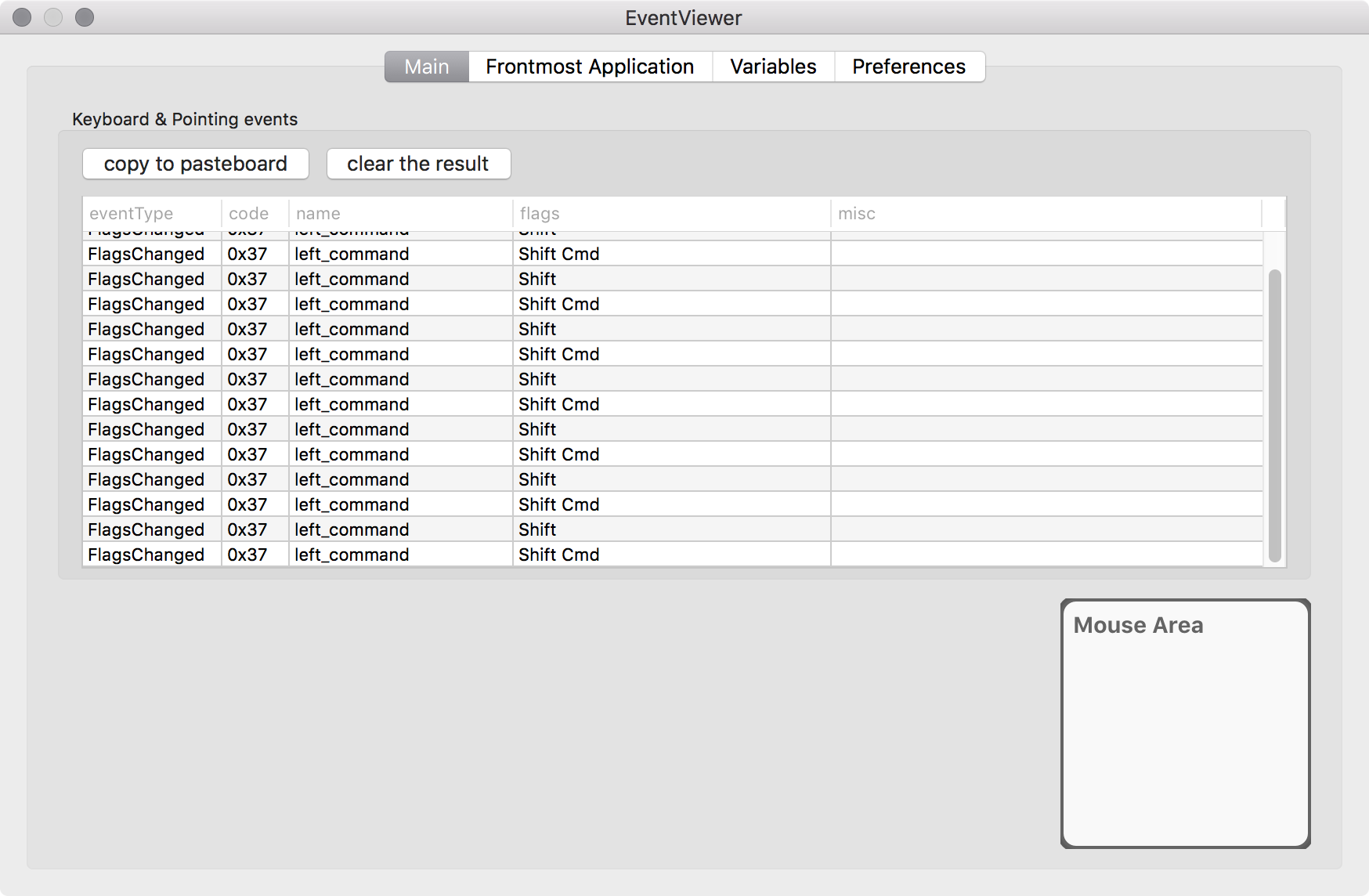
As you can see, pressing the left command key issues Shift and Shift+Command in succession. Please note that Elements was quit before taking the screen shot.
akira-okumura
on 13 Oct 2017
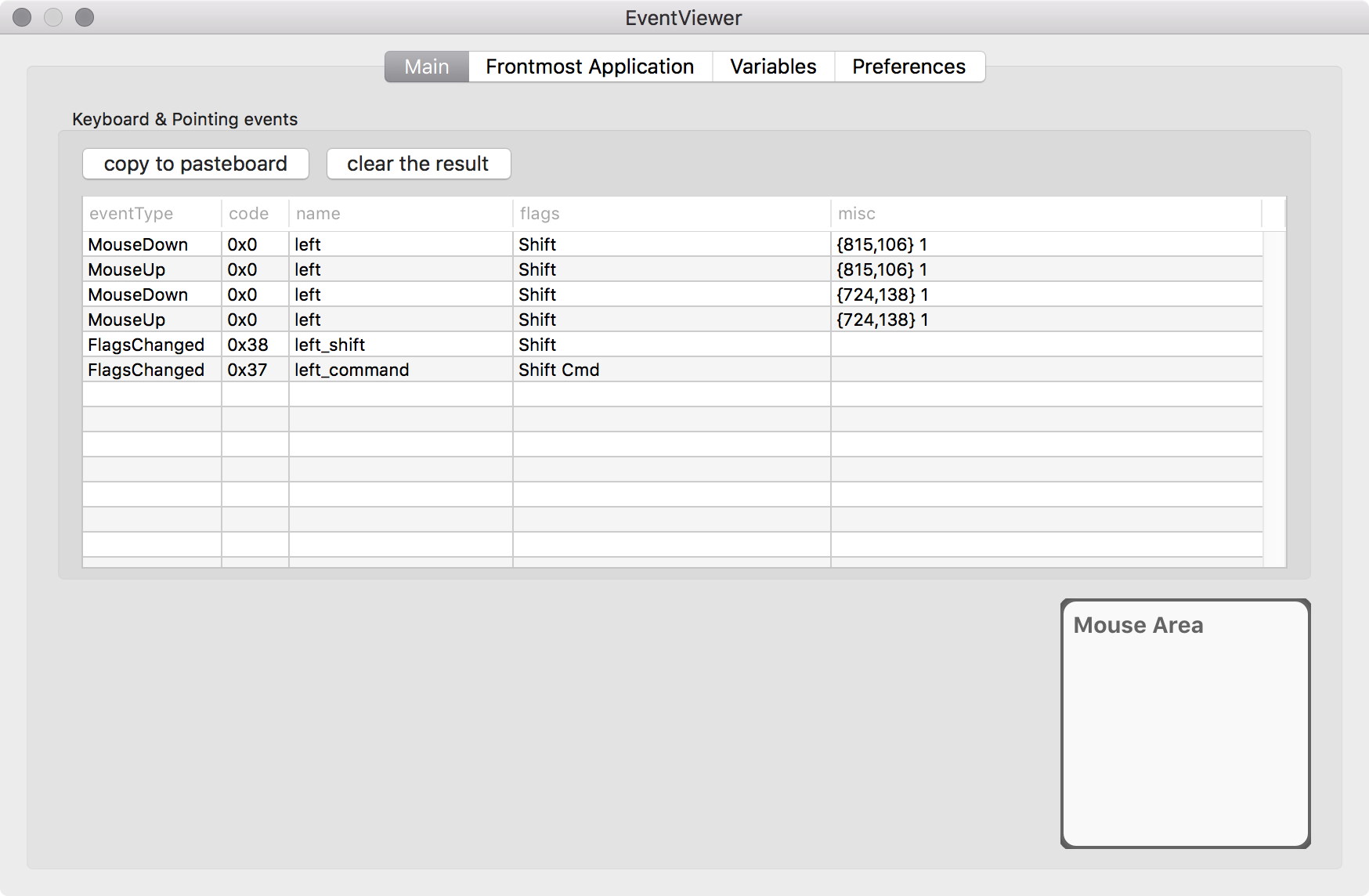
This one is for mouse click with the left shift flag being unexpectedly added.
The both were captured with KE 11.1.0 on MBP 15-inch mid 2014 (10.12.6).
akira-okumura
on 14 Oct 2017
Getting this behavior on KE 11.1.0 on mid-2015 MBP. Quitting KE and restarting seems to fix it somewhat, in some applications, but a full reboot is required to get back to normal behavior
 chrisjohnson
on 16 Oct 2017
chrisjohnson
on 16 Oct 2017
Most recently had this problem (shift stuck with mouse presses), wouldn't go away until I went into preferences -> Devices, unchecked my trackpad, and restarted K-E. Then was fixed.
n8henrie
on 21 Oct 2017
I periodically get my command key 'stuck' with the only remedy to quit KE. I am not remapping my command key (my only remap is esc -> caps lock) but I do use an external keyboard.
Mid-2015 MBP running High Sierra (10.13) and KE 11.1.0
 DrumMachineLearning
on 30 Oct 2017
DrumMachineLearning
on 30 Oct 2017
This is a terrible, terrible bug. I was plagued with this for months until I found this thread. It would happen periodically after long periods of use. As I also run BetterTouchTool and SteerMouse, I had no idea which was the culprit. Unloading all three never resolved the issue - a reboot was always required. This would usually clear the issue for a long while. After the latest upgrade to 11.3 the issue got MUCH worse, to the point where it would reappear immediately after reboot. The only thing that has resolved it entirely is uninstalling Karabiner completely. I hope it can be resolved so I can reinstall.
 prohtex
on 13 Nov 2017
prohtex
on 13 Nov 2017
My experience with this issue a bit different:
This does happen to me, but only rarely... once a month?
I can always launch Karabiner Elements via spotlight, click on Misc, and click the Quit Karabiner-Elements button. Relaunching the tool then works fine for me without reboot.
Not sure why this only happens to me infrequently, maybe because I have only one remapping in place?
YesThatAllen
on 14 Nov 2017
I've had the same thing happen. I never got around to trying a restart of K-E, but I did find that if I go to Accessibility and enable/disable sticky keys, it clears the issue.
 dchenbecker
on 27 Nov 2017
dchenbecker
on 27 Nov 2017
Just created a Github account to thank @linusyang for saving a portion of my sanity (see below for qualifiers). I'm using your build of the 0.90.60 version.
Backstory for anyone experiencing similar problems:
- Spilled an entire mug of tea on my MBP in Feb/March of this year
- Shift key has acted up since (probably shorted, often effectively "stuck" in the "down" position)
- Downloaded Karabiner (not Elements... don't really know the difference) and fixed the problem; acted up again maybe twice this year and had to restart
- Recently had to restart 6 times in 2 weeks; Googled furiously; found this thread
- Uninstalled my previous version of Karabiner and installed the latest Karabiner Elements, which fixed half of the problem: internal keyboard stopped recognizing the Shift key as constantly down, BUT the mouse (both trackpad and USB) was still behaving as if Shift was down. Also, my USB keyboard preferences got messed up.
- Uninstalled the latest Karabiner Elements and installed 0.90.60 per DrChr and Linusyang's advice; and now the problem is... reversed! The mouse now behaves normally; but the built-in keyboard is now behaving as if the Shift key is pressed. Thankfully, my USB keyboard (which I use most of the time anyway) is still functioning normally, as it has been throughout this process.
- I plan to restart my computer, and hope that that dispels any confusion it might have about the Shift flag. I'll continue using as normal and post an update in a few weeks.
 ethanjrt
on 28 Nov 2017
ethanjrt
on 28 Nov 2017
Update: Happy to report that since switching back to @linusyang 's 0.90.60 build, I haven't seen this issue recur. At first I had a little trouble with the mapping (0.90.60 doesn't seem to allow you to simply disable a key, like the newer Karabiner does), but I ultimately remapped my Shift key to Num Lock and that seems to have done the trick.
ethanjrt
on 6 Dec 2017
@ethanjrt Thanks for your feedback. I have actually used my customized build for months and haven't met the "sticky Command key" issue so far.
Edit: Change to correct Github account to reply.
linusyang
on 6 Dec 2017
This issue has been automatically marked as stale because it has not had recent activity. It will be closed if no further activity occurs. Thank you for your contributions.
![stale[bot] picture](https://avatars3.githubusercontent.com/in/1724?v=4&s=40) stale[bot]
on 3 Mar 2018
stale[bot]
on 3 Mar 2018
It is less frequent, but I still have this issue with macOS 10.13.3 and KE 11.6.0.
akira-okumura
on 4 Mar 2018
Still seeing this insane crippling bug that makes it impossible for me to use Karabiner anymore
prohtex
on 4 Mar 2018
Can confirm that this is still occurring in OSX 10.12.6 and KE 11.6.0. It doesn't seem to happen as often as it did in 9.x, but it still will crop up.
schulzj01
on 5 Mar 2018
Karabiner-Elements 11.6.0
High Sierra 10.13.3
the bug still present
 sjgn
on 14 Mar 2018
sjgn
on 14 Mar 2018
Happens for me regularly, even if not frequently. K-E 11.6.0 on Sierra. @tekezo, is there anything that we could do to bribe you into fixing this problem? :)
I may have found something interesting in the logs. I'm attaching a full dump here to make sure I don't skip anything important, but please at least take a look at the warnings that I'm getting:
[2018-03-15 08:26:10.031] [info] [grabber]   vendor_id: 1452
[2018-03-15 08:26:10.031] [info] [grabber]   product_id: 627
[2018-03-15 08:26:10.031] [info] [grabber]   location_id: 0x1000000
[2018-03-15 08:26:10.031] [info] [grabber]   registry_entry_id: 4294976505
[2018-03-15 08:26:10.031] [info] [grabber]   is_keyboard: false
[2018-03-15 08:26:10.031] [info] [grabber]   is_pointing_device: true
[2018-03-15 08:26:10.042] [info] [grabber] Apple Internal Keyboard / Trackpad (device_id:21) is detected.
[2018-03-15 08:26:10.045] [info] [grabber] Apple Internal Keyboard / Trackpad (device_id:21) is ignored.
[2018-03-15 08:26:10.220] [info] [grabber] Apple Internal Keyboard / Trackpad (device_id:20) is grabbed
[2018-03-15 08:53:05.790] [info] [grabber] matching device:
[2018-03-15 08:53:05.790] [info] [grabber]   manufacturer: Microsoft
[2018-03-15 08:53:05.790] [info] [grabber]   product: Microsoft® 2.4GHz Transceiver v9.0
[2018-03-15 08:53:05.790] [info] [grabber]   vendor_id: 1118
[2018-03-15 08:53:05.790] [info] [grabber]   product_id: 1957
[2018-03-15 08:53:05.790] [info] [grabber]   location_id: 0x14200000
[2018-03-15 08:53:05.790] [info] [grabber]   registry_entry_id: 4294976944
[2018-03-15 08:53:05.790] [info] [grabber]   is_keyboard: true
[2018-03-15 08:53:05.790] [info] [grabber]   is_pointing_device: false
[2018-03-15 08:53:05.793] [info] [grabber] Microsoft® 2.4GHz Transceiver v9.0 (device_id:22) is detected.
[2018-03-15 08:53:05.799] [info] [grabber] Apple Internal Keyboard / Trackpad (device_id:21) is ignored.
[2018-03-15 08:53:05.800] [info] [grabber] matching device:
[2018-03-15 08:53:05.800] [info] [grabber]   manufacturer: Microsoft
[2018-03-15 08:53:05.801] [info] [grabber]   product: Microsoft® 2.4GHz Transceiver v9.0
[2018-03-15 08:53:05.801] [info] [grabber]   vendor_id: 1118
[2018-03-15 08:53:05.801] [info] [grabber]   product_id: 1957
[2018-03-15 08:53:05.801] [info] [grabber]   location_id: 0x14200000
[2018-03-15 08:53:05.801] [info] [grabber]   registry_entry_id: 4294976947
[2018-03-15 08:53:05.801] [info] [grabber]   is_keyboard: false
[2018-03-15 08:53:05.802] [info] [grabber]   is_pointing_device: true
[2018-03-15 08:53:05.803] [info] [grabber] Microsoft® 2.4GHz Transceiver v9.0 (device_id:23) is detected.
[2018-03-15 08:53:05.808] [info] [grabber] Microsoft® 2.4GHz Transceiver v9.0 (device_id:23) is ignored.
[2018-03-15 08:53:05.808] [info] [grabber] Apple Internal Keyboard / Trackpad (device_id:21) is ignored.
[2018-03-15 08:53:05.910] [info] [grabber] Microsoft® 2.4GHz Transceiver v9.0 (device_id:22) is grabbed
[2018-03-15 11:34:08.714] [info] [grabber] removal device:
[2018-03-15 11:34:08.725] [info] [grabber]   vendor_id: 1118
[2018-03-15 11:34:08.725] [info] [grabber]   product_id: 1957
[2018-03-15 11:34:08.725] [info] [grabber]   location_id: 0x14200000
[2018-03-15 11:34:08.725] [info] [grabber] Microsoft® 2.4GHz Transceiver v9.0 (device_id:23) is removed.
[2018-03-15 11:34:08.837] [info] [grabber] Apple Internal Keyboard / Trackpad (device_id:21) is ignored.
[2018-03-15 11:34:08.841] [info] [grabber] removal device:
[2018-03-15 11:34:08.841] [info] [grabber]   vendor_id: 0
[2018-03-15 11:34:08.841] [info] [grabber]   product_id: 0
[2018-03-15 11:34:08.865] [info] [grabber] Apple Internal Keyboard / Trackpad (device_id:21) is ignored.
[2018-03-15 11:34:08.868] [info] [grabber] removal device:
[2018-03-15 11:34:08.868] [info] [grabber]   vendor_id: 1118
[2018-03-15 11:34:08.868] [info] [grabber]   product_id: 1957
[2018-03-15 11:34:08.868] [info] [grabber]   location_id: 0x14200000
[2018-03-15 11:34:08.868] [info] [grabber] Microsoft® 2.4GHz Transceiver v9.0 (device_id:22) is removed.
[2018-03-15 11:34:08.878] [info] [grabber] Apple Internal Keyboard / Trackpad (device_id:21) is ignored.
[2018-03-15 12:15:29.478] [info] [grabber] matching device:
[2018-03-15 12:15:29.479] [info] [grabber]   manufacturer: Microsoft
[2018-03-15 12:15:29.479] [info] [grabber]   product: Microsoft® 2.4GHz Transceiver v9.0
[2018-03-15 12:15:29.479] [info] [grabber]   vendor_id: 1118
[2018-03-15 12:15:29.479] [info] [grabber]   product_id: 1957
[2018-03-15 12:15:29.479] [info] [grabber]   location_id: 0x14200000
[2018-03-15 12:15:29.479] [info] [grabber]   registry_entry_id: 4294977881
[2018-03-15 12:15:29.479] [info] [grabber]   is_keyboard: false
[2018-03-15 12:15:29.479] [info] [grabber]   is_pointing_device: true
[2018-03-15 12:15:29.480] [info] [grabber] Microsoft® 2.4GHz Transceiver v9.0 (device_id:24) is detected.
[2018-03-15 12:15:29.495] [info] [grabber] Apple Internal Keyboard / Trackpad (device_id:21) is ignored.
[2018-03-15 12:15:29.495] [info] [grabber] Microsoft® 2.4GHz Transceiver v9.0 (device_id:24) is ignored.
[2018-03-15 12:15:29.497] [info] [grabber] matching device:
[2018-03-15 12:15:29.497] [info] [grabber]   manufacturer: Microsoft
[2018-03-15 12:15:29.497] [info] [grabber]   product: Microsoft® 2.4GHz Transceiver v9.0
[2018-03-15 12:15:29.497] [info] [grabber]   vendor_id: 1118
[2018-03-15 12:15:29.497] [info] [grabber]   product_id: 1957
[2018-03-15 12:15:29.497] [info] [grabber]   location_id: 0x14200000
[2018-03-15 12:15:29.497] [info] [grabber]   registry_entry_id: 4294977884
[2018-03-15 12:15:29.497] [info] [grabber]   is_keyboard: true
[2018-03-15 12:15:29.497] [info] [grabber]   is_pointing_device: false
[2018-03-15 12:15:29.500] [info] [grabber] Microsoft® 2.4GHz Transceiver v9.0 (device_id:25) is detected.
[2018-03-15 12:15:29.504] [info] [grabber] Apple Internal Keyboard / Trackpad (device_id:21) is ignored.
[2018-03-15 12:15:29.504] [info] [grabber] Microsoft® 2.4GHz Transceiver v9.0 (device_id:24) is ignored.
[2018-03-15 12:15:29.606] [info] [grabber] Microsoft® 2.4GHz Transceiver v9.0 (device_id:25) is grabbed
[2018-03-15 14:58:05.701] [info] [grabber] removal device:
[2018-03-15 14:58:05.713] [info] [grabber]   vendor_id: 1118
[2018-03-15 14:58:05.713] [info] [grabber]   product_id: 1957
[2018-03-15 14:58:05.713] [info] [grabber]   location_id: 0x14200000
[2018-03-15 14:58:05.713] [info] [grabber] Microsoft® 2.4GHz Transceiver v9.0 (device_id:24) is removed.
[2018-03-15 14:58:05.762] [info] [grabber] Apple Internal Keyboard / Trackpad (device_id:21) is ignored.
[2018-03-15 14:58:05.763] [info] [grabber] removal device:
[2018-03-15 14:58:05.763] [info] [grabber]   vendor_id: 0
[2018-03-15 14:58:05.763] [info] [grabber]   product_id: 0
[2018-03-15 14:58:05.785] [info] [grabber] Apple Internal Keyboard / Trackpad (device_id:21) is ignored.
[2018-03-15 14:58:05.786] [info] [grabber] removal device:
[2018-03-15 14:58:05.786] [info] [grabber]   vendor_id: 1118
[2018-03-15 14:58:05.786] [info] [grabber]   product_id: 1957
[2018-03-15 14:58:05.786] [info] [grabber]   location_id: 0x14200000
[2018-03-15 14:58:05.786] [info] [grabber] Microsoft® 2.4GHz Transceiver v9.0 (device_id:25) is removed.
[2018-03-15 14:58:05.800] [info] [grabber] Apple Internal Keyboard / Trackpad (device_id:21) is ignored.
[2018-03-15 15:43:04.121] [info] [grabber] matching device:
[2018-03-15 15:43:04.128] [info] [grabber]   manufacturer: Microsoft
[2018-03-15 15:43:04.128] [info] [grabber]   product: Microsoft® 2.4GHz Transceiver v9.0
[2018-03-15 15:43:04.128] [info] [grabber]   vendor_id: 1118
[2018-03-15 15:43:04.128] [info] [grabber]   product_id: 1957
[2018-03-15 15:43:04.128] [info] [grabber]   location_id: 0x14200000
[2018-03-15 15:43:04.128] [info] [grabber]   registry_entry_id: 4294980367
[2018-03-15 15:43:04.128] [info] [grabber]   is_keyboard: true
[2018-03-15 15:43:04.128] [info] [grabber]   is_pointing_device: false
[2018-03-15 15:43:04.153] [info] [grabber] Microsoft® 2.4GHz Transceiver v9.0 (device_id:26) is detected.
[2018-03-15 15:43:04.239] [info] [grabber] Apple Internal Keyboard / Trackpad (device_id:21) is ignored.
[2018-03-15 15:43:04.245] [info] [grabber] matching device:
[2018-03-15 15:43:04.245] [info] [grabber]   manufacturer: Microsoft
[2018-03-15 15:43:04.245] [info] [grabber]   product: Microsoft® 2.4GHz Transceiver v9.0
[2018-03-15 15:43:04.245] [info] [grabber]   vendor_id: 1118
[2018-03-15 15:43:04.245] [info] [grabber]   product_id: 1957
[2018-03-15 15:43:04.245] [info] [grabber]   location_id: 0x14200000
[2018-03-15 15:43:04.245] [info] [grabber]   registry_entry_id: 4294980370
[2018-03-15 15:43:04.245] [info] [grabber]   is_keyboard: false
[2018-03-15 15:43:04.245] [info] [grabber]   is_pointing_device: true
[2018-03-15 15:43:04.246] [info] [grabber] Microsoft® 2.4GHz Transceiver v9.0 (device_id:27) is detected.
[2018-03-15 15:43:04.269] [info] [grabber] Microsoft® 2.4GHz Transceiver v9.0 (device_id:27) is ignored.
[2018-03-15 15:43:04.270] [info] [grabber] Apple Internal Keyboard / Trackpad (device_id:21) is ignored.
[2018-03-15 15:43:04.472] [info] [grabber] Microsoft® 2.4GHz Transceiver v9.0 (device_id:26) is grabbed
[2018-03-15 15:58:53.431] [info] [grabber] removal device:
[2018-03-15 15:58:53.444] [info] [grabber]   vendor_id: 1118
[2018-03-15 15:58:53.444] [info] [grabber]   product_id: 1957
[2018-03-15 15:58:53.444] [info] [grabber]   location_id: 0x14200000
[2018-03-15 15:58:53.444] [info] [grabber] Microsoft® 2.4GHz Transceiver v9.0 (device_id:27) is removed.
[2018-03-15 15:58:53.488] [info] [grabber] Apple Internal Keyboard / Trackpad (device_id:21) is ignored.
[2018-03-15 15:58:53.489] [info] [grabber] removal device:
[2018-03-15 15:58:53.489] [info] [grabber]   vendor_id: 0
[2018-03-15 15:58:53.489] [info] [grabber]   product_id: 0
[2018-03-15 15:58:53.493] [info] [grabber] Apple Internal Keyboard / Trackpad (device_id:21) is ignored.
[2018-03-15 15:58:53.493] [info] [grabber] removal device:
[2018-03-15 15:58:53.493] [info] [grabber]   vendor_id: 1118
[2018-03-15 15:58:53.493] [info] [grabber]   product_id: 1957
[2018-03-15 15:58:53.493] [info] [grabber]   location_id: 0x14200000
[2018-03-15 15:58:53.493] [info] [grabber] Microsoft® 2.4GHz Transceiver v9.0 (device_id:26) is removed.
[2018-03-15 15:58:53.496] [info] [grabber] Apple Internal Keyboard / Trackpad (device_id:21) is ignored.
[2018-03-15 20:47:55.758] [info] [grabber] removal device:
[2018-03-15 20:47:55.912] [info] [grabber]   vendor_id: 1452
[2018-03-15 20:47:55.912] [info] [grabber]   product_id: 627
[2018-03-15 20:47:55.912] [info] [grabber]   location_id: 0x1000000
[2018-03-15 20:47:55.912] [info] [grabber] Apple Internal Keyboard / Trackpad (device_id:21) is removed.
[2018-03-15 20:47:55.928] [info] [grabber] removal device:
[2018-03-15 20:47:55.929] [info] [grabber]   vendor_id: 0
[2018-03-15 20:47:55.929] [info] [grabber]   product_id: 0
[2018-03-15 20:47:55.933] [info] [grabber] removal device:
[2018-03-15 20:47:55.934] [info] [grabber]   vendor_id: 1452
[2018-03-15 20:47:55.934] [info] [grabber]   product_id: 627
[2018-03-15 20:47:55.934] [info] [grabber]   location_id: 0x1000000
[2018-03-15 20:47:55.934] [info] [grabber] Apple Internal Keyboard / Trackpad (device_id:20) is removed.
[2018-03-15 20:47:55.939] [info] [grabber] matching device:
[2018-03-15 20:47:55.939] [info] [grabber]   product: Apple Internal Keyboard / Trackpad
[2018-03-15 20:47:55.939] [info] [grabber]   vendor_id: 1452
[2018-03-15 20:47:55.939] [info] [grabber]   product_id: 627
[2018-03-15 20:47:55.939] [info] [grabber]   location_id: 0x1000000
[2018-03-15 20:47:55.940] [info] [grabber]   registry_entry_id: 4294980920
[2018-03-15 20:47:55.940] [info] [grabber]   is_keyboard: true
[2018-03-15 20:47:55.940] [info] [grabber]   is_pointing_device: false
[2018-03-15 20:47:55.992] [info] [grabber] Apple Internal Keyboard / Trackpad (device_id:28) is detected.
[2018-03-15 20:47:56.000] [info] [grabber] matching device:
[2018-03-15 20:47:56.001] [info] [grabber]   product: Apple Internal Keyboard / Trackpad
[2018-03-15 20:47:56.001] [info] [grabber]   vendor_id: 1452
[2018-03-15 20:47:56.001] [info] [grabber]   product_id: 627
[2018-03-15 20:47:56.001] [info] [grabber]   location_id: 0x1000000
[2018-03-15 20:47:56.001] [info] [grabber]   registry_entry_id: 4294980926
[2018-03-15 20:47:56.001] [info] [grabber]   is_keyboard: false
[2018-03-15 20:47:56.002] [info] [grabber]   is_pointing_device: true
[2018-03-15 20:47:56.048] [info] [grabber] Apple Internal Keyboard / Trackpad (device_id:29) is detected.
[2018-03-15 20:47:56.052] [info] [grabber] Apple Internal Keyboard / Trackpad (device_id:29) is ignored.
[2018-03-15 20:47:56.221] [warning] [grabber] We cannot grab Apple Internal Keyboard / Trackpad (device_id:28) while any modifier flags are pressed. (right_shift )
[2018-03-15 20:47:56.325] [warning] [grabber] We cannot grab Apple Internal Keyboard / Trackpad (device_id:28) while a key is repeating.
[2018-03-15 20:47:56.929] [info] [grabber] Apple Internal Keyboard / Trackpad (device_id:28) is grabbed
[2018-03-16 07:06:01.362] [info] [grabber] removal device:
[2018-03-16 07:06:01.744] [info] [grabber]   vendor_id: 1452
[2018-03-16 07:06:01.744] [info] [grabber]   product_id: 627
[2018-03-16 07:06:01.745] [info] [grabber]   location_id: 0x1000000
[2018-03-16 07:06:01.745] [info] [grabber] Apple Internal Keyboard / Trackpad (device_id:29) is removed.
[2018-03-16 07:06:02.145] [info] [grabber] removal device:
[2018-03-16 07:06:02.145] [info] [grabber]   vendor_id: 0
[2018-03-16 07:06:02.145] [info] [grabber]   product_id: 0
[2018-03-16 07:06:02.165] [info] [grabber] removal device:
[2018-03-16 07:06:02.165] [info] [grabber]   vendor_id: 1452
[2018-03-16 07:06:02.165] [info] [grabber]   product_id: 627
[2018-03-16 07:06:02.165] [info] [grabber]   location_id: 0x1000000
[2018-03-16 07:06:02.165] [info] [grabber] Apple Internal Keyboard / Trackpad (device_id:28) is removed.
[2018-03-16 07:06:02.174] [info] [grabber] matching device:
[2018-03-16 07:06:02.174] [info] [grabber]   product: Apple Internal Keyboard / Trackpad
[2018-03-16 07:06:02.175] [info] [grabber]   vendor_id: 1452
[2018-03-16 07:06:02.175] [info] [grabber]   product_id: 627
[2018-03-16 07:06:02.175] [info] [grabber]   location_id: 0x1000000
[2018-03-16 07:06:02.175] [info] [grabber]   registry_entry_id: 4294981582
[2018-03-16 07:06:02.175] [info] [grabber]   is_keyboard: true
[2018-03-16 07:06:02.175] [info] [grabber]   is_pointing_device: false
[2018-03-16 07:06:02.177] [info] [grabber] Apple Internal Keyboard / Trackpad (device_id:30) is detected.
[2018-03-16 07:06:02.220] [info] [grabber] matching device:
[2018-03-16 07:06:02.221] [info] [grabber]   product: Apple Internal Keyboard / Trackpad
[2018-03-16 07:06:02.221] [info] [grabber]   vendor_id: 1452
[2018-03-16 07:06:02.221] [info] [grabber]   product_id: 627
[2018-03-16 07:06:02.221] [info] [grabber]   location_id: 0x1000000
[2018-03-16 07:06:02.221] [info] [grabber]   registry_entry_id: 4294981588
[2018-03-16 07:06:02.221] [info] [grabber]   is_keyboard: false
[2018-03-16 07:06:02.221] [info] [grabber]   is_pointing_device: true
[2018-03-16 07:06:02.235] [info] [grabber] Apple Internal Keyboard / Trackpad (device_id:31) is detected.
[2018-03-16 07:06:02.390] [info] [grabber] Apple Internal Keyboard / Trackpad (device_id:31) is ignored.
[2018-03-16 07:06:02.523] [info] [grabber] Re-enable event_tap_ by kCGEventTapDisabledByTimeout
[2018-03-16 07:06:02.561] [info] [grabber] Apple Internal Keyboard / Trackpad (device_id:30) is grabbed
[2018-03-16 07:08:55.874] [info] [grabber] pid:1175 is exited
[2018-03-16 07:08:55.960] [info] [grabber] Connected devices are ungrabbed
[2018-03-16 07:08:55.960] [info] [grabber] event_tap_manager terminated
[2018-03-16 07:08:55.960] [info] [grabber] virtual_hid_device_client::close_connection
[2018-03-16 07:08:55.968] [info] [grabber] removal device:
[2018-03-16 07:08:55.968] [info] [grabber]   vendor_id: 5824
[2018-03-16 07:08:55.968] [info] [grabber]   product_id: 10203
[2018-03-16 07:08:55.968] [info] [grabber]   location_id: 0x0
[2018-03-16 07:08:55.968] [info] [grabber] Karabiner VirtualHIDKeyboard (device_id:5) is removed.
[2018-03-16 07:08:55.968] [info] [grabber] virtual_hid_device_client::close_connection
[2018-03-16 07:08:55.968] [info] [grabber] Connected devices are ungrabbed
[2018-03-16 07:08:55.969] [info] [grabber] IOServiceOpen is succeeded @ void krbn::virtual_hid_device_client::matched_callback(io_iterator_t)
[2018-03-16 07:08:55.969] [info] [grabber] virtual_hid_device_client_ is connected
[2018-03-16 07:08:55.969] [info] [grabber] Apple Internal Keyboard / Trackpad (device_id:31) is ignored.
[2018-03-16 07:09:20.457] [info] [console_user_server] version 11.6.0
[2018-03-16 07:09:20.485] [info] [console_user_server] Check version...
[2018-03-16 07:09:20.535] [info] [console_user_server] Load karabiner.json...
[2018-03-16 07:09:20.542] [info] [console_user_server] core_configuration is updated.
[2018-03-16 07:09:20.543] [info] [console_user_server] Check for updates...
[2018-03-16 07:09:21.535] [info] [console_user_server] input_source_manager initialize
[2018-03-16 07:09:21.677] [info] [grabber] karabiner_console_user_server is connected (pid:35598)
[2018-03-16 07:09:21.677] [info] [grabber] event_tap_manager initialized
[2018-03-16 07:09:21.677] [info] [console_user_server] receiver is initialized
[2018-03-16 07:09:21.677] [info] [console_user_server] Check version...
[2018-03-16 07:09:21.677] [info] [console_user_server] grabber_client_ is connected
[2018-03-16 07:09:21.678] [info] [grabber] Load karabiner.json...
[2018-03-16 07:09:21.680] [info] [grabber] core_configuration is updated.
[2018-03-16 07:09:21.683] [info] [grabber] initialize_virtual_hid_keyboard
[2018-03-16 07:09:21.683] [info] [grabber]   keyboard_type:40
[2018-03-16 07:09:21.683] [info] [grabber]   caps_lock_delay_milliseconds:0
[2018-03-16 07:09:21.684] [info] [grabber] Apple Internal Keyboard / Trackpad (device_id:31) is ignored.
[2018-03-16 07:09:21.684] [warning] [grabber] virtual_hid_keyboard is not ready. Please wait for a while.
[2018-03-16 07:09:21.687] [info] [grabber] matching device:
[2018-03-16 07:09:21.688] [info] [grabber]   manufacturer: pqrs.org
[2018-03-16 07:09:21.688] [info] [grabber]   product: Karabiner VirtualHIDKeyboard
[2018-03-16 07:09:21.688] [info] [grabber]   vendor_id: 5824
[2018-03-16 07:09:21.688] [info] [grabber]   product_id: 10203
[2018-03-16 07:09:21.688] [info] [grabber]   location_id: 0x0
[2018-03-16 07:09:21.688] [info] [grabber]   serial_number: pqrs.org:org_pqrs_driver_Karabiner_VirtualHIDDevice_VirtualHIDKeyboard_v050000
[2018-03-16 07:09:21.688] [info] [grabber]   registry_entry_id: 4294981751
[2018-03-16 07:09:21.688] [info] [grabber]   is_keyboard: true
[2018-03-16 07:09:21.688] [info] [grabber]   is_pointing_device: false
[2018-03-16 07:09:21.694] [info] [grabber] Karabiner VirtualHIDKeyboard (device_id:32) is detected.
[2018-03-16 07:09:21.695] [info] [console_user_server] Load karabiner.json...
[2018-03-16 07:09:21.697] [info] [grabber] Apple Internal Keyboard / Trackpad (device_id:31) is ignored.
[2018-03-16 07:09:21.697] [info] [console_user_server] core_configuration is updated.
[2018-03-16 07:09:21.807] [info] [grabber] Apple Internal Keyboard / Trackpad (device_id:30) is grabbed
[2018-03-16 07:09:21.822] [info] [console_user_server] frontmost_application_observer initialize
[2018-03-16 07:09:21.825] [info] [console_user_server] input_source_observer initialize
[2018-03-16 07:09:22.700] [info] [console_user_server] system_preferences::values is updated.
[2018-03-16 07:09:22.701] [info] [grabber] system_preferences_values_updated
 bl-nero
on 16 Mar 2018
bl-nero
on 16 Mar 2018
Confirming this cursed bug still exists in 11.6.7. I thought perhaps it was related to USB devices but it just locked up my macbook. I've just uninstalled Karabiner on all my machines again. Please, please how can we sort this out?
prohtex
on 29 Mar 2018
Same problem on Karabiner-Elements 11.6.0. Command key gets stuck, probably when I disconnect external keyboard when my macbook is in sleep mode. The updater says it's latest version of Karabiner. High Sierra 10.13.4.
 djeer
on 2 Apr 2018
djeer
on 2 Apr 2018
+1
K-E version: 12.0.0
OS version: 10.13.4
 SimpleFate
on 21 May 2018
SimpleFate
on 21 May 2018
This issue has been automatically marked as stale because it has not had recent activity. It will be closed if no further activity occurs. Thank you for your contributions.
stale[bot]
on 20 Jul 2018
I'm currently on macOS v10.13.5 (Beta), and it's been a while since the last time I noticed the cmd key get stuck, but every once in a while the other keys get stuck for a short amount of time, for instance sometimes I press the "=" key once and "==` gets printed, like if I pressed it twice.
 fabiospampinato
on 21 Jul 2018
fabiospampinato
on 21 Jul 2018
I may have found something interesting in the logs. I'm attaching a full dump here to make sure I don't skip anything important, but please at least take a look at the warnings that I'm getting:
[2018-03-15 08:26:10.031] [info] [grabber] vendor_id: 1452
[2018-03-15 08:26:10.031] [info] [grabber] product_id: 627
[2018-03-15 08:26:10.031] [info] [grabber] location_id: 0x1000000
[2018-03-15 08:26:10.031] [info] [grabber] registry_entry_id: 4294976505
[2018-03-15 08:26:10.031] [info] [grabber] is_keyboard: false
[2018-03-15 08:26:10.031] [info] [grabber] is_pointing_device: true
[2018-03-15 08:26:10.042] [info] [grabber] Apple Internal Keyboard / Trackpad (device_id:21) is detected.
[2018-03-15 08:26:10.045] [info] [grabber] Apple Internal Keyboard / Trackpad (device_id:21) is ignored.
[2018-03-15 08:26:10.220] [info] [grabber] Apple Internal Keyboard / Trackpad (device_id:20) is grabbed
[2018-03-15 08:53:05.790] [info] [grabber] matching device:
[2018-03-15 08:53:05.790] [info] [grabber] manufacturer: Microsoft
[2018-03-15 08:53:05.790] [info] [grabber] product: Microsoft® 2.4GHz Transceiver v9.0
[2018-03-15 08:53:05.790] [info] [grabber] vendor_id: 1118
[2018-03-15 08:53:05.790] [info] [grabber] product_id: 1957
[2018-03-15 08:53:05.790] [info] [grabber] location_id: 0x14200000
[2018-03-15 08:53:05.790] [info] [grabber] registry_entry_id: 4294976944
[2018-03-15 08:53:05.790] [info] [grabber] is_keyboard: true
[2018-03-15 08:53:05.790] [info] [grabber] is_pointing_device: false
[2018-03-15 08:53:05.793] [info] [grabber] Microsoft® 2.4GHz Transceiver v9.0 (device_id:22) is detected.
[2018-03-15 08:53:05.799] [info] [grabber] Apple Internal Keyboard / Trackpad (device_id:21) is ignored.
[2018-03-15 08:53:05.800] [info] [grabber] matching device:
[2018-03-15 08:53:05.800] [info] [grabber] manufacturer: Microsoft
[2018-03-15 08:53:05.801] [info] [grabber] product: Microsoft® 2.4GHz Transceiver v9.0
[2018-03-15 08:53:05.801] [info] [grabber] vendor_id: 1118
[2018-03-15 08:53:05.801] [info] [grabber] product_id: 1957
[2018-03-15 08:53:05.801] [info] [grabber] location_id: 0x14200000
[2018-03-15 08:53:05.801] [info] [grabber] registry_entry_id: 4294976947
[2018-03-15 08:53:05.801] [info] [grabber] is_keyboard: false
[2018-03-15 08:53:05.802] [info] [grabber] is_pointing_device: true
[2018-03-15 08:53:05.803] [info] [grabber] Microsoft® 2.4GHz Transceiver v9.0 (device_id:23) is detected.
[2018-03-15 08:53:05.808] [info] [grabber] Microsoft® 2.4GHz Transceiver v9.0 (device_id:23) is ignored.
Interesting that I'm also using a Microsoft Keyboard same as you, and seeing this problem. Perhaps that's part of the reason we're seeing this bug? Anyone else in the thread that is seeing this issue using a MS keyboard?
schulzj01
on 23 Jul 2018
I also experienced this with the shift flag only effecting mouse clicks. Furthermore, killing the process resulted in Karabiner restarting automatically.
 andrewsanchez
on 27 Jul 2018
andrewsanchez
on 27 Jul 2018
GOODNESS ME!
I had tried everything to fix this, except quitting Karabiner Elements. And that fixed it like a magic!
Sierra 10.12.6 .. Karabiner-Elements 12.1.0.
The event viewer would NOT show any repeats or stuck keys. But still something was stuck. Links would open in a new window. Selecting text would select the whole field from where the cursor was.
I thought restarting MBP is the only fix.. until I quit Karabiner. Please please get this fixed, it's really annoying.
 ehti
on 6 Aug 2018
ehti
on 6 Aug 2018
@tekezo Say a word. Any. Or it's hopeless for your app. This bug was issued on 2nd Dec 2016. Every tenth time I open my MacBook, I get stuck, can't type in my password, because it's flooding the textfields. Just a hard restart could fix this for the next nine times.
 macx
on 6 Aug 2018
macx
on 6 Aug 2018
Just in case, if it can help. Someone in my desk has moved to high sierra recently. She uses a Wacom tablet, but not K-E. Since then, sometime the shift key get stuck while using the tablet. Everybody is complaining like in the comments of this video: https://www.youtube.com/watch?v=uHW-ThXrQjQ. People from Wacom are trying to solve it, but it looks like they don't manage and they certainly have quite more money than @tekezo.
I wonder if those troubles are not linked, as if it could come in fact from OS X that doesn't respect it's own documentation regarding the way to produce an input device driver.
If it's the case, this means solving that issue is not by trying to find a bugg, but trying to find a trick : like detect the problem have occurred and restart the app automatically. So, the difficulty is now: how to make the difference between a human pressing shift/command/alt intentionally for a long time and a OS artefact?
 e-gaulue
on 2 Oct 2018
e-gaulue
on 2 Oct 2018
The problem might only affect few users, but annoyance and inconvenience it leads to warrants at least adding an item to KE menu (one the drops down when icon in Mac status bar is clicked) like "Reset all keys and reload the app".
 Vladimir-Yashin
on 2 Oct 2018
Vladimir-Yashin
on 2 Oct 2018
I have been having my shift key get stuck on a very regular basis! So far I can only solve it via restart. I do have a Wacom tablet ... I'm going to try to downgrade Wacom tablet driver to see if this helps. I'm not sure what to do, and I don't want to not use KE! :(
Ok, looks like it is my Wacom driver, and not KE. Sorry for the false report. Thanks to @e-gaulue for the tip off and YT video link. That really helped!
 mhulse
on 11 Oct 2018
mhulse
on 11 Oct 2018
This issue has been automatically marked as stale because it has not had recent activity. It will be closed if no further activity occurs. Thank you for your contributions.
stale[bot]
on 10 Dec 2018
Definitely not stale!
 jonashaag
on 11 Dec 2018
jonashaag
on 11 Dec 2018
Definitely not stale!
Still seeing it here on the latest version as well.
schulzj01
on 11 Dec 2018
Same here. I had to stop using KE because sometimes I can't even type my password on the lock screen and I have to reset.
 georgiyordanov
on 20 Dec 2018
georgiyordanov
on 20 Dec 2018
I've started having an issue with this pattern and came here to check if it was known. So far, I've experienced it with [g], [enter], and [space]. each time I've been able to navigate into the karabiner elements menu bar item and find a way to restart it - the first two I was able to simply quit karabiner elements, but the last one required opening its preferences and finding the restart button, because space was instantly pressing the "cancel, don't quit karabiner" button, which imo isn't a good idea for this and also general workflow usability reasons.
 lahwran
on 15 Feb 2019
lahwran
on 15 Feb 2019
btw, ping @tekezo for what sort of logs or analysis you'd want to do if this happened on a machine you had access to. I can eg run karabiner in a debug mode, add breakpoints, whatever, just tell me what to do - I don't have a ton of spare time right now to figure out how to analyze it myself.
My system and other fancy desktop apps I use:
MacBookPro11,3
High Sierra 10.13.6
BetterTouchTool 2.687
HyperSwitch 0.2.588-dev
SwitchResX 4.8.1
TotalSpaces2 v2.7.7
Google Backup and Sync 3.43.2448.9071
Macs Fan Control 1.4.12
f.lux 39.987
MenuMeters El Capitan Port 1.9.2
LittleSnitch 4.2.4
lahwran
on 15 Feb 2019
I started seeing this issue as well recently with K-E 12.2.0 on Mojave 10.14.3
 deepredsky
on 4 Mar 2019
deepredsky
on 4 Mar 2019
I suspect this issue is bound to deep sleep mode. I have different use patterns of my laptop: sometime I don't unplug it nor close the lid for months, and sometime every day is on the go unplugged and closed. The issue occures periodically during "on the go" pattern when I open the lid, and never during "stationary" pattern.
berlic
on 6 Mar 2019
Same problem here again
 gcuisinier
on 13 Mar 2019
gcuisinier
on 13 Mar 2019
Same here. I nearly had to stop using KE because there was one time I can't even type my password on the lock screen and I have to reset and lost my hours worth of TurboTax input. (I knew I should have hit save every 10 minutes or so, but it was the first time in years I had ever had to force reset my mac!)
 DrShengPeng
on 20 Mar 2019
DrShengPeng
on 20 Mar 2019
@tekezo this is a major issue, there are 110 comments here about it, as well a bunch of other issues reporting the same problem (#1645, #1758). Can you acknowledge you are aware of it?
Is this possibly the same root cause as #545?
 russelldavis
on 21 Mar 2019
russelldavis
on 21 Mar 2019
BTW, for anyone who is experiencing this problem and stubbornly keeps using KE: You need to turn off or slow way down the key repeat speed via the keyboard system settings. It saved my ass just the other day. I was able to type in my password in multiple chunks by deleting the slowly repeating fake input and rush in several keys and finally logged in and killed KE and voila! Admittedly, this won't be helpful if it's a modifier key.
DrShengPeng
on 21 Mar 2019
For me, I found that turning off key repeat entirely (like this http://cdn.osxdaily.com/wp-content/uploads/2019/03/fix-double-typing-keys-mac-key-repeat-off.jpg) (temporarily) and typing any key stroke breaks the cycle!!
I also realized that I have my KeyRepeat setting customized to 1 (via defaults write NSGlobalDomain KeyRepeat -int 1, whereas the fastest setting in the UI sets it to 2), and I wonder if that contributes to the likelihood of the bug triggering?
 danielpops
on 16 Apr 2019
danielpops
on 16 Apr 2019
I can vouch that turning off Key Repeat works (Sierra, K-E12.2.0) — just a slick and simple slide!
A long while ago I used to often encounter this bug, but haven't lately until this specific incident. I've forgotten how I used to debug it, but Key Repeat off is the best current method for me.
 wilstenholme
on 24 Apr 2019
wilstenholme
on 24 Apr 2019
Having this same issue... this issue has been going on for 2 years without a fix?
 gevro
on 27 Apr 2019
gevro
on 27 Apr 2019
I have this issue almost daily. Very annoying. Would be so grateful for a fix.
 plufz
on 28 Apr 2019
plufz
on 28 Apr 2019
This is the most commented issue on Karabiner, and has been going on for more than 2 years without a fix.
gevro
on 28 Apr 2019
It’s not just a lack of a fix, but lack of an acknowledgement or response of any kind from @tekezo. He’s actively committing and usually responsive, so I’m guessing he’s somehow not seeing these and not aware how bad the issue is.
Does anyone have a backchannel to him?
russelldavis
on 28 Apr 2019
I remember he talked about this before and afaik there's no easy fix, this is MacOS' limitation. So in short:
- There's the original keyboard and Karabiner's virtual one
- Usually, Karabiner loads and keep original keyboard's state
- You press 1 button just before Karabiner finishes loading (mostly during PC's wake up), and before you release the button Karabiner's virtual keyboard takes over.
- Karabiner keeps original keyboard state and keeps pressing that button
 ntcong
on 28 Apr 2019
ntcong
on 28 Apr 2019
Interesting. That kind of makes sense but also doesn't make sense. Karabiner, as far as I know, loads with the first login, but it doesn't get unloaded when the computer goes to sleep. This problem happens upon wake-up from sleep. So it can't be related to Karabiner loading. Perhaps Karabiner re-initializes keyboard state upon wake-up?
If so, then:
1) Perhaps an easy solution is to wake up the computer from sleep using only the mouse so that the keyboard is not affected?
2) There in Karabiner "Misc" tab to copy the config to the system default config, and it says this lets you use Karabiner even before login. Would this fix the problem?
gevro
on 28 Apr 2019
Same here, for me the command key is stuck. This was happening about a year ago with a much earlier version of KE. Sorry to see it is back. It is a complete nightmare and disabling KE doesn't work - you have to restart. Only long term solution is to uninstall. 10.14.4 and KE 12.3.0
prohtex
on 3 May 2019
For anyone else on this thread: please do not comment like @leventyalcin and @cseelus did only to say "same issue" or describe symptoms that are elsewhere in the thread. It pings those of us following this thread hoping for updates with an email with your trivialities.
A +1 reaction to the OP is good GitHub etiquette, says "me too" and doesn't ping everyone.
 brandonforster
on 7 May 2019
brandonforster
on 7 May 2019
I have tried to read as many comments as I could, I can see that this is a common issue and the root cause is somewhat understood. One thing I haven't seen discussed is possible long term solutions (instead of workarounds)
I remember he talked about this before and afaik there's no easy fix, this is MacOS' limitation. So in short:
- There's the original keyboard and Karabiner's virtual one
- Usually, Karabiner loads and keep original keyboard's state
- You press 1 button just before Karabiner finishes loading (mostly during PC's wake up), and before you release the button Karabiner's virtual keyboard takes over.
- Karabiner keeps original keyboard state and keeps pressing that button
What would be the impact of disabling the original keyboard's state hand-off to karabiner, and karabiner starting fresh? (potentially as an opt-in setting). Other than the repeat stopping, and the user having to release key and press it again, what other functionality would be missing?
 fmichea
on 13 May 2019
fmichea
on 13 May 2019
Going into Karabiner > Devices and switching off and on the Apple Internal Keyboard / Trackpad entry seemed to fix the stuck command key for me just now. Changing/disabling key repeat did not work. Hope this helps others!
 bpartridge
on 14 May 2019
bpartridge
on 14 May 2019
There's an update in NEWS.md:
Beta:
Fixed a key stuck issue which occurs when the key is released, and at the exact same moment Karabiner-Elements opens the device.
Version 12.4.0:
Fixed a key stuck issue which occurs when the key is held down before Karabiner-Elements opens the device.
berlic
on 20 May 2019
there's a more recent thread about this too: https://github.com/tekezo/Karabiner-Elements/issues/1828
 WuTheFWasThat
on 21 May 2019
WuTheFWasThat
on 21 May 2019
Going into Karabiner > Devices and switching off and on the Apple Internal Keyboard / Trackpad entry seemed to fix the stuck command key for me just now. Changing/disabling key repeat did not work. Hope this helps others!
This seems to have fixed it for me on
Karabiner 12.10
Mojave 10.14.5
 mikewudev
on 26 May 2019
mikewudev
on 26 May 2019
This issue has been automatically marked as stale because it has not had recent activity. It will be closed if no further activity occurs. Thank you for your contributions.
stale[bot]
on 25 Jul 2019
Happening here as well:
sometimes the shift gets stuck, sometimes is letter A
System reboot solves the issue. The Apple Internal Keyboard / Trackpad is already disabled in the Devices tab, enabling/disabling didn't fix.
Karabiner 12.10.0
Catalina 10.15.6
 leonardofaria
on 30 Jul 2020
leonardofaria
on 30 Jul 2020
Please do not mark this issue as stale. I have been having this issue as well. It is even more insidious. Sometimes both my external and apple keyboard would have the same malfunction.
The d key would not respond, despite showing up in Karabiner-EventViewer. Also, every keystroke would have the flag right_shift. Confusingly, typing normally does not result in all-caps.
I would donate if this gets fixed.
catalina 10.15.5
biner 12.10.0
 ZeliTheZealot
on 21 Sep 2020
ZeliTheZealot
on 21 Sep 2020
Same. I meet this problem very often
 beautyfree
on 24 Sep 2020
beautyfree
on 24 Sep 2020
I had the same issue yesterday. 'A' for me. Kept popping up the little macOS accent character menu, unplugging and replugging two different keyboards didn't help. The Apple keyboard viewer showed that 'a' was constantly pressed. It basically made my machine unusable and I lost work because I couldn't interact with the save dialogue. Rebooting fixed the issue. I think this is the second or third time it's happened, but only since I upgraded to Catalina in August just gone.
Karabiner: 12.10.0
macOS: 10.15.6
 baz4096
on 24 Sep 2020
baz4096
on 24 Sep 2020
@brandonforster as you can see the issue is closed right now, so we need some activity to show that the problem still exists.
If you are in a bad mood, I advise you to have a rest :)
beautyfree
on 24 Sep 2020
Have you guys tried beta version?
 MuhammedZakir
on 24 Sep 2020
MuhammedZakir
on 24 Sep 2020
Have you guys tried beta version?
Will give it a go, thanks @MuhammedZakir
baz4096
on 24 Sep 2020
@MuhammedZakir Beta version worked for 3 or 4 days, but now the same problem with the d key came up. The only reason I could think of is that earlier on, I had a "mouse keys" modification, where the activation key is the key d. However, that modification has long since been disabled (having only used it for a few days a couple of months ago).
The way I fix the problem is by launching Karabiner. It then magically fixes itself. (Or if Karabiner is already open, then I quit and reopen it). Absolute sorcery.
ZeliTheZealot
on 26 Sep 2020
I'm currently experiencing this, and for me it's the Shift key. Oddly enough, I'm not holding down Shift to type this normally - but my mouse click inputs are treated as if I'm holding down Shift. Same thing for when I use any modifier key, it acts as if I'm holding Shift in addition to the key(s).
Within the Karabiner-EventViewer, there is no detection that Shift is being entered.
Restarting Karabiner-Elements doesn't seem to do the trick either.
I'm running Karabiner-Elements 13.0.0
I eventually turned off my external keyboard, and my laptop's built-in keyboard was completely non-functional.
Computer:
macOS 10.15.6 (19G2021)
MacBook Pro (15-inch, 2017) / MacBookPro14,3

Keyboard:
G915 TKL Logitech G915
Update:
Restarting my computer did the trick. But will keep an eye on this and will update this comment if it happens again.
 spjpgrd
on 14 Oct 2020
spjpgrd
on 14 Oct 2020
Related issues
 jason0342
·
3Comments
jason0342
·
3Comments
 willisworley
·
3Comments
willisworley
·
3Comments
 chaucy
·
3Comments
chaucy
·
3Comments
 cajhin
·
3Comments
cajhin
·
3Comments
 impala75
·
3Comments
impala75
·
3Comments
Most helpful comment
This has only happened so far for me after waking up from sleep (i.e. opening my MBP after having it closed for a few hours).