Karabiner-elements: Request: How to map one key to multikeys like old time in Karabiner?
In the old time I can map かな key to L_Option+L_Command+Space by putting this in the profile
    <item>
        <name>Modify かな</name>
        <identifier>private.KanaSwitcher</identifier>
        <appendix>Map かな to Command+Option+Space</appendix>
        <device_only>
            DeviceVendor::InternalKeyboard,
            DeviceProduct::InternalKeyboard
        </device_only>
        <autogen>
            __KeyToKey__
            KeyCode::JIS_KANA,
            KeyCode::SPACE, ModifierFlag::COMMAND_L | ModifierFlag::OPTION_L
        </autogen>
    </item>
Can I do this in the Karabiner-Elements now?
 chinanoahli
All 8 comments
I think it cannot. Karabiner-Elements now only supports single-to-single key mapping. I use ⌘英かな for that feature.

 delphinus
on 23 Nov 2016
delphinus
on 23 Nov 2016
Thank you! This is solve issue.. https://github.com/tekezo/Karabiner-Elements/issues/434 - lol. Use another app/
 KAMIKAZEUA
on 24 Nov 2016
KAMIKAZEUA
on 24 Nov 2016
This solve for #456 too.
 mavichow
on 30 Nov 2016
mavichow
on 30 Nov 2016
Thank you! This is solve my issue.
But I think Karabiner-Elements may not so powerful that Karabiner. :eyes:
chinanoahli
on 6 Dec 2016
Ditto on ⌘英かな . The app works well, but is a little hard to use since all the menus are in Japanese. Overall a really good suggestion. I can map my shifts keys to parens now!
 daviesgeek
on 10 Dec 2016
daviesgeek
on 10 Dec 2016
Update after using the app for awhile. I had to disabled it because this app types on key down, rather than the old Karabiner behavior of typing on key up. This causes a huge issue with typing capital letters :/
daviesgeek
on 30 Jan 2017
Thanks for the hint to that Japanese program. Works way better than trying to set this up in Karabiner Elements.
 derwaldgeist
on 2 Jul 2017
derwaldgeist
on 2 Jul 2017
Just in case anyone else gets to this page when searching how to solve this - I note that it is now possible from within Karabiner-Elements (I'm running 11.6.0 at the time of writing) using the "complex modifications" tab - and adding the "PC-Style Shortcuts" from here: https://pqrs.org/osx/karabiner/complex_modifications/
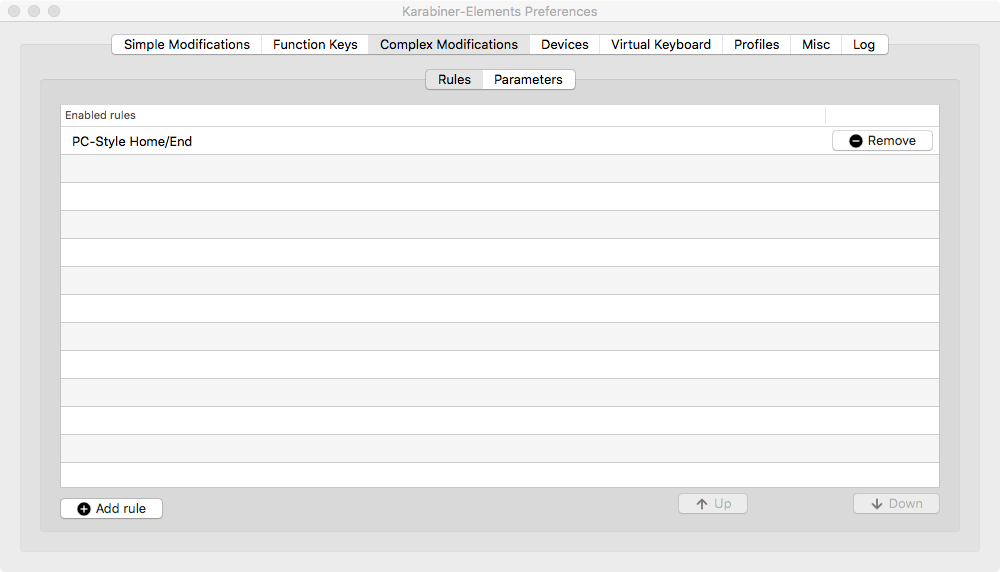
You can then either enable the "PC-Style Home/End" rule if you want "Cmd + Left_Arrow" / "Cmd + Right_Arrow" behaviour; or "Home key to the beginning of the line" / "End key to the end of the line" if you want Control + a / Control + e...
 AJPoulter-Soton
on 26 Feb 2018
AJPoulter-Soton
on 26 Feb 2018
Related issues
 jason0342
·
3Comments
jason0342
·
3Comments
 Fengur
·
3Comments
Fengur
·
3Comments
 baurmatt
·
3Comments
baurmatt
·
3Comments
 cajhin
·
3Comments
cajhin
·
3Comments
 impala75
·
3Comments
impala75
·
3Comments
Most helpful comment
I think it cannot. Karabiner-Elements now only supports single-to-single key mapping. I use ⌘英かな for that feature.