Karabiner-elements: What is the syntax for switching command+tab with control+tab?
I am trying to switch command+tab with control+tab and vice versa but can't find a way to do it.
 afkplus
All 23 comments
You can switch ctrl to command and command to control globally like this

_disregard the first line_
However you currently can't do so only for the specific combinations
 k0nserv
on 12 Oct 2016
k0nserv
on 12 Oct 2016
Thanks. I've already done this. The problem is, after doing this I have to press control+tab on the keyboard to switch between applications.
afkplus
on 12 Oct 2016
Was that not then intention?
k0nserv
on 12 Oct 2016
No, my intention was to switch Mac's keyboard layout to a Linux like layout. I've been using it with Command and Ctrl keys switched, and Command+Tab swapped with Ctrl+Tab. Since Sierra forced Karabiner to change it's own architecture, the option for swapping Command+Tab with Ctrl+Tab is not yet implemented in the UI. So I was looking for a way to do it using the JSON configuration file.
afkplus
on 12 Oct 2016
Ah okay, as far as I understand swapping command + tab with ctrl + tab is not supported yet.
k0nserv
on 12 Oct 2016
I found a closed issue in the Karabiner repository asking for the exact same thing: https://github.com/tekezo/Karabiner/issues/161
It would be great to know if there is a way doing the same with Karabiner Elements.
In short: map left_control to left_command and left_command to left_control but at the same time keep the physical shortcut cmd+tab to switch applications.
 brunoimbrizi
on 25 Jan 2017
brunoimbrizi
on 25 Jan 2017
I'm trying to do something similarly impossible with elements. I think the issue is that we don't have specific key combinations as virtual keys in elements.
This is what I'm trying to do (config from Karabiner):
<item>
<name>Disable Command-Tab</name>
<identifier>private.disable_command_tab</identifier>
<autogen>
--KeyToKey--
KeyCode::TAB, VK_COMMAND | ModifierFlag::NONE,
KeyCode::VK_NONE
</autogen>
<autogen>
--KeyToKey--
KeyCode::TAB, VK_COMMAND | VK_SHIFT | ModifierFlag::NONE,
KeyCode::VK_NONE
</autogen>
</item>
(For motivation as to why someone would want to do this, see: http://blog.erikphansen.com/disabling-command-tab-on-mac-os-x/)
 jrhorn424
on 26 Feb 2017
jrhorn424
on 26 Feb 2017
Hi!
At least it will be quite cool to know is it possible to perform such settings maybe not from GUI, but from raw .json file?
 ikhlestov
on 11 Apr 2017
ikhlestov
on 11 Apr 2017
It seems this is finally possible, at least on 0.91.4:
"complex_modifications": {
    "rules": [
        {
            "manipulators": [
                {
                    "description": "Ctrl+Tab to Cmd+Tab",
                    "from": {
                        "key_code": "tab",
                        "modifiers": {
                            "mandatory": [
                                "left_control"
                            ],
                            "optional": [
                                "any"
                            ]
                        }
                    },
                    "to": [{
                        "key_code": "tab",
                        "modifiers": ["left_command"]
                    }],
                    "type": "basic"
                },
                {
                    "description": "Cmd+Tab to Ctrl+Tab",
                    "from": {
                        "key_code": "tab",
                        "modifiers": {
                            "mandatory": [
                                "left_command"
                            ],
                            "optional": [
                                "any"
                            ]
                        }
                    },
                    "to": [{
                        "key_code": "tab",
                        "modifiers": ["left_control"]
                    }],
                    "type": "basic"
                }
            ]
        }
    ]
},
At last, my fingers can know peace.
 l1bbcsg
on 28 Jun 2017
l1bbcsg
on 28 Jun 2017
Thank you this works great. The configuration file can be found in ~/.config/karabiner/karabiner.json and you see the modification directly after saving. (In your Karabiner-Elemnts window you can see in the Log tab what's happening).
 johvo
on 30 Jun 2017
johvo
on 30 Jun 2017
Thank you @l1bbcsg!
afkplus
on 4 Aug 2017
Anyone found this slightly dissatisfactory in terms of emulation of the original behavior on Mac? With this remap you cannot hold the modifier to keep the 'switcher window' up and press 'tab' or 'shift+tab' at your own pace to get to the correct app.
 lingnand
on 29 Dec 2017
lingnand
on 29 Dec 2017
@lynnard Yes, it is annoying for me also, but it is the best option we have for now, I guess. I'll reopen this issue. Let's see if anyone can come up with a better solution.
afkplus
on 2 Jan 2018
I think what would be needed is a small program that toggles a state underneath i.e., when <custom key>+Tab is first pressed, our program (run by Karabiner) notes it down in a flag and translates all subsequent <custom key> down events to cmd until it is released; at which point we clear the flag so that key becomes itself again.
This is probably possible with AutoHotKey on Windows - I don't even know if this is possible with the older, more powerful version of Karabiner.
lingnand
on 2 Jan 2018
This issue has been automatically marked as stale because it has not had recent activity. It will be closed if no further activity occurs. Thank you for your contributions.
![stale[bot] picture](https://avatars3.githubusercontent.com/in/1724?v=4&s=40) stale[bot]
on 3 Mar 2018
stale[bot]
on 3 Mar 2018
This is available in the Karabiner rules repository, search for "Exchange Command+Tab (generally 'cycle through applications') and Control+Tab (generally 'cycle through tabs')".
 nnmm
on 26 Jul 2018
nnmm
on 26 Jul 2018
Thank you @l1bbcsg ! In my case I wanted the Windows Alt-tab functionality and the above fix works for that as well, by swapping "left_control" for "left_option." Combine this with a simple Karabiner swap of left command for left control and all three mod keys are finally working as expected.
 rmgaddis
on 24 Jun 2019
rmgaddis
on 24 Jun 2019
Anyone found this slightly dissatisfactory in terms of emulation of the original behavior on Mac? With this remap you cannot hold the modifier to keep the 'switcher window' up and press 'tab' or 'shift+tab' at your own pace to get to the correct app.
@lingnand
Moreover @l1bbcsg's solution doesn't correctly handle pressing of the Escape. When you are switching between apps by using the default Cmd+Tab you can press Escape and the app switcher stops. But with this modification it will switch you to the selected app which is not correct behaviour.
I've been struggle to solve this for slightly different problem. I wanted to remap Ctrl+Tab behaviour in Chrome browser to the Alt+Y in order to delegate switching between tabs to this extension (Popup Tab Switcher). I solved all the problems with Shift and Escape pressings in this modification.
Here is an improved version of the macro that maps Ctrl+Tab to Cmd+Tab
{
  "title": "Maps Ctrl+Tab to Cmd+Tab",
  "rules": [
    {
      "description": "Maps Ctrl+Tab to Cmd+Tab",
      "manipulators": [
        {
          "from": {
            "key_code": "tab",
            "modifiers": {
              "mandatory": [
                "left_control"
              ],
              "optional": [
                "left_shift"
              ]
            }
          },
          "to": [
            {
              "key_code": "tab",
              "modifiers": [
                "left_command"
              ]
            }
          ],
          "type": "basic"
        },
        {
          "from": {
            "key_code": "left_shift",
            "modifiers": {
              "optional": [
                "left_control"
              ]
            }
          },
          "to": [
            {
              "key_code": "left_shift",
              "lazy": true
            }
          ],
          "type": "basic"
        },
        {
          "from": {
            "key_code": "escape",
            "modifiers": {
              "mandatory": [
                "left_control"
              ],
              "optional": [
                "left_shift"
              ]
            }
          },
          "to": [
            {
              "key_code": "escape",
              "modifiers": [
                "left_command"
              ]
            }
          ],
          "type": "basic"
        }
      ]
    }
  ]
}
 dvdvdmt
on 17 Jul 2019
dvdvdmt
on 17 Jul 2019
@dvdvdmt This is great and thanks for sharing! One problem I found is that it somehow prevents double keypress. Some software I use have shortcuts set to double taps for certain keys. For example double tapping the shift key opens a search window. Do you have any idea how to fix that behavior?
afkplus
on 17 Jul 2019
@afkplus I see, this happens because of the "lazy": true. It seems that a slightly modified version of this macro will work in your case:
{
  "title": "Maps Ctrl+Tab to Cmd+Tab",
  "rules": [
    {
      "description": "Maps Ctrl+Tab to Cmd+Tab",
      "manipulators": [
        {
          "from": {
            "key_code": "tab",
            "modifiers": {
              "mandatory": [
                "left_control"
              ],
              "optional": [
                "left_shift"
              ]
            }
          },
          "to": [
            {
              "key_code": "tab",
              "modifiers": [
                "left_command"
              ]
            }
          ],
          "type": "basic"
        },
        {
          "from": {
            "key_code": "left_shift",
            "modifiers": {
              "mandatory": [
                "left_control"
              ]
            }
          },
          "to": [
            {
              "key_code": "left_shift",
              "modifiers": [
                "left_command"
              ]
            }
          ],
          "type": "basic"
        },
        {
          "from": {
            "key_code": "escape",
            "modifiers": {
              "mandatory": [
                "left_control"
              ],
              "optional": [
                "left_shift"
              ]
            }
          },
          "to": [
            {
              "key_code": "escape",
              "modifiers": [
                "left_command"
              ]
            }
          ],
          "type": "basic"
        }
      ]
    }
  ]
}
Looks like it works. Thanks @dvdvdmt!
afkplus
on 22 Jul 2019
@dvdvdmt how to swap Ctrl+Tab and Cmd+Tab, not only Maps Ctrl+Tab to Cmd+Tab.
I try to modify your solution , but not work.
Thanks
 ruanima
on 28 Apr 2020
ruanima
on 28 Apr 2020
@dvdvdmt how to
swap Ctrl+Tab and Cmd+Tab, not onlyMaps Ctrl+Tab to Cmd+Tab.
I try to modify your solution , but not work.Thanks
I think i'm after something similar. I want to swap Command and control like a PC, and have Ctrl + Tab switch tabs (aka in chrome, or finder etc.) and Command + Tab switch windows (aka like AltTab).
This setup works for the most part, but it causes some weirdness and extra keypresses. So close, yet so far.
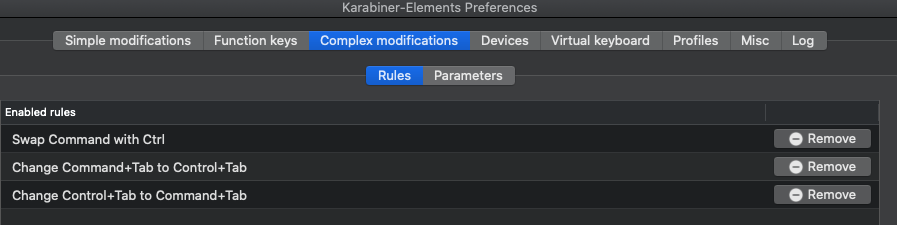
Edit:
Finally got it working with the following.
- Enabled all of Windows shortcuts on macOS except the one titled
Cmd+Tab => Cmd+Alt+0 (Reassigned command for opening Mission control) - Out of the box this sets Ctrl+ tab to switch tabs, and all the shortcuts to work with control as is.
- I then use AltTab for switching apps, which I set to Command + Tab within it's preferences.
- Finally for Terminals, I add these 2 rules from karabiner-windows-mode so Copy/paste work with the Control + Shift.

Edit #2: Unfortunately there were too many shortcuts to maintain, so I went back to just swapping Ctrl + Command, and then adding 2 rules for Ctrl + Tab and Command + Tab.
- The issue with mouse events is still a pain, but i'm willing to deal with it for now (#2304 #978 #1554)
 nathang21
on 11 Jul 2020
nathang21
on 11 Jul 2020
Related issues
 jason0342
·
3Comments
jason0342
·
3Comments
 Ox0400
·
3Comments
Ox0400
·
3Comments
 ghost
·
3Comments
ghost
·
3Comments
 LittleNewton
·
3Comments
LittleNewton
·
3Comments
 baurmatt
·
3Comments
baurmatt
·
3Comments
Most helpful comment
It seems this is finally possible, at least on 0.91.4:
At last, my fingers can know peace.