Karabiner-elements: F-keys don't work when Karabiner-Elements is running on Mac Sierra
Elements did a good job of remapping the Caps key to Esc. However, when it is running, I'm unable to F keys on my Kinesis Freestyle2 Blue Mac keyboard. It is the same regardless of my "Use all F1, F2, etc. keys as standard function keys" in osx keyboard settings.
Here is my karabiner.json file:
{
    "profiles": [
        {
            "name": "Default profile",
            "selected": true,
            "simple_modifications": {
                "caps_lock": "escape"
            }
        }
    ]
}
 assembler
All 36 comments
same here! any ideas how to fix it?
 dgow
on 10 Oct 2016
dgow
on 10 Oct 2016
Opposite problem - I can't use the F keys as regular F keys.
 zhangandyx
on 11 Oct 2016
zhangandyx
on 11 Oct 2016
Maybe try to add the f-keys specification in json file as follows:
{
  "profiles" : [
    {
      "fn_function_keys" : {
        "f1" : "vk_consumer_brightness_down",
        "f2" : "vk_consumer_brightness_up",
        "f3" : "vk_mission_control",
        "f4" : "vk_launchpad",
        "f5" : "vk_consumer_illumination_down",
        "f6" : "vk_consumer_illumination_up",
        "f7" : "vk_consumer_previous",
        "f8" : "vk_consumer_play",
        "f9" : "vk_consumer_next",
        "f10" : "mute",
        "f11" : "volume_down",
        "f12" : "volume_up"
      },
      "name" : "Default profile",
      "selected" : true,
      "simple_modifications" : {

      }
    }
  ]
}
 peteger
on 12 Oct 2016
peteger
on 12 Oct 2016
Actually trying to do exact opposite. How would I get the F6 key working as F6?
zhangandyx
on 12 Oct 2016
In this case try:
"f6" : "f6"
peteger
on 12 Oct 2016
@petrsel this didn't work for me. on my keyboard in order to get to F keys, i have to press Fn+F. When doing so, i can do simple_modification of F1 to letter 'a' and when i press Fn+F1 it types 'a'.
However, I can't get the volume keys to work (those should work without pressing the Fn key).
It worked with Seil before I upgraded to Sierra out of the box.
assembler
on 12 Oct 2016
In other words fn_function_keys.f1 collides with simple_modifications.f1 - both point to same "Fn+F1" key.
assembler
on 12 Oct 2016
@assembler And what settings are you using for "Keyboard - Use F-keys as standard keys" in System Preferences? I have this disabled, and Karabiner is handling them. I would also remove the code from simple_modifications and use just fn_function_keys.
peteger
on 12 Oct 2016
I should've also mention I am using internal keyboard of my MB Pro.
peteger
on 12 Oct 2016
I have that system preference unchecked just like you. I could remove code from simple_modifications, and only use fn_function_keys but then I wouldn't have what i need: F4 maps to F4 and Fn+F4 maps to vk_launchpad for example.
Come to think of it it is the exact problem that @ZhangBanger is having - i can map Fn+F keys, but I can't map the F keys without Fn.
Btw, it works fine on my internal MB Pro keyboard, it doesn't work with the bluetooth keyboard that I'm using.
assembler
on 12 Oct 2016
This is strange.. I've opened up visual keyboard on mac, and when i press F4 (without any karabiner modifications to it) it highlights the F12 key. Then if I map F12 key to F4 (via simple modifications) I finally get F4 key to work as F4. This works only for F4 sadly :(
assembler
on 12 Oct 2016
Is there a "don't remap apple/internal" option?
The whole point of this (I thought) was to remap other keyboards like Windows/Microsoft. That's where my F keys don't work. Remapping F6->F6 does nothing useful.
Edit: Just checked out the master (beta) version and I know what you're talking about now. The F keys were being remapped to vol up/down etc on Windows also, but that is fixed now.
zhangandyx
on 12 Oct 2016
I'm having the same issue. I need the play/pause(F8) to still be play/pause so I can map caps_lock to F8.
I tried by removing the section from the json file and maping capslock to f8 but now both keys (F8 without Fn and capslock) are play/pause.
So, to be clear, I need to map capslock -> F8 (key code 100, as if pressing Fn+play/pause)
And leave alone the play/pause as in pressing the key without Fn
 jpdborgna
on 13 Oct 2016
jpdborgna
on 13 Oct 2016
same issue, it drives me crazy :
 KTamas
on 22 Oct 2016
KTamas
on 22 Oct 2016
Apparently this email includes a working private.xml meant for the original Karabiner - how would we go about reimplementing that for K-Elements?
 toyg
on 26 Oct 2016
toyg
on 26 Oct 2016
Why can't this "feature" be turned off? With the newest update I got a Function keys tab, but no matter what I set there, it's wonky :(
 szkrd
on 27 Oct 2016
szkrd
on 27 Oct 2016
This has been fixed - thank you!
On Thu, Oct 27, 2016 at 10:19 AM, Szabolcs Kurdi [email protected]
wrote:
Why can't this "feature" be turned off? With the newest update I got a
Function keys tab, but no matter what I set there, it's wonky :(—
You are receiving this because you were mentioned.
Reply to this email directly, view it on GitHub
https://github.com/tekezo/Karabiner-Elements/issues/274#issuecomment-256711174,
or mute the thread
https://github.com/notifications/unsubscribe-auth/ABRIPBnvCw2SaOVyEo-ioGeml9zD2oNOks5q4N0egaJpZM4KSYwD
.
zhangandyx
on 27 Oct 2016
What fixed this problem for me is going to Devices > Modify events from this device, and disabling a extra keyboard that was listed there and checked but that is not the one I'm using.
 incandescentman
on 29 Apr 2017
incandescentman
on 29 Apr 2017
Actually, it's not been fixed. I've just upgraded from El Capitan to Sierra, and all F keys act as Fn + F keys.
I use Karabiner Elements 0.91.6
 kornerr
on 12 Jul 2017
kornerr
on 12 Jul 2017

Turns out, all I had to do is check 'Use all F1, F2, etc. keys as standard function keys'.
Now F keys work as F keys!
kornerr
on 13 Jul 2017
And in the current version of karabiner-elements, also make sure to delete the fn keys specification from the json. This was needed at some point but now it isn't anymore. When you delete and check the checkbox above, they behave as the default.
 juanibiapina
on 19 Aug 2017
juanibiapina
on 19 Aug 2017
Not really fixed, I'm afraid - basically, any Shift-F1/... or (any modifier key combo, such as Ctrl/Cmd/Alt) will not work...
- Sierra 10.12.6
- Karabiner-Elements 0.91.16
- "Use all F1, F2, ... as standard functions keys" option - both check on and off (didn't help).
- Deleted "fn" settings from JSON file:
{
    "global": {
        "check_for_updates_on_startup": true,
        "show_in_menu_bar": true,
        "show_profile_name_in_menu_bar": false
    },
    "profiles": [
        {
            "complex_modifications": {
                "parameters": {
                    "basic.to_if_alone_timeout_milliseconds": 1000
                },
                "rules": []
            },
            "devices": [],
            "name": "Default profile",
            "selected": true,
            "simple_modifications": [
                {
                    "from": {
                        "key_code": "caps_lock"
                    },
                    "to": {
                        "key_code": "escape"
                    }
                },
                {
                    "from": {
                        "key_code": "right_option"
                    },
                    "to": {
                        "key_code": "left_control"
                    }
                }
            ],
            "virtual_hid_keyboard": {
                "caps_lock_delay_milliseconds": 0,
                "keyboard_type": "ansi"
            }
        }
    ]
 budowski
on 16 Sep 2017
budowski
on 16 Sep 2017
What worked for me was when I removed all "fn_function_keys" { ... } sections in the karabiner.json. The issue i was having was that the touchbar didn't show when I pressed the fn-key. I also have an external keyboard that F-keys didn't work, but I can't test it at the moment, hopefully this solved it!
 nicmar
on 18 Sep 2017
nicmar
on 18 Sep 2017
I tried removing that section, as you can see my json file above, it didn't work, I'm afraid...
(I'm not using an external keyboard)
Important to mention that I have the new MacBook pro with the touch bar, if that's relevant.
budowski
on 18 Sep 2017
Seems like Karabiner is still not usable for any developer on any MAcbook with Touchbar since there is no solution so far for this issue. Would like to be corrected of wrong :-)
 Jeetah
on 20 Dec 2017
Jeetah
on 20 Dec 2017
actually I'm using this, since I only need the fn keys for certain professional programmes:

it was then been disabled.
Is there an option to completely disable the function keys feature in Karabiner and let other programme take control?
 PeiyiMusik
on 11 Jan 2018
PeiyiMusik
on 11 Jan 2018
Seems like this problem is solved - either by Karabiner update or by one of macOS...
Jeetah
on 11 Jan 2018
I'm still experiencing this issue. For the life of me, I can't get my F-keys to act like regular F-keys on my Kinesis Freestyle2 Blue. I would think there would be a preset that does this (a Complex Modification maybe?). This is really frustrating.
I've tried to manually do
                    "simple_modifications": [
                        {
                            "from": {
                                "consumer_key_code": "display_brightness_decrement"
                            },
                            "to": {
                                "key_code": "f1"
                            }
                        },
                        {
                            "from": {
                                "consumer_key_code": "display_brightness_increment"
                            },
                            "to": {
                                "key_code": "f2"
                            }
                        },
                        {
                            "from": {
                                "consumer_key_code": "play_or_pause"
                            },
                            "to": {
                                "key_code": "f6"
                            }
                        },
                        {
                            "from": {
                                "consumer_key_code": "mute"
                            },
                            "to": {
                                "key_code": "f8"
                            }
                        }
                  ]
It seems to work alright for f6 and f8, but not for remapping brightness to f1 and f2. It seems like something might be wrong with my syntax, because I'm seeing this:

 acjay
on 13 Feb 2018
acjay
on 13 Feb 2018
Same here, still having this issue and it's really frustrating. Would like to use karabiner-elements but don't see being able to forgo using function keys.
 Aerlinger
on 17 May 2018
Aerlinger
on 17 May 2018
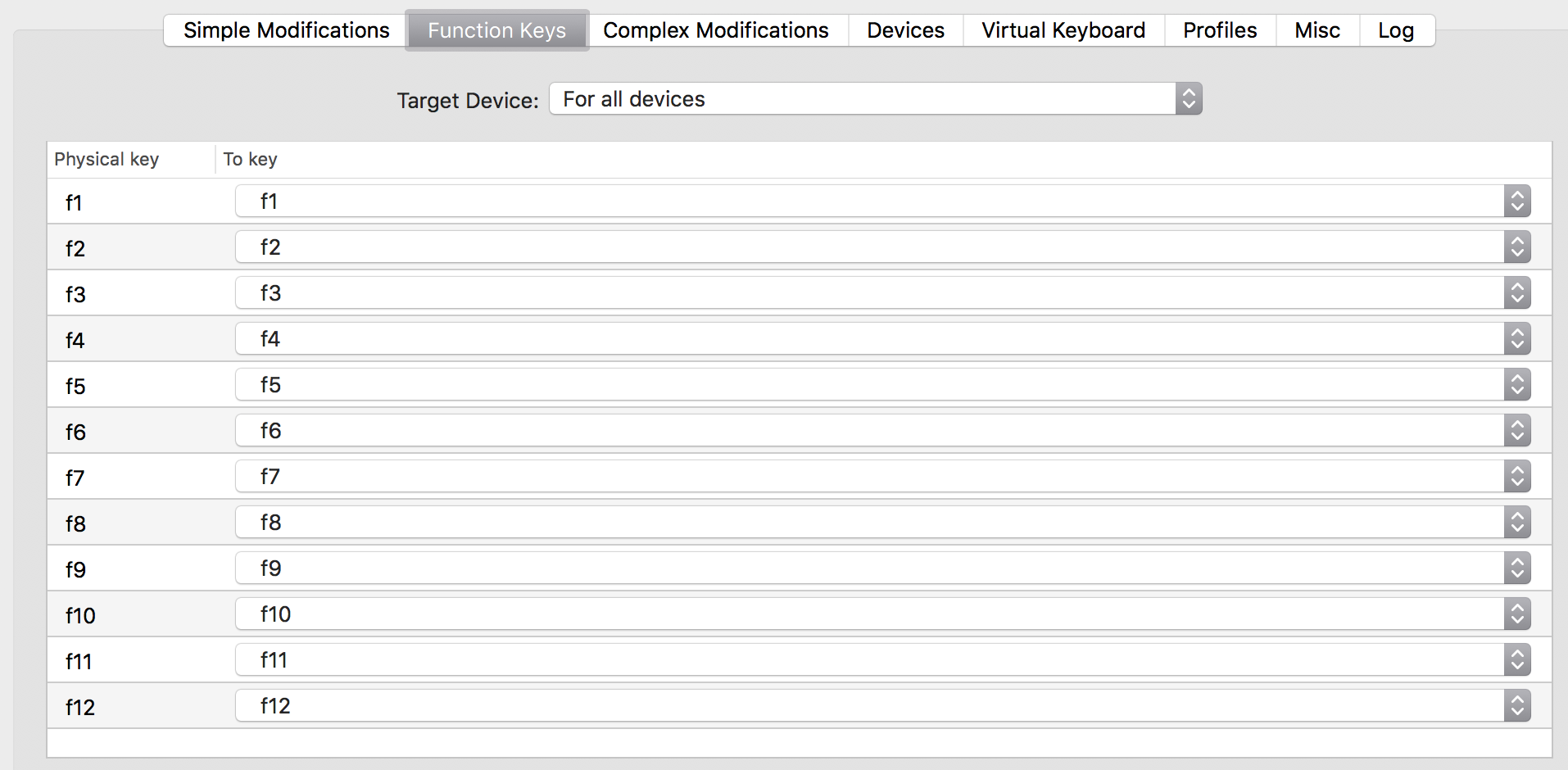
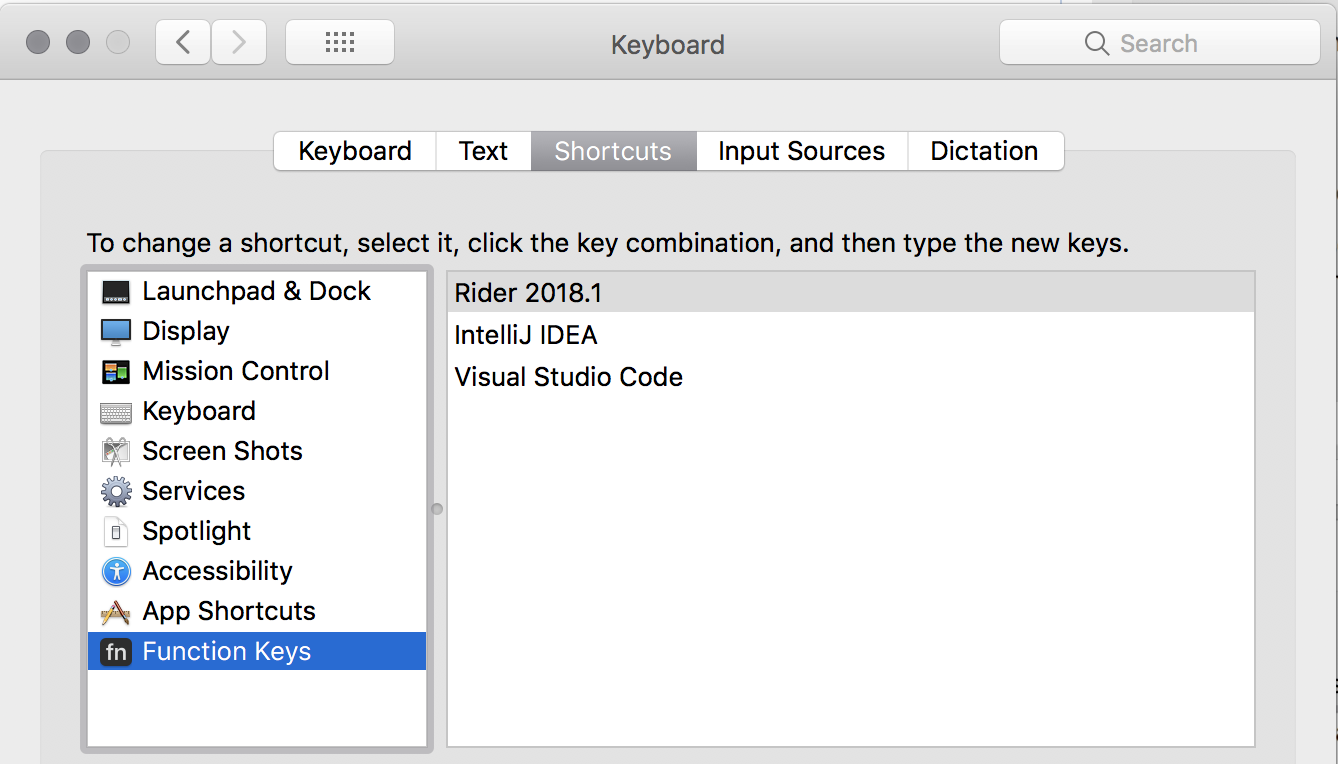
After much trial and tribulation I got this working as I wanted reliably now on a MacBook with a
blasted Touchbar. The function keys are available and working in my programming applications where I want them! Here is pretty much the only setup I could get to work. Hope this helps someone:


 johnculviner
on 24 May 2018
johnculviner
on 24 May 2018
Unfortunately the steps described by @johnculviner above do not for me on High Sierra with Kinesis Freestyle2 Blue.
@acjay @assembler I see that you have the same keyboard model. Were you enable to solve the issue?
 wheleph
on 5 Jun 2018
wheleph
on 5 Jun 2018
@wheleph Nope, unfortunately.
acjay
on 5 Jun 2018
@assembler @acjay
Apparently Kinesis introduced the regression in their Kinesis Freestyle2 Blue for Mac. Here's the quote for the user guide:
To use the traditional function keys (blue legends on the keyboard, listed in parentheses below), hold down the fn key.
While for the wired version the behavior is different:
To use the traditional function keys (blue legends on the keyboard, listed in parentheses below), toggle on the fn action.
I got in touch with Kinesis support and they told me that this behavior will be changed back (to toggle) in the upcoming revisions of "Blue" keyboard.
Unfortunately it doesn't help the owners for the current revision...
wheleph
on 6 Jun 2018
I know this is an old, closed issue, but it was the first google result for me when I searched this today. Just wanted to post my 2 cents on the off chance that it helps someone in the future. For me, the fix was that my keyboard (logitech 850) has a management app that has it's own checkbox for the "use f1-f12 as standard function keys" setting 🙄 . In order to make it work, it has to be checked in all 3 places. I wouldn't have even thought to look there until @wheleph started talking about his Kinesis, so appreciate the assist. 😄
 mwhitis
on 24 Apr 2019
mwhitis
on 24 Apr 2019
After much trial and tribulation I got this working as I wanted reliably now on a MacBook with a
blasted Touchbar. The function keys are available and working in my programming applications where I want them! Here is pretty much the only setup I could get to work. Hope this helps someone:
I don't know why it's marked as closed but this guy is a hero. When I already decided that it's a snowball's chance in hell to make it work, the weird combination of unrelated checkboxes above did the miracle.
Mojave 10.14.6
Karabiner-Elements 12.9.0
 Ghedeon
on 20 Apr 2020
Ghedeon
on 20 Apr 2020
Tried following @johnculviner 's steps, to no avail.
Using the builtin keyboard, catalina 10.15.4
 avshyz
on 17 May 2020
avshyz
on 17 May 2020
Related issues
 KyleAtDND
·
3Comments
KyleAtDND
·
3Comments
 aniude
·
3Comments
aniude
·
3Comments
 DanweDE
·
3Comments
DanweDE
·
3Comments
 Fengur
·
3Comments
Fengur
·
3Comments
 PSalant726
·
3Comments
PSalant726
·
3Comments
Most helpful comment
After much trial and tribulation I got this working as I wanted reliably now on a MacBook with a
blasted Touchbar. The function keys are available and working in my programming applications where I want them! Here is pretty much the only setup I could get to work. Hope this helps someone: