Karabiner-elements: howto short/long (sticky) keypress? (Ctrl/Esc et al.)
Karabiner-Elements (just installed) works well: many thanks @tekezo !
I would like to setup a feature for CapsLock :
- short CapsLock keypress = Escape
- long CapsLock keypress + other key = Control + other key
[edit: I think it was called: Control_L to Control_L (+when you type Control_L only, send Escape)
]
Do you have a template for that or some guidance?
Regards
 bosr
bosr
All 121 comments
After looking at the code and Development.md (thanks for that), I think the closest thing to what was sticky keys behavior is operation_type_post_modifier_flags_struct, but it is not hooked up in the json configuration file, and I am not sure how to use it.
bosr
on 13 Sep 2016
I am also looking forward to this, it seems it won't be placed in simple_modifications, but we don't have a complex example.
 sachka
on 15 Sep 2016
sachka
on 15 Sep 2016
Keeping an eye on this as this is the sole reason I use Karabiner.
 mcmillion
on 20 Sep 2016
mcmillion
on 20 Sep 2016
This is my main interest as well, as I use a "Hyper Key" setup for Capslock (Escape when tapped, Ctrl+Shift+Cmd+Option when held) as described here:
 stylerw
on 21 Sep 2016
stylerw
on 21 Sep 2016
Yep, that's also my reference! (along with http://stevelosh.com/blog/2012/10/a-modern-space-cadet/). It was eyes-opening for me.
I use Karabiner to set my actual Control_L key for Hyper, and set CapsLock for Ctrl/Esc.
I use Slate for those Hyper-* shortcuts. This still works by the way, I just have to type Shift+Ctrl+Opt+Cmd instead of my Hyper key...
Cheers
bosr
on 21 Sep 2016
@bosr take a look on HammerSpoon. Iv coupled it with BetterTouchTool to perform some kind of replacement of karabiner.
_You never know that you love something until you have lost it_
 noma4i
on 22 Sep 2016
noma4i
on 22 Sep 2016
Really looking forward to having this functionality back.
In the mean time, I'm using Keyboard Maestro with these settings. Make sure "is tapped once" is set. Unfortunately, I don't think the delay can be tweaked like it could be in Karabiner, which is sometimes annoying. So I really hope this gets implemented soon.
 clessg
on 22 Sep 2016
clessg
on 22 Sep 2016
I also have used seil/karabiner mainly for the esc/control mapping on the caps lock key hope to get it back soon
 norges
on 23 Sep 2016
norges
on 23 Sep 2016
@noma4i thanks!
bosr
on 23 Sep 2016
@clessg which version of keyboard-Maestro u used ? I can't find The Device Key any where of Keyboard-Maestro-7.3
 transtone
on 23 Sep 2016
transtone
on 23 Sep 2016
@transtone “This device key” is in the dropdown as “USB Device Key Trigger”.
 jasoncodes
on 23 Sep 2016
jasoncodes
on 23 Sep 2016
thx, I found This device key, but it can't recognize my keyboard.
transtone
on 23 Sep 2016
Tough to oversell the importance of this feature. I just upgraded to Sierra and realized I had accidentally broken all my muscle memory. I was starting to like the 'ubiquitous vim' feature, but the multi-function Ctrl/Esc key instead of Caps Lock will take me months of coding to unlearn.
Is it coming back, or do I need to resign myself to an ugly future?
 MatthewMDavis
on 24 Sep 2016
MatthewMDavis
on 24 Sep 2016
@clessg thanks for the tip. I got mine working based on your tip. I do miss Seil.
 jluckyiv
on 24 Sep 2016
jluckyiv
on 24 Sep 2016
In karabiner.json, how does one map fn to a hyper key? For example, pressing fn and having it mapped to control+shift+option+command.
 sunapi386
on 24 Sep 2016
sunapi386
on 24 Sep 2016
@MatthewMDavis I got really desperate too, but the solution with keyboard maestro works for now (even though the software is horrible).
 juanibiapina
on 24 Sep 2016
juanibiapina
on 24 Sep 2016
Well, hopefully a trial period of Keyboard Maestro will let me limp along until Karabiner Elements picks up the slack. Thanks to all for the recommendation of a fix. RSI staved off for now.
MatthewMDavis
on 24 Sep 2016
I actually rolled back to El Cap until this gets implemented. I tried but I just couldn't unlearn it.
mcmillion
on 26 Sep 2016
@mcmillion Wish it was that easy for the rest of us 😏
sunapi386
on 26 Sep 2016
+1
 leeorengel
on 26 Sep 2016
leeorengel
on 26 Sep 2016
I'm using Emacs and like to map held-down Enter key to Ctrl, which is the primary reason I used Karabiner on El Capitan. Haven't found a solution to this on Sierra yet.
 zhengpd
on 27 Sep 2016
zhengpd
on 27 Sep 2016
Well, I'll leave my comment with my use case as well as everybody else in case it helps.
I use vim and tmux and it's handy when _caps lock_ is mapped to _escape_ and when you press it with some other key It acts like _control_ e.g. useful for tmux prefix. I hope you will implement this behaviour. 🙁😔
 vladshablinsky
on 27 Sep 2016
vladshablinsky
on 27 Sep 2016
+1 @clessg Note, that you need to make sure Keyboard Maestro has access to everything under your privacy settings. I was knocking my head around for an hour trying to figure out why the hell it wasn't picking up my keys!
 tommyc38
on 30 Sep 2016
tommyc38
on 30 Sep 2016
@mcmillion Undo the biggest mistake
 vbauerster
on 30 Sep 2016
vbauerster
on 30 Sep 2016
@vbauerster Requires a Time Machine backup which most of us probably don't have :(
 axsuul
on 30 Sep 2016
axsuul
on 30 Sep 2016
For anyone else waiting on this, I've discovered that it's possible to mimic the behavior using hs.eventtap from Hammerspoon. It won't distinguish between Ctrl_L and Ctrl_R, but it does the trick for me:
https://gist.github.com/arbelt/b91e1f38a0880afb316dd5b5732759f1
There are some things that might make it better, like monitoring for other presses and disabling the sending of escape in that case, but I use a pretty short delay (150 ms) so that it's unlikely to press, say, Ctrl-A and still trigger the Escape.
 arbelt
on 2 Oct 2016
arbelt
on 2 Oct 2016
I'd like to take this opportunity to remind everybody that tekezo accepts donations which are much more helpful than "+1" comments. I'd rather send tekezo $10 than buy a $36 Keyboard Maestro license.
 ravicious
on 2 Oct 2016
ravicious
on 2 Oct 2016
I definitely donated. Im just letting tekezo know what my donation was for ;)
mcmillion
on 3 Oct 2016
I'm also looking forward to the solution. In the meanwhile, I want to neither roll back to El Capitan, nor switch to esc instead of single tapped caps lock. I've hacked around the source code (thanks for open-sourcing it!), and here is a workable version (at least workable for me).
I know little about Karabiner code structure and c++, so if you want to compile and use, expect bugs.
The code is here https://github.com/wwwjfy/Karabiner-Elements/tree/standalone-modifiers
Usage in karabiner.json:
{
    "profiles": [
        {
            "name": "Default profile",
            "selected": true,
            "simple_modifications": {
                "caps_lock": "left_control"
            },
            "standalone_modifiers": {
                "left_control": "escape"
            }
        }
    ]
}
 wwwjfy
on 3 Oct 2016
wwwjfy
on 3 Oct 2016
@wwwjfy, thanks a lot for this!
I have just tried it, using your karabiner.json, but a single tap on caps_lock seems to do nothing (I mean nothing more than a left_control): it should yield an escape, right?
bosr
on 3 Oct 2016
Right. I don't know what is wrong, but I would,
1) use Karabiner-EventViewer to see what happened
2) check by kextstat -l | grep pqrs to see if org.pqrs.driver.VirtualHIDManager is loaded. There should be one and only one kext. (recent commits combines former two kext into one, you may want to try uninstallation first)
3) check file creation time of files in /Library/Application Support/org.pqrs/Karabiner-Elements/bin
4) check logs in /private/var/log/karabiner and ~/.karabiner.d/log to see if there is any error
if logs like [grabber] [warning] event_manipulator_ is not ready. Please wait for a while. come up, it usually means the kext is not loaded properly, maybe not code signed, try to load by sudo kextload /Library/Extensions/org.pqrs.driver.VirtualHIDManager.kext/ and check Console.app.
5) I myself is using a version with the above change along with the hyper key hack (ctrl + alt + cmd + shift). If you want to try, it's in https://github.com/wwwjfy/Karabiner-Elements/tree/master (can be downloaded at https://github.com/wwwjfy/Karabiner-Elements/releases/tag/0.90.46)
my karabiner.json:
{
    "profiles": [
        {
            "name": "Default profile",
            "selected": true,
            "simple_modifications": {
                "caps_lock": "left_control",
                "left_control": "hyper"
            },
            "standalone_modifiers": {
                "left_control": "escape"
            }
        }
    ]
}
@wwwjfy It works for me. Thank you.
@bosr Do you install @wwwjfy's modified version of Karabiner-Elements ?
 yjlintw
on 3 Oct 2016
yjlintw
on 3 Oct 2016
@yjlintw yes, of course, but I may still have old binaries lying around
bosr
on 3 Oct 2016
@wwwjfy
Thanks for the update
- I checked with Karabiner-EventViewer, of course, and I only have left_control events
- good catch for the kext!, I have 2 of them, the rest is ok (good installation times)
- no errors in the logs
bosr
on 3 Oct 2016
@bosr I think it may only be caused by incompatibility of keyboard (the Apple built in one works) or some obsoleted files/processes.
If you're interested, add logs in src/core/grabber/include/manipulator/event_manipulator.hpp to see what is wrong. (mainly on handle_keyboard_event, process_standalone_modifier_key). logger::get_logger().info("log")
The basic logic is, when a modifier is pressed, save it (and stop the key pressed event), and when a modifier is released, compare it to last saved modifier, and if they match, and there is a configuration, map it to the other key (in post_standalone_modifier_key), otherwise, send pressed and released event.
wwwjfy
on 3 Oct 2016
@wwwjfy, thanks, I use the built-in keyboard.
I think you were right regarding the extensions, and anyway it works for you and @yjlintw. I am not used to macOS extensions, so I could only unload the old extension org.pqrs.driver.Karabiner but it must still be present somewhere: it was reloaded at reboot.
bosr
on 3 Oct 2016
It's in /Library/Extensions if you are looking for installed kext, also check the uninstall script about unload and uninstallation.
wwwjfy
on 3 Oct 2016
@wwwjfy Thanks a lot! Just to confirm, this also works for another use case that was mentioned here and in #102. (hold-down enter key for ctrl)
To get both cases working again I used:
        "simple_modifications": {
            "caps_lock": "left_control",
            "return_or_enter": "right_control"
        },
        "standalone_modifiers": {
            "left_control": "escape",
            "right_control": "return_or_enter"
        }
Have you considered to create a pull request for it? (Some other temporary solutions were accepted as pull requests.)
 bjorntropf
on 3 Oct 2016
bjorntropf
on 3 Oct 2016
Oops, ok thanks, signing the package solved it! Thank you again @wwwjfy, great work!
bosr
on 3 Oct 2016
@wwwjfy thank you v. much! Just installed fork (after upgrading/updating brew) and your (first) karabiner.json works great.
 maxscott
on 3 Oct 2016
maxscott
on 3 Oct 2016
@wwwjfy Thanks a million. You saved me. Your hack is working for me.
 kourosh2
on 4 Oct 2016
kourosh2
on 4 Oct 2016
@wwwjfy you are a rockstar!
 skgbanga
on 4 Oct 2016
skgbanga
on 4 Oct 2016
@wwwjfy Your fork is working for me so far, thanks!
 itsachen
on 4 Oct 2016
itsachen
on 4 Oct 2016
@wwwjfy Thank you so much!
 chrissem
on 4 Oct 2016
chrissem
on 4 Oct 2016
@wwwjfy Thanks !
 linzerui
on 4 Oct 2016
linzerui
on 4 Oct 2016
Could you please stop posting thanks? I think it's great that @wwwjfy made something that helps you out, but I'm subscribing to this issue to follow the official progress. Give @wwwjfy a thumbs up instead if you like his work.
 mafredri
on 4 Oct 2016
mafredri
on 4 Oct 2016
@bjorntropf Thanks for the advice. But I think the hack is really just a _hack_, and better not to mess the commit history. And it's not well tested.
I'm glad it helps, and I can't agree more with @mafredri that "+1" or "thank you" are not appropriate as replies. That's why Github implements reactions for each post, right? :)
wwwjfy
on 4 Oct 2016
@wwwjfy I agree with @bjorntropf that you should consider creating a pull request. The worst thing that happens is that it gets rejected. It will likely give this issue attention sooner than it would otherwise receive and Tekezo would likely appreciate that someone else has already thought through the problem. The eventual solution might incorporate part of your code even if other parts need to be de-_hacked_.
 jfeaver
on 5 Oct 2016
jfeaver
on 5 Oct 2016
I'm not being afraid to be rejected, as the code is meant to be rejected. But on a second thought, I think a pull request is better for others to _temporarily_ apply the hack, so I'll create one, with the usage.
BTW, I fixed two bugs yesterday.
wwwjfy
on 6 Oct 2016
I am in the same camp as @zhengpd. I want return_or_enter mapped to right_control when held down, and mapped to enter when tapped quickly, and this functionality is extremely important to me.
Per @noma4i’s comment, I tried out BetterTouchTool and was able to get this working as follows.
First, edit karabiner.json:
{"profiles": [{
  "name": "Default profile",
  "selected": true,
  "simple_modifications": {
    "caps_lock": "left_control",
    "return_or_enter": "right_control"}}]}
Next, install BetterTouchTool and open it:
- Go to the “keyboard” tab
- Click “add new shortcut or key sequence”
- Select “key sequence” (as opposed to shortcut)
- Click “record new key sequence”
- Press and release the enter key. Since karabiner has remapped this to
right_control, BetterTouchTool should detect keycode62pressed and released. - Click “stop recording”
- Check “required” and “order relevant” for both keydown and keyup events. (So all 4 checkboxes should be checked).
- Optionally adjust the max pause between keystrokes
- Click save
- Now this is tricky because you need to tell BTT to “trigger other keyboard shortcut” by clicking below the “trigger other keyboard shortcut” and typing enter, but you can’t type enter because we already remapped it to right_control. So, just disable karabiner temporarily so you can type the enter key into this “trigger other keyboard shortcut” box. I did this by temporarily removing the “return_or_enter” line of the json configuration and saving the file. (Karabiner-Elements appears to automatically reload the configuration upon saving
karabiner.json). - After mapping this custom key sequence to trigger an enter, you can re-enable the Karabiner configuration that maps
return_or_entertoright_control.
The obvious downside to this approach is it requires a whole other piece of software, which is also paid (though it’s pretty moderately priced at your choice of $4.50 - $50). Or maybe we all just have 45 days to get this working in Karabiner itself before our BTT trials expire :).
 aiba
on 10 Oct 2016
aiba
on 10 Oct 2016
I was referenced to this post from here but I don't think this is really accurate to what I want.
I want to assign a key, for example 'O' key, that when held down, the next key that I will press, will make an action. So for example press if I press 'O' alone, it types 'O'. Pressing O, holding it and pressing 'A' will do an action that I want.
I essentially want this back.
Can this already be done in Karabiner Elements?
 nikitavoloboev
on 13 Oct 2016
nikitavoloboev
on 13 Oct 2016
@wwwjfy Hi there, is it possible to add the meta key option?
sachka
on 15 Oct 2016
@nikitavoloboev I recreated something similar using Hammerspoon. See Launcher Mode in my config file here.
 JakeSc
on 16 Oct 2016
JakeSc
on 16 Oct 2016
Is there any progress or hope for this feature? Any update if we can expect something or should start looking for other solutions?
Thanks again for all the hard work on Karabiner/Seil and now Karabiner-Elements.
 rjhilgefort
on 28 Oct 2016
rjhilgefort
on 28 Oct 2016
@rjhilgefort: There's definitely hope. It's taking a long time because there's 200 issues and only 1 maintainer. Check out the project pulse: https://github.com/tekezo/Karabiner-Elements/pulse
Just now, it says that Takezo made 56 commits to the project this week. That's a lot more than I have made to open source projects in the same time period :)
jfeaver
on 1 Nov 2016
I'm hoping that this arrives before my new macbook pro at work, I haven't upgraded to macOS yet because I use capslock as ctrl and escape. Would adding a bounty help? I'd be willing to compensate the maintainers for picking up this issue ahead of others :)
 sorahn
on 18 Nov 2016
sorahn
on 18 Nov 2016
@sorahn count me in for increasing the bounty, I actually use a fork that fixes this particular issue but I need the meta key
sachka
on 18 Nov 2016
@Sachka Yeah, I have a regular macbook at home, and it has macOS. The fork that @wwwjfy provided above (thanks!!!!) is indeed working, so if push comes to shove we're covered, but obviously it benefits everyone involved for this to just get cleaned up here.
sorahn
on 18 Nov 2016
@wwwjfy Thanks for your work. Your fork works well on my old macbook air. But break on 2016 mbp + sierra. I don't know what happened.
 runningdemo
on 18 Nov 2016
runningdemo
on 18 Nov 2016
I have a hacky Hammerspoon implementation in place for some things that I can't live without, currently:
- Caps Lock:
- Tapped = Backspace (which is standard for Colemak).
- Held = Backspace with autorepeat.
- Chorded = Control + other key.
- Enter:
- Tapped = Enter.
- Held = Enter with autorepeat.
- Chorded = Control + other key.
- Control + I in Vim and MacVim = F6 (hack for mapping Tab and Control + I independently in the terminal, as described here.
Code is messy but seems to be working all right over the last few days. I will try to clean it up a bit and might get to adding some of the missing features I had with Karabiner, like the SpaceFN layout.
 wincent
on 19 Nov 2016
wincent
on 19 Nov 2016
@liaa I don't have a 2016 mbp, but I think the chance is smaller that a problem is related to a specific hardware. Maybe there is something useful in the logs.
wwwjfy
on 19 Nov 2016
JFYI, my latest implementation uses a timer, so it more matches the issue now.
https://github.com/wwwjfy/Karabiner-Elements/releases
Expect bugs. :)
wwwjfy
on 6 Dec 2016
So there is still no official implementation of making various keys modifier keys? If I understand it correctly.
nikitavoloboev
on 7 Dec 2016
@wwwjfy Thanks a lot for the hack. So much appreciated. I want to use ESC and CTRL together using caps lock, it works pretty well before using the hack you provided on OCT 3rd. I just reinstall the new version from the release tag and then it stops working. I can only use caps lock as ctrl.
 nuynait
on 20 Dec 2016
nuynait
on 20 Dec 2016
@nuynait
By "the new version", did you mean the new version from "https://github.com/wwwjfy/Karabiner-Elements/releases"?
I'm using it, without any problem. There are two possible reasons I can think of. 1) Since a timer is used to separate two behaviors (ESC or CTRL in your case), it's possible you pressed the key a bit longer, so it timed-out, and became CTRL. Please try to adjust the Standalone Key settings in Key Repeat tab in Karabiner-Elements app. 2) standalone_modifiers in configuration has been renamed to standalone_keys
wwwjfy
on 20 Dec 2016
@wwwjfy Oh, I don't know that standalone_modifiers has been renamed to standalone_keys. Thanks for the quick reply.
nuynait
on 20 Dec 2016
even after changing standalone_modifiers to standalone_keys in karabiner.json my ESC and CTRL together using caps lock is no longer working. caps lock only acts as ctrl. esc doesn't work.
@wwwjfy the latest release notes state that the caps lock key is not supported. Could you upload an older release that still works with it?
 alxyang
on 21 Dec 2016
alxyang
on 21 Dec 2016
I'd like to report back to this thread that I'm now using @wincent's "hacky Hammerspoon implementation" he linked to above in order to get enter-held-as-control working. It works really well, even better than the Karabiner+BetterTouchTool strategy I previously wrote about.
aiba
on 21 Dec 2016
@alxyang By caps lock, I mean you cannot map a key to caps lock, not that caps lock cannot become other keys. I'm using caps lock to be ESC and CTRL too.
Have you checked the Key Repeat tab, and anything in log?
wwwjfy
on 21 Dec 2016
@wwwjfy my key repeat tab standalone key is set at 200ms, which should be fine. Perhaps my karabiner.json is set up incorrectly?
{
    "profiles": [
        {
            "name": "Default profile",
            "selected": true,
            "simple_modifications": {
                "caps_lock": "left_control",
                "left_control": "hyper"
            },
            "standalone_keys": {
                "left_control": "escape"
            }
        }
    ]
}
The event viewer shows only ctrl being captured.
The log has a bunch of messages like
[2016-12-20 17:23:44.113] [warning] [grabber] event_manipulator_ is not ready. (virtual_hid_device_client is not ready) Please wait for a while.
alxyang
on 21 Dec 2016
@alxyang it's the same as mine.
You may try to adjust the standalone key delay, try other keys, try to reinstall, try to monitor logs from the start
wwwjfy
on 21 Dec 2016
@alxyang I just reinstalled using https://github.com/wwwjfy/Karabiner-Elements/releases/tag/0.90.68.hyper, before that I tried to use a manually compiled one which wasn't working for me either. The logs were showing the following:
[2016-12-21 14:21:46.033] [warning] [grabber] event_manipulator_ is not ready. (virtual_hid_device_client is not ready) Please wait for a while.
After reinstalling, it finally works for me with the following configs:
{
    "profiles": [
        {
            "name": "Default profile",
            "selected": true,
            "simple_modifications": {
                "caps_lock": "left_control",
                "return_or_enter": "right_control"
            },
            "standalone_keys": {
                "left_control": "escape",
                "right_control": "return_or_enter"
            }
        }
    ]
}
Delay Until Repeat: 250
Key Repeat: 17
Standalone Key: 200
Note, I'm not using the hyper key but I'm using Return/Enter as a dual function key.
Many thanks @wwwjfy for making this work.
 ur5us
on 21 Dec 2016
ur5us
on 21 Dec 2016
@ur5us i used your exact configurations (pasted into karabiner.json) and it still doesn't work for me. Still seeing the same warnings in the logs. I reinstalled as well. I'll keep investigating..
alxyang
on 21 Dec 2016
@alxyang I've reinstalled several times actually as I was compiling + trailing different builds/branches. At some point, I just couldn't get rid of the warnings, no matter how many times I've reinstalled, and I am not entirely sure what I did the last time. Under the _Devices_ tab, try deactivating all your keyboards before uninstalling Karabiner-Elements. I think that did it for me such that the warnings went away with the next reinstall.
ur5us
on 21 Dec 2016
@alxyang That error may indicate something wrong with the kext VirtualHIDDevice.
Check if anything appears in the output of kextstat -l | grep VirtualHIDDevice.
Also, uninstall Karabiner-Elements, and make sure the kext is indeed uninstalled.
It may cause by old version VirtualHIDDevice not cleaned up. If so, find the uninstall script, remove the kext and reinstall
wwwjfy
on 21 Dec 2016
@ur5us deactivating all my keyboards before uninstalling, then reinstalling worked! much thanks...still not sure of the root cause
alxyang
on 23 Dec 2016
I got these [warning] log entries too and was able to figure out a workaround thanks to your comments above. See: https://github.com/tekezo/Karabiner-Elements/issues/448#issuecomment-271209309
 esambo
on 9 Jan 2017
esambo
on 9 Jan 2017
I spent quite a lot of time installing and re-installing and copy/pasting multiple configs out. Until I realised the JSON pasted around here isn't the exact behaviour I was using in previous Karabiner.
Previously I remapped Caps lock to Escape, and then used Capslock tap as Escape and Caps lock modifier as Ctrl.
For future me's:
- Uninstall all Karabiner and restart OSX, ensure
kextstat -l | grep pqrsreturns no results. - Install @wwwjfy prebuilt version
- Set Standalone Keys Delay to ~200ms (or just copy the entire config below)
When Tapping Capslock AND Left Control will be Escape
When used as a Modifier, Capslock and Left Control will be Control.
{
    "global": {
        "check_for_updates_on_startup": true,
        "show_in_menu_bar": true,
        "show_profile_name_in_menu_bar": false
    },
    "profiles": [
        {
            "name": "Default profile",
            "selected": true,
            "simple_modifications": {
                "caps_lock": "left_control"
            },
            "standalone_keys": {
                "caps_lock": "escape",
                "left_control": "escape"
            },
            "virtual_hid_keyboard": {
                "caps_lock_delay_milliseconds": 0,
                "keyboard_type": "ansi",
                "standalone_keys_delay_milliseconds": 200
            }
        }
    ]
}
 dekz
on 12 Feb 2017
dekz
on 12 Feb 2017
@dekz
I had unInstall karabiner ,but I get some info like this
$ kextstat -l | grep pqrs
  129    0 0xffffff7f83237000 0x29000    0x29000    org.pqrs.driver.Karabiner (10.22.0) 75A195F3-FC81-39D0-9040-64D3880249EE <36 5 4 3 1>
how to delete them
 aizigao
on 10 Mar 2017
aizigao
on 10 Mar 2017
@dekz
I am not sure which one of these fixed my problem, but I think If you uninstall karabiner from the picture I wil work.

What I did was reinstall @wwwjfy prebuilt version and uninstall from the Misc,
and repeat this process for original version of Karabiner-Elements.
Hope this helps you :D
 oiojin831
on 14 Mar 2017
oiojin831
on 14 Mar 2017
@dekz - This worked until 0.90.90. standalone_keys_delay_milliseconds and standalone_keys seem to have been removed in 0.90.92.
I too cannot emphasize the importance of this feature enough. It is literally the only reason I use Karabiner (Elements).
 cdeyoung
on 24 Mar 2017
cdeyoung
on 24 Mar 2017
@dekz Thank you so much. After a half year of waiting, I finally can use this featuring. I am so happy now. I will just stick with 0.90.90. As long as it works, I will not update to new version.
 randolphpark
on 5 Apr 2017
randolphpark
on 5 Apr 2017
For those wanting to remap return to control when pressed with another key, use the instructions provided by @dekz and the following...
"simple_modifications": {
    "caps_lock": "left_control",
    "return_or_enter": "right_control"
},
"standalone_keys": {
    "caps_lock": "escape",
    "return_or_enter": "return_or_enter"
},
 olivertaylor
on 15 May 2017
olivertaylor
on 15 May 2017
With the latest version downloaded (0.90.92) the above settings don't seem to work unfortunately.
 al3xandru
on 24 May 2017
al3xandru
on 24 May 2017
Has anyone tried using this technique to map a modifier key to an ordinary key (when pressed alone)? Until I updated to Sierra, I was mapping left_command to "(", and right_command to ")" when pressed by themselves (I'm a Lisper; I type a _lot_ of parentheses...). I've added the following to my karabiner.json, but it seems to have no effect, and the event viewer just shows the command keys as left-command-key-down and then left-command-key-up (and the right-command equivalents).
Anyone have any idea what might be going wrong? It's gonna really hurt if that one goes away...
            "standalone_keys": {
                "left_command": "(",
                "right_command": ")"
            },
(EDIT to add: I've tried with both 0.90.92 and 0.90.90 without success)
 eggsyntax
on 30 May 2017
eggsyntax
on 30 May 2017
ANSWER to my own question above (how to map modifier keys to ordinary keys when pressed by themselves):
I managed to get it working using a further fork from @wwwjfy 's fork (thanks, wwwjfy, for getting us most of the way there, and of course a thousand thanks to the one and only tekezo!). Here's the fork that worked for my use case: https://github.com/IvanRublev/Karabiner-Elements
Here's standalone_keys in my config (will only work with the IvanRublev fork!)
"standalone_keys": {
                "left_command": [
                    "left_shift",
                    "9"
                ],
                "right_command": [
                    "left_shift",
                    "0"
                ]
            },
eggsyntax
on 30 May 2017
I've been using 0.90.83 for several months. I do the caps-lock/control/escape thing, and similarly semicolon as a control modifier and normal semicolon when tapped.
I just noticed (it's probably been like this all along) that if I hold down shift+semicolon (in an attempt to type a long line of repeated colons), it does nothing. The events viewer shows it's registering a shift+control hold.
I've been holding off on updating because I've got a stable build and didn't want to rock the boat, but I noticed it sounds like 0.90.86-2 may have fixed this issue.
fixed the case when continuous standalone keys are pressed
@wwwjfy Is that referring to the issue I'm seeing?
my karabiner.json:
{
    "global": {
        "check_for_updates_on_startup": true,
        "show_in_menu_bar": true
    },
    "profiles": [
        {
            "devices": [],
            "fn_function_keys": {
                "f1": "display_brightness_decrement",
                "f10": "mute",
                "f11": "volume_decrement",
                "f12": "volume_increment",
                "f2": "display_brightness_increment",
                "f3": "mission_control",
                "f4": "launchpad",
                "f5": "illumination_decrement",
                "f6": "illumination_increment",
                "f7": "rewind",
                "f8": "play_or_pause",
                "f9": "fastforward"
            },
            "name": "Default profile",
            "selected": true,
            "simple_modifications": {
                "caps_lock": "left_control",
                "semicolon": "right_control"
            },
            "standalone_keys": {
                "caps_lock": "escape",
                "semicolon": "semicolon"
            },
            "virtual_hid_keyboard": {
                "caps_lock_delay_milliseconds": 0,
                "keyboard_type": "ansi",
                "standalone_keys_delay_milliseconds": 250
            }
        }
    ]
}
 ivanbrennan
on 12 Jun 2017
ivanbrennan
on 12 Jun 2017
I would like to setup a feature for CapsLock :
- short CapsLock keypress = Escape
- long CapsLock keypress + other key = Control + other key
As an adaptation of @arbelt's work in https://github.com/tekezo/Karabiner-Elements/issues/8#issuecomment-250995668, ControlEscape.spoon provides this ☝️ functionality with a (mostly) automated setup process. There's a good chance that you can get it installed and running in less than a minute. 😅
I hope this helps. If you try it out and run into any problems, please open an issue to let me know.
 jasonrudolph
on 12 Jun 2017
jasonrudolph
on 12 Jun 2017
@jasonrudolph that looks great! Have you tested this and https://github.com/jasonrudolph/keyboard with Mac OS 10.12.5? I've been holding off on that upgrade cause I saw a comment saying that it broke the fix to make CapsLock useful.
 oliverxchen
on 12 Jun 2017
oliverxchen
on 12 Jun 2017
@ivanbrennan Yes, please try to use the latest build. If anything goes wrong, you can always revert to the old version
wwwjfy
on 12 Jun 2017
@wwwjfy Thanks for the fast response. I installed the latest (0.90.92) and rebooted. Unfortunately, the behavior is unchanged, i.e. holding down shift+semicolon registers as a continuous shift+control rather than a repeated colon.
Not a huge deal, as it's not that often you need to type a long line of colons (well, maybe in C++ 😄 ).
I'm curious though, has anyone else run into this?
ivanbrennan
on 12 Jun 2017
@ivanbrennan You're right.
Sorry I didn't read your comment carefully.
It's now designed to be like this, for the cases you want to press shift+ctrl+(any other key). If it works as you expect, there is no way (I can now think of) to make it behavior like ctrl.
I see it a compromise, other than a bug. If you can think of a way to achieve both, please let me know. I'm happy to fix that.
wwwjfy
on 12 Jun 2017
@wwwjfy Got it, that makes sense.
Maybe we could use karabiner.json to specify a binding for the ordered combination shift+key that takes precedence over key's simple-modification. I imagine something like,
"simple_modifications": {
    "semicolon": "right_control"
},
"ordered_modifications": {
    "shift": {
        "semicolon": "colon"
    }
},
"standalone_keys": {
    "semicolon": "semicolon"
},
allowing shift+; to send :, and ;+shift to act as control+shift.
ivanbrennan
on 12 Jun 2017
ControlEscape.spoon provides this ☝️ functionality with a (mostly) automated setup process.
Have you tested this and https://github.com/jasonrudolph/keyboard with Mac OS 10.12.5?
@oliverxchen: Yes. I'm actively using them both on macOS 10.12.5. 👌
If you run into any problems, please open an issue on one of those repositories.
jasonrudolph
on 12 Jun 2017
Hi all, and thanks @wwwjfy for the fork. It works wonderfully!
One quick question: is profile switching supposed to work in this or @tekezo 's Karabiner-Elements? I'm on 0.90.92, macOS 10.12.5, and with multiple profiles I notice that I have to restart Karabiner-Elements for an alternate profile to take effect.
 karansag
on 13 Jun 2017
karansag
on 13 Jun 2017
@ivanbrennan I think the introduced complexity may not worth it because bugs can be introduced, too.
@karansag Once you edited the karabiner.json, it'll reload the configuration automatically. You can see that in the "Log" tab of the app. Or you can use /Library/Application Support/org.pqrs/Karabiner-Elements/bin/karabiner_cli --select-profile xxx to switch
wwwjfy
on 14 Jun 2017
@wwwjfy Yeah, I agree.
ivanbrennan
on 14 Jun 2017
This is now natively supported in 0.91.3+
Example ~/.config/karabiner/karabiner.json:
{
    "profiles": [
        {
            "complex_modifications": {
                "rules": [
                    {
                        "manipulators": [
                            {
                                "description": "Change caps_lock to control when used as modifier, escape when used alone",
                                "from": {
                                    "key_code": "caps_lock",
                                    "modifiers": {
                                        "optional": [
                                            "any"
                                        ]
                                    }
                                },
                                "to": [
                                    {
                                        "key_code": "left_control"
                                    }
                                ],
                                "to_if_alone": [
                                    {
                                        "key_code": "escape",
                                        "modifiers": {
                                            "optional": [
                                                "any"
                                            ]
                                        }
                                    }
                                ],
                                "type": "basic"
                            }
                        ]
                    }
                ]
            }
        }
    ]
}
Thanks for your interim solution @wwwjfy!
 zeekay
on 16 Jun 2017
zeekay
on 16 Jun 2017
@zeekay This is exciting! Has there been any documentation yet or examples of how to fully take advantage of complex_modifications?
axsuul
on 16 Jun 2017
Supported "natively" meaning in the main project fork?
Tip: you need to remove any simple_modification of caps to escape for this to work.
 atomkirk
on 16 Jun 2017
atomkirk
on 16 Jun 2017
@axsuul: look in the examples directory in the code, there's some in there :)
 cmsj
on 16 Jun 2017
cmsj
on 16 Jun 2017
@zeekay I did the same thing too, worked like a charm (also did "right_shift to right_shift, backslash if alone" because European keyboards suck).
Then I realized that if I mapped left_control or escape to caps_lock, either via simple or complex modification, all keys would work the same way (escape if alone, left_control otherwise). So now, I can't find any way of having a caps_lock key.
Any chance someone has figured this one out?
 kbairak
on 4 Jul 2017
kbairak
on 4 Jul 2017
@kbairak. Not sure if I understand your question, but I have L-Shift + R-Shift together mapped to Caps Lock, which frees up the Caps Lock key to be mapped to Backspace (Colemak) + Control.
wincent
on 5 Jul 2017
Can anyone explain the effect of the to_if_alone_timeout_milliseconds setting? From the name, I expected it would affect the delay used to distinguish a stand-alone keypress from a chorded press, but even if I set it super high (3000), I can't perceive any difference.
For context, I'm talking about the setting that shows up here:
"profiles": [
    {
        "complex_modifications": {
            "parameters": {
                "basic.to_if_alone_timeout_milliseconds": 1000
@ivanbrennan: Just say you have caps lock set to fire backspace if pressed alone, or act as control if pressed with another key:
- Hold caps lock for 995 ms, release: it fires backspace.
- Hold caps lock for 1005 ms, release: it does nothing (shows up in event viewer as control-down, control-up).
1000ms is the default. I set it to 500ms in my set-up and I believe (subjectively) that I was able to notice the effect I described above.
wincent
on 28 Jul 2017
@wincent Ah, got it, thanks!
ivanbrennan
on 28 Jul 2017
FWIW, these recent changes have allowed me to get back to my preferred keyconfig: using the shift keys by themselves as left and right parens, requiring "proper" shift key usage (i.e., left side keys with right shift, and vice versa), and disabling shift-9 and shift-0 completely (so as to force the use of the shift keys for parens). Thanks to everybody that's participated on this thread. 8^)
 genehack
on 13 Aug 2017
genehack
on 13 Aug 2017
@genehack How where you able to disable shift 0/9? I wasn't able to get this to work on my side
 BerkeleyTrue
on 13 Aug 2017
BerkeleyTrue
on 13 Aug 2017
@BerkeleyTrue See here for shift-9 and here for shift-0.
Note also that there are other parts of the config that disable right_shift with 0 and 9 (as part of a generalized "require the proper shift and command key usage" setup), so the above config only disables with left_shift.
genehack
on 13 Aug 2017
@genehack Thanks, That did it for me. Happy Coding.
BerkeleyTrue
on 13 Aug 2017
The implementation of to_if_alone works great as stated, but actually doesn't handle my own use case. I'm trying to map spacebar to left_command when paired with other keys, and to use it as a normal spacebar when alone. I found that even after mapping w/ to_if_alone, the main issue is that spacebar is used very often. Because of this, it's pretty common to accidentally hit another character while the space key is still pressed, especially when typing quickly.
Ideally, I could set some arbitrary millisecond threshold. If spacebar is only held for less than that threshold, then it will always be treated as a spacebar press (Even if I press another key during that initial spacebar press). However, if I hold spacebar for more than that threshold, it will be treated as left_command. If anyone's done something like that in a fork, let me know!
 jonathankau
on 15 Sep 2017
jonathankau
on 15 Sep 2017
@jonathankau: I suspect that what you need is what used to be called __BlockUntilKeyUp__ in the old Karabiner. I created an issue for that a while back (#877).
wincent
on 15 Sep 2017
@wincent At first I thought that was exactly what I needed, but after checking the EventViewer it turns out that the way I generally activate shortcuts is via a CMD down ---> C down ---> CMD up ---> C up flow.
jonathankau
on 15 Sep 2017
Well, I close this issue because the latest karabiner-elements now implements it perfectly (https://github.com/tekezo/Karabiner-Elements/pull/247). Many thanks to @tekezo, @wwwjfy and the community!
bosr
on 20 Sep 2017
Will this continue to work on High Sierra? Not sure if I should upgrade if not.
 ddickstein
on 20 Nov 2017
ddickstein
on 20 Nov 2017
 joeybaker
on 20 Nov 2017
joeybaker
on 20 Nov 2017
Follow up question - if I enable "change caps_lock to control if pressed with other keys, to escape if pressed alone" it disables my simple rule of mapping the escape key to caps lock and the escape key continues to work like escape. How can I get escape working like caps while caps working like escape if tapped and ctrl if pressed with other keys?
(update: it seems it causes any key mapped to caps to instead behave like escape b/c of this rule that changes how the caps key code is processed. I'd like only actually pressing caps lock to trigger this ctrl/esc behavior, while allowing other keys to trigger the normal caps functionality).
ddickstein
on 20 Nov 2017
After struggling for a while I found a reliable way to get caps lock to be escape when tapped and control when held on High Sierra without modifying the ~/.config/karabiner/karabiner.json file directly.
1) First follow the instructions in Jeff Gerlings blog: https://www.jeffgeerling.com/blog/2017/remapping-caps-lock-key-escape-macos-sierra
2) Then open up karbiner elements and go to the complex rule section, and go to complex modifications. Then go to add a rule, there is an import more rules from the internet button, hit it and it'll take you to: https://pqrs.org/osx/karabiner/complex_modifications/
3) Import Change caps lock key, and then all you have to do is select:
Change caps_lock to control if pressed with other keys, to escape if pressed alone.
4) Make sure that is the only rule selected in the simple and complex modification tabs, then you should be good to go!
 wardch
on 1 Dec 2017
wardch
on 1 Dec 2017
Since I was only using Seil/Karabiner to remap caps lock ➡F19 and F19 to Esc (when tapping) / Ctrl (holding) and this feature does not seem to be supported, this is what I ended up doing to achieve the same results without using Seil/Karabiner:
- close karabiner/seil if they are still open (optionally uninstall them)
- Execute the script below
# It assumes you have `homebrew` already installed.
mkdir -p ~/.hammerspoon/Spoons
git clone https://github.com/jasonrudolph/ControlEscape.spoon.git ~/.hammerspoon/Spoons/ControlEscape.spoon
cd ~/.hammerspoon/Spoons/ControlEscape.spoon
script/setup
Give accessibility access to hammerspoon (Settings -> Security and Privacy -> Privacy tab)
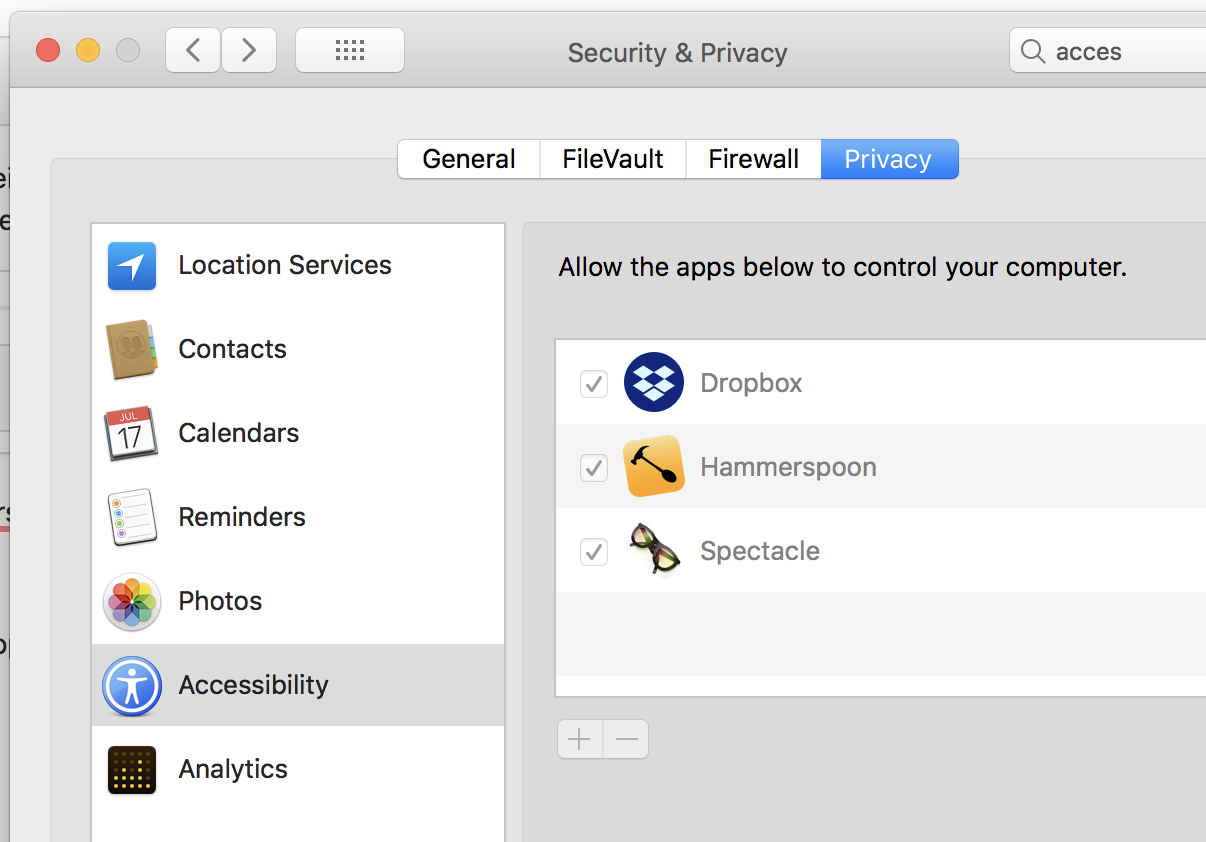
This will change the behaviour of your Ctrl (so it sends
Escwhen tapped). Now all you gotta do is to remap your Caps Lock to Ctrl (Settings -> Keyboard -> modifier keys):

 marlonbernardes
on 16 Feb 2018
marlonbernardes
on 16 Feb 2018
This is the only feature I was looking for...
 hk0i
on 30 Mar 2018
hk0i
on 30 Mar 2018
so https://github.com/tekezo/Karabiner-Elements/issues/8#issuecomment-348611260 did not work for me, but https://github.com/tekezo/Karabiner-Elements/issues/8#issuecomment-366189816 did. I'm running 10.13.3 not sure why.
 elliottw
on 27 Apr 2018
elliottw
on 27 Apr 2018
Related issues
 Joilence
·
3Comments
Joilence
·
3Comments
 Farzy
·
3Comments
Farzy
·
3Comments
 chaucy
·
3Comments
chaucy
·
3Comments
 willisworley
·
3Comments
willisworley
·
3Comments
 ghost
·
3Comments
ghost
·
3Comments
Most helpful comment
Keeping an eye on this as this is the sole reason I use Karabiner.