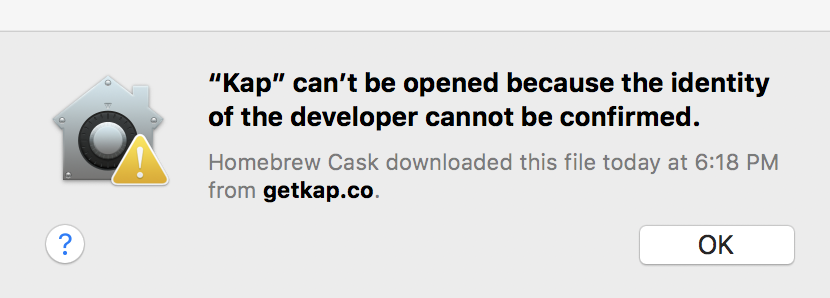
Kap: "Kap" can't be opened because the identity of the developer cannot be confirmed. | after brew install
macOS version: 10.13.6
Kap version: 3.2.2
Steps to reproduce
brew cask install kap- Try to open the app
I don't have the open to "open anyway" in my settings so it seems as though I just can't use the app.
Current behaviour
App won't open
Expected behaviour
App opens
Screenshot:
 RayBB
RayBB
All 11 comments
We have had reports of issues with installations via Homebrew Cask in the past, while we take another look, are you able to download and open it as expected via getkap.co?
 skllcrn
on 7 May 2020
skllcrn
on 7 May 2020
I only tried homebrew after downloading the dmg had the same issue.
RayBB
on 7 May 2020
Can you try right-click -> open? Sometimes that helps
 karaggeorge
on 7 May 2020
karaggeorge
on 7 May 2020
Just tried and that didn't help
RayBB
on 7 May 2020
@RayBB Can you uninstall then re-install and post the raw brew logs?
brew uninstall kap
brew cask install kap
Especially the downloading source url
 stevelacy
on 8 May 2020
stevelacy
on 8 May 2020
RaymBe3-SYS:~ 2$ brew cask uninstall kap
==> Uninstalling Cask kap
==> Backing App 'Kap.app' up to '/usr/local/Caskroom/kap/3.2.2/Kap.app'.
==> Removing App '/Applications/Kap.app'.
==> Purging files for version 3.2.2 of Cask kap
RaymBe3-SYS:~ 2$ brew cask install kap
==> Downloading https://github.com/wulkano/kap/releases/download/v3.2.2/Kap-3.2.
Already downloaded: /Users/210118/Library/Caches/Homebrew/downloads/219efe4e664569aaad7578e4874d885f28a1e93ecd1072f6599d14e66af807e9--Kap-3.2.2.dmg
==> Verifying SHA-256 checksum for Cask 'kap'.
==> Installing Cask kap
==> Moving App 'Kap.app' to '/Applications/Kap.app'.
🍺  kap was successfully installed!
Verbose output
brew cask install --verbose  kap
==> Downloading https://github.com/wulkano/kap/releases/download/v3.2.2/Kap-3.2.
Already downloaded: /Users/210118/Library/Caches/Homebrew/downloads/219efe4e664569aaad7578e4874d885f28a1e93ecd1072f6599d14e66af807e9--Kap-3.2.2.dmg
==> Verifying SHA-256 checksum for Cask 'kap'.
==> Installing Cask kap
hdiutil attach -plist -nobrowse -readonly -noidme -mountrandom /var/folders/gv/vzm7h6gn5fz7fhbjxxqgdvbszggyhy/T/d20200508-26067-1mbjutu /Users/210118/Library/Caches/Homebrew/downloads/219efe4e664569aaad7578e4874d885f28a1e93ecd1072f6599d14e66af807e9--Kap-3.2.2.dmg
mkbom -s -i /var/folders/gv/vzm7h6gn5fz7fhbjxxqgdvbszggyhy/T/20200508-26067-punz6x.list -- /var/folders/gv/vzm7h6gn5fz7fhbjxxqgdvbszggyhy/T/20200508-26067-1i4d0f3.bom
ditto --bom /var/folders/gv/vzm7h6gn5fz7fhbjxxqgdvbszggyhy/T/20200508-26067-1i4d0f3.bom -- /private/var/folders/gv/vzm7h6gn5fz7fhbjxxqgdvbszggyhy/T/d20200508-26067-1mbjutu/dmg.q6UNy4 /var/folders/gv/vzm7h6gn5fz7fhbjxxqgdvbszggyhy/T/d20200508-26067-132x51q
diskutil eject /private/var/folders/gv/vzm7h6gn5fz7fhbjxxqgdvbszggyhy/T/d20200508-26067-1mbjutu/dmg.q6UNy4
cp -pR /var/folders/gv/vzm7h6gn5fz7fhbjxxqgdvbszggyhy/T/d20200508-26067-132x51q/Kap.app/. /usr/local/Caskroom/kap/3.2.2/Kap.app
chmod -Rf +w /var/folders/gv/vzm7h6gn5fz7fhbjxxqgdvbszggyhy/T/d20200508-26067-132x51q
==> Moving App 'Kap.app' to '/Applications/Kap.app'.
🍺  kap was successfully installed!
Thanks, and can you get the sha of the binary?
shasum /Users/210118/Library/Caches/Homebrew/downloads/219efe4e664569aaad7578e4874d885f28a1e93ecd1072f6599d14e66af807e9--Kap-3.2.2.dmg
a8f1e627b2ee12c2c812cdb6a7a70f67bf3edf28 /Users/210118/Library/Caches/Homebrew/downloads/219efe4e664569aaad7578e4874d885f28a1e93ecd1072f6599d14e66af807e9--Kap-3.2.2.dmg
Quick workaround is to try opening the binary again then go to System Preferences > Security & Privacy and then allow Kap to run with Open Anyway
stevelacy
on 8 May 2020
I would do that but I don't have that option. I suspect it's due to my this work computer being locked down for security. Anyway, this isn't a rush for me personally but wanted to flag it in case it's going to be an issue for others too.
RayBB
on 8 May 2020
I have the same problem, workaround it opening Kap from terminal:
alias kap="~/Applications/Kap.app/Contents/MacOS/Kap"
 renatoagds
on 12 May 2020
renatoagds
on 12 May 2020
Related issues
 Glutnix
·
3Comments
Glutnix
·
3Comments
 tyler-reitz
·
4Comments
tyler-reitz
·
4Comments
 Qix-
·
3Comments
Qix-
·
3Comments
 danielbachhuber
·
3Comments
danielbachhuber
·
3Comments
 albinekb
·
3Comments
albinekb
·
3Comments
Most helpful comment
I would do that but I don't have that option. I suspect it's due to my this work computer being locked down for security. Anyway, this isn't a rush for me personally but wanted to flag it in case it's going to be an issue for others too.