Kap: Add ability to only record audio, with start/stop being activated by one hotkey
I'd like to suggest a feature that allows one to capture just audio. An example scenario would be whenever I want to record the audio of some video online in a different language to add to an Anki deck of that language, it would be nice to be able to start and stop a recording of that audio simply with two presses of a single hotkey. I don't necessarily want to capture the screen, I would just like to be able to record the audio. I have yet to find an application that fulfills these exact parameters that I want.
 oudajosefu
All 9 comments
Kap (and Aperture) currently records sound from your microphone or other input devices. I don't think we have an option to record system sound, so we'd have to look into that as a possibility before something like this would be feasible.
 karaggeorge
on 10 Oct 2019
karaggeorge
on 10 Oct 2019
@karaggeorge Well actually, using apps like Loopback, I am able to use system sound as a custom input device, so that's not a problem for me. I would just like an option to only record the audio from the input device with no screen capture. And as said before, it would be nice to be able to start and stop the recording with one hotkey.
oudajosefu
on 10 Oct 2019
Curious, @oudajosefu are you using Anki + MIA Dictionary add on?
@karaggeorge this app won't need to worry about the input device, as this is solved by BlackHole.
I would also like an audio option only, and the ability to start/stop recording using a global keyboard shortcut.
 evolutionxbox
on 24 Aug 2020
evolutionxbox
on 24 Aug 2020
We've decided not to pursue this feature for now. We want to remain focused on improving our current feature set, and from out point of view this adds overhead that would require resources we'd rather invest in making recording and sharing screen captures even faster, and to continue improving our plugin ecosystem.
A dedicated audio recording tool paired with video editing software that allows you to manipulate the audio channels would serve your example use case better.
 skllcrn
on 24 Aug 2020
skllcrn
on 24 Aug 2020
I can understand. Sadly there is no audio recording tool that starts/stops using a keyboard shortcut. They all require a convoluted interface and aren't made for "fast" recording workflows.
However, this app is perfect for this kind of workflow.
evolutionxbox
on 24 Aug 2020
I decided to build this tonight as I've been looking for a small project to finish in an evening.
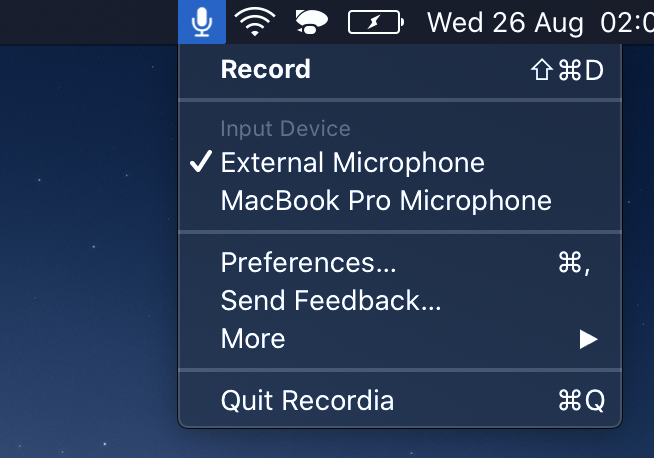
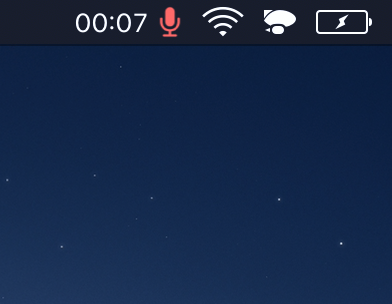
It records at 48000 hz to either M4A (AAC, compressed) or WAV (PCM, uncompressed). You can set a custom keyboard shortcut to toggle recording.
Some things missing (but planned):
- Launch at login preference.
- Set default output directory.
- Pause/resume recording (also with keyboard shortcut).
Feedback welcome if you notice anything else missing or things that could be improved.
I'm quite busy for the next month, but I plan to finish it and put it in the App Store in October (free).
 sindresorhus
on 26 Aug 2020
sindresorhus
on 26 Aug 2020
I'm in awe.
I've spent two days _trying_ to make a mac automator workflow using nodejs, and you've built a functional app in an evening.
:sob:
evolutionxbox
on 26 Aug 2020
I decided to finish it, so it's now in the App Store: https://apps.apple.com/app/id1529006487
sindresorhus
on 2 Sep 2020
@evolutionxbox Yes, this issue was originally opened because I was trying to find a way to record audio like Windows users do in ShareX for use in Anki and the MIA Dictionary add-on. I am really glad to see that it was finally completed. At one point, I also tried to make a dedicated app to accomplish this function, but unfortunately couldn't get over the learning curve with everything happening at the time. @sindresorhus Appreciate your help, I'll definitely be using it from now on!
oudajosefu
on 4 Sep 2020
Related issues
 deadcoder0904
·
3Comments
deadcoder0904
·
3Comments
 rubenbuijs
·
3Comments
rubenbuijs
·
3Comments
 albinekb
·
3Comments
albinekb
·
3Comments
 tyler-reitz
·
4Comments
albinekb
·
4Comments
tyler-reitz
·
4Comments
albinekb
·
4Comments
Most helpful comment
I decided to finish it, so it's now in the App Store: https://apps.apple.com/app/id1529006487