Kap: Record Audio button missing in main bar
macOS version: 10.14.6 Mojave
Kap version: 3.0.0
Steps to reproduce
Start Kap
Try to enable/disable audio by checking the "Record Audio" button
Current behavior
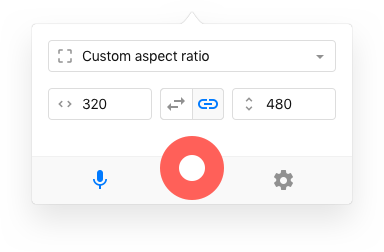
Button not available in main bar

Expected behavior
Button as in version 2.2 available in main bar to immediately enable/disable for each recording
Workaround
Enable/disable globally in the preferences
Attention: it is not clear while recording if audio is recorded or not
 raabmar
All 6 comments
Thanks for bringing this up @raabmar. In the next version of Kap, you can choose to remove the audio channel in the editor after recording, or completely opt-out of audio recording in your preferences.
 skllcrn
on 28 Sep 2019
skllcrn
on 28 Sep 2019
Thanks a lot. Personally, I think a user knows beforehand if he/she would like to enable/disable audio. So having the opportunity to enable/disable quickly with one switch upfront sounds more logical to me. But I am sure you thought it through and tested the usability. Happy to have the option back soon - so far Kap 3.0.0 seems quite stable.
raabmar
on 28 Sep 2019
+1
I would really like this back, even though I trust that Kap will remove the audio on export if I choose, I have a headset that if it detects audio input is enabled will change the sound processor, which makes recording with audio default on (for the few times I need it) quite annoying.
Thanks :)
 MattieTK
on 28 Nov 2019
MattieTK
on 28 Nov 2019
Idea for this, that minimizes UI changes and pushing this around. We could add a shortcut to toggle audio recording in the menu that shows when you right-click the tray icon, or the ... icon in the main bar:
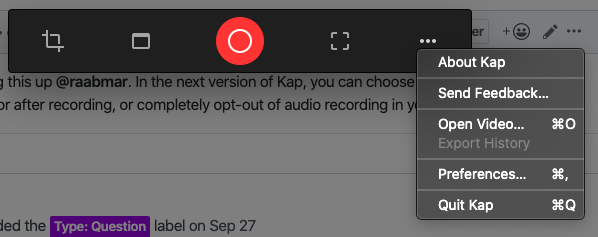
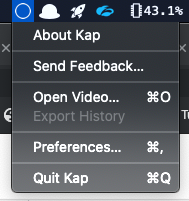
It could be a checkbox item that would show toggled if audio is enabled, and could be clicked to toggle on/off.
Additionally we can also have a keyboard shortcut in the cropper (maybe m?)
 karaggeorge
on 28 Nov 2019
karaggeorge
on 28 Nov 2019
Additionally we can also have a keyboard shortcut in the cropper (maybe m?)
Having a shortcut like that without a clear indicator if audio is recorded would be "dangerous" I can see myself hitting m by accident.
 albinekb
on 6 Dec 2019
albinekb
on 6 Dec 2019
This was fixed in #859
karaggeorge
on 22 Jul 2020
Related issues
 deadcoder0904
·
3Comments
albinekb
·
3Comments
deadcoder0904
·
3Comments
albinekb
·
3Comments
 danielbachhuber
·
3Comments
danielbachhuber
·
3Comments
 tyler-reitz
·
4Comments
tyler-reitz
·
4Comments
 petetnt
·
4Comments
petetnt
·
4Comments
Most helpful comment
Thanks a lot. Personally, I think a user knows beforehand if he/she would like to enable/disable audio. So having the opportunity to enable/disable quickly with one switch upfront sounds more logical to me. But I am sure you thought it through and tested the usability. Happy to have the option back soon - so far Kap 3.0.0 seems quite stable.