Kap: Unhandled Promise Rejection Error: Call `.startRecording()`
macOS version: 10.14
Kap version:

Steps to reproduce
- Record a video
- Play the recording
- Select a Window
Current behaviour
Unhandled Promise Rejection
Error: Call `.startRecording()` first
    at Aperture.stopRecording (/Applications/Kap.app/Contents/Resources/app.asar/node_modules/aperture/index.js:141:13)
    at EventEmitter.<anonymous> (file:///Applications/Kap.app/Contents/Resources/app.asar/dist/renderer/js/main.js:207:39)
    at Generator.next (<anonymous>)
    at step (file:///Applications/Kap.app/Contents/Resources/app.asar/dist/renderer/js/main.js:39:191)
    at file:///Applications/Kap.app/Contents/Resources/app.asar/dist/renderer/js/main.js:39:437
    at Promise (<anonymous>)
    at EventEmitter.<anonymous> (file:///Applications/Kap.app/Contents/Resources/app.asar/dist/renderer/js/main.js:39:99)
    at EventEmitter.stopRecording (file:///Applications/Kap.app/Contents/Resources/app.asar/dist/renderer/js/main.js:223:20)

Expected behaviour
It should not throw the error.
 abranhe
All 12 comments
A lot of the scenarios that would cause this error are handled in the latest beta build, could you see if you're able to recreate it using that @abranhe?
 skllcrn
on 27 Nov 2018
skllcrn
on 27 Nov 2018
Getting the exact same error. Here's a bit more info:
macOS: Version 10.14.2
Kap: Version 2.2.0 (2.2.0.880)
I opened the application and it asked for permission to use the microphone. It's never asked me that before so I'm assuming it's due to a version update.
I said no.
When I start a recording, the following error messages pop up.

("Recording error" pops up first, and then "aperture quit unexpectedly" pops up less than a second later.)
Here is my stab at prettifying the content of the error message:
Command failed: /Applications/Kap.app/Contents/Resources/app.asar.unpacked/node_modules/aperture/aperture {
  "destination":"file:///private/var/folders/2p/5pbqmrms5c90c9x1szvzk2hw0000gn/T/e960e9cfa3f3c2e128ffdb7e43697701.mp4",
  "fps":30,"showCursor":true,"highlightClicks":true,"displayId":"69948396",
  "audioDeviceId":"AppleHDAEngineInput:1F,3,0,1,0:1",
  "cropRect":[[514,286],[1209,768]]
}
Fatal error: Error raised at top level:
  Error Domain=AVFoundationErrorDomain
  Code=-11852 "Cannot use Built-in Microphone"
  UserInfo={
    NSLocalizedFailureReason=This app is not authorized to use Built-in Microphone.,
    AVErrorDeviceKey=<AVCaptureHALDevice: 0x7fc964413110 [Built-in Microphone][AppleHDAEngineInput:1F,3,0,1,0:1]>,
    NSLocalizedDescription=Cannot use Built-in Microphone
  }
  : file /BuildRoot/Library/Caches/com.apple.xbs/Sources/swiftlang/swiftlang-900.0.69.2/src/swift/stdlib/public/core/ErrorType.swift,
  line 187
This clearly indicates the problem is due to not having access to the microphone.
At this point, Kap thinks it is recording (the stop button is shown in the menubar icon). Whether it actually is or not I have no idea.
When I click the menubar icon to stop the recording, I get the identical error posted by @abranhe.
I do not get given a recording at this point. Menubar still shows the stop button. Application is essentially unusable.
Workaround
Re-enabling the microphone for Kap fixes the problem. Open _System Preferences_, then go to _Security & Privacy_ > _Privacy_ > _Microphone_ and enable microphone access for Kap.
I don't think it should be necessary for Kap to have microphone access to work. I use it for screen captures and don't ever need or want it recording audio, which is why I disabled mic access originally. Hope this gets fixed in future versions!
Thanks for an awesome and extremely useful piece of software otherwise. Keep up the great work.
 nmccrea-db
on 3 Jan 2019
nmccrea-db
on 3 Jan 2019
Thank you for the detailed summary and workaround @nmccrea-db! Could you test to see if you're able to recreate the issue on the latest beta version of the app?
skllcrn
on 6 Jan 2019
@skllcrn, I tried it out super quickly. I wasn't able to reproduce the issue:
- I had no problems capturing a GIF. Kap Beta did not ask me for access to the microphone at any point.
- Kap Beta did not appear at all in my system's allowed-apps list for microphone access, so I assume it does not need it.
I spent less than ten minutes on this since that is all I have but as far as I can tell that's all there is to it and it looks like this is not an issue in beta.
Cheers,
Nick
nmccrea-db
on 15 Jan 2019
Closing as it looks like this is fixed in v3.
 sindresorhus
on 20 Feb 2019
sindresorhus
on 20 Feb 2019
Sentry issue: KAP-3G3
skllcrn
on 6 May 2019
I can add a +1 to this issue; latest version (2.2.0.880) on Mac OS 10.14.4.
From my own testing, it seems as though this has something to do with audio altogether. For me, I get the error consistently when I try to enable the audio just using the regular 'microphone' shaped button. With audio enabled, any action – record, stop record, etc – all trigger the error. It goes away with audio disabled.
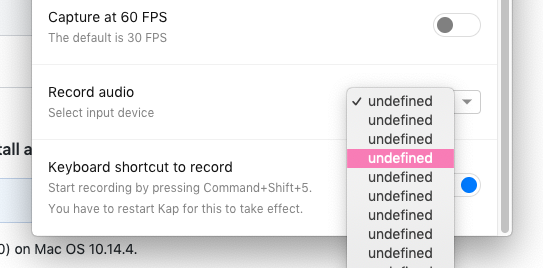
Possibly related: when I try to configure the audio source (Preferences > Record audio / select input device), the only "devices" available to select are a list of 100+ instances of "undefined".
 wosevision
on 7 May 2019
wosevision
on 7 May 2019
Thank you for this report @wosevision, I think these might be separate issues. You mention that the error triggers specifically when starting or stopping a recording, or changing your audio device. It sounds like at least part of that might be relating to aperture-node @sindresorhus?
It'd be really helpful if you could test our our latest beta release and tell us which of these issues you're able to recreate in newer version of Kap @wosevision.
Also, you can track the audio input list showing a list of undefined or no input devices at #384
skllcrn
on 7 May 2019
Thanks @skllcrn – I'll track that other issue over there for now then!
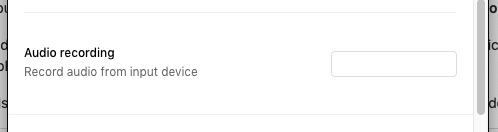
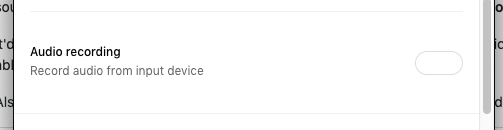
Re: this issue, I gave the beta a shot and don't get the error! But then again the enable/disable audio button in this version is different so the nature of the problem seems to be as well. The closest thing I found was in the preferences menu, an 'Audio recording' option that looks like a text box but changes to the shape of an empty switch when clicked. Neither state enables the audio though, so I guess the issue still exists?
Here's the enable option I'm talking about, in both unclicked and clicked states:
wosevision
on 7 May 2019
Can you check if starting recording gives you the same unhandled promise rejection error @wosevision?
skllcrn
on 7 May 2019
@skllcrn Nope, no error! I haven't gotten the unhandled promise rejection error in this beta yet. Still no audio functionality though. The app prompted for use of my microphone but nothing recognized still; I guess this is a separate issue now since the original error seems to be gone!
wosevision
on 14 May 2019
skllcrn
on 11 Dec 2019
Related issues
 petetnt
·
4Comments
petetnt
·
4Comments
 Glutnix
·
3Comments
Glutnix
·
3Comments
 xenio
·
4Comments
xenio
·
4Comments
 felixdorner
·
3Comments
felixdorner
·
3Comments
 tyler-reitz
·
4Comments
tyler-reitz
·
4Comments
Most helpful comment
Getting the exact same error. Here's a bit more info:
macOS: Version 10.14.2
Kap: Version 2.2.0 (2.2.0.880)
I opened the application and it asked for permission to use the microphone. It's never asked me that before so I'm assuming it's due to a version update.
I said no.
When I start a recording, the following error messages pop up.
("Recording error" pops up first, and then "aperture quit unexpectedly" pops up less than a second later.)
Here is my stab at prettifying the content of the error message:
This clearly indicates the problem is due to not having access to the microphone.
At this point, Kap thinks it is recording (the stop button is shown in the menubar icon). Whether it actually is or not I have no idea.
When I click the menubar icon to stop the recording, I get the identical error posted by @abranhe.
I do not get given a recording at this point. Menubar still shows the stop button. Application is essentially unusable.
Workaround
Re-enabling the microphone for Kap fixes the problem. Open _System Preferences_, then go to _Security & Privacy_ > _Privacy_ > _Microphone_ and enable microphone access for Kap.
I don't think it should be necessary for Kap to have microphone access to work. I use it for screen captures and don't ever need or want it recording audio, which is why I disabled mic access originally. Hope this gets fixed in future versions!
Thanks for an awesome and extremely useful piece of software otherwise. Keep up the great work.