macOS Version:
ProductName: Mac OS X
ProductVersion: 10.14
BuildVersion: 18A391
Kap Version: Version 2.2.0 (2.2.0.880), but tested on Version 3.0.0-beta.1 (3.0.0-beta.1.1006) too
Steps to reproduce
- Open Kap
- Click microphone icon so audio is toggled on:

- Open Preferences and confirm that 'Record audio' set to the correct device (in my case, just the standard Built-in Microphone):

- Open Sound system preferences window and confirm device is selected and levels are visible on Input tab:

- Perform a recording in Kap, keeping the Sound system preference panel open to observe levels
- Try and play back resulting recording. Not there is no audio in the Editor or when saving the file as an MP4.
Current behaviour
No audio recorded with Kap videos. Settings all appear to be correct -- audio toggled on in Kap, device set correctly, levels are clearly visible in the Sound preference panel, but still no audio.
Expected behaviour
Audio should be recorded with a video.
Workaround
Use Quicktime Player with equivalent settings; recording works with sound; I tested this immediately after trying and failing with Kap.
 davidjb
All 28 comments
Thanks for the detailed issue @davidjb. Based on what you mentioned in the other issue you posted recently, it sounds like there's something not quite right with your installation of Kap. I'd like to know how you installed/updated Kap and if you had one or more instances of the app on your system from before, in addition to any others details you think might be useful.
 skllcrn
on 18 Jul 2018
skllcrn
on 18 Jul 2018
As per #488, I just installed Kap for the very first time on this machine today. Fresh new install from brew cask which comes from the 2.2.0 dmg here on GH. I've uninstalled and rm -rf'd the application support directory, and reinstalled and same experience.
Never had two versions; this is the very first time I've used this on this computer. Everything else works mind you -- video recording and saving is flawless, but audio doesn't work + the analytics-not-saving issue in #488.
davidjb
on 18 Jul 2018
Thanks for the quick reply @davidjb! Really is strange, maybe there's something up with the permissions. Could you remove it again and try this build https://kap-artifacts.now.sh/next
skllcrn
on 18 Jul 2018
Tested the new version and same issue persisting. I saw the new / moved Audio recording setting and enabled that:
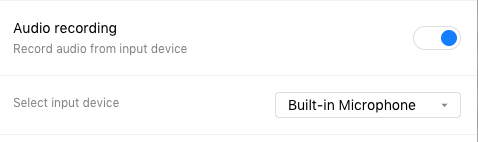
but the result is still a video that appears in the Editor window with no sound; the speaker icon is crossed out like so, which seems to indicate no audio track:
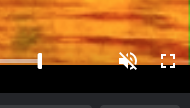
UI on the new version is much more user friendly otherwise btw!
davidjb
on 18 Jul 2018
We haven't had other reports of this issue @davidjb, thinking it might be due to something unique in your setup.
Any chance you could download the Kap Beta and test if the issue is still persisting @davidjb? If that doesn't work and we're not able to reproduce it I'll have to close this issue for now.
skllcrn
on 26 Sep 2018
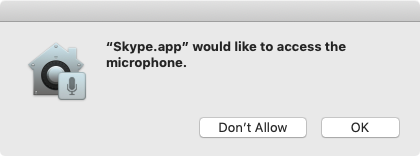
@skllcrn Nope, still no success on the Kap Beta. I'm now on Mojave (10.14) and Kap Beta doesn't make a request for the Microphone (eg macOS doesn't ask me for permission to access it). Just for clarification, I did go and enable the Audio Recording option as it wasn't enabled by default. By comparison, an app like Skype causes the OS to ask for permission so it's not like my audio system doesn't work:
Possibly unrelated but what I did notice is that the entries in the Sound preference pane differ from what's the Kap Beta "Select Input Device" menu:
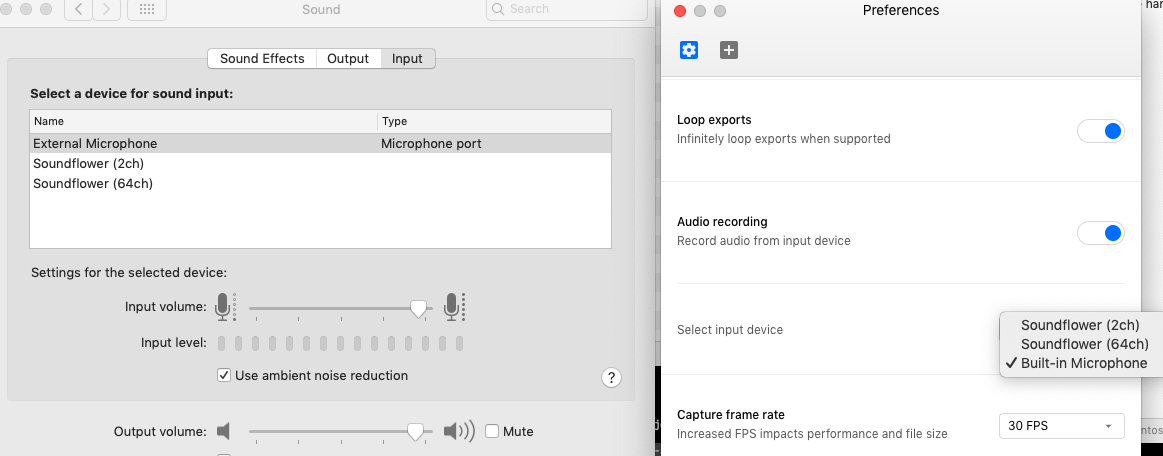
In the Preference pane on the left, the microphone is listed as External Microphone but in Kap on the right, it's shown as Built-in Microphone.
Is there any debugging information I can extract from Kap to find out what's going on (or suggestions on where I should be putting console.log())?
davidjb
on 2 Oct 2018
Sentry issue: KAP-3CH
skllcrn
on 2 Oct 2018
I'm seeing the same issue on my Mac. I also never got prompted to provide permission for Kap to access my microphone and do not see it listed in Privacy settings.

Running beta 1 of version 3 on macOS Mojave.
 pnewell
on 2 Oct 2018
pnewell
on 2 Oct 2018
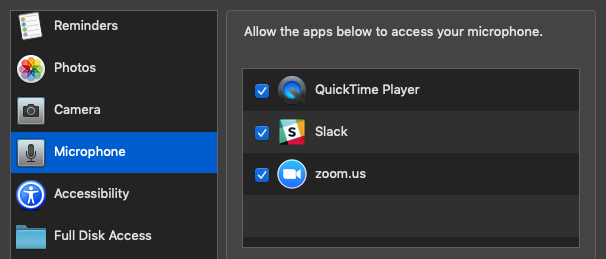
Also having same issues, both with 2.2.0 & 3.0.0-beta.3 on macOS Mojave.
Never got a permission request either, while all other apps did.
 Martin-Pitt
on 19 Oct 2018
Martin-Pitt
on 19 Oct 2018
I was googling around for other similar issues in regards to Mojave, Electron and permissions and found this as the most useful comment so far: https://github.com/electron/electron/issues/14801#issuecomment-427235881
Martin-Pitt
on 19 Oct 2018
Saw same issue with newly upgraded macos Mojave. Slack works fine.
 rhwu
on 5 Nov 2018
rhwu
on 5 Nov 2018
Did you see a prompt asking for microphone access @rhwu? I any case, could you try completely uninstalling Kap and reinstall using the latest beta?
skllcrn
on 5 Nov 2018
Did you see a prompt asking for microphone access @rhwu? I any case, could you try completely uninstalling Kap and reinstall using the latest beta?
Thanks for your quick response. I did try both v3.0.0-beta.3 and v2.2.0. Neither of them gave a prompt asking for permission.
rhwu
on 5 Nov 2018
@skllcrn I grabbed the latest beta that you linked. I did see the prompt to allow Kap Beta to access the microphone. I gave it permission and the app shows up in the system pref pane.
I suspect the issue pointed out by @davidjb is a UX thing. The default value for the export format is GIF which (sadly) wouldn't include audio. Changing that to MP4 I see the audio icon change and hear the captured audio.
Hope this helps, and thank you! 🎉
 fermion
on 9 Nov 2018
fermion
on 9 Nov 2018
@fermion Export formats are chosen _after_ recording occurs, so that shouldn't have any bearing on whether audio is captured or not. A permission prompt should be seen when the microphone is attempted to be accessed; so before/as a recording is beginning.
Fwiw, I've re-tested with 3.0.0-beta3, now on 10.14.1 and it's the same result. Set my Preferences to capture audio and set the audio device:
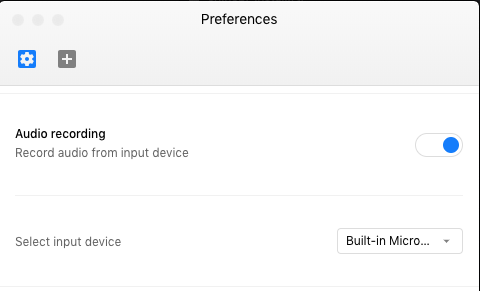
and tried to start recording. No prompt asking for permission, no audio recorded.
davidjb
on 11 Nov 2018
Can you attempt to completely uninstall Kap (including anything in ~/Library/Application Support/Kap) and reinstall the beta @davidjb, @rhwu and @Martin-Pitt? Once you've reinstalled, make sure audio recording in enabled in preferences and also try using the default input device. Please let me know if you get the prompt to allow microphone access at any point and if there's audio when exporting either MP4 or WebM.
As @fermion said, make sure you've selected a format that supports audio in the preview! If GIF or APNG is selected, the audio will be disabled in the preview even if it was captured in the original recording. This isn't immediately obvious in the current UI, we're working on and improvement #561 (https://github.com/wulkano/kap/pull/571).
skllcrn
on 11 Nov 2018
@skllcrn Completely uninstalled (including both ~/Library/Application Support/Kap and ~/Library/Application Support/Kap Beta). Audio recording is set and configured as per my previous screenshot. No prompt to allow microphone access at any point either in Preferences or when starting recording. The resulting MP4 output has an audio track but inspecting the track shows it is nothing but silence.
When does Kap access the microphone / when should the prompt appear?
davidjb
on 12 Nov 2018
@davidjb sorry, I wasn't clear here. I'm saying that I
- installed
Kap Beta.app - was asked for microphone permission by the app and granted it
- recorded a short product demo video
- heard no audio on the preview window
The default export format in the preview window is for a GIF which wouldn't have audio. Playing the video in the preview window I heard no audio from my recording and saw the same disabled volume icon that you linked earlier in this thread.
After changing the preview's format selector to MP4 I could hear audio when playing the preview.
I have to assume that the preview doesn't play audio when GIF is selected because the final output won't have audio. Selecting MP4, I heard it.
I think that everything's 👍 on my end here so I hope that you're able to figure out things on your machine 🤞
fermion
on 12 Nov 2018
@skllcrn followed the steps and had the same results as @davidjb – No microphone prompt at any point.
Martin-Pitt
on 12 Nov 2018
Still having the same problem here, on MacOS 10.14.1 (18B75)
 harryfear
on 18 Jan 2019
harryfear
on 18 Jan 2019
I have the same issue - no audio on recordings with newly installed Kap Beta 3.0.0.-beta.3 and Mac OS 10.14.2. Audio options in Kap beta are set to use built in microphone and microphone is confirmed working in sound preferences of mac os. audio recordings worked perfectly with Kap 2.2 but Kap 2.2 wouldn't export videos for me after Mojave so i completely uninstalled it using AppCleaner and installed Kap beta.
 tech4eleven
on 22 Jan 2019
tech4eleven
on 22 Jan 2019
I believe I have found the reason why on my setup it can sometime not work. I at least have strong correlation; which does not imply causation, but who knows.
I do record on an external screen, when my laptop lid is closed sounds is not recorded.
When my laptop lid is open sounds is recorded.
Maybe some people will have the cause.
 Carreau
on 4 Apr 2019
Carreau
on 4 Apr 2019
This issue is a bit elusive and aspects of it might be upstream. Please continue sending reports you think might help address this issue.
skllcrn
on 27 Apr 2019
@skllcrn Upstream as in Electron? If so, the existing issues around AudioContext all seem to have error messages so can we run Kap in a terminal / get logging out of its Electron-packaged app? Otherwise it seems like shooting in the dark without an error message to track or report upstream.
Fwiw, trying the latest stable Kap (v2.2.0) again today on a whim actually saw a microphone prompt appear -- that's the very first time Kap's ever shown that. However, audio still doesn't get recorded. Trying the latest Kap beta (v3.0.0-beta.5) shows no microphone prompt for its app and the UI in Kap is interesting:
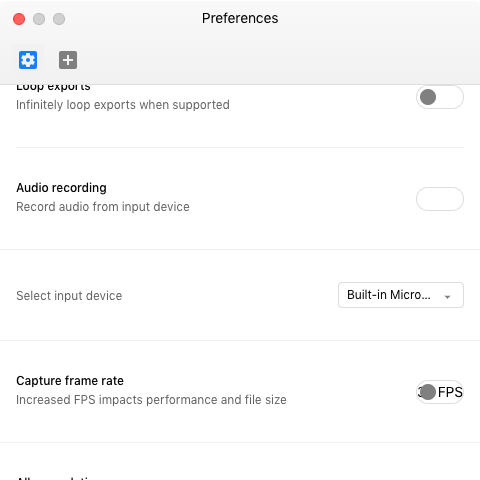
What appears to be a toggle for audio recording is empty/missing and does nothing when clicked. The listing of audio devices is present and correct, though.
davidjb
on 28 Apr 2019
That's a really good idea @davidjb, want to help? I'm struggling to wrap my head around this issue, and Chrome itself isn't exactly the best at keeping track of input and output audio. Do you think this issue could stem from somewhere in Aperture @sindresorhus?
These are some errors I'm seeing:
TypeErrorcommon:settings at null.
devices.someis not a function
TypeErrornull.
(common:settings)
devices.someis not a function
Fatal error: Error raised at top level: Error Domain=AVFoundationErrorDomain Code=-11852 "Cannot use Built-in Microphone"
UserInfo={NSLocalizedFailureReason=This app is not authorized to use Built-in Microphone., AVErrorDeviceKey=<AVCaptureHALDevice: 0x7fa3e0d23840 [Built-in Microphone][AppleHDAEngineInput:1F,3,0,1,0:1]>, NSLocalizedDescription=Cannot use Built-in Microphone
ErrorPromise.all.then.arr(/Applications/Kap.app/Contents/Resources/app.asar/node_modules/aperture/node_modules/execa/index.js)
Command failed: >/Applications/Kap.app/Contents/Resources/app.asar.unpacked/node_modules/aperture/aperture
skllcrn
on 29 Apr 2019
Okay, so I just cloned/built Kap from source (commit https://github.com/wulkano/kap/commit/16729954e6056886bc79c3cdb47d2508588ba71d) and running it with yarn start can successfully record audio, hooray! macOS prompts that it is a process in my terminal asking for microphone permission and upon accepting, the mic is accessed and recordings in MP4 format have audio. No errors logged in the Developer Console, just warnings about unrelated resources being loaded over HTTP (presumably since it's a debug build).
Now, here's where things get interesting. Running yarn run pack is able to successfully build the .app file but when I run it, it looks as though it's all fine (prompted for permissions, then MicroSnitch reports the mic is in use), but upon trying to start a recording it doesn't start, eventually erroring Could not start recording within 5 seconds, and leaving Kap in a broken state (eg black overlay still present), requiring a force quit. The only errors in Console.app are:
# About 50 of these errors
error   20:42:43.858741 +1000   Kap nw_path_close_fd Failed to close guarded necp fd 49 [9: Bad file descriptor]
error   20:42:11.746512 +1000   Kap Helper  CMIOHardware.cpp:339:CMIOObjectGetPropertyData the System is exiting
error   20:42:11.746607 +1000   Kap Helper  CMIO_DALA_System.cpp:264:GetPropertyData error 1970171760 (<private>) getting property selector (<private>) scope (<private>) element 0
error   20:42:50.363728 +1000   aperture    CMIOUnitFigBaseObjectImpl.c:246:CMIOUnitCreateFromDescription Invalid paramater
error   20:42:50.408021 +1000   aperture    CMIO_Unit_Input_HAL.cpp:985:GetPropertyInfo CMIOUInputBase::GetPropertyInfo failed for ID 102, Error: -67456
error   20:42:56.689724 +1000   aperture    CMIOHardware.cpp:339:CMIOObjectGetPropertyData the System is exiting
error   20:42:56.689774 +1000   aperture    CMIO_DALA_System.cpp:264:GetPropertyData error 1970171760 (<private>) getting property selector (<private>) scope (<private>) element 0
error   20:42:56.689876 +1000   aperture    CMIOHardware.cpp:339:CMIOObjectGetPropertyData the System is exiting
error   20:42:56.689926 +1000   aperture    CMIO_DALA_System.cpp:264:GetPropertyData error 1970171760 (<private>) getting property selector (<private>) scope (<private>) element 0
/Applications/Kap.app/Contents/Resources/app.asar.unpacked/node_modules/aperture/aperture is the aperture referenced above.
So, perhaps there's something different between running as yarn start and yarn run pack leading to these differences in behaviour. At very least, I now have a workaround for being able to use Kap 👍
Out of interest, I also took a look at what happens when my build of Kap.app is denied microphone access (or has it turned off later), the resultant error causes Kap to crash (eg Apple's error reporter loads, which is different to the 5-second timeout above):
Command failed: /Applications/Kap.app/Contents/Resources/app.asar.unpacked/node_modules/aperture/aperture {"destination":"file:///private/var/folders/1j/cstfyltx4sjcydsy9zs07ckr0000gr/T/662e83c5ee23f95a5e0dd51675334a06.mp4","framesPerSecond":30,"showCursor":true,"highlightClicks":false,"screenId":69731584,"audioDeviceId":"AppleHDAEngineInput:1B,0,1,0:1","cropRect":[[1233,537],[262,182]]}
Fatal error: Error raised at top level: Error Domain=AVFoundationErrorDomain Code=-11852 "Cannot use Built-in Microphone" UserInfo={NSLocalizedFailureReason=This app is not authorized to use Built-in Microphone., AVErrorDeviceKey=<AVCaptureHALDevice: 0x7fcaef4268b0 [Built-in Microphone][AppleHDAEngineInput:1B,0,1,0:1]>, NSLocalizedDescription=Cannot use Built-in Microphone}: file /BuildRoot/Library/Caches/com.apple.xbs/Sources/swiftlang_Fall2018/swiftlang_Fall2018-1000.11.42/src/swift/stdlib/public/core/ErrorType.swift, line 191
So some graceful error handling there would be good to avoid a hard crash in the case of the user not authorising the microphone.
davidjb
on 29 Apr 2019
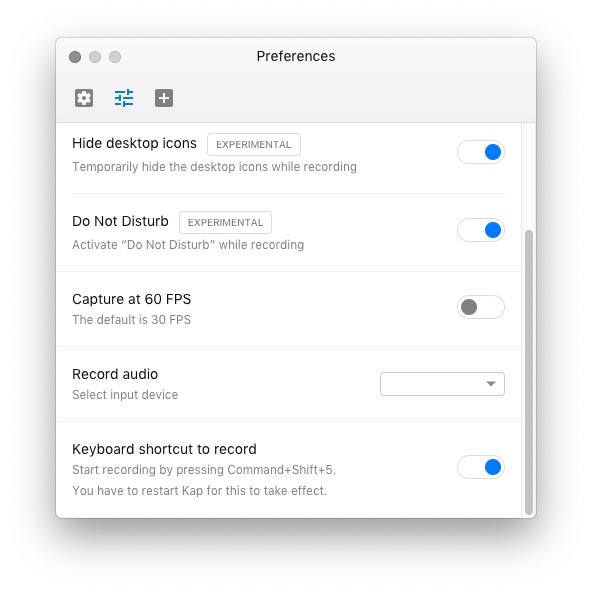
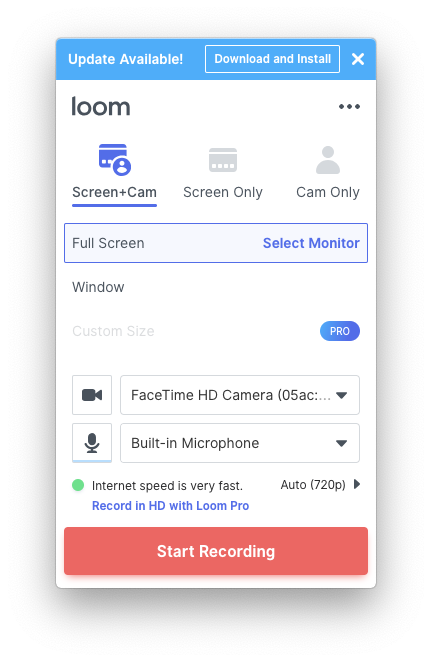
I was wondering if the Loom app and Kap app are based on the same Electron foundation? If so, it might help to understand why this issue arrises in Kap but not in Loom? I'm no a MacOS developer but it looks like they both run on Electron?
harryfear
on 6 May 2019
There seems to be no reports of this happening on recent releases, so I'll be closing this issue now. Thanks to everyone who participated!
skllcrn
on 13 Jan 2021
Related issues
 timothyis
·
3Comments
timothyis
·
3Comments
 danielbachhuber
·
3Comments
danielbachhuber
·
3Comments
 pedromassango
·
3Comments
pedromassango
·
3Comments
 xenio
·
4Comments
xenio
·
4Comments
 deadcoder0904
·
3Comments
deadcoder0904
·
3Comments
Most helpful comment
I'm seeing the same issue on my Mac. I also never got prompted to provide permission for Kap to access my microphone and do not see it listed in Privacy settings.
Running beta 1 of version 3 on macOS Mojave.