Kap: Add ability to edit keyboard shortcuts (Custom shortcuts)
Platform:
OSX
Kap Version:
1
Steps to reproduce
Command + Shift + 5
Current behaviour
Shortcut is clashing with another shortcut with no way to change it.
Expected behaviour
Preferences should have an option to set new shortcut
Workaround
 freelancesam
All 18 comments
Hey @freelancesam, thanks for the issue.
This is planned in an upcoming release. We'll use this issue to keep you up to date.
 timothyis
on 24 Feb 2017
timothyis
on 24 Feb 2017
Command + Shift + 5 happens to be the "run" command in Codepen
 controversial
on 26 Apr 2017
controversial
on 26 Apr 2017
Contributions are welcome 😄
timothyis
on 26 Apr 2017
Also Skitch screenshot is Command + Shift + 5.
Perhaps I'll have a look and submit a PR.
 boaticus
on 26 Apr 2017
boaticus
on 26 Apr 2017
I'd like to work on this too.
Does it make sense to put it only in to the preferences Window or also on the control panel ?
 fokusferit
on 24 May 2017
fokusferit
on 24 May 2017
That's awesome news @fokusferit! Keyboard shortcut configuration would live within preferences in it's own tab.
 skllcrn
on 24 May 2017
skllcrn
on 24 May 2017
I must agree with @skllcrn here. I don't see the interaction value in investing scarce interface real-estate in order to enable direct access to manipulate keyboard shortcuts from the control panel.
 onordbo
on 24 May 2017
onordbo
on 24 May 2017
I just wanted to share my small experience, I tried to work on this feature but I'm not confident at all with the code base.
If it used something like React or Vue it would have been much easier, and I guess you'd get more contributors. Just my 2cents
 FezVrasta
on 7 Aug 2017
FezVrasta
on 7 Aug 2017
@FezVrasta We absolutely want to rewrite Kap with React (Next.js) but we wanted our feature set to take priority so we're currently working on getting v2 out and then we'll absolutely work on porting Kap into React ❤️
Thanks for your input.
timothyis
on 7 Aug 2017
Until we ship this I suggest adding a setting to turn keyboard shortcuts on or off all together, that way it's easy for people to avoid conflicts with other apps.
skllcrn
on 25 Aug 2017
Would really love some customizability here. Even if kap just looked for some config file that we can edit in a text editor before falling back to the hard-coded default.
(whether the config file is something we create in our user directory, or something we need to find after each update in Applications -> Kap (right click -> show package contents) -> some folder.
 YoavGivati
on 6 Feb 2018
YoavGivati
on 6 Feb 2018
To me it would be enough to have a checkbox to disable them
FezVrasta
on 6 Feb 2018
In progress as part of #450

skllcrn
on 12 May 2018
Apple is using the keyboard shortcut Command+Shift+5 in the new macOS 10.14 Mojave due to the new screen capture & recording feature. Kap is also using exactly this keyboard shortcut when enabling the option "Keyboard shortcut to record" (Command+Shift+5).
Via @oliveratgithub in #483
skllcrn
on 27 Jun 2018
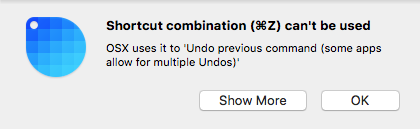
When the accelerator is already taken by other applications, this call will silently fail. This behavior is intended by operating systems, since they don't want applications to fight for global shortcuts.
We'll need a hard-coded list of shortcuts and messages. Could be a good reusable Electron module!
skllcrn
on 19 Sep 2018
It's happening #507
skllcrn
on 22 Sep 2018
Hi! That latest OSX release Mojave has made the default hotkey for screenshots command+shift+5 which interferes with Skitch's default hotkey. I need the ability to change/customize Skitch's hotkeys to avoid this issue. Please let me know when that will be done :)
 jesset55
on 27 Sep 2018
jesset55
on 27 Sep 2018
Hey @jesset55, You can sign up to get early access and start using the new custom keyboard shortcuts at getkap.co!
skllcrn
on 27 Sep 2018
Related issues
 rubenbuijs
·
3Comments
rubenbuijs
·
3Comments
 pedromassango
·
3Comments
pedromassango
·
3Comments
 vadimdemedes
·
4Comments
vadimdemedes
·
4Comments
 deadcoder0904
·
3Comments
deadcoder0904
·
3Comments
 rgbkrk
·
4Comments
rgbkrk
·
4Comments
Most helpful comment
In progress as part of #450