Kap: App window shows for a short period of time when starting a record
 timothyis
All 12 comments
I just looked into this and here's what I concluded:
I put console.log(Date.now())s in the following locations:
https://github.com/wulkano/aperture.js/blob/99110e848368af117ee573ffe693433d0eff7ec4/index.js#L55
Result:


Kap receives the recording started signal from aperture 7 ms after it starts and then the mainWindow.hidden() is called 1 ms later.
So: it's probably something on the aperture or Swift side and it's going to need some time to debug. Any help is more than welcome 😄
 matheuss
on 13 Oct 2016
matheuss
on 13 Oct 2016
is the waiting for recording started really needed? the window could be hidden and still wait for the signal. I might take a look into this tonight
 Khaledgarbaya
on 25 Jan 2017
Khaledgarbaya
on 25 Jan 2017
@matheuss I'm not surprised. The API is async, so it's not going to resolve the promise instantly. The native API reports exactly when the screen recording starts, so there's going to be some lag.
 sindresorhus
on 31 Jan 2017
sindresorhus
on 31 Jan 2017
@Khaledgarbaya It usually takes 1-2 seconds for the screen recording to start (Not us, but the system), so it's an indicator you're not being recorded yet. I can't really think of a better solution right now, so I guess we can at least do what you suggest for now.
sindresorhus
on 31 Jan 2017
@Khaledgarbaya I'm not sure if I like your idea 😕 If you want the window to be hidden, you can just leave it docked to the menubar.
I will try and hack something during 2.0.0 🕵️
matheuss
on 31 Jan 2017
Ok, just discussed with @skllcrn and we have an idea: we'll just hide the window when you click to record, and then the menubar icon will be more useful: we can show the time, a pause button etc. Something like CloudApp:

(Obviously with a better UI/UX, since we got @skllcrn 😎)
matheuss
on 31 Jan 2017
My worry is that people will think the recording has started as soon as the app window is hidden. I'll see what I can do. As @sindresorhus and @matheuss have explained, we're limited by the API here. You want to know that Kap is "Getting ready..." and that your recording hasn't started yet, but of course you don't want the window showing in the actual recording. If we hide the window immediately, we still need to communicate that the app is working and give a clear hint as soon as we know the recording has started (which isn't accurate).
 skllcrn
on 31 Jan 2017
skllcrn
on 31 Jan 2017
I looked into this yesterday and we have two options:
In the Swift code in Aperture, handle writing the movie file ourselves. This would let us drop the frames until Kap signals it's ready and Kap would be able to record exactly when it wanted to. The problem is that it's both difficult and verbose to do anything manual with AVFoundation and we would not be able to use the simple method we're currently using. We would also need a different solution for Linux when we add support for that.
Save the time when
.startRecording()is called. Have Aperture send the time back in the resolved promise when the recording actually started. Useffmpegto losslessly trim that time away from the start of the movie. This process is super fast (like you would have done it in QuickTime Player). This would also work for the Linux version without any extra code. This way we could actually have a nice countdown too as we would be fully in control of when the actual recording started.
I think 2 would be the best solution.
sindresorhus
on 1 Feb 2017
I came across this bug as well. Before I started using kap, I always used LiceCap. I like how they do it. To illustrate this, I made a capture of a LiceCap capture :p.
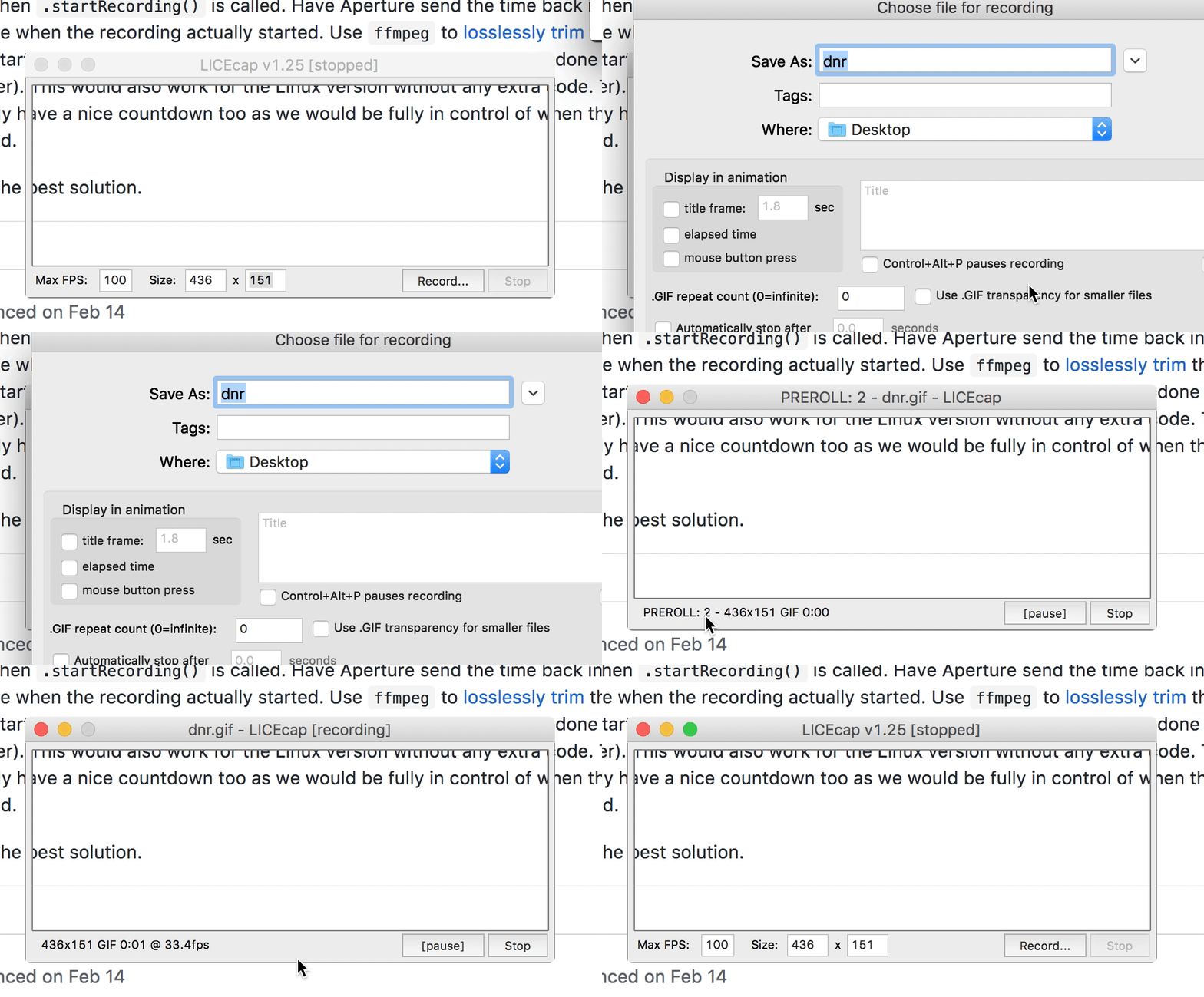
As you can see, LiceCap always uses a preroll of 3 seconds. Don't think it's configurable, but might be a nice feature. That timer could then be shown in the menubar on top. Currently, it's hard to tell how much time you have before the capture actually starts.
 SamVerschueren
on 15 Jun 2017
SamVerschueren
on 15 Jun 2017
How about when we click the red record button, the window is hidden immediately then a three-to-one counter would replace the tray icon (three new tray icons, five in total). I noticed that the recording starts the second the tray icon becomes stop instead of record, so in theory it should work. Is this feasible?
 sonaye
on 2 Sep 2017
sonaye
on 2 Sep 2017
Fixed on master, thank you @vadimdemedes! Feel free to close this issue when you're ready.
skllcrn
on 1 Nov 2017
This should no longer be a problem in the latest beta as we hide the window right away and then bounce the menubar icon while it prepares.
sindresorhus
on 19 Jan 2018
Related issues
 tyler-reitz
·
4Comments
tyler-reitz
·
4Comments
 rubenbuijs
·
3Comments
rubenbuijs
·
3Comments
 rgbkrk
·
4Comments
rgbkrk
·
4Comments
 vadimdemedes
·
4Comments
vadimdemedes
·
4Comments
 felixdorner
·
3Comments
felixdorner
·
3Comments
Most helpful comment
I looked into this yesterday and we have two options:
In the Swift code in Aperture, handle writing the movie file ourselves. This would let us drop the frames until Kap signals it's ready and Kap would be able to record exactly when it wanted to. The problem is that it's both difficult and verbose to do anything manual with AVFoundation and we would not be able to use the simple method we're currently using. We would also need a different solution for Linux when we add support for that.
Save the time when
.startRecording()is called. Have Aperture send the time back in the resolved promise when the recording actually started. Useffmpegto losslessly trim that time away from the start of the movie. This process is super fast (like you would have done it in QuickTime Player). This would also work for the Linux version without any extra code. This way we could actually have a nice countdown too as we would be fully in control of when the actual recording started.I think
2would be the best solution.