Kanboard: Bad translation on Date Picker (spanish)
Actual behaviour
When select start date or due date, the date picker have mixed translations on chinese (or similar language) and english.
Expected behaviour
Date picker with all translations on spanish. In version 1.2.11, the translation works.
Steps to reproduce
Change the language to Español (España) or Español (Venezuela)
Screenshots
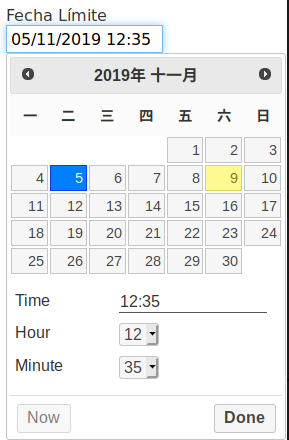
Configuration
Kanboard version: 1.2.12
Database type and version:  10.1.41-MariaDB
PHP version: 7.2.24
OS: Ubuntu 18.04
Browser: Chrome / Firefox
 ConsultorML
All 4 comments
@consultorml the fix for this was merged into master and should now be good to close!
 SladeP
on 17 Nov 2019
SladeP
on 17 Nov 2019
Thank you @SladeP. I made the changes and works flawlessly.
ConsultorML
on 18 Nov 2019
Good morning,
I'm just upgrading to the current release (1.2.13) and am experiencing this issue as well (same Chinese text as shown in the screenshot above), although we have the default language set to English and I can see that the files installed on the server reflect the new change that was merged in with #4347.
Not sure if there's any PHP caching occurring of the previous files, which could potentially be a source of the issue somehow, but I don't think that's the issue here (I've already completed a few actions that should rule that out as the potential source of the issue on my end).
 orware
on 19 Dec 2019
orware
on 19 Dec 2019
For my issue it seems like it might be related to the Customizer plugin so I've reported that separately over here: https://github.com/creecros/Customizer/issues/103
This issue may be able to remain closed since it doesn't seem to be due to the main Kanboard code anymore.
orware
on 19 Dec 2019
Related issues
 lianguan
·
7Comments
lianguan
·
7Comments
 stbc
·
6Comments
stbc
·
6Comments
 stertingen
·
3Comments
stertingen
·
3Comments
 george-viaud
·
3Comments
george-viaud
·
3Comments
 Finrod927
·
4Comments
Finrod927
·
4Comments