K9s: Logs page for any pod or container shows "Waiting for logs..." without showing old logs

Describe the bug
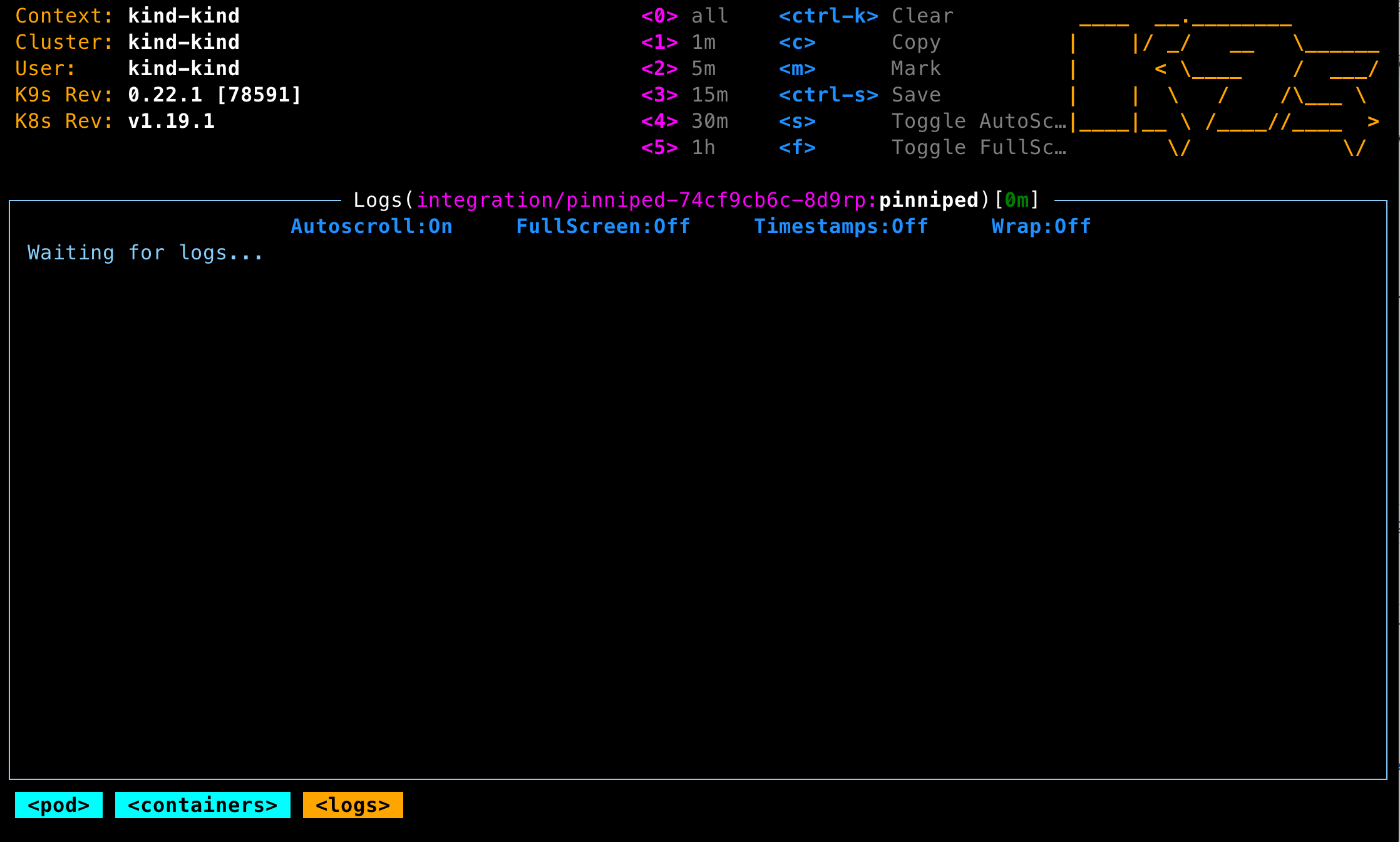
Logs page for any pod or container just shows "Waiting for logs..." without showing old log lines. Once new lines of log are output by the container, those new lines appear.
To Reproduce
Steps to reproduce the behavior:
- Type
:pods. - Type
lor hit enter twice to get to a logs page. - Inside the box where it would normally show lines of logs, in shows only "Waiting for logs..." until the next line of log is output.
Expected behavior
I seem to recall that older versions of k9s used to always pull all of existing logs and show them on the logs page as soon as you opened the logs page. Am I recalling that correctly?
Screenshots
Versions (please complete the following information):
- OS: OSX Catalina 10.15.6
- K9s: 0.22.1 and also seen with all other recent versions
- K8s: v1.19.1 and also seen with older versions
Additional context
I tried brew uninstall k9s && rm ~/.k9s/config.yml && brew install k9s before creating this issue, but it din't help. Is there anything else that I should try to make sure it's not a problem with my install?
I love k9s, and this makes it hard to use k9s as a debugging tool. I wish I could see the logs right away so I can see what has happened recently in the pods.
 cfryanr
All 5 comments
@cfryanr Thank you for you kind words Ryan! I looks like its trying to pull the latest logs - try hitting 0 while in the log view and see if you get any logs. You can also set logger.since.Seconds to 300 to the last 5 mins or -1 for all logs.
 derailed
on 8 Oct 2020
derailed
on 8 Oct 2020
Ahh, that's exactly what has happened! Thank you! Every time I visit a logs page, it was resetting the number of minutes back to the default and I wasn't noticing, and the default was confusingly 0m. I'm not sure why it was 0m, because I had never edited ~/.k9s/config.yml. I wonder if that happened during an upgrade to a previous version? I seem to recall that this behavior started when I upgraded a few versions ago, although I might be remembering incorrectly.
Anyway, after deleting ~/.k9s/config.yml now it always seems to reset it back to 1m. When I edit the k9s.logger.sinceSeconds value, it does seem to respect that value as the default for all new log pages.
I'm not sure how it got stuck at 0m, as shown in the screenshot above. It's not acting that way now. If I manually edit the k9s.logger.sinceSeconds to be a small number, like 1 or 2 then I can see that the UI shows 0m, so perhaps during an upgrade or due to some bug k9s had somehow written a very small integer as the value of that setting and I didn't notice?
I appears that the default value for a new install is 60. That means that a new user will typically not see any logs when they go to a logs page, unless the container is very chatty in its logging. Perhaps 300 would be a better default? Also/or, perhaps a better user experience would be to show a more descriptive message where it currently says Waiting for logs.... For example, if it had instead said No logs in the past 0m. Waiting for logs... then I would have immediately realized my misunderstanding.
Thanks for your help! I ❤️ k9s and use it every day!
cfryanr
on 8 Oct 2020
@cfryanr Thank you Ryan for the feedback! This make sense. I'll change the default to 5m as you've suggested in the next release. And again thank you for your support!!
derailed
on 13 Oct 2020
Also for Pods in Error or Completed state you only see "stream closed".
I have to press 0 to see the logs which I only found out by reading this ticket.
The logs since is a bit confusing. I rather tail to the last 100 lines.
 yoshz
on 26 Oct 2020
yoshz
on 26 Oct 2020
@yoshz @cfryanr - Should be better on v0.23.1
derailed
on 30 Oct 2020
Related issues
 mimizone
·
4Comments
mimizone
·
4Comments
 brentco
·
4Comments
brentco
·
4Comments
 mhaddon
·
3Comments
mhaddon
·
3Comments
 dalgibbard
·
3Comments
dalgibbard
·
3Comments
 vasicvuk
·
3Comments
vasicvuk
·
3Comments
Most helpful comment
@cfryanr Thank you for you kind words Ryan! I looks like its trying to pull the latest logs - try hitting
0while in the log view and see if you get any logs. You can also set logger.since.Seconds to 300 to the last 5 mins or -1 for all logs.