K9s: Not able to switch off Command and Search Icons? [WSL]

Describe the bug
Already struggled with fonts, icons on WSL (example: setting up oh-my-zsh)
I was trying to switch off the icons, because of WSL I get those squares[] which is quite annoying.
Still have those squares on Ubuntu18.04[WSL]
Expected behavior
Able to switch on/off those icons.
Screenshots
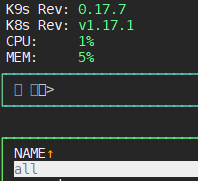
Versions:
- OS: [Ubuntu18.04 WSL]
- K9s [0.17.7]
- K8s [v1.17.1]
 norbertbodo
All 4 comments
@norbertbodo I think these are command and search icons and not the xray view icons. If you actually goto the xray view I believe your skin file will work for xray but not for the prompt. Makes sense?
If so please correct the issue as this relates to the command and search prompt.
It is indeed a bug in k9s command prompt when icons are not supported by the terminal impl.
I'll try to fix this soon...
 derailed
on 20 Mar 2020
derailed
on 20 Mar 2020
@derailed Thank you for your response. I'm sorry for my misunderstanding. I edited the issue. Keep up the good work. This is the best k8s-tool.
norbertbodo
on 23 Mar 2020
Hi @norbertbodo,
the problem is the same of #599.
Command prompt and Powershell do not fully support utf-8 (icons and emojis), fortunately microsoft has released windows terminal that solve that problem. You can download it here. (It's still a preview but it's very stable. I think it will officialy relesed with next version of Windows)
 moebius87
on 4 Apr 2020
moebius87
on 4 Apr 2020
@norbertbodo You can now set noIcons: true to disable k9s icons in your .k9s/config.yml
derailed
on 14 Apr 2020
Related issues
 vasicvuk
·
3Comments
vasicvuk
·
3Comments
 brentco
·
4Comments
brentco
·
4Comments
 lfundaro
·
4Comments
lfundaro
·
4Comments
 cdunford
·
3Comments
cdunford
·
3Comments
 RothAndrew
·
3Comments
RothAndrew
·
3Comments
Most helpful comment
@norbertbodo I think these are command and search icons and not the xray view icons. If you actually goto the xray view I believe your skin file will work for xray but not for the prompt. Makes sense?
If so please correct the issue as this relates to the command and search prompt.
It is indeed a bug in k9s command prompt when icons are not supported by the terminal impl.
I'll try to fix this soon...