K9s: Unreadable logs for light theme of terminal

Describe the bug
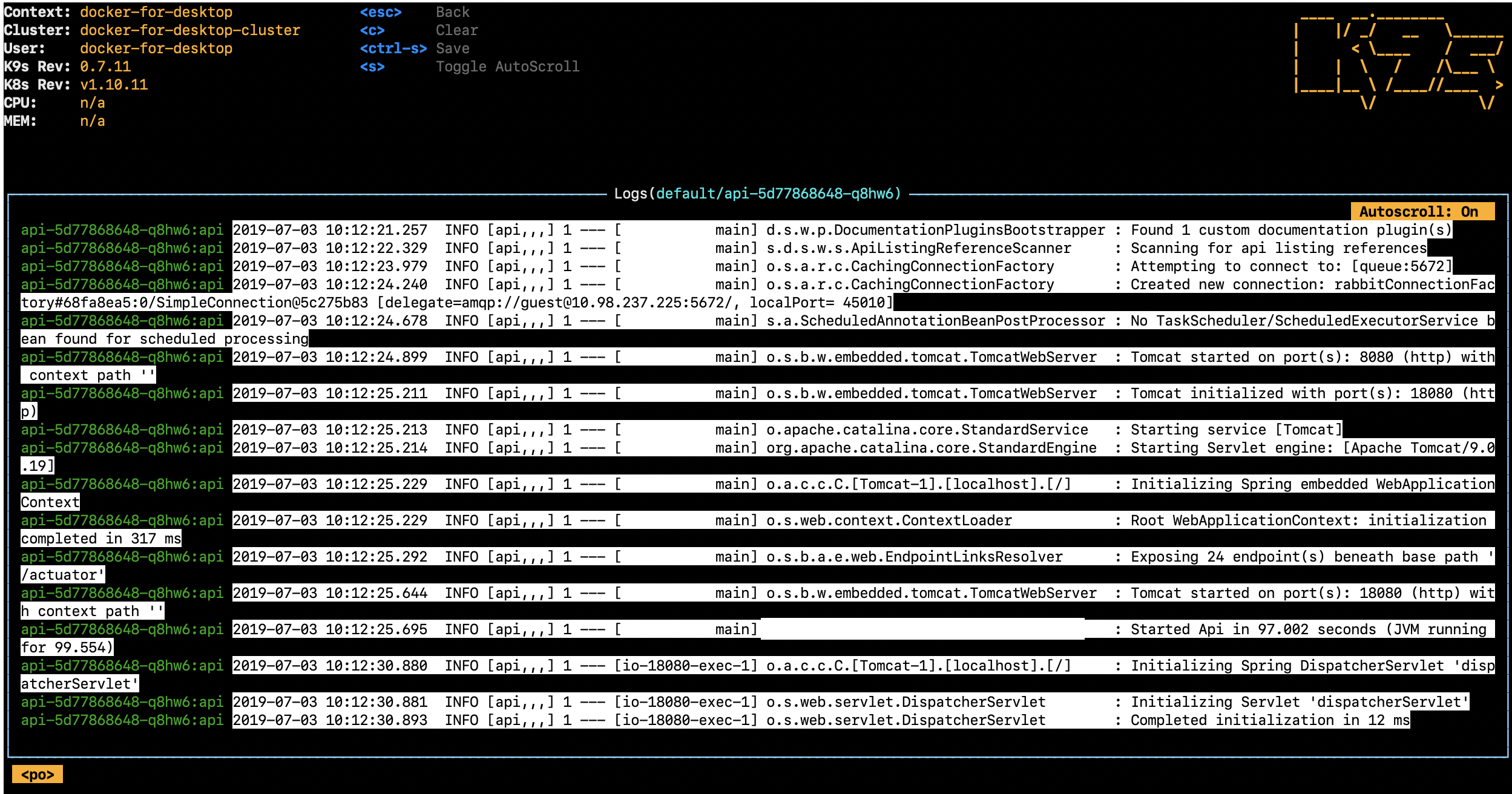
Colors in logs for white color theme of terminal is broken.
Logs became unreadable after upgrade from some old version to 0.7.11
To Reproduce
Steps to reproduce the behavior:
- Just install the newest version (for now 0.7.11)
- Use white color schema of terminal (e.g. OSX default terminal)
- Go to logs of any pod
- See logs as on the screenshot
Expected behavior
Good readable logs for the light theme.
Background have to be the same on all logs page
Screenshots
Versions (please complete the following information):
- OS: 10.14.5
- K9s 0.7.11
- K8s 1.10.11
Additional context
For dark theme terminal all is ok
 alexloiko
All 7 comments
@tryelse Thank you for this report! Do you happen to have a skin.yml file in your .k9s dir?
 derailed
on 3 Jul 2019
derailed
on 3 Jul 2019
I have the same problem and I don't have a skin.yml.
 ncsibra
on 4 Jul 2019
ncsibra
on 4 Jul 2019
@derailed No, ~/.k9s contains only config.yml
alexloiko
on 4 Jul 2019
Same here. Just upgraded, no skin.
Besides the format problem, this version is prepending the pod name in every log record, which in my case where pod names are quite long, this extra text is taking almost 40% of the line. Is there any way to disable prepending pod name in logs?
 cyaconi
on 5 Jul 2019
cyaconi
on 5 Jul 2019
@tryelse. I think I see the issue. I will push a fix in a bit.
@cyaconi How would you propose we deal with containers names in multi logs scenarios? I understand the issue with log pod:container names but we need a way to decipher where the logs are coming from in multi-resources/containers scenarios??
derailed
on 8 Jul 2019
About the pod name issue, I think showing the pod name only in multi log/container scenario would be enough. Most of our pods have only 1 container, so seeing the pod name is pointless.
ncsibra
on 9 Jul 2019
@tryelse @ncsibra @cyaconi - Fixed 0.7.12! I think I've fixed the original issue with the background being reset in white terminal mode. As for the pod names I've changed the logic a bit.
- When viewing multiple pod logs the full pod:container will be shown.
- When viewing a single pod with multiple containers the container name will be shown
- When viewing a single pod with a single container just the log will be shown.
We may need to revisit in the future, but I think this will solve most of these issues mentioned above.
Thank you all so much for you feedback and pitching ideas!
derailed
on 12 Jul 2019
Related issues
 signaleleven
·
3Comments
signaleleven
·
3Comments
 ArnaudMsh
·
3Comments
ArnaudMsh
·
3Comments
 rahilb
·
3Comments
rahilb
·
3Comments
 dalgibbard
·
3Comments
dalgibbard
·
3Comments
 pgoodjohn
·
4Comments
pgoodjohn
·
4Comments
Most helpful comment
@tryelse @ncsibra @cyaconi - Fixed 0.7.12! I think I've fixed the original issue with the background being reset in white terminal mode. As for the pod names I've changed the logic a bit.
We may need to revisit in the future, but I think this will solve most of these issues mentioned above.
Thank you all so much for you feedback and pitching ideas!