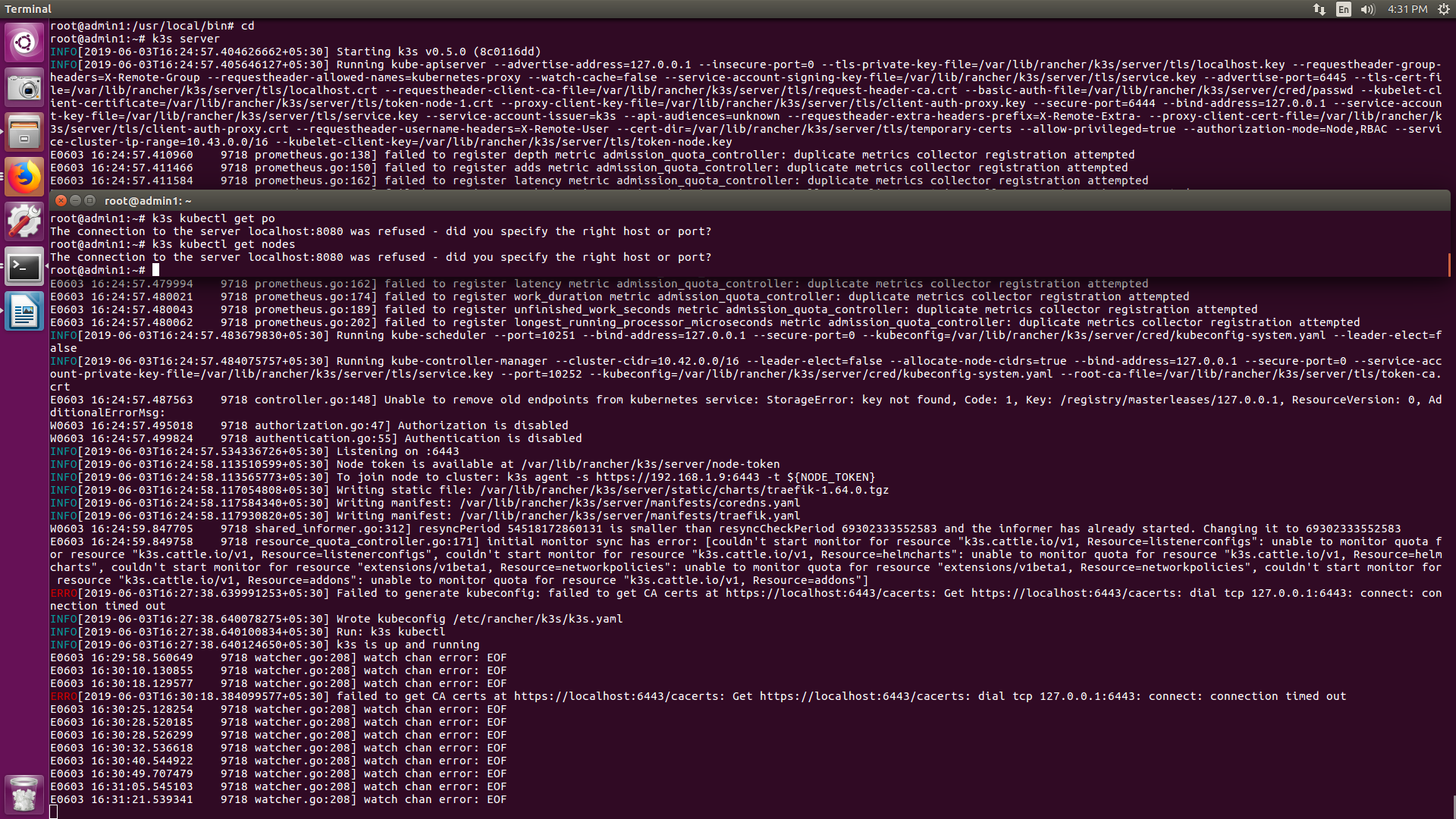
I am not able to run the server properly as the kubeconfig file is not getting generated cuz of some certificate issue. When i download the binary and run the server, a fatal issue is detected which says- Kubeconfig not generated.
To Reproduce
just simply download the binary from the relases link and run the server
Expected behavior
The server should have run properly without any error.
Screenshots

Additional context
code-
INFO[2019-06-04T10:29:17.628418754+05:30] Starting k3s v0.5.0 (8c0116dd)
INFO[2019-06-04T10:29:17.629489316+05:30] Running kube-apiserver --requestheader-group-headers=X-Remote-Group --allow-privileged=true --authorization-mode=Node,RBAC --service-account-signing-key-file=/var/lib/rancher/k3s/server/tls/service.key --proxy-client-key-file=/var/lib/rancher/k3s/server/tls/client-auth-proxy.key --requestheader-extra-headers-prefix=X-Remote-Extra- --api-audiences=unknown --requestheader-client-ca-file=/var/lib/rancher/k3s/server/tls/request-header-ca.crt --proxy-client-cert-file=/var/lib/rancher/k3s/server/tls/client-auth-proxy.crt --watch-cache=false --advertise-address=127.0.0.1 --secure-port=6444 --tls-cert-file=/var/lib/rancher/k3s/server/tls/localhost.crt --tls-private-key-file=/var/lib/rancher/k3s/server/tls/localhost.key --basic-auth-file=/var/lib/rancher/k3s/server/cred/passwd --kubelet-client-key=/var/lib/rancher/k3s/server/tls/token-node.key --requestheader-username-headers=X-Remote-User --service-cluster-ip-range=10.43.0.0/16 --advertise-port=6445 --bind-address=127.0.0.1 --service-account-key-file=/var/lib/rancher/k3s/server/tls/service.key --service-account-issuer=k3s --cert-dir=/var/lib/rancher/k3s/server/tls/temporary-certs --insecure-port=0 --kubelet-client-certificate=/var/lib/rancher/k3s/server/tls/token-node-1.crt --requestheader-allowed-names=kubernetes-proxy
E0604 10:29:17.634915   31163 prometheus.go:138] failed to register depth metric admission_quota_controller: duplicate metrics collector registration attempted
E0604 10:29:17.635807   31163 prometheus.go:150] failed to register adds metric admission_quota_controller: duplicate metrics collector registration attempted
E0604 10:29:17.635909   31163 prometheus.go:162] failed to register latency metric admission_quota_controller: duplicate metrics collector registration attempted
E0604 10:29:17.635992   31163 prometheus.go:174] failed to register work_duration metric admission_quota_controller: duplicate metrics collector registration attempted
E0604 10:29:17.636069   31163 prometheus.go:189] failed to register unfinished_work_seconds metric admission_quota_controller: duplicate metrics collector registration attempted
E0604 10:29:17.636121   31163 prometheus.go:202] failed to register longest_running_processor_microseconds metric admission_quota_controller: duplicate metrics collector registration attempted
W0604 10:29:17.673907   31163 genericapiserver.go:315] Skipping API batch/v2alpha1 because it has no resources.
W0604 10:29:17.685905   31163 genericapiserver.go:315] Skipping API node.k8s.io/v1alpha1 because it has no resources.
E0604 10:29:17.702292   31163 prometheus.go:138] failed to register depth metric admission_quota_controller: duplicate metrics collector registration attempted
E0604 10:29:17.702329   31163 prometheus.go:150] failed to register adds metric admission_quota_controller: duplicate metrics collector registration attempted
E0604 10:29:17.702378   31163 prometheus.go:162] failed to register latency metric admission_quota_controller: duplicate metrics collector registration attempted
E0604 10:29:17.702423   31163 prometheus.go:174] failed to register work_duration metric admission_quota_controller: duplicate metrics collector registration attempted
E0604 10:29:17.702461   31163 prometheus.go:189] failed to register unfinished_work_seconds metric admission_quota_controller: duplicate metrics collector registration attempted
E0604 10:29:17.702495   31163 prometheus.go:202] failed to register longest_running_processor_microseconds metric admission_quota_controller: duplicate metrics collector registration attempted
INFO[2019-06-04T10:29:17.706247668+05:30] Running kube-scheduler --port=10251 --bind-address=127.0.0.1 --secure-port=0 --kubeconfig=/var/lib/rancher/k3s/server/cred/kubeconfig-system.yaml --leader-elect=false
INFO[2019-06-04T10:29:17.706672596+05:30] Running kube-controller-manager --kubeconfig=/var/lib/rancher/k3s/server/cred/kubeconfig-system.yaml --service-account-private-key-file=/var/lib/rancher/k3s/server/tls/service.key --secure-port=0 --port=10252 --bind-address=127.0.0.1 --cluster-cidr=10.42.0.0/16 --root-ca-file=/var/lib/rancher/k3s/server/tls/token-ca.crt --leader-elect=false --allocate-node-cidrs=true
E0604 10:29:17.708197   31163 controller.go:148] Unable to remove old endpoints from kubernetes service: StorageError: key not found, Code: 1, Key: /registry/masterleases/127.0.0.1, ResourceVersion: 0, AdditionalErrorMsg:
W0604 10:29:17.717311   31163 authorization.go:47] Authorization is disabled
W0604 10:29:17.717347   31163 authentication.go:55] Authentication is disabled
INFO[2019-06-04T10:29:17.749303080+05:30] Listening on :6443
INFO[2019-06-04T10:29:17.850707130+05:30] Node token is available at /var/lib/rancher/k3s/server/node-token
INFO[2019-06-04T10:29:17.850760490+05:30] To join node to cluster: k3s agent -s https://192.168.1.9:6443 -t ${NODE_TOKEN}
INFO[2019-06-04T10:29:17.853089424+05:30] Writing static file: /var/lib/rancher/k3s/server/static/charts/traefik-1.64.0.tgz
INFO[2019-06-04T10:29:17.868066956+05:30] Writing manifest: /var/lib/rancher/k3s/server/manifests/coredns.yaml
INFO[2019-06-04T10:29:17.868236676+05:30] Writing manifest: /var/lib/rancher/k3s/server/manifests/traefik.yaml
ERRO[2019-06-04T10:31:57.553325408+05:30] Failed to generate kubeconfig: failed to get CA certs at https://localhost:6443/cacerts: Get https://localhost:6443/cacerts: dial tcp 127.0.0.1:6443: connect: connection timed out
INFO[2019-06-04T10:31:57.553382819+05:30] Wrote kubeconfig /etc/rancher/k3s/k3s.yaml
INFO[2019-06-04T10:31:57.553394832+05:30] Run: k3s kubectl
INFO[2019-06-04T10:31:57.553406426+05:30] k3s is up and running
E0604 10:34:20.880091   31163 watcher.go:208] watch chan error: EOF
E0604 10:34:25.729367   31163 watcher.go:208] watch chan error: EOF
E0604 10:34:31.727815   31163 watcher.go:208] watch chan error: EOF
E0604 10:34:32.882241   31163 watcher.go:208] watch chan error: EOF
ERRO[2019-06-04T10:34:37.297504306+05:30] failed to get CA certs at https://localhost:6443/cacerts: Get https://localhost:6443/cacerts: dial tcp 127.0.0.1:6443: connect: connection timed out
E0604 10:34:45.876604   31163 watcher.go:208] watch chan error: EOF
E0604 10:34:53.765242   31163 watcher.go:208] watch chan error: EOF
E0604 10:34:53.766284   31163 watcher.go:208] watch chan error: EOF
 sez98
sez98
All 2 comments
Edit /etc/systemd/system/k3s.service, add --write-kubeconfig-mode 664:
[Unit]
Description=Lightweight Kubernetes
Documentation=https://k3s.io
After=network-online.target

[Service]
Type=notify
EnvironmentFile=/etc/systemd/system/k3s.service.env
ExecStartPre=-/sbin/modprobe br_netfilter
ExecStartPre=-/sbin/modprobe overlay
ExecStart=/usr/local/bin/k3s \
    server \
    --write-kubeconfig-mode 664 \

KillMode=process
Delegate=yes
LimitNOFILE=infinity
LimitNPROC=infinity
LimitCORE=infinity
TasksMax=infinity
TimeoutStartSec=0
Restart=always

[Install]
WantedBy=multi-user.target
Then:
sudo systemctl daemon-reload
sudo systemctl restart k3s
 smartwang
on 20 Jun 2019
smartwang
on 20 Jun 2019
👍12
🚀1
❤1
🎉1
😄1
@smartwang It works, thank you!
 xuxusheng
on 12 Aug 2019
xuxusheng
on 12 Aug 2019
Was this page helpful?
0 / 5 - 0 ratings
Related issues
 dduportal
·
4Comments
dduportal
·
4Comments
 VictorRobellini
·
3Comments
VictorRobellini
·
3Comments
 davidnuzik
·
3Comments
davidnuzik
·
3Comments
 Moep90
·
3Comments
Moep90
·
3Comments
 ewoutp
·
4Comments
ewoutp
·
4Comments
Most helpful comment
Edit /etc/systemd/system/k3s.service, add
--write-kubeconfig-mode 664:Then: