Hi folks.
I'm trying to get kubernetes dashboard running on k3s. I followed the instructions given in rancher/k3s#87 (https://kubernetes.io/docs/tasks/access-application-cluster/web-ui-dashboard/) and managed to get to the login screen. On the page mentioned above a service user is created and a role binding is done to role cluster-admin which does not exist by default in k3s.
I used the cluser-roles.yaml file from https://github.com/kubernetes/kubernetes/tree/master/plugin/pkg/auth/authorizer/rbac/bootstrappolicy/testdata to create the roles.
Then, after following the instructions to expose the login token for the service account, the login still does not work. After hitting the SIGN IN button, the login screen just stays there.
Using developer tools, I can see that a csrf-token is returned and used to retrieve a JWT token, but the final status call just returns:
{
  "tokenPresent": false,
  "headerPresent": false,
  "httpsMode": true
 }
What am I missing?
 sahlex
All 15 comments
Hi @sahlex, I was able to access the dasboard using the instructions from the linked URL. I think the difference might be in how you are creating the cluster-admin, using the instructions for 'creating sample user' I did the following:
erik@lubuntu:~/go/src/github.com/rancher/k3s$ cat >dashboard-admin.yaml
apiVersion: v1
kind: ServiceAccount
metadata:
  name: admin-user
  namespace: kube-system

---

apiVersion: rbac.authorization.k8s.io/v1
kind: ClusterRoleBinding
metadata:
  name: admin-user
roleRef:
  apiGroup: rbac.authorization.k8s.io
  kind: ClusterRole
  name: cluster-admin
subjects:
- kind: ServiceAccount
  name: admin-user
  namespace: kube-system
erik@lubuntu:~/go/src/github.com/rancher/k3s$ kubectl apply -f dashboard-admin.yaml
serviceaccount/admin-user created
clusterrolebinding.rbac.authorization.k8s.io/admin-user created
erik@lubuntu:~/go/src/github.com/rancher/k3s$ kubectl -n kube-system describe secret $(kubectl -n kube-system get secret | grep admin-user | awk '{print $1}')
Name:         admin-user-token-8m2xh
Namespace:    kube-system
Labels:       <none>
Annotations:  kubernetes.io/service-account.name: admin-user
              kubernetes.io/service-account.uid: 93ed4ed9-476f-11e9-8a44-0800270cf1bd

Type:  kubernetes.io/service-account-token

Data
====
ca.crt:     1062 bytes
namespace:  11 bytes
token:      eyJhbGciOiJSUz...
Then running kubectl proxy, visiting the url in the docs, and copying & pasting the token allowed me to login to dashboard:

 erikwilson
on 15 Mar 2019
erikwilson
on 15 Mar 2019
OK, Got it.
My problem was, that I have started the proxy with settings, that allow access from a remote server (not localhost). After setting up a ssl-tunnel to the host running the proxy to my local (windows) host. it's working properly. Seems that the dashboard only talks to "localhost".
Thanks!
sahlex
on 18 Mar 2019
@sahlex How do you implement ssh tunnel?
 lygstate
on 18 Mar 2019
lygstate
on 18 Mar 2019
@erikwilson Can you provide a demo access dashboard from external world but now localhost?
lygstate
on 18 Mar 2019
@lygstate I will try to come up with instructions for the README which describes how to setup the dashboard and proxy from another host.
erikwilson
on 18 Mar 2019
@lygstate, I used MobaXterm's ssh tunnel implementation. It's very simple.
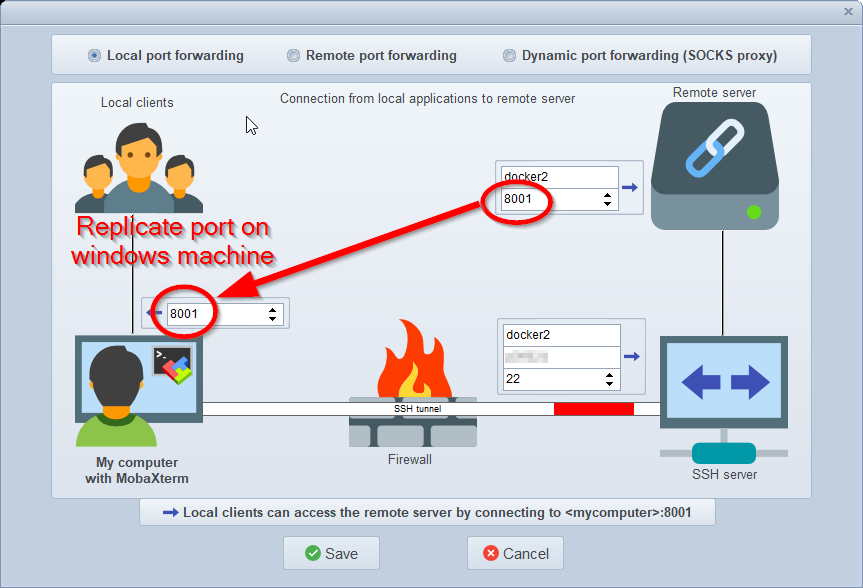
sahlex
on 19 Mar 2019
@sahlex are directly tunning into the docker or something else?
lygstate
on 19 Mar 2019
@sahlex Thanks, works now:)
lygstate
on 19 Mar 2019
so, I used the admin token creation as noted above, did:
kubectl --namespace=kube-system port-forward kubernetes-dashboard-57df4db6b-q6lx6 --address 0.0.0.0 8443
accepted the self-signed cert, and logged in. and it works!
 ThomasADavis
on 26 Mar 2019
ThomasADavis
on 26 Mar 2019
looks good, you do not use proxy?
lygstate
on 26 Mar 2019
proxy can also use the --address 0.0.0.0; the default bind is to 127.0.0.1 or ::1 if you do nothing. I'm still learning all of this.
ThomasADavis
on 26 Mar 2019
You can also expose the dashboard by adding:
type: LoadBalancer
to the service in the kubernetes-dashboard.yaml. Then the service part looks like:
# ------------------- Dashboard Service ------------------- #

kind: Service
apiVersion: v1
metadata:
  labels:
    k8s-app: kubernetes-dashboard
  name: kubernetes-dashboard
  namespace: kube-system
spec:
  type: LoadBalancer
  ports:
    - port: 443
      targetPort: 8443
  selector:
    k8s-app: kubernetes-dashboard
 milosonator
on 19 Jun 2019
milosonator
on 19 Jun 2019
Would be cool for "someone" to write this up, as a k3s-dashboard-README.md. I am learning too - trying hard to stay on the Developer side of this! - but will do what I have to, to get a lightweight K8S up on my Ubuntu laptop w/ multipass. Thanks so much for this Project, rancher-team!
 biggers
on 30 Dec 2019
biggers
on 30 Dec 2019
@sahlex
The latest K3s documentation update provides an:
Installation guide to deploy and configure the Kubernetes Dashboard on K3s
 nicdesousa
on 13 Feb 2020
nicdesousa
on 13 Feb 2020
So I'm completely lost in trying to remotely access the dashboard (as I'm running a headless system so localhost isn't an option). I'm trying to follow the port forwarding guide but have no idea what I'm doing in regards to the dashboard. I believe I need forward a port to a service, but can't seem to find a service for the dashboard.
 TrikkStar
on 18 Sep 2020
TrikkStar
on 18 Sep 2020
Related issues
 gilkotton
·
3Comments
gilkotton
·
3Comments
 giminni
·
3Comments
giminni
·
3Comments
 ewoutp
·
4Comments
ewoutp
·
4Comments
 davidnuzik
·
3Comments
davidnuzik
·
3Comments
 wpwoodjr
·
3Comments
wpwoodjr
·
3Comments
Most helpful comment
@sahlex
The latest K3s documentation update provides an:
Installation guide to deploy and configure the Kubernetes Dashboard on K3s