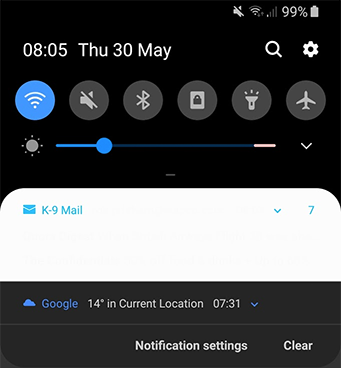
K-9: Multiple message notification is unreadable when Night Mode active
On my Samsung S9 running Android P, I have enabled Night Mode.
When multiple new emails arrive, and the notification represents them together, the background to the notification and the text on it are both white. Therefore it's unreadable.
This is a recently introduced problem, either from an update to K-9 or a system update on the S9.
Steps to reproduce
- Enable Night Mode
- Receive multiple new emails at once
- Observe the notification
Environment
K-9 Mail version: 5.600
Android version: Pie
Account type (IMAP, POP3, WebDAV/Exchange): IMAP
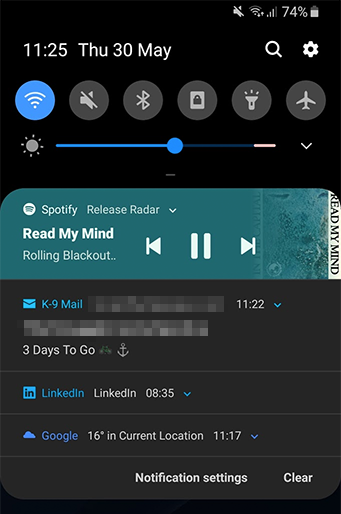
Single notifications still appear OK:
 robpridham-bbc
All 17 comments
Same problem here. I also have Galaxy S9 running android P. Hope this is fixed soon and the background for multiple emails is changed to dark. It looks better that way.
 ghost
on 30 May 2019
ghost
on 30 May 2019
I tested this against https://github.com/k9mail/k-9/pull/4073 and it still occurs.
robpridham-bbc
on 30 May 2019
I also tested that it wasn't the platform/device, using a quick demo app - NotificationCompat and a very similar setup to K9. The grouped notifications appeared correctly, respecting dark mode.
I have briefly looked through the K9 source (I'm a professional Android developer) and I can't see any easy answer to why it appears white.
robpridham-bbc
on 30 May 2019
I don't know anything about making apps for android so I can't really help.. I will leave it to those who know how to do it.
ghost
on 30 May 2019
I have this problem as well. I would love it to get fixed :). I am running on a Galaxy S10+. When the phone was new this problem didn't exist, but then after a firmware update it started doing it.
 dannyauble
on 19 Aug 2019
dannyauble
on 19 Aug 2019
The issue is still here. Will there be an update soon? I have it on a s10+ too.
 Maetts
on 1 Nov 2019
Maetts
on 1 Nov 2019
@cketti What if anything can I do to support or provide more info into this issue? As above, I'm a professional Android dev.
robpridham-bbc
on 2 Nov 2019
@robpridham-bbc: Figure out the problem and propose a fix? I don't have any more information on this than you have, and I can't reproduce it on my devices. From the comments it seems like it's specific to Samsung devices.
 cketti
on 2 Nov 2019
cketti
on 2 Nov 2019
Let me know what Info you need - I will provide it.
Maetts
on 2 Nov 2019
I've tried it from master today, and as expected the fault persists.
I think this is fundamentally a Samsung bug - AFAIK we're all running their version of Pie/9, which has Dark Mode support provided early by bolting it on, rather than the true support in Q/10. What I didn't (and still don't completely) understand is what the difference could be between K9 and other apps that display correctly.
However I have made it work by raising the k9mail targetSdkVersion from 23 to 29.
robpridham-bbc
on 2 Nov 2019
I incrementally reduced it back down and it only broke when back on 23 (i.e. it works on 24), at least on my S9, so hopefully that helps you reduce the change impact.
@cketti is this something you think you can action?
robpridham-bbc
on 2 Nov 2019
We'll have to raise the targetSdkVersion to 28 anyway to be able to release an update on Google Play. If this will fix the issue, then there's nothing else you need to do. Thanks for investigating this :+1:
cketti
on 2 Nov 2019
This is fantastic news. I can also confirm on the s10+ with beta Android 10 the problem currently goes away without any fix.
dannyauble
on 2 Nov 2019
Thanks for the good news. Since Samsung's release of Android 10 will traditionally take more time - do you have a schedule for the K9 update?
Maetts
on 9 Nov 2019
I also have this issue with 5.600, Samsung Galaxy A10 with Android Pie.
 oliv3
on 30 Nov 2019
oliv3
on 30 Nov 2019
The issue is now fixed for me on my Samsung Galaxy S9 with K-9 v5.702. Just FYI...
 Tobias-B-Besemer
on 17 Dec 2019
Tobias-B-Besemer
on 17 Dec 2019
I raised this and I'm also happy to confirm it's fixed for me, as expected since the target version has changed. Thanks for the work.
robpridham-bbc
on 17 Dec 2019
Related issues
 Agno94
·
3Comments
Agno94
·
3Comments
 NovaViper
·
3Comments
NovaViper
·
3Comments
 farson2003
·
4Comments
farson2003
·
4Comments
 asbach2
·
3Comments
asbach2
·
3Comments
 D0ve
·
3Comments
D0ve
·
3Comments
Most helpful comment
We'll have to raise the targetSdkVersion to 28 anyway to be able to release an update on Google Play. If this will fix the issue, then there's nothing else you need to do. Thanks for investigating this :+1: