K-9: Confusing setting name: "When ‘Auto-sync’ is checked"
K9 > Settings > Global Settings > Network > Background sync: When ‘Auto-sync’ is checked
It's not obvious at all it meant ‘Auto-sync’ in Android’s settings.
Personally I spent a lot of time and efforts just to find it out. Not everybody might be such stubborn.
BTW, what exactly the Android's Setting is this? It is even not mentioned in Documentation.
Different Android versions have different Settings(names, locations). Didn't find any suitable for Nougat.
 bam80
bam80
All 4 comments
I'd like to introduce more in-app help to address this. That probably means moving away from PreferenceActivity to PreferenceFragment and then adding the icon to the Toolbar.
You can see an example of that in Android here - see the ? button in the top right.
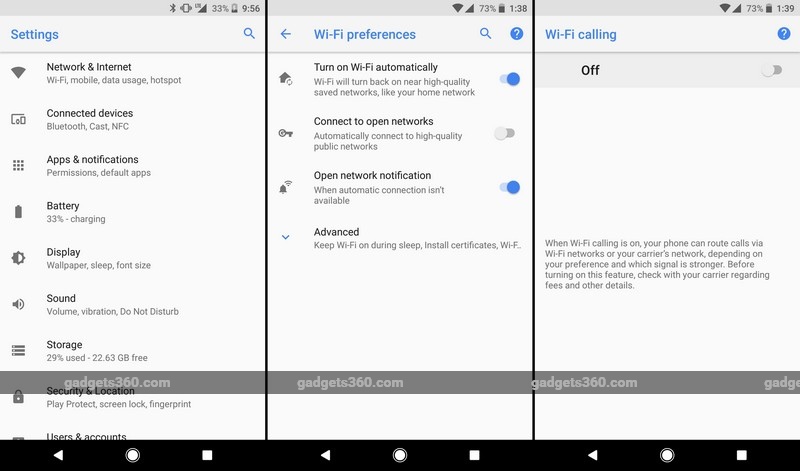
I've raised the linked issue on the website to improve the documentation.
 philipwhiuk
on 5 Jan 2018
philipwhiuk
on 5 Jan 2018
We can perhaps also find a way to link to that setting in your Android settings.
philipwhiuk
on 5 Jan 2018
Thanks @philipwhiuk, the in-app help is what I was thinking myself. Also, the link to that setting in Android settings would solve the problem definitely
bam80
on 5 Jan 2018
Back in gingerbread you could understand, it was hidden behind the overflow buttons, now its called "automatically sync data"
 aucklander
on 8 Jan 2018
aucklander
on 8 Jan 2018
Related issues
 Kareem-Ahmed
·
3Comments
Kareem-Ahmed
·
3Comments
 D0ve
·
3Comments
philipwhiuk
·
3Comments
D0ve
·
3Comments
philipwhiuk
·
3Comments
 Immortalin
·
3Comments
Immortalin
·
3Comments
 maltfield
·
3Comments
maltfield
·
3Comments
Most helpful comment
I'd like to introduce more in-app help to address this. That probably means moving away from PreferenceActivity to PreferenceFragment and then adding the icon to the Toolbar.
You can see an example of that in Android here - see the ? button in the top right.
I've raised the linked issue on the website to improve the documentation.