K-9: Focus shifts to message body while typing addresses
Expected behavior
- Create new email
- In 'to', type: [email protected]
- Tap body to enter body.
Actual behavior
- After entering the 'a' from 'lack.com', the focus is lost, switched to the body of the email, the address is locked to "contact@l" and can't be edited anymore.
Steps to reproduce
- See above
Environment
K-9 Mail version: 5.208
Android version: 8.0.0/October patch
Device: Nexus 6P
Account type (IMAP, POP3, WebDAV/Exchange): IMAP
 starbuck3000
All 26 comments
Can't reproduce this on the same device. What keyboard do you have installed?
 philipwhiuk
on 13 Oct 2017
philipwhiuk
on 13 Oct 2017
I was able to reproduce this. It almost looks like touches to the keyboard are misinterpreted as touches to the content area and the input field loses focus. I can't be sure, though.
I'm using the Gboard keyboard on Android 8.0.0 on a Nexus 6P, too. I also have a contact that has an email address that starts with contact@. So until I reach the domain part the auto-complete popup is showing.
 cketti
on 14 Oct 2017
cketti
on 14 Oct 2017
Hello philipwhiuk,
thanks for trying to reproduce it. I'm using gboard, and I can reproduce it in both English and French keyboards.
@cketti: that's a good explanation of the feeling indeed, it feels like "something" touches the body area and it takes over the focus.
starbuck3000
on 15 Oct 2017
I can reproduce this on Android 8.0.0 (patch level October 2017) on a Google Pixel and K-9 5.208. Also using Google's keyboard, English/German/QWERTY all.
The workaround is to add the address I want to mail to to my contacts first, and then selecting from there, but that is a bit kludgy.
 l-mb
on 25 Oct 2017
l-mb
on 25 Oct 2017
Hello,
I've just found a new sequence. Not sure it may help understand the issue: it's triggered when I try entering a destination address starting with the word "priority" (breaks after the "o").
starbuck3000
on 27 Oct 2017
This happens for me if I have username1@domain1 in my contacts, and I try to send to username1@domain2 -- after the first letter of domain2, as soon as I hit any other character, it acts as if I've hit return/enter and treats the address as fully entere (and no longer editable). If I do this for an address where I do not have username1@
I have tested this by adding a new contact, seeing the (mis-)behavior, and then deleting the contact, and seeing the expected behavior return.
 rantingnerd
on 17 Nov 2017
rantingnerd
on 17 Nov 2017
The issue is widespread in my case. I also have Android 8.0.0 on a Nexus 5X, fresh install, no OTA, and the latest K-9 mail.
I use Google keyboard in various languages. The issue is not language-dependent.
I can for example type "esme" and then I lose focus. I can reclick on it and finish, of course, but that's not the point.
I can also go the (partially written) recipient and start using backspace. Sometimes it stops after 2-3 touches and again I'm sent to the body.
 dewi-ny-je
on 16 Jan 2018
dewi-ny-je
on 16 Jan 2018
I don't know what is causing this weird behavior. But switching to AppCompat fixes the issue for me. That means the successor of version 5.6xx won't have this problem.
Since I don't want to invest more time, I plan to release 5.600 without fixing this bug.
cketti
on 8 Apr 2018
I understand that you have other priorities, but currently it's impossible to enter email addresses that I don't have saved in my contacts. The described behavior is triggered for me whenever I want to enter an email adress on two devices:
Pixel, Android 8.1, Gboard
Nokia 8, Android 8, Gboard.
It does not happen on
Sony Xperia XZ1, Android 8, Same Gboard version.
 ben-8409
on 16 May 2018
ben-8409
on 16 May 2018
Hi cketti, I appreciate your assistance. Could you please help us understand if/when a version will be released that fixes this address entry bug on the latest devices? (It seems a number of us reporting this issue have Pixel phones running Oreo, which is somewhat ironic given that it's supposed to be stock Android or very close.)
Please pardon my confusion here: The 5.403 ver. on Android Play Store hasn't been updated since Jan. 6th, 2018. It sounds from a prior post here that a potential fix will be available after 5.6xx but we don't even have that version available on the Play Store yet.
Is there a newer build or version available for testing? I might be willing to test it. Just need to know how to get it, and whether it's possible to revert back to 5.403 (if needed) without losing my local K-9 mail store (POP3) on my Pixel 2 XL.
Thanks in advance.
P.S. K-9 is otherwise working well for me, once I figured out the battery optimization bypass settings early on so it could keep checking/fetching mail on Oreo.
 NunovYurbiz
on 3 Aug 2018
NunovYurbiz
on 3 Aug 2018
I face same problem.
Phone: xiaomi MI A1
OS: Oreo 8.1.0 (stock)
K-9 ver.: 5.600
Keyboard: Gboard (English), key2pass android
Root: false
Apart from stock Android Oreo (similarity with Google pixel), I have Google pixel camera installed on my system (I doubt it affects keyboard).
 fr0z3nfyr
on 8 Oct 2018
fr0z3nfyr
on 8 Oct 2018
I'm seeing behavior most closely matching #2887, which was closed as a duplicate of this bug.
I want to send email to an address starting with "dawn", but I have an existing contact starting with "dalton". I type 'd', 'a', and then I see the suggestion. I type 'w', and the key sticks. I mean, normally when I hit a key, it shows an enlarged version of the key while it's being pressed, as a little visual feedback that you hit the right key. The 'w' just stays popped up. When I hit 'n', focus pops down to the signature field.
Substituting different characters for 'w' and 'n' changes the behavior. If I type 'd', 'a', 'w', 'w', and repeat 'w', the cursor moves to the body, but no characters are entered. If I then type 'n', that character gets entered into the body. This feels very much like the text entry area is losing focus, and the keys are being interpreted as focus selection commands.
Keyboard is Hacker's Keyboard, Android version is 8.1.0, and the device is Nexus 5x.
 abugher
on 8 Nov 2018
abugher
on 8 Nov 2018
I still have the same issue with a ZTE Axon 9 Pro with Android 8.1.0.
This is quite annoying. Is there anything I can help to fix this?
 EmilObermayr
on 23 Jan 2019
EmilObermayr
on 23 Jan 2019
I and a number of others have reported this issue quite a while back (see the duplicate reports). It seems clear that they just want to ignore it, which is a shame.
No other email client app I use has this particular problem/bug, so it is specific to K-9 on Android.
Devs, it IS a major pain as we often are trying to rip off a fast email or reply to someone, (as we should be able to do EASILY on a mobile email app of all things), only to have it totally screw up the signature block while simultaneously screwing up the recipient address.
Look, I get that an open source app dev's time needs to be prioritized on certain things, but this is a pretty glaring problem and major source of frustration and impediment to sending emails.
Let me respectfully ask again:
CAN SOMEONE ON THE DEV TEAM PLEASE MAKE FIXING THIS A PRIORITY?
(Not intending the caps as shouting, but rather, just emphasizing it so it gets noticed. Thanks for understanding.)
On Wed, Jan 23, 2019 at 4:31 AM, EmilObermayrnotifications@github.com wrote:
I still have the same issue with a ZTE Axon 9 Pro with Android 8.1.0.
This is quite annoying. Is there anything I can help to fix this?
—
You are receiving this because you commented.
Reply to this email directly, view it on GitHub, or mute the thread.
NunovYurbiz
on 24 Jan 2019
While typing to the "to" field of K9's message composer it normally shows a drop-down list of matching contact adresses. As soon as I type a caracter wich don't match any known address anymore and therefore leave the results empty. This closes the result box and forcibly ends the ability to finish entering the reciepient address. I think it has to do with the closing action of the matching list drop-down witch also accidently sets the active focus into the message body field.
This results in beeing totally unable to send an email to lots of "new" addresses.
Still an issue in v5.600 vom Playstore
Using "Hacker's keyboard"
 Sprinterfreak
on 7 Mar 2019
Sprinterfreak
on 7 Mar 2019
K-Mail 5.600, Nexus 6P all latest patches.
I also have this problem, I issued #3580 which was just closed because of this entry, which is fine.
My issue is:
- I have many addresses in my contact list
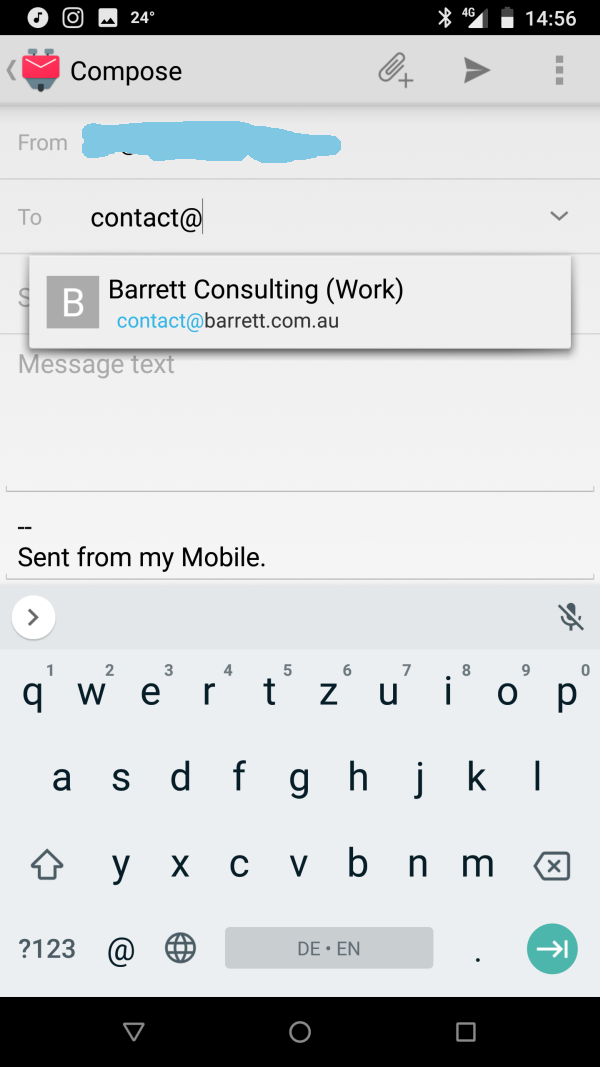
- I have one that is called [email protected]
- If I create an email and I start with contact@ it will show me the [email protected] address
- but I continue typing as I need [email protected]
- I can type the "o" no problem
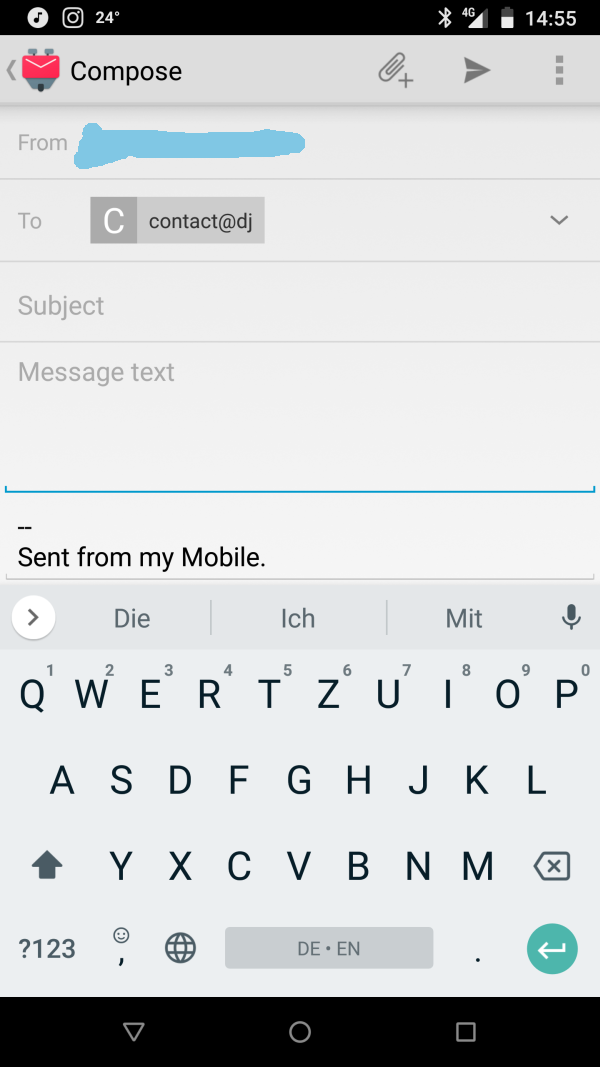
- as soon as I hit the second char "t" it locks the email address like so "contact@o" and I cant do a thing
- I cannot change the address
- I cannot edit the address
- I am stuck, I cannot send any address that begins with the same characters as another address as the matching algorithm will not allow me to enter it.
Attached are the screenshots taken during typing the address "[email protected]" and the suggestion box coming up, then after 2 more chars (dj) the email locked and cannot be edited.
 jobst
on 8 Mar 2019
jobst
on 8 Mar 2019
I was able to reproduce this. It almost looks like touches to the keyboard are misinterpreted as touches to the content area and the input field loses focus. I can't be sure, though.
I do not think it is that, once the email address is typed and in the box I cannot edit it, even if I type a brand new address like "[email protected]" - you can ONLY delete it but NOT edit even if you want to re-edit to add a 1 like "[email protected]".
jobst
on 8 Mar 2019
I have exactly the same problem as @jobst . Could you give me a hint where this problem is anchored, then I'll look at it myself and do a PR.
 C0D3D3V
on 11 Jul 2019
C0D3D3V
on 11 Jul 2019
Same here....Basically, you can't enter an email address manually. Seriously? This bug was reported nearly 2 years ago.
 MTKnife
on 18 Jul 2019
MTKnife
on 18 Jul 2019
SO I figured out a way to get passed this problem indicating that it has nothing to do with the FOCUS but rather with the PARSING of the email address.
Here you go, follow exactly and you can enter an email address that is SIMILAR to an existing address:
- start typing the email address that has the first letters SAME to an existing one
- the suggestion box WILL appear with the email address the starts the same as you are typing
- continue to type the email address into the field INCLUDING the @ symbol
- touch the message part of the email
- an exclamation mark and a message (error parsing address) will appear in the TO field
- touch the TO field again and you can finish the email address, the message WILL disappear!
Hope this help all the people having this issue.
I still like the problem fixed, though.
jobst
on 19 Jul 2019
The error could be in the class RecipientSelectView or in the external dependency TokenCompleteTextView itself. I'll try to debug it in the next few days. Especially the implementation of defaultObject and performCompletion might be interesting.
C0D3D3V
on 19 Jul 2019
I just tried to reproduce this. But it works quite nicely now.
Version of K9: 5.6
OS: Android 9, EMUI 9.0.1
Hardware is different now: Huawei Y6 2019
EmilObermayr
on 19 Jul 2019
It's not hard to reproduce the error:
Precondition you have saved a contact in your contact book, for example: [email protected]
Start by entering the email address stored in your contact book in the Recipient field.
You type in: "crazyemail@"
As you type, you will notice the completion suggestion. But actually you want to enter "[email protected]" .
So now you are typing "gm" as next... And already the focus is no longer in the input field.
Version of K9: 5.6
OS: Omni 8.1,
Device: OP3T
C0D3D3V
on 19 Jul 2019
I can reproduce this problem. Typing any address, ragrdless if anything similar is in the address book or not, misbehaves after enteringthe first character after the @-sign. Example test@f
K-9: 5.6
OS: unmodified Android 8.1
Device: bq Aquaris V
 rramthun
on 11 Sep 2019
rramthun
on 11 Sep 2019
Bump. Still broken in October 2019.
Sprinterfreak
on 15 Oct 2019
This is fixed in K-9 Mail 5.7xx.
cketti
on 5 Oct 2020
Related issues
 Agno94
·
3Comments
Agno94
·
3Comments
 robsmith11
·
3Comments
robsmith11
·
3Comments
 jrtberlin
·
3Comments
jrtberlin
·
3Comments
 digitalcraftsman
·
3Comments
digitalcraftsman
·
3Comments
 maltfield
·
3Comments
maltfield
·
3Comments
Most helpful comment
This is fixed in K-9 Mail 5.7xx.