K-9: Feature request - Resize image in k9mail on the fly
Hello
this is only a feature request, not an issue.
There could be an option to resize an added image on the fly to a lower resolution. In the options or in a dialog when I add a picture (JPG etc.).
There is no way in k9mail to do this.
Some email-clients can do this, not sure if it is easy done in k9mail, but it would be extremely useful.
At the moment I use an external app to resize pictures and send them to k9mail then.
By the way, what I dream of is a kind of option to use k9mail as Chat Client, e.g. like WhatsApp, Signal, Threema, etc. Could be done I guess and would be very handy on a Smartphone :)
Environment
K-9 Mail version: 5.010
Android version: CM 13 nightly of 21.10.2016 on Samsung Galaxy S4
Account type (IMAP, POP3, WebDAV/Exchange): IMAP
Thanks.
frank
 francwalter
All 22 comments
You're talking about resizing images when you attach them to a new email, just to be clear?
As for chat clients, nice thought, but e-mail is complex enough ;)
 philipwhiuk
on 26 Oct 2016
philipwhiuk
on 26 Oct 2016
Yes, this I mean. I have most pictures with some 5 MB big ("13 MPX") and as email it is not really useable in this size. Mostly I need only pictures in a low resolution, as in Chat Clients. They resize it automatically.
francwalter
on 26 Oct 2016
As for chat clients, nice thought, but e-mail is complex enough ;)
Just a few changes, like the above auto resize or show the mail history as a chat history compactly, and some other things.
I am sure this could be done and this would higher the usefulness of k9mail a lot. On smartphones often a simple chat client is the first choice for fast communication for me, but what can a chat client do that couldn't be done in an email client?
It's p
francwalter
on 26 Oct 2016
Sorry, I hit the wrong button :)
francwalter
on 26 Oct 2016
Ok. We probably can do slightly better on email threading - there's other issues open for that though.
Let's keep this one focused on the image resizing.
philipwhiuk
on 26 Oct 2016
Could it be done? Is it a reasonable feature request?
francwalter
on 26 Oct 2016
its not a good idea to make an app do everything.
you should rather use:
https://f-droid.org/repository/browse/?fdfilter=size&fdid=mobi.omegacentauri.SendReduced
or
https://play.google.com/store/apps/details?id=mobi.omegacentauri.SendReduced
 zoff99
on 26 Oct 2016
zoff99
on 26 Oct 2016
I'm in two minds.
On the one hand, image manipulation is not really the job of an email program.
On the other hand, I disagree with the idea that you should need a separate app. This is not something like OpenPGP where your PGP key could have uses outside of email. It's specifically about sending email.
SendReduced is open source, it's Apache2 licensed and it's on GitHub - There's no reason why we couldn't reuse 90% of the code:
https://github.com/arpruss/sendreduced/
If the maintainers co-operated we could modify the upstream library into a core code module and app module and the core code module could be used directly in K-9. We do something similar to allow K-9's functionality to be re-used.
Even if they didn't we could still maintain a close fork and downstream fixes when necessary.
I think it's a reasonable feature on balance - but it needs developer time to implement. The Attachment code would need to hook into the reducing code appropriately.
philipwhiuk
on 26 Oct 2016
it can be used for other things, like sharing your images via a messenger or bluetooth. it also can strip EXIF data.
1 app should do 1 thing good, not many things average.
zoff99
on 26 Oct 2016
Does anyone on a smartphone attach 5 or more mb pictures??
This would be a rare scenario. When there is no easier way to send a foto than email I nearly always reduce size with another app which makes it more uncomfortable to use k9mail.
And k9mail is a client mostly for smartphones.
And the idea to use one app for doing one thing good can be exactly used here: I will need size reduced images on an app which is optimized for smartphones. This should be then part of the app
francwalter
on 26 Oct 2016
the best (ideal) option would be to work together with the dev of SendReduced and define an API, so both apps can work together seamless.
doesn't make any sense that k-9 devs need to manage even more features and keep them up-todate
zoff99
on 27 Oct 2016
@cketti : I want to work upon the above issue, but am not able to understand, why integrating the feature into k-9 would be a bad idea. It can be done using a 3rd party library, or developed from scratch.
 harjot-oberai
on 2 Mar 2017
harjot-oberai
on 2 Mar 2017
I don't mind including this functionality in K-9 Mail. However, I'd like to see a UI/UX concept first.
Things to consider:
- Resizing takes time. When should it be done? How is the progress visualized?
- Some people only want to occasionally resize images. Some people only occasionally want to not resize images. How can we accommodate both groups without asking every time an image attachment is added?
- What size should images be resized to by default?
- Should there be a setting with multiple options?
 cketti
on 2 Mar 2017
cketti
on 2 Mar 2017
I would expect image resizing to be in the sub-second range. Either way, this should integrate neatly with Attachment.LoadingState. I also think asking every time an image attachment is added is fine, similar to this maybe:
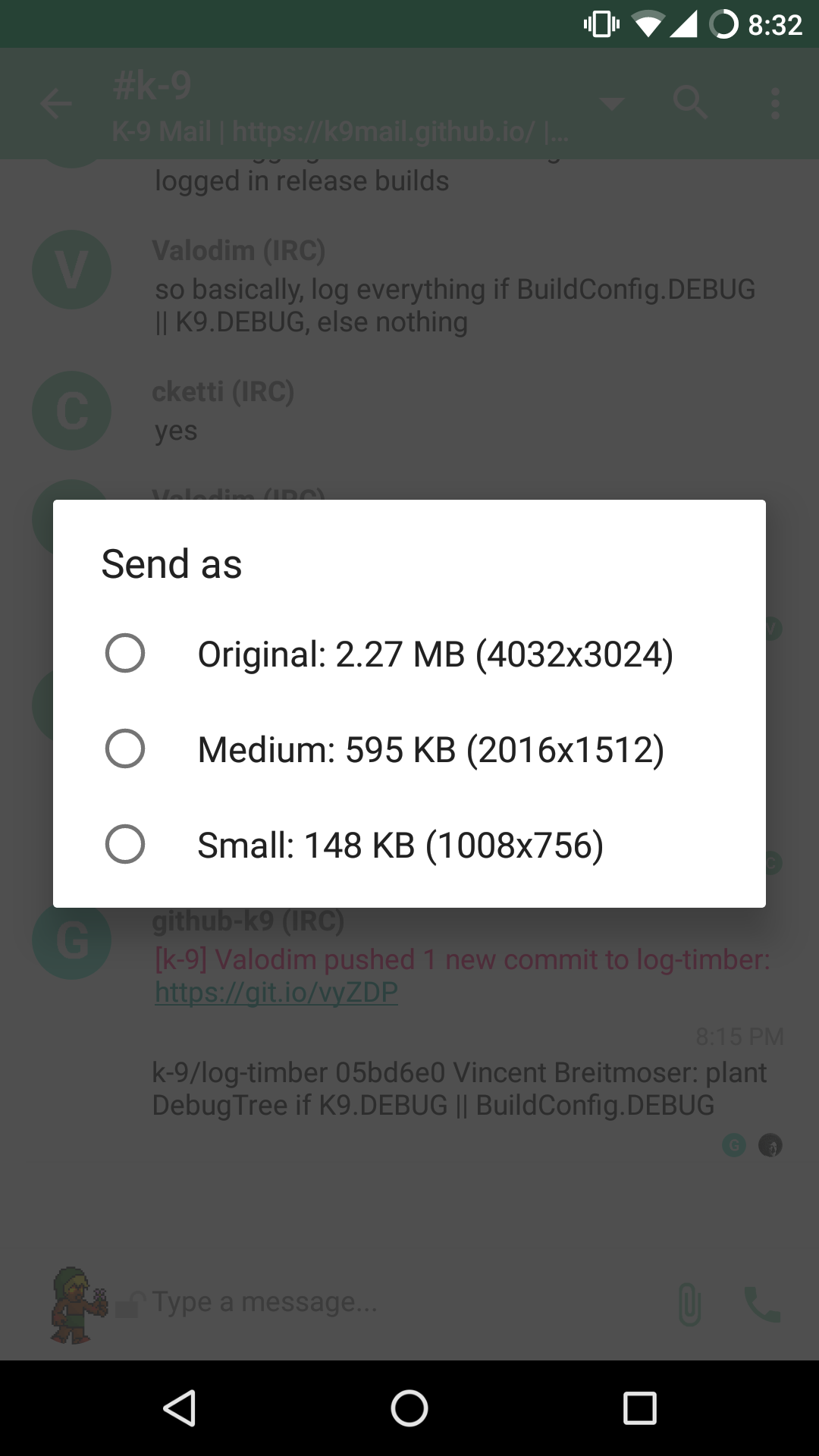
 Valodim
on 2 Mar 2017
Valodim
on 2 Mar 2017
I guess it could be done after the user presses send. That way the user can change the default behavior (via a button on the attachment box or something) before the image is resized.
cketti
on 2 Mar 2017
The approach that I was thinking of includes a
resizebutton/option in theattachmentView. It solves 2 problems :- In case multiple images are selected, the user would not get multiple dialogs one after the another.
- It will work for both groups of people, those who resize occasionally and those who don't. It will be as easy to use as deleting the attachment.
Resizing would most probably take less than a second, so I don't think we should worry about showing a progress for it.
Also I think multiple default resize options should be given (as shown in above pic). We may add an option for custom size if needed.
I think resizing should be done as soon as user chooses a resize option, instead of resizing after clicking send.
I wish to reuse the existing methods, so my approach will be as follows :
- When a user chooses a resize option a temporary file is created that holds the the resized image.
- The current attachment is removed and a new attachment is added with Uri from the temporary file.
harjot-oberai
on 2 Mar 2017
Resizing after "user chooses a resize option" implies user interaction. That's not acceptable for users who want to resize images most of the time. User interaction should be the exception, i.e. only necessary if you don't want the configured default behavior.
cketti
on 2 Mar 2017
We can add an option in the global settings for that. User can choose a default resize option (1/2 or 1/4th size) and it will be applied automatically to all image attachments.
harjot-oberai
on 2 Mar 2017
Well, yes. That's what my comment implied.
Settings: default behavior
Button on attachment box: override default
Then do the actual resizing after the send button has been pressed. Because only then you know that the user won't change their mind and override/change the resize option of an attachment.
cketti
on 2 Mar 2017
Ok, I misinterpreted your comment. I will start working on it now, and comment here in case of any issue 👍
harjot-oberai
on 2 Mar 2017
By the way, what I dream of is a kind of option to use k9mail as Chat Client, e.g. like WhatsApp, Signal, Threema, etc. Could be done I guess and would be very handy on a Smartphone :)
Now, years later, there is something like it, called Delta Chat also on github.
That was exactly what I ment!
By the way, is there any progress on image resize on the fly in k9mail?
I since this issue use Send Reduced Pro, which is OK, but other email clients have that image reducing on the fly.
2020-06-04, years later: since a good while there is even a PR for a image resize version but it has been never merged.
So since some months I use FairEmail, also opensource with even more functions (one of them image resize) and settings. Works better for me :)
k9mail I use only on a device with few internal memory, because FairEmail needs much more space.
By the way: Image Reduced doesn't work anymore on Android 9 and is since long abandoned.
francwalter
on 26 Nov 2017
There seems to be a solution that is not merged yet:
https://github.com/k9mail/k-9/pull/2335
 Flexmaen
on 17 Jan 2018
Flexmaen
on 17 Jan 2018
Related issues
 farson2003
·
4Comments
farson2003
·
4Comments
 D0ve
·
3Comments
D0ve
·
3Comments
 SpatMan05
·
3Comments
SpatMan05
·
3Comments
 asbach2
·
3Comments
asbach2
·
3Comments
 robsmith11
·
3Comments
robsmith11
·
3Comments
Most helpful comment
There seems to be a solution that is not merged yet:
https://github.com/k9mail/k-9/pull/2335