K-9: "Unable to save attachment to SD card" since Android 6.0.1
Expected behavior
Attachment should be saved on my extrenal SD Card
Actual behavior
java.io.FileNotFoundException: /storage/AC6E-B51D/Download/20160530082804967.pdf: open failed: EACCES (Permission denied)
In some other apps like Estrong FileExplorer I believe I got some dialogue like "chose actual path to SD card to get write access". Don't remember exactly...
Steps to reproduce
- Chose the save attachments to the external SD
- Receive an email with attachment
- Choose to save it
Environment
K-9 Mail version:
5.010
Android version:
Android 6.0.1
Account type (IMAP, POP3, WebDAV/Exchange):
Irrelevant
k9-log-save-attachement.txt
 JeppeTh
All 26 comments
We probably need to incorporate the checks for manually giving permission seen here: http://stackoverflow.com/questions/33139754/android-6-0-marshmallow-cannot-write-to-sd-card
 philipwhiuk
on 19 Jun 2016
philipwhiuk
on 19 Jun 2016
This issue has been a problem for a very long time. When will it be fixed?
 jhoc2000
on 31 Dec 2016
jhoc2000
on 31 Dec 2016
Glib answer: When someone submits a PR for it and that PR is released.
Longer answer: I don't have a device with an SD card which makes it low priority for me. It also makes it impossible for me to test a fix.
philipwhiuk
on 31 Dec 2016
Same here, no sd card *shrug
 Valodim
on 31 Dec 2016
Valodim
on 31 Dec 2016
+1 Are there any informations needed I could provide to speed up the bugfix?
 tristan-k
on 1 Mar 2017
tristan-k
on 1 Mar 2017
@tristan-k If this fails for you with the EACCES error too, can you check whether K-9 has "storage" permission in your setup, in Settings -> Apps -> K9?
We are currently targeting api level 22, so should not be affected by runtime permissions yet. Permissions can still be removed by the user after installation, so it's possible we are affected by that.
Valodim
on 2 Mar 2017
@Valodim, app has storage permissions - that's not the reason for the failure.
JeppeTh
on 2 Mar 2017
Same issue here. Permissions are set correctly. However, K9 fails to store attachments to SD card on a Sony Xperia Z5 compact patched to latest Android 7 and K9 mail release from App store. The actual path for the download is apparently not relevant, it has to do with the external SD-card. Setting storage to "/storage/emulated/0/DCIM" (the internal storage) works as expected. (ed: Had to edit this comment twice and correct my assertion, that it is storage-independent).
 MarcSaric
on 5 Mar 2017
MarcSaric
on 5 Mar 2017
Galaxy S5 with Android 6.01. Have the same issue.
Hope there is a fix shortly.
 pellajl
on 24 Mar 2017
pellajl
on 24 Mar 2017
Still an issue with latest K9 on Android 7 on Galaxy S7 Edge
 nick4fake
on 15 May 2017
nick4fake
on 15 May 2017
Xperia Z3 compact (6.0.1) has same issue. External strage path was set corretly by OI file manager, but can't save.
 ya8sa
on 10 Jun 2017
ya8sa
on 10 Jun 2017
For me it was fixed by going to Settings > _Miscellaneous_ and setting a path that the app can write to, e.g. /storage/emulated/0/documents (the folder must exist!).
 ghost
on 1 Oct 2017
ghost
on 1 Oct 2017
@elFua, emulated/0 isn't an external SD - it's internal storage.
JeppeTh
on 1 Oct 2017
Apps can write to their special designated folders without requiring extra permissions. This means you can save k9 attachments to a physical (non-emulated) sdcard if you save them to the _app-specific_ folder which should be located under Android/data. The subfolder should match the application package name which for k9 is com.fsck.k9.
Example:
Given that you have an sd card mounted under /storage/0692-3573:
Create in the root of the sd card a subfolder
Android/data/com.fsck.k9(use a desktop computer in case if your file manager can't create it).From k9 go to Settings > _Miscellaneous_ and set the path to
/storage/0692-3573/Android/data/com.fsck.k9.
Not the most elegant solution, but it works. Verified with a samsung 64GB card (fat32) on Android 7.
ghost
on 10 Oct 2017
This worked for me on Android Marshmallow but it would be nice to grant K9 to create a file on the SDcard.
J.
On 11 October 2017 6:59:16 AM AEDT, elFua notifications@github.com wrote:
Apps can write to their special designated folders without requiring
extra permissions. This means you can save k9 attachments to a physical
(non-emulated) sdcard in if you save them to the _app-specific_
folder.Example:
Given that you have an sd card mounted as
/storage/0692-3573.
Create in the root of the sd card a subfolder
Android/data/com.fsck.k9(use a desktop computer in case if your file
manager can't create it and/or you don't have root).From k9 go to Settings > _Miscellaneous_ and set the path
to/storage/0692-3573/Android/data/com.fsck.k9.--
You are receiving this because you are subscribed to this thread.
Reply to this email directly or view it on GitHub:
https://github.com/k9mail/k-9/issues/1461#issuecomment-335589828
jhoc2000
on 10 Oct 2017
If I've got it right, since some Android version (I wasn't yet able to find out which one it exactly is), apps can write on a physical sdcard only to their app-specific folder such as /storage/0692-3573/Android/data/com.fsck.k9. (I'd be happy, if someone proves me wrong!)
https://source.android.com/devices/storage/traditional
Apps must not be allowed to write to secondary external storage devices, except in their package-specific directories as allowed by synthesized permissions.
And also the documentation of Context.getExternalFilesDirs (added in API level 19, i.e. Android 4.4, KitKat) says something like this:
Write access outside of these paths on secondary external storage devices is not available.
I wondered what other apps do. For instance, AntennaPod shows a list of folders based on the result of ContextCompat.getExternalFilesDirs:
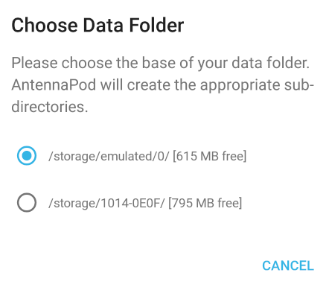
Wouldn't that be a solution also for K-9, at least for API level >=19? We could also add an option to the list manually enter a path, if desired.
 Trogel
on 15 Oct 2017
Trogel
on 15 Oct 2017
@Trogel - other apps can write to any external SD card folder. I.e. I have a Download folder om my external SD Card.
From Android 6 or similar it seem the User must explicitly give permission to the App by a specific dialogue (i.e. it's not just some settting). See my initial post.
JeppeTh
on 15 Oct 2017
I agree.
When I want to save a document to the SDcard using WPS Office (and other apps) I'm asked to grant permission for WPS Office to access the SDcard.
I think this was implemented by Android for security reasons just after KitKat. I think it's stupid. What's the use of having an SDcard if one can't use it.
The SDcard can be initiated as an extension to the internal memory but if that's done, I don't think that the SDcard can be transferred to another phone without losing all that data. Stupid Android idea.
On 16 October 2017 6:33:53 AM AEDT, JeppeTh notifications@github.com wrote:
@Trogel - other apps can write to any external SD card folder. I.e. I
have a Download folder om my external SD Card.From Android 6 or similar it seem the User must explicitly give
permission to the App by a specific dialogue (i.e. it's not just some
settting). See my initial post.--
You are receiving this because you are subscribed to this thread.
Reply to this email directly or view it on GitHub:
https://github.com/k9mail/k-9/issues/1461#issuecomment-336735524
jhoc2000
on 16 Oct 2017
@JeppeTh, @jhoc2000: Thanks for your feedback! Explicitly giving permission via some dialog is needed only if either (1) the app targets API level >=23 or (2) the user manually removed the permission via the system settings > Apps > K-9 Mail > Permissions.
Regarding (1), K-9 targets API level 22, so it gets the required permission automatically on installation. I tried it on two different devices with Android 7 and LineageOS 14.1. In both cases K-9 already has the right permissions, but still cannot write to the sdcard outside of the app-specific folders.
However, at least for (2) it probably would not hurt to let K-9 check for the runtime permission
WRITE_EXTERNAL_STORAGEand ask for it, if missing. Still, this does not resolve this issue. I changed a K-9 debug build to check for this permission and write the result to the log. In line with the system settings, the app reported that it already has the required permission. Therefore, it would not even show a dialog to ask for the permission. Still, the app cannot write to the sdcard.
However, you are right, there _are_ apps that can actually write to other folders on the sdcard. I tried it with the open-source file manager Amaze and much to my surprise it is also able to write to any directory on my external sdcard.
I looked it up in the source code, and found a class with the suggestive name MediaStoreHack:
From its description:
Wrapper for manipulating files via the Android Media Content Provider. As of Android 4.4 KitKat,
applications can no longer write to the "secondary storage" of a device. Write operations using
the java.io.File API will thus fail. This class restores access to those write operations by way
of the Media Content Provider.Note that this class relies on the internal operational characteristics of the media content
provider API, and as such is not guaranteed to be future-proof. Then again, we did all think the
java.io.File API was going to be future-proof for media card access, so all bets are off.If you're forced to use this class, it's because Google/AOSP made a very poor API decision in
Android 4.4 KitKat. Read more at https://plus.google.com/+TodLiebeck/posts/gjnmuaDM8sn
So, this is essentially a hack that may fail at any time in the future. I'd assume that the closed-source apps do a similar thing. (Again, if there is a better solution, please point me to it!)
For K-9 this raises the question, whether including such hack would be acceptable. Except for that, I still think that showing a list of writable folders (as suggested in my preceding comment) plus checking/asking for runtime permissions would be an improvement.
I can imagine to work on some of these things, but would prefer to know in advance whether this has a chance to get merged into K-9.
So, what do the K-9 developers think about the ideas and particularly about the hack?
Trogel
on 16 Oct 2017
There seems to be a better solution at least for API level >=21 (Android 5.0, Lollipop):
https://stackoverflow.com/questions/26744842/how-to-use-the-new-sd-card-access-api-presented-for-android-5-0-lollipop
I'll take a deeper look, as soon as I find some time.
Trogel
on 16 Oct 2017
I don't you think you're assumptions are correct.
At least K-9 has permissions according to app settings in my device. So if K9 uses 22 your statement is incorrect, since it doesn't work anyhow.
I'm pretty sure this problem began when upgrading from Android 5 to 6. So I'm not sure your stack overflow tip is applicable either. I never noticed those dialogues before at least.
JeppeTh
on 16 Oct 2017
We'll be using the storage access framework moving forward. I created issue #2844 for that.
 cketti
on 17 Oct 2017
cketti
on 17 Oct 2017
The "Android/data/com.fsck.k9" workaround worked for me on Samsung S5 running Android 6.0.1 with external SD Card.
 donbarthel
on 26 Nov 2018
donbarthel
on 26 Nov 2018
That's the only directory that will work. Try the "Download" directory on the SDcard.
On 27 November 2018 7:27:15 AM AEDT, Don Barthel notifications@github.com wrote:
The "Android/data/com.fsck.k9" workaround worked for me on Samsung S5
running Android 6.0.1 with external SD Card.--
You are receiving this because you were mentioned.
Reply to this email directly or view it on GitHub:
https://github.com/k9mail/k-9/issues/1461#issuecomment-441785779
jhoc2000
on 26 Nov 2018
What text file can I edit to change the Attach directory. Mine is pointing to an invalid location and I can't change it through the gui
 markd89
on 17 Dec 2019
markd89
on 17 Dec 2019
For posterity:
There is no text file. There is an SQLite database /data/data/com.fsck.k9/databases/preferences_storage
I did an update to change the value to /sdcard for primkey='attachmentdefaultpath'
markd89
on 17 Dec 2019
Related issues
 jrtberlin
·
3Comments
jrtberlin
·
3Comments
 asbach2
·
3Comments
asbach2
·
3Comments
 digitalcraftsman
·
3Comments
digitalcraftsman
·
3Comments
 farson2003
·
4Comments
farson2003
·
4Comments
 Agno94
·
3Comments
Agno94
·
3Comments