K-9: Figure out how to deal with Doze (Android 6+)
Doze reduces battery consumption by deferring background CPU and network activity for apps when the device is unused for long periods of time.
Learn more about it here: Optimizing for Doze and App Standby
As far as I can tell we have these options:
- Embrace Doze. When the device tells us to go to sleep we do.
- Fight Doze. Use the new API to schedule checks for new mail (can't be more frequent than every 15 minutes)
- Evade Doze. Foreground services (think music player) prevent the device from entering Doze. This requires displaying an ongoing notification.
As far as I can tell users can't disable Doze in settings. They have, however, the option to put apps on a whitelist.
An app that is whitelisted can use the network and hold partial wake locks during Doze and App Standby. However, other restrictions still apply to the whitelisted app, just as they do to other apps. For example, the whitelisted app’s jobs and syncs are deferred, and its regular AlarmManager alarms do not fire.
So the interval between mail checks still has to be at least 15 minutes. But there is a chance that Push might work during Doze. Keeping a connection open doesn't require alarms.
My goal is to first collect all options we have and then decide on the best way forward. Please let me know if you can think of any other options and I will add them to this post. Also, if you have a special use-case regarding mail checks that you think should be supported by K-9 Mail let us know.
Update (2015-11-10): It looks like the only way for an app to prevent the device from entering Doze is to keep the screen on. So option 3 is not something that's feasible for us.
Update (2015-11-20): Using a foreground service is possible but tricky due to a bug in Android. See https://commonsware.com/blog/2015/11/18/another-doze-edge-case-foreground.html
 cketti
All 174 comments
High priority GCM notifications do work normally during Doze (that does not help K9, of course), so Hangout messages do work. For me, mails are as important as Hangout messages. So, doing nothing about Doze (like Gmail does not fetch IMAP) is not on option for me.
I think, push should work if the user whitelists the app (this setting allegedly helps WhatsApp). If the user enables push, K9 could ask the user to put the app on the whitelist (there is an API for that). I have not tested that, because I do not use push.
For periodic mail checking, K9 should use the new AlarmManager methods. K9 should have an option to do that. This still allows the device entering Doze mode and saves battery. I would not call that "fighting Doze".
Having an ongoing notification is annoying IMHO and a mail app should not prevent the device from going into Doze at all.
 sidamos
on 23 Oct 2015
sidamos
on 23 Oct 2015
If whitelisting the app is required to make push and/or poll to work, then I'm fine with that. As mentioned above, there should be some notification to the user that it's necessary to do so.
 ssieb
on 24 Oct 2015
ssieb
on 24 Oct 2015
Does anyone know for sure how much " inactive " time needs to elapse before doze mode kicks in ?
 NadirHusain
on 24 Oct 2015
NadirHusain
on 24 Oct 2015
@NadirHusain: As far as I can tell OEMs are free to tweak the different timeout values. See DeviceIdleController.
From what I've read current Nexus devices enter Doze after 1 hour without significant motion.
cketti
on 24 Oct 2015
I agree with @sidamos . Doing nothing is not an option. Since I am a push user ( and perhaps driven by that) I feel push should be a top priority. Alarm manager should be used to fetch . Sorry I can't code so really can't contribute in any tangible way except just to put forth my opinion. Thanks
NadirHusain
on 24 Oct 2015
Doze mode seems like a reasonable concept, except that it's trying to push people into GCM (which is non-Free and has privacy issues). I would suggest going down two paths simultaneously
- Try to be a good doze client. With polling, just allow the polling interval to get longer as doze requires it. That might be as simple as setting an alarm for now+poll_interval on every wakeup and not worrying that it's longer than configured. This is not really so crazy, as the idea that one needs rapid polling when the device is really idle only seems to fit a use case where one leaves the phone on a table in a room and stays there for hours. I guess it will be interesting to see logs of real people and if their phones doze when they are not asleep or really away from them. Also with this, intercept some done_dozing signal and poll again if it's been longer than the configure interval. Perhaps also set some doze-mode poll interval, so the user can say poll every 10 minutes, but only every hour in doze mode, if that's what they want. Or maybe that's too complicated.
- Make push still work. It seems we really don't understand enough yet, and whitelisting is the only way. Somewhat eparately from this, it would be nice if push could have much longer times in IDLE, to make k-9 use less power in doze mode.
What I don't see being all that useful or important (to me) is enabling polling in doze more often than every 15 minutes. I suppose that could be important to people who can't use push, need to get mail promptly, and leave their phone on a table while being near it. It would be interesting to hear from anybody who sees themselves in that situation.
For me, if my phone goes into doze because I haven't touched it and it hasn't moved in over an hour, having mail arrive up to 15 minutes late is ok. Unless I am mis-guessing how often doze will happen.
 gdt
on 24 Oct 2015
gdt
on 24 Oct 2015
Periodic check:
You don't have to implement, what you are describing in your 1st paragraph, Android does that already.
If you use the old AlarmManager methods, they won't fire during Doze, unless the device enters the maintenance window (every hour or more).
If you use the new AlarmManager methods, alarms are being throttled to fire every 15 minutes at most.
My use case is this: During work, the phone lies on my table for longer periods of time. But I don't want to get mails only every hour or even later.
Also, Doze is supposed to end, when you move the device. But in my test, it only ends if I switch the display on. And I don't want to switch the display on every now and then only to enable K9 to look for new mails.
So, K9 should use the new AlarmManager method, if the user desires to get mails during Doze.
Push:
If we are lucky, push should work as normal if K9 is on the whitelist. So, nothing _has_ to be implemented for this. Optionally, K9 could ask the user to be put on the whitelist. There is an intent for that.
sidamos
on 24 Oct 2015
As an aside I would like to mention that I only get real push if my " refresh idle connection" is set to 6 minutes or less. Any higher number and my messages are delayed. I understand my cellular operator is most likely responsible for this but was just wondering if this option would still be available to me in the doze mode ? I am sure there are others like me and k9 needs to be able to " force " this incase doze " kills " this option in default mode . Thanks
NadirHusain
on 25 Oct 2015
My current plan is:
- By default we embrace Doze. If Push is enabled we disable it while Doze is active. That will prevent the app from establishing a Push connection during the Doze maintenance windows.
- If K-9 Mail was whitelisted by the user we use the new API for our alarms. That should allow poll frequencies of up to every 15 minutes and Push should work, too. The Push refresh interval can't be smaller than 15 minutes though.
cketti
on 20 Nov 2015
as of now K9 5.107 android 5.1.1 i need a minimum refresh time of 6 minutes to be able to get real time push notifications (tcp/cellular service provider issue). setting the minimum idle refresh time at 15 minutes would mean end of push mail for me (as i know it) unless there is a way to set idle refresh time at 6 minutes or less when doze mode is NOT active and could switch to 15 minutes when doze kicks in. i am sure there are many others like me who need real time push and have idle refresh set at very low intervals . request you to consider this use case issue . thanks
NadirHusain
on 20 Nov 2015
@NadirHusain: Doze is only available on Android 6+. If Doze is not active (or on previous Android versions) K-9 Mail will not impose any new restrictions.
cketti
on 20 Nov 2015
@cketti clear now . thanks .
NadirHusain
on 20 Nov 2015
Good idea. This should have been done by Google, without the need to call new AlarmManager methods by the app.
sidamos
on 20 Nov 2015
Any progress on this? If I have to look at K9 periodically just to get my notifications, I might as well set my sync to manual which defeats the whole purpose of push notifications. If you're looking at ways to bypass, do what apps like KeepPass do and set a transparent notification icon which keeps the app in the foreground like a music app and prevents doze.
 imsaguy
on 6 Jan 2016
imsaguy
on 6 Jan 2016
@imsaguy For now you can manually whitelist K9 under Settings > Battery > Battery Optimization (or similar). Mostly fixes push and #970. Doze still partially applies, since current AlarmManager will only fire during increasingly spaced apart maintenance windows, so I think the IMAP IDLE connection may eventually time out if there is no traffic and the device is stationary long enough. Also, to be specific, the foreground service prevents App Standby but not Doze.
 daradib
on 6 Jan 2016
daradib
on 6 Jan 2016
@cketti So under the "embrace Doze" plan, is the idea to stop push connections during Doze but - and this would seem to be the difference from the user end - re-enabling push connections when the device comes out of Doze?
Sort of separately, and maybe because I don't understand the specifics, why would this approach prevent the establishment of push connections during the Doze maintenance windows?
 gadgetfan10
on 15 Jan 2016
gadgetfan10
on 15 Jan 2016
@gadgetfan10 Poor wording on my part.
Embrace Doze:
- Close existing Push connections when entering Doze; don't attempt to create new ones while in Doze or maintenance window
- During maintenance windows we trigger a simple mail synchronization
- Return to normal operation (e.g. establish Push connections) when exiting Doze (device returns to normal operation; not just Doze maintenance window)
cketti
on 15 Jan 2016
Sounds like a solid plan. Thanks for the clarification.
Looking forward to seeing it implemented. If I had programming skills, I'd offer to help. Since I don't, I'll just say thanks for your efforts.
gadgetfan10
on 15 Jan 2016
@cketti As I understand how this will work: is there no way to enable doze _and_ keep push connections alive during screen-off? Right now, I'm using a Sony smartphone that features similar functionality called 'Stamina Mode' and by whitelisting K9Mail I am ensured the K9Mail app works as if Stamina Mode hasn't been enabled - other apps that are not whitelisted will still be forced to go to sleep and ceize their activity.
Doze seems to be more refined than Stamina Mode, as it offers an API that allows apps certain activity but still well controlled and more battery-friendly than if the feature was disabled altogether; which isn't the case for Stamina Mode.
 doodhout
on 10 Mar 2016
doodhout
on 10 Mar 2016
Just a note to say that this issue is exacerbated on Android N where Doze 2.0 is initiated on screen off rather than a perceived period of inactivity.
 bobpullen
on 22 Mar 2016
bobpullen
on 22 Mar 2016
is there a proper workaround to this?
I can confirm poll checks are not working, I just whitelisted k9 in the power saving options, and am waiting to now see if the poll works.
 chrcoluk
on 29 Jun 2016
chrcoluk
on 29 Jun 2016
@chrcoluk Even when whitelisted, the poll checks will only occur in (but not outside of) the windows of activity that Doze permits, and the time between those windows will increase continuously thus delaying poll checks by minutes or hours!
doodhout
on 29 Jun 2016
yeah so this is now broken for the forseeable future then?
I thought I managed to disable doze on the entire phone by turning of the battery savings feature, but seems it is still in use. :(
The phone is samsung touchwiz 6.0.1.
chrcoluk
on 30 Jun 2016
According to greenify dev if you add GCM priority option to the app and the user enables it, then the app can bypass doze mode.
chrcoluk
on 30 Jun 2016
@chrcoluk Not sure I understand the comment about GCM priority; I mean, I understand that an app sending high priority GCM notifications will cause the phone to exit Doze mode, but k9 doesn't use GCM, so how is this helpful?
 garfieldthecat
on 9 Aug 2016
garfieldthecat
on 9 Aug 2016
I have found this partial solution works for me: http://androidforums.com/threads/marshmallow%E2%80%99s-doze-broke-push-notifications-my-fix-is-preventing-doze-with-macrodroid.1058445/
I use MacroDroid to 'do something' at regular intervals, preventing the phone from entering Doze. The battery usage is OK. It does not solve the issue of getting push with Doze, but it does - indirectly - solve the issue of getting push email on an unrooted Marshmallow device. The post also has details on Aquamail and GCM-based clients; in summary, as of now there is no solution to get proper push email with Doze, because no email app sends high-priority GCM notifications. Google has gone crazy.
garfieldthecat
on 10 Aug 2016
Has any one figured out with certainty if push (imap idle) never works when in Doze, or only works under certain conditions?
garfieldthecat
on 11 Aug 2016
I ended up disabling doze.
on XDA is a app called "doze settings editor" Needs root, you can fine tune all the doze variables, this app is unique in that it allows one to tone doze down rather than make it more aggressive that all the other doze related apps seem to do.
I set the interactive timeout to 86400secs (one day) so basically the phone now needs one day to enter doze mode, effectively disabling it for me as I use the phone daily. Now K9 works a treat again.
Of course only people with rooted phones and the confidence to adjust this sort of thing can use my fix, I think k9 needs to somehow find a more widespread fix to the problem or it will disappear into irrelevance when doze mode is standard on all devices.
chrcoluk
on 30 Sep 2016
@chrcoluk: Couldn't you just have whitelisted K9Mail in the Battery Saving menu on your phone? That would effectively disable doze for that app. I've done so and it seems to work... I think.
doodhout
on 5 Oct 2016
@doodhout whitelisting an app does not completely exempt it from doze - https://developer.android.com/training/monitoring-device-state/doze-standby.html#support_for_other_use_cases
bobpullen
on 5 Oct 2016
I think we need to add Intent handling for ACTION_DEVICE_IDLE_MODE_CHANGED to BootReceiver and look at the values of:
isIgnoringBatteryOptimizationsisDeviceIdleMode
When we come out of idle mode we need to restart sync if it's been stopped by going into Doze.
When we go in we should stop sync unless isIgnoringBatteryOptimizations is true I expect.
We may also want to look at isPowerSaveMode
See: PowerManager
 philipwhiuk
on 27 Nov 2016
philipwhiuk
on 27 Nov 2016
Listening for these intents is proving difficult. I tried both Manifest changes and, following advice on StackOverflow, code, but neither seemed to work for my device.
philipwhiuk
on 27 Nov 2016
I heard conversations is doing a good job figuring out the state and informing the user about this, might be worth taking a look at their code
 Valodim
on 27 Nov 2016
Valodim
on 27 Nov 2016
They request whitelisting:
<uses-permission android:name="android.permission.REQUEST_IGNORE_BATTERY_OPTIMIZATIONS" />
philipwhiuk
on 27 Nov 2016
If this can't be solved on app side / whitelisting, please update FAQ (https://k9mail.github.io/documentation/faq.html#anchor15) to inform users what to do as the FAQ doesn't mention that at all ATM.
I have MIUI 8.1.1.0 (based on Android 6.0.1) and it happened to me as well. I think Settings->Battery & performance->Manage apps battery usage->Choose apps->k9 Mail and setting "No restrictions" under "Background settings" fixes it but it probably resets after the K9 is updated, I am not sure. I need more time to watch it if it will work again now after this manual re-whitelisting.
 k3a
on 5 Dec 2016
k3a
on 5 Dec 2016
Because you closed my android 7.1 thread and marked as duplicate of this one. I saw this one and wasn't sure if it is really a duplicate because interestingly I didn't have those problems with CM13 (android 6). Just now with CM 14 (android 7).
 djdookie
on 5 Dec 2016
djdookie
on 5 Dec 2016
Doze is a lot more aggressive on Android 7 so you're much more likely to run into it. Specifically it no longer matters if the phone moves - it can still doze.
philipwhiuk
on 6 Dec 2016
@djdookie CyanogenMod removed the doze functionality from their Android 6/CM13 builds. It is enabled in CM14 (Android 7) though.
 Bubu
on 31 Dec 2016
Bubu
on 31 Dec 2016
The implementation of K9 5.2 RC regarding enabling using the new AlarmManager API to be able to fetch mails despite active Doze mode is not optimal.
It relies on disabling (whitelisting) battery optimization (standby mode) for K9. But that itself has nothing to do with Doze from an Android OS standpoint. So, K9 is just reusing that settings screen for something else.
Problem is, some Android 6.0 implementations do not have this particular settings screen, for example MIUI. I guess, MIUI does not use that "standby" mode of Android 6.0, because they have their own ways of battery optimization. It however makes use of Doze mode.
After fresh install of K9 5.2, battery optimization of K9 is enabled despite android.permission.REQUEST_IGNORE_BATTERY_OPTIMIZATIONS. I checked that by opening the battery optimization screen via a Nova Launcher Activity shortcut. Because of that, K9 does not fetch mails at specified intervals during Doze.
So, the better thing for K9 would be IMHO to have that setting inside K9 owns preferences screens. It makes more sense.
sidamos
on 1 Jan 2017
Okay, so while investigating an entirely separate issue I found the major thing that had been blocking me working on this. Namely that I couldn't work out why we weren't getting notifications of Doze state change. The reason was annoyingly simple. Our target API level for some reason is still 22.
Anyway, as soon as I bumped it up I got notifications of Doze.
Now for proper behaviour all we have to do is notify the mail service that we have changed state (essentially a connectivity change). This will need a bit of work and some testing but it's no longer as blocked as I thought it was.
My current expectations for this issue are:
- Make it so that when we resume from Doze we reactive push.
This is the biggest problem with K-9 right now. Doze actively breaks K-9 because it acts like a network connectivity change and only forcing a real network change fixes that. So even once Doze ends, right now, you won't get emails until you toggle/leave your WiFi point / etc.
This is now possible with intent handling stuff I mentioned earlier.
- Add REQUEST_IGNORE_BATTERY_OPTIMIZATIONS and have some UX dialog stuff that explains why we want it (Doze will cause your email to stop being synced).
philipwhiuk
on 21 Jan 2017
I don't believe we have to change the targetSdkVersion to fix this. It might "fix" things as a side-effect because when targetSdkVersion is 24 broadcast receivers declared in the manifest won't receive connectivity changes at all. See https://developer.android.com/about/versions/nougat/android-7.0-changes.html#bg-opt
As an immediate fix we should probably register a broadcast receiver to listen for doze change events and adjust our internal connectivity state accordingly. We also only want to poll in maintenance windows and not establish a new push connection that will be killed moments later anyway.
cketti
on 22 Jan 2017
As an immediate fix we should probably register a broadcast receiver to listen for doze change events
Having tested it, I don't think you can get Doze change events unless you target v23.
philipwhiuk
on 20 Feb 2017
Bumping minSdk to 21 is probably not an option, and maintaining a JobScheduler implementation next to AlarmManager (which none of the devs will have in daily use then) sounds very painful. We should probably look at https://github.com/evernote/android-job to help with this?
Valodim
on 20 Feb 2017
I had a hard time figuring out how to whitelist k-9 from battery optimizations. For anyone else finding this ticket, on Android 7.1.1 it was:
Settings -> Battery -> Menu (three dots top right of screen) -> Battery optimization -> All apps (switch from "Not optimized" -> K-9 Mail -> Don't optimize
Hope this helps someone. Perhaps this condition should be detected? It seems possible for an app to change its setting, tasker did.
 ryancdotorg
on 27 Feb 2017
ryancdotorg
on 27 Feb 2017
Whitelisting from battery optimizations doesn't seem to help. :-(
ryancdotorg
on 27 Feb 2017
Yes, this was already determined in #2242
From the discussion above, I could not derive a clear recommendation how to get push running again under Android 7. Looks like a coding solution is required?
 coogor
on 1 Mar 2017
coogor
on 1 Mar 2017
Yes. Our current best idea is to rewrite the push code using the android-job library mentioned above. However this is not a simple task, so it's difficult to give a timeline :hurtrealbad:
Valodim
on 1 Mar 2017
Seems like an evil google conspiracy to coerce use of gcm. Feed your souldata to the google lake of fire.
 chadwickblane
on 9 Mar 2017
chadwickblane
on 9 Mar 2017
I optimize my battery by uninstalling all google apps and all provider apps [verizon]. The battery lasts much longer, and the handset uses less data.
chadwickblane
on 9 Mar 2017
This isn't a discussion forum @chadwickblane. Please avoid adding stuff that doesn't contribute productively. For what it's worth, many non stock ROMs implement Doze as well.
philipwhiuk
on 9 Mar 2017
As per https://github.com/k9mail/k-9/issues/857#issuecomment-269886738 after upgrading my Samsung S7 to Android 7.0, I had to use Nova Launcher's Activity Shortcut function to launch the stock Android Battery activity and disable optimization for K9-Mail. The activity name on my S7 is .fuelgauge.PowerUsageSummary . Using Samsung's battery settings to change the optimization setting didn't seem to do anything. After turning off the optimization, both push and fetch are back to working normally.
 staples1347
on 16 Mar 2017
staples1347
on 16 Mar 2017
Same for MIUI on Android 6.x. That standard Android Battery activity of Android is not "officially" available there also.
That's why K9 should "push" the user to that dialog.
sidamos
on 16 Mar 2017
On 16/03/2017 00:46, staples1347 wrote:
As per #857 (comment)
https://github.com/k9mail/k-9/issues/857#issuecomment-269886738 after
upgrading my Samsung S7 to Android 7.0, I had to use Nova Launcher's
Activity Shortcut function to launch the stock Android Battery activity
and disable optimization for K9-Mail. The activity name on my S7 is
.fuelgauge.PowerUsageSummary . Using Samsung's battery settings to
change the optimization setting didn't seem to do anything.
On my S7e, running 7.0, that activity is available via the normal
Settings UI:
Device Maintenance — Battery — Battery Usage
which is a small button under the estimated battery life. So there's no
need for the launcher custom activity shortcut (unless you want a shortcut).
[unless you're saying that the UI only has any effect when accessed via
the activity shortcut, rather than the same UI access via the Settings
UI, which seems unlikely?]
That UI does then have an “extra” menu, accessed via three dots at the
top-right, then “optimise battery usage,” which takes you to a list of apps.
This seems to be different from the app power usage list, and so users
should check that K-9 is not enabled for optimisation in this list, too.
i.e. K-9 should be listed in:
• the Unmonitored Apps list from the App power monitor section on the
main Battery page
• (as disabled, i.e. not optimised) in the “optimise battery usage” list
from the extra menu of the Battery Usage page.
I don't have the “sync disabled” issue; whether it's because of the
above settings, or some other setting I happen to have set, I don't know.
cheers,
calum.
 cdmackay
on 16 Mar 2017
cdmackay
on 16 Mar 2017
>
On my S7e, running 7.0, that activity is available via the normal
Settings UI:Device Maintenance — Battery — Battery Usage
which is a small button under the estimated battery life. So there's no
need for the launcher custom activity shortcut (unless you want a shortcut).[unless you're saying that the UI only has any effect when accessed via
the activity shortcut, rather than the same UI access via the Settings
UI, which seems unlikely?]That UI does then have an “extra” menu, accessed via three dots at the
top-right, then “optimise battery usage,” which takes you to a list of apps.This seems to be different from the app power usage list, and so users
should check that K-9 is not enabled for optimisation in this list, too.i.e. K-9 should be listed in:
• the Unmonitored Apps list from the App power monitor section on the
main Battery page• (as disabled, i.e. not optimised) in the “optimise battery usage” list
from the extra menu of the Battery Usage page.I don't have the “sync disabled” issue; whether it's because of the
above settings, or some other setting I happen to have set, I don't know.cheers,
calum.
I noticed a bug with the Usage screen - the menu 3 dot button is white on white background, causing it to be invisible, but selectable, so some users might think it is not there. I just found it myself, will see if that fixes the snooze issue for K9. not hopeful :/
 trostc
on 19 Mar 2017
trostc
on 19 Mar 2017
• the Unmonitored Apps list from the App power monitor section on the main Battery page
• (as disabled, i.e. not optimised) in the “optimise battery usage” list from the extra menu of the Battery > Usage page.
I don't have the “sync disabled” issue; whether it's because of the above settings, or some other setting I happen to have set, I don't know.cheers, calum.
I had K-9 listed on Unmonitored Apps and was still experiencing this, but disabling the battery optimization fixed the issue for me. Thanks.
 governorgoat
on 22 Mar 2017
governorgoat
on 22 Mar 2017
i put k-9 on the unmonitored apps whitelist from battery settings, but the problem persists.
If I close force-close k-9, then it comes back to life and new emails sync
 rexdwilson
on 25 Mar 2017
rexdwilson
on 25 Mar 2017
On android 7 it's more complicated I disable doze, guive all permissions and reduce the idle connexion time to 1 minute and the problems persists, I like the app but I can't use this way. I'm sorry for my bad English
 davidzini
on 27 Mar 2017
davidzini
on 27 Mar 2017
If this is related to doze, I was reading about disable doze completely through this app and script.
I am going to try it later when I am at said phone.
"dumpsys deviceidle disable"
 Newbie1980
on 6 Apr 2017
Newbie1980
on 6 Apr 2017
This made no difference grrrrrr
Newbie1980
on 7 Apr 2017
I was waiting for your answer @Newbie1980 thanks , well I think it will have to wait for a solution from the programmers
davidzini
on 7 Apr 2017
• the Unmonitored Apps list from the App power monitor section on the main Battery page
• (as disabled, i.e. not optimised) in the “optimise battery usage” list from the extra menu of the Battery > Usage page.
I don't have the “sync disabled” issue; whether it's because of the above settings, or some other >>setting I happen to have set, I don't know.cheers, calum.
I had K-9 listed on Unmonitored Apps and was still experiencing this, but disabling the battery
optimization fixed the issue for me. Thanks.
Same here with Samsung Galaxy S8 (Android 7.0). It is need both of those battery Not Optimize settings.
Thanks a lot!
 McNobody
on 27 Apr 2017
McNobody
on 27 Apr 2017
If anyone know how to work around this problem on the Huawei P9 with Android 7.0, please share.
 toreanderson
on 7 May 2017
toreanderson
on 7 May 2017
The same issue on Galaxy S7 since Android 7.0. Battery Optimization ("Do not", exclude from optimization) and Background Sync ("Always") does not help at all - mail is not checked (sync is disabled) until new network (modem or WiFi) connected/disconnected, or if manually resynced.
For example, in AquaMail I had the same issue after upgrade to Android 7.0, but... in few weeks it was fixed without my any actions. And now AquaMail is correctly checking the mail every 5 minutes, but K-9 - not. Not even 5 minutes, not even 15, not even hour or a few hours. It is checking mail only in case if you are open it manually and/or connected/disconnected from modem/WiFi networks. Maybe AquaMail added itself to the non-optimization list? Is it possible by program automatically?
I had solved with K-9 only by steps as written here. I will write more detailed instruction for Samsung S7 Android 7.0 (TouchWiz UI), both TWO steps are required, one is not enough:
1) Settings -> Optimization, you will see a screen with a few icons, the first one will be "Battery", tap on it. Then new screen will be opened, scroll down it to the very bottom and you will find "Exclude list" ("Select an application that will not be recommended to switch to a sleep mode"). You need to click on that "Exclude list", new screen will be opened with an exclude list. Then you need to scroll it bottom and click "(+) Add an application", and add K-9 Mail to the exclude list.
2) Settings -> Optimization, you will see a screen with a few icons, the first one will be "Battery", tap on it, then new screen will be opened, you will see something like a circle with percents, and time of battery and small button [Statistics]. Tap on this button. New screen will be opened. Now click on "..." (like ":") on the top right corner and select "Optimization". Now new screen will be opened with a filter in combobox: "Not Optimized", "All Applications". Select in combobox "All Applications" and search for a K-9 Mail. When you will find it you need to switch off a slider near it. This will disable optimization for K-9.
After doing this two steps the problem is "fixed" for me.
 ghsrcgh
on 7 Jul 2017
ghsrcgh
on 7 Jul 2017
Thanks for above, loads of people have done that but it still does not fix it for so many.
Newbie1980
on 8 Jul 2017
I am polling every minute, and none of these fixes work for me. I have read a few ppl stating that this frequency is unnecessary. I disagree. K9 is the only way to get emails to trigger events in tasker. I get emails when live servers go down, our home video surveillance notices movement etc and in all cases 15 minute waits are not acceptable
 FB54321
on 11 Jul 2017
FB54321
on 11 Jul 2017
Tasker then does things like disable silent mode and play an alarm, something which eg Gmail doesn't do. At night the phone is plugged in so battery really isn't my concern.
FB54321
on 11 Jul 2017
I just went from Marshmallow to Nougat.
Under Marshmallow I never had an issue with Doze/K9. Under Nougat K9 does some crazy things including this sync disabled bug.
You may want to make sure your analysis and options are correct for both operating systems as Nougat seems to be different wrt the Doze impact on K9.
 galapogos01
on 13 Jul 2017
galapogos01
on 13 Jul 2017
This issue would probably get a lot less noise and less dupes if the FAQ wasn't completely misleading at this moment (https://k9mail.github.io/documentation/faq.html#-why-is-k-9-telling-me-syncing-disabled). It would be better to acknowledge this is a serious open issue, reference #857, and then discuss possible workarounds:
- whether reducing email check frequency >= 15m helps the issue. I'm a once-a-minute type, but I'd rather go to 15m and not have days will go by without a notification if I don't force-quit the app.
- whether to bother with the optimization whitelisting. (I read the "optimizing for doze" article and it seems like this should work; if it doesn't, are there bug reports being submitted to google?). If it works for some it's worth adding to the FAQ.
 sirlensalot
on 16 Jul 2017
sirlensalot
on 16 Jul 2017
My Goodness. Couldn't you do an sync adapter? I think you could set it's frequency. All the other apps do it.
 androos
on 17 Jul 2017
androos
on 17 Jul 2017
I don't think push mail can be done using a sync adapter.
I think one of the problems with push mail which remains after currently implemented doze fixes is that there seems to be a blind spot of many minutes if you try to use push _and_ poll regularly too. That's because polling and imap idle refresh times do not seem to be synchronized.
If e.g. imap idle is up for refresh every 24 mins and poll is done every 15 minutes, this allows for the following scenario: Let's say poll happens 2 mins before the imap idle connection should be refreshed. The poll is done and k-9 sets its timer to kick in after 2 minutes to refresh imap idle. 2 minutes is, however, too short for android, which will deliver the timer only after 15 minutes. The server will close the connection, because it didn't hear from k9 in time and that will leave you with a blind spot of > 10 minutes during which push does not work. And apparently the blind spot's potential maximum duration cannot be reduced by reducing poll frequency, because Android will wake up the app at a maximum rate of 15 mins (is this interval documented somewhere?)
This is what seems to be happening to me. So if I get the situation correctly (?), synchronizing imap idle refresh and poll intervals would be a good idea.
EDIT: Apparently push stops working also when I don't have poll enabled, so while my above suggestion might be usefull, it is not the only fix needed to get push mail working reliably. This sucks. Could it the number of open connections then, which is the problem? I have some 5 folders lined up for push...
 lobstaj
on 17 Jul 2017
lobstaj
on 17 Jul 2017
Actually I switched to Aqua Mail, which has a workaround for this issue. It has an option disabling power saving for itself. There is a new option in system power dialog. If K-9 could adopt this, it would fix this issue.
http://imgur.com/a/FA18M
 ponchofiesta
on 18 Jul 2017
ponchofiesta
on 18 Jul 2017
Guess what I installed just a few hours before I read your post :-) Thanks for the hint, anyway!
The thing is, I did exempt k9 from the power optimization manually. So I did get the same kind of text in the application settings which your image shows. But it still didn't work.
If I interpret google's doze and app standby guidelines correctly, I don't really see any reason, why imap idle could not work. IIRC it states that if an app is exempt from power optimization, it can do networking and it can wake up from a timer every once in a while (not too often though). And these two things should - in theory! - be enough to implement imap idle. So I somehow suspect k9's implementation might use too many timers, tries to wake up too often or uses too many network connections. But I don't have the time and can't be bothered to read the source to check, so these are just guesses...
And unfortunately I have noticed a few other bugs in k9 in the last months: Notifications disappearing (without the mail being marked read on the server), notifications not disappearing when they should (when the mail has been marked read on the server...), no notification sound when there's multiple mails arriving at the same time, and well, this push thingy.
So, I guess I'll go with aqua mail until that gets buggy too ;-)
lobstaj
on 18 Jul 2017
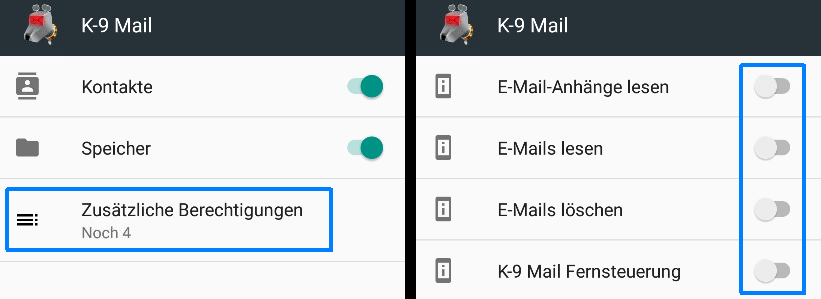
It worked for me after manually granting every permission to the app (see screenshot). I fear that this was not the real cause, but maybe someone else can check this also. Just to make sure...
 matthiasstock
on 21 Jul 2017
matthiasstock
on 21 Jul 2017
On my HTC M9 with stock ROM, it doesn't work Android 7.0). K9 is white listed K9 in battery optimization.
Using Lineage OS it works definitely in doze mode with same settings. (Android 7.1)
androos
on 27 Jul 2017
I'm bumping to watch this topic ... although so far it doesn't appear manually granting every permission to the app for my Samsung Galaxy Tab S3 tablet (on Android 7.0) resolved the issue (Plus I verified I already edited the Battery Saver so K-9 is always active, and the K-9 Global Network setting is set to Sync Always).
I look forward to the Doze solution!
 purefct
on 13 Aug 2017
purefct
on 13 Aug 2017
It has already been 2 years since this ticket has been opened.
K-9 Mail effectively does not show me new mails unless I fetch them manually (on Android >= 7.x). Is there a solution planned or not? I, and most likely everybody else who wants their emails, can't use a mail program which doesn't show new mails.
It's that simple. Either this is fixed or K-9 mail is unusable for a lot of people. The FAQ is rather evasive and points to this thread which has no useful information, except that it does not work.
I'm sorry for being so blunt and this might sound harsh, but this issue has been known for 2 years. The main purpose of an email client is to receive emails, which k-9 Mail does not do on Android >= 7.x (unless initiated manually). Don't you understand that this renders this app totally useless?
 tessus
on 21 Aug 2017
tessus
on 21 Aug 2017
I have not had any issues after disabling battery monitoring and optimization for K9, both on Android 6.x and 7.x using an IMAP mailbox AND Gmail
trostc
on 21 Aug 2017
@trostc it is nice that it workd for you, but for most people (as you can see in this thread) it is NOT working. Neither does it work for me (Google Pixel, Android 7.1.2).
tessus
on 21 Aug 2017
The battery optimization workaround no longer resolves this reliably for me in Android 8.0. After some time my phone vibrates with ~2+ new emails that should have come in individually, but instead got bulk updated during some wake period. So something has definitely changed (which should not be surprising -- major changes to the Doze functionality is a feature in Android 8.0).
 mhoran
on 21 Aug 2017
mhoran
on 21 Aug 2017
which makes this thread even more important. Google will roll out 8.0 this week and then what? another 2 years of endless discussions why it is not working? I'm really sorry about being so negative, but K9-mail was my number 1 app. I had to migrate to a new phone and all of a sudden it does not work anymore. and voila, the issue has been known for 2 years, yet nothing has been fixed. with the upcoming android release it seems this doze architecture is going to be even more tricky than it already was. so where does this leave people who want to receive emails?
tessus
on 21 Aug 2017
@tessus Do you have have it set in both places?
trostc
on 21 Aug 2017
@trostc there are no 2 separate settings on stock android (this is a Samsung thing). you can set it there:
Settings - Battery - (three dots in top right corner) - Battery optimization
then change K9 to "Don't optimize".
You could also change it here, but it is the same setting (as you set above, so it already shows "Don't optimize"):
Settings - Apps - (select K-9 Mail) - Battery - (click on Battery optimization)
And yes, background sync is active for K-9 in the OS and always sync is set in the global options of K-9 mail.
tessus
on 21 Aug 2017
Is there any email app where push works properly? AFAIK the problem is not k9, but Android's Doze. AFAIK the one and only way to get push to work with Doze is to have a server-based email system which sends high priority GCM notifications (or whatever they're called now). I have found some server based apps, but none which sends high priority GCMs.
garfieldthecat
on 21 Aug 2017
@garfieldthecat but on what phone? It's working on Samsung devices, at least for me on Nougat
trostc
on 21 Aug 2017
It does not work for me on a T-Mobile Samsung Galaxy S7 with Android 7.0. I have done lots of permutations of the settings and nothing works.
 prices
on 21 Aug 2017
prices
on 21 Aug 2017
On August 21, 2017 2:52:30 PM MDT, Scott Price notifications@github.com wrote:
It does not work for me on a T-Mobile Samsung Galaxy S7 with Android
7.0. I have done lots of permutations of the settings and nothing
works.
Same here. Moto X 2014 with LineageOS 14.1 (based off Nougat)
 ghost
on 21 Aug 2017
ghost
on 21 Aug 2017
Same here. Moto X 2014 with LineageOS 14.1 (based off Nougat)
And yet it works for me on a Moto E 2015 with LineageOS 14.1. Was previsously working on a Moto E 2014 also with lineage.
Bubu
on 21 Aug 2017
It's hit or miss with me on a Samsung Galaxy s7 edge running Android 7. The same applied to my Sony Z5 running Nougat. And to apps to access work email (Blackberry Good and Maas360) on both phones. Doze is meant to break any push notification which is not a high priority GCM (like WhatsApp notifications are).
It is sheer madness that Google didn't think it should have provided a way to exempt email clients, and it insane that push email worked perfectly on devices of 10 years ago, but not on current devices!
garfieldthecat
on 21 Aug 2017
Agreed it is a big pain and very annoying it has not been fixed.
I am running 5.010 an APG still due to issues that were never fixed.
Newbie1980
on 21 Aug 2017
On August 21, 2017 3:25:39 PM MDT, Marcus Hoffmann notifications@github.com wrote:
And yet it works for me on a Moto E 2015 with LineageOS 14.1. Was
previsously working on a Moto E 2014 also with lineage.
Interesting. Even push notifications work? For me, I have to change networks for it to check and notify for new email.
Edit: I should also point out that I'm not running any Gapps, just F-Droid.
ghost
on 22 Aug 2017
What kind of email accounts are you using, for those of you with broken k9?
trostc
on 22 Aug 2017
In house Dovecot server using imaps. Push email worked well before I had to get the S7.
prices
on 22 Aug 2017
@prices you've got k9 in unmonitored status in app power monitor and disabled for optimization?
trostc
on 22 Aug 2017
K-9 is definitely unmonitored. The disable optimization seems to have disappeared in the last update. I can't find it anymore. Anyone know where it went on an S7 running 7.0? At one point I definitely set it to off.
prices
on 22 Aug 2017
I'm also running Dovecot (four accounts) with one work email (gmail). All of these emails typically don't come through until I walk away from a wifi network and switch to cell (and vice-versa).
The unmonitor setting is specific to Galaxy software, isn't it? I can't find anything like that on LineageOS. K9 is set to no battery optimization.
Also, I do have push support enabled (IDLE) and polling disabled. Would it be better to just have manual polling?
ghost
on 22 Aug 2017
Okay, I finally found it.
Settings->Applications->3dots->Special access->optimize battery usage
It was on for K-9. I turned it off again. I will see if that makes a difference.
prices
on 22 Aug 2017
@prices it might also be a good measure to reboot after changing
trostc
on 22 Aug 2017
@ainola what's your IDLE refresh time?
trostc
on 22 Aug 2017
@trostc 24 Minutes
ghost
on 22 Aug 2017
@ainola I have one account at 24, but also another at 12. Also have option checked to poll when connecting for push. Otherwise no polling
trostc
on 22 Aug 2017
On August 21, 2017 10:18:40 PM MDT, trostc notifications@github.com wrote:
@ainola I have one account at 24, but also another at 12. Also have
option checked to poll when connecting for push. Otherwise no polling
I tried moving it down to 12. No dice, still not notifying me.
ghost
on 22 Aug 2017
@ainola Yes push emails work for me. Also no gapps, only apps from fdroid. Push is working for 3 different account here.
Bubu
on 22 Aug 2017
That last change fixed it for me. I don't know if I didn't set that before, or if it didn't work before. There have been two updates from T-Mobile since I last tried messing with it.
So K-9 is now checking email all the time for me on a T-Mobile Samsung Galaxy S7 running Android 7.0.
prices
on 23 Aug 2017
@prices nice. Though I assume for non-samsung users, they don't have a Settings->Applications->3dots->Special access->optimize battery usage option
trostc
on 23 Aug 2017
Probably not. I don't have a non-samsung phone to try it with.
prices
on 23 Aug 2017
Me either.
And this for Stock android is Settings>Battery>More> Battery Optimization>Tap Down Arrow, then Not Optimized>Disable Optimization for K9
But I believe most here have verified this
trostc
on 23 Aug 2017
I joined just to thank ghsrcgh because his post of July 6th fixed the K9 Mail problem for me. It was working fine on my Note 5 with Android 7.0 but when I switched to an S8+ with 7.0, K9 stopped collecting mail once the phone had gone unused for some period of time.
This T-Mobile S8+ has slightly different menu items so I'll post what I see when trying to follow ghsrcgh's instructions. My settings are in [ ] BRACKETS...
Settings -> Optimization [Device maintenance], you will see a screen with a few icons, the first one (at the bottom on the screen) will be "Battery", tap on it. Then new screen will be opened, scroll down it to the very bottom and you will find "Exclude list" ("Select an application that will not be recommended to switch to a sleep mode") [Unmonitored apps -- Select apps that won't be suggested to be put to sleep]. You need to click on that "Exclude list" [Unmonitored apps], new screen will be opened with an exclude list. Then you need to scroll it bottom and click "(+) Add an application" [Add apps], and add K-9 Mail to the exclude list.

Settings -> Optimization, [Device maintenance] you will see a screen with a few icons, the first one (at the bottom on the screen) will be "Battery", tap on it, then new screen will be opened, you will see something like a circle with percents, and time of battery and small button (Statistics) [Battery Usage]. Tap on this button. New screen will be opened. Now click on "..." (like ":") on the top right corner and select "Optimization" [Optimize battery usage]. Now new screen will be opened with a filter in combobox: "Not Optimized", "All Applications" [Apps not optimized, All apps]. Select in combobox "All Applications" [All apps] and search for a K-9 Mail. When you will find it you need to switch off a slider near it. This will disable optimization for K-9.
I'm so thankful this worked for me and I hope the K9 devs can figure out how to make it work for the rest of you.
 JimGill
on 25 Aug 2017
JimGill
on 25 Aug 2017
If anyone is not already using the latest beta, 5.208, it was posted today and changelog indicates a fix resolving issue where sync did not resume after device exits Doze mode. Might help some of you
trostc
on 29 Aug 2017
@mhoran what's the status with Android 8? did you get it to work?
tessus
on 31 Aug 2017
I'm running 5.208 now and it seems to be a bit better. I still have optimization disabled for K-9 -- I'm not sure if this is necessary.
mhoran
on 1 Sep 2017
@mhoran Do you get email notifications while the screen is off?
tessus
on 1 Sep 2017
I do. There seem to be other bugs (duplicate notifications, for example) but that _seems_ unrelated to Doze.
In DP4 and 5.207 I was definitely seeing worse behavior -- no notification for over a half hour and then suddenly tons of new mail. I don't _think_ that I've seen this since upgrading to the final release and 5.208, but I can't be completely certain.
mhoran
on 1 Sep 2017
I have been running 5.208 (fdroid) as well but haven't seen any increase in reliability. This morning I had to refresh my main mailbox to see three emails that had come hours ago during the night.
ghost
on 1 Sep 2017
I will add that despite unlocking my phone multiple times within the past few hours I still didn't get four emails until I manually refreshed again. This is with polling off and IDLE set to 24 minutes.
I believe that gmail, however, is functioning properly even in doze mode. More testing is needed but it does appear that this issue is applying to my non-gmail accounts
ghost
on 1 Sep 2017
I tried it on ASUS go live 501 running marshmallow and it works no problems.
Strange that it is only on some phones.
Newbie1980
on 17 Sep 2017
As I see some posts here with people without gapps: I think those devices should not be affected from this problem because a requirement for doze mode is GCM which is missing withlout gapps, so this devices should not doze at all. This is at least true for my gapps free phone.
 theBoatman
on 19 Sep 2017
theBoatman
on 19 Sep 2017
Same issue (S7 Edge, Android 7.0) - imap idle interval is set to 24 minutes, poll 1 hour, app is whiteleisted in power manager - I find it in "Sync disabled" state every now and then including (surprise) when on AC.
Basically, there are no push emails at all (unless screen is on) - issue that I never had with GMail or AquaMail. OK, GMail may use GCM, but AquaMail definitely does not...
What is even more frustrating - even when I unlock my phone I still do not get any new emails, I have to manually sync it every time.
It would be nice (at least) to have an option like "Renew imap idle on unlock/screen on" or "Sync on unlock/screen on".
 aldem
on 22 Sep 2017
aldem
on 22 Sep 2017
I just moved from a Google Nexus 6 running Android 7.1.1 / K-9 5.208 (K-9 push working fine) to a Note 8 running 7.1.1 / 5.208 (K-9 push not working at all). K-9 settings were exported from the Nexus, so nothing changed; same Android version, same K-9 version, same settings.
I implemented the two settings recommended by @ghsrcgh and push is now working fine on the Note. So it appears that at least in my case, the issue is with Samsung's custom battery management.
 jtemples
on 26 Sep 2017
jtemples
on 26 Sep 2017
Hi all,
I was trying to understand why my k9 say "sync disabled" sometimes, and I've just discovered this open issue. As far as I understand, it's a doze related problem, but there are 2 things that I don't get:
- If it's doze-related, why it says sync disabled even when the screen is on..? Shouldn't doze be disabled when the screen is on..?
- Why, if I turn wifi off and on again, it re-enables sync without any problem..?
I'm just trying to understand, cause for me it doesn't seem a doze related problem
 segdan
on 30 Sep 2017
segdan
on 30 Sep 2017
I agree.
But I had those symptoms, on both my Samsung Nougat phones, and making these changes cured it:
add k-9 to the list of unmonitored apps
also disable battery optimisation for it
cheers,
calum.
On 30 September 2017 11:14:04 BST, Daniele Segoloni notifications@github.com wrote:
Hi all,
I was trying to understand why my k9 say "sync disabled" sometimes, and
I've just discovered this open issue. As far as I understand, it's a
doze related problem, but there are 2 things that I don't get:
- If it's doze-related, why it says sync disabled even when the screen
is on..? Shouldn't doze be disabled when the screen is on..?- Why, if I turn wifi off and on again, it re-enables sync without any
problem..?I'm just trying to understand, cause for me it doesn't seem a doze
related problem--
You are receiving this because you are subscribed to this thread.
Reply to this email directly or view it on GitHub:
https://github.com/k9mail/k-9/issues/857#issuecomment-333298877
--
Sent from my phone. Please excuse brevity.
cdmackay
on 30 Sep 2017
@segdan It's related to how the push service works internally.
Whenever an error is encountered in the push service (eg trying to connect when no internet is available), a counter is incremented. If this counter goes above 10, then push (ie sync) is automatically disabled in order to preserve battery life.
This is what doze does - it prevents k-9 from being able to access the internet and hence triggers enough errors to disable the push service, so you see "sync disabled" when you unlock your phone after it has spent a long amount of time in Doze.
When a network change is detected (like reconnecting to WiFi), the above mentioned counter is reset and the push service is restarted.
The latest version of k-9 mail solves this issue by resetting the poll service when coming out of doze.
 rhari991
on 30 Sep 2017
rhari991
on 30 Sep 2017
@rhari991 I see. Now everything is clear, thank you.
segdan
on 30 Sep 2017
I had instant success with this fix.
The new update did not help at all. (However there was an update for Accuweather that finally fixed the update issue there, whoopee!)
I went to the k-9 app on google play and there is a recent review there with these instructions and this finally has fixed the issue with K-9 mail not syncing:
1) Go to Andriod Settings- Battery.
2) Click on the "Battery Usage box toward the top center of the screen.
3) Click the Menu (Three vertical dots in upper right).
4) Click on Optimize Battery Usage.
5) Select "All Apps" from the drop down arrow at the top of the screen.
6) Scroll to K-9 Mail and toggle it Off
 2mkb1
on 2 Oct 2017
2mkb1
on 2 Oct 2017
Go to Andriod Settings- Battery.
Click on the "Battery Usage box toward the top center of the screen.
Click the Menu (Three vertical dots in upper right).
Click on Optimize Battery Usage.
Select "All Apps" from the drop down arrow at the top of the screen.
Scroll to K-9 Mail and toggle it Off
This has worked for me. I had the 'syncing disabled' problem (and was just as annoyed and disappointed as everyone else).
I made the change as quoted above whilst also ensuring that K9Mail has the following settings too:
1, K9Mail is entered as an entry in to the battery 'Unmonitored Apps' (thus stopping it from being put to or suggested for putting to sleep)
2, 'Allow background data usage' = Enabled (under Data Usage - Mobile Data usage)
3, 'Allow app while Data saver on' is Enabled (because I also have data saver turned on phone my phone)
With all of the above I think I have effectively allowed K9mail full reign of non-sleeping/unrestricted processor and unhindered background data and battery thus keeping it fully awake and able to operate. and so far (3 days later) it seems to have worked.
 jimimaseye
on 16 Oct 2017
jimimaseye
on 16 Oct 2017
I have a p8 lite 2017 and the problem is still here.
I tried all settings of battery savings but after some time k-9 stops fetching email.
I have several accounts, some gmail, some imap and some pop3.
All these have same problem :(
 Frykky
on 29 Nov 2017
Frykky
on 29 Nov 2017
I'm using K9 quite a time now and was happy compared to other mail app I tried. So many thanks to all developers!
Unfortunately I'm not able to get push of K9 on my _Sony Xperia X compact_ running (Android 7.1.1)
In total there are 4 devices working w/ K9
_Sony Xperia Tipo_ (Android 4.0.4, K9 5.001)
-> no push issue at all
_Samsung Galaxy S4_ (Android 6.x, K9 5.001) & _Samsung Galaxy Tab A 2016_ (Andriod 7.0, K9 5.001)
-> push not working in standby (or doze) after K9 install, but if it was active lately
=> but w/ disabling standby for K9 and allowing background data it finally works as expected :)
_Sony Xperia X Compact_ (Android 7.1.1, K9 5.208, 5.303)
-> push not working at all if phone is in standby (push works when phone was active lately), even with all tips and tricks from this thread (incl. disabling standby, allowing background data, push only / push and timed mail fetch, different push refresh and fetch intervalls ...) nothing worked
Mail accounts are IMAP from web.de & gmx.de.
So even w/ latest version 5.303 problems are still there.
@cketti: Should I give 5.301 also a try (as mentioned in #2841)? Or even 5.001?
Thanks.
 XCompactUser
on 1 Dec 2017
XCompactUser
on 1 Dec 2017
Another option that would avoid all the trouble seen above is to do like Conversations is doing that is, embrace GCM when it's available but don't send any data through it.
This has multiple advantages:
- No need to make an exception from K9-mail in numerous and obscure system's dialog
- Have the best energy saving possible (your device is no more polling or waiting on an idle push connection)
- It's future proof
Basically, the idea is to have a server, I'm calling "proxy", that's requesting for changes on your imap accounts and when any change is visible, sends an empty message to google's firebase servers with high priority. This, in turns, wakes up your device from a specific intent where it'd connect to the imap servers to check for changes. Google does not know what changed since it's an empty message (it only knows that something changed).
The "proxy" server could be run by any entity, but it would be best if it was open source and easily installable on your NAS (if you are paranoïd like me). This proxy server does not necessarily need your account passwords (only if PUSH is not supported by the IMAP server) and can work as a TCP proxy. The idea is:
- K9 connect to the "proxy" server giving it the destination (IMAP) server's URL on some port.
- The "proxy" starts connecting to the IMAP server proxying each packet untouched to K9.
- Since most IMAP server use SSL/TLS, it means proxyfing encrypted packets, so it should be safe.
- K9 does not use this connection to fetch mail, but only to set up IDLE mode of the server
- K9 disconnect to the "proxy" server, yet the "proxy" server's connection is maintained to the IMAP's server
- Any event on the IMAP / "proxy" socket is likely due to a change in the IMAP's account state, and the "proxy" server then trigger the GCM/FCM trick (it sends an empty FCM notification message to your device that wakes it up from dozing)
- Your device is awaken, it connects to the IMAP server to fetch new mails (polling mode in that case)
This scheme however might have some issues:
- If the IMAP server does not support IDLE mode, then the "proxy" must know your credentials to poll it. This is mitigated by either auditing and trusting the source code of the server or running your own server instance.
- If the IDLE interval is too short, the connection will be dropped, thus creating an event on the socket. The "proxy" will trigger a notification, then K9 will have to resume the IDLE connection (using the same system). This means that K9 will be running at least with the interval of the IDLE refresh time. It might or might not be an issue. Again, it's possible that it's easier to know your credentials and maintain the IDLE connection by itself, but that's possible anyway.
Honestly, there is a reason why almost all Email app on the AppStore are now using server's side email storage, Google is killing the email application with its new takeover of the Doze feature.
 X-Ryl669
on 22 Dec 2017
X-Ryl669
on 22 Dec 2017
It may be wise to suggest the user whitelist the app from doze, just like Conversations does.
 marmistrz
on 6 Jan 2018
marmistrz
on 6 Jan 2018
I been fine for several months having overriden doze settings with "doze settings editor" but I noticed k9 misbehaving the past month or so, and then I discovered android seems to be forcefully resetting doze settings to defaults, so k9 is now broken again on my phone.
chrcoluk
on 31 Jan 2018
With current vendor-specific app-killing systems Doze seems not enough, cf. https://github.com/siacs/Conversations/issues/2775
marmistrz
on 4 Feb 2018
@marmistrz
If devices want to randomly kill apps with no documentation on how apps are chosen there's little we can do about it. Doze is not this.
At most we will just be able to warn people when we get reports of it happening.
philipwhiuk
on 4 Feb 2018
I am using K-9 as an IMAP email client. For some reason, I didn't have this issue with Android 6, but I have it with Android 7 (and its also a new phone). I tried altering various settings in K-9 (Poll when connecting for push, shortening IDLE refresh time, deleting the entire account on K-9 and starting over) and on the phone (moving K-9 to the unmonitored app whitelist) to try to alleviate it, but nothing is helping with obtaining consistent timely notification of new emails.
I am now exploring other email clients starting with BlueMail to see how they fare. Interestingly, BlueMail seems to be finding new email as soon as it hits my email server, so those developers seemed to have figured something out to allow IMAP push to work effectively under Android 7 with their email client. I have not done anything special with their account configuration options, and I have not put BlueMail in the unmonitored app list. I know that doesn't obviously help you folks, but it at least shows that it is possible to have timely discovery of new email with push IMAP under Android 7.
 maxbraketorque
on 27 Mar 2018
maxbraketorque
on 27 Mar 2018
Interestingly enough, I just moved to a Galaxy S9 from S7. Applied both setting changes to not monitor K9, and have no trouble getting IMAP messages. On Oreo of course
On March 27, 2018 12:05:15 PM CDT, maxbraketorque notifications@github.com wrote:
I am using K-9 as an IMAP email client. For some reason, I didn't have
this issue with Android 6, but I have it with Android 7 (and its also a
new phone). I tried altering various settings in K-9 (Poll when
connecting for push, shortening IDLE refresh time, deleting the entire
account on K-9 and starting over) and on the phone (moving K-9 to the
unmonitored app whitelist) to try to alleviate it, but nothing is
helping with obtaining consistent timely notification of new emails.I am now exploring other email clients starting with BlueMail to see
how they fare. Interestingly, BlueMail seems to be finding new email
as soon as it hits my email server, so those developers seemed to have
figured something out to allow IMAP push to work effectively under
Android 7 with their email client. I have not done anything special
with their account configuration options, and I have not put BlueMail
in the unmonitored app list. I know that doesn't obviously help you
folks, but it at least shows that it is possible to have timely
discovery of new email with push IMAP under Android 7.--
You are receiving this because you were mentioned.
Reply to this email directly or view it on GitHub:
https://github.com/k9mail/k-9/issues/857#issuecomment-376600901
--
Sent from my Android device with K-9 Mail. Please excuse my brevity.
trostc
on 27 Mar 2018
Guys, this is quite a long thread already. I'll try to sum this up, to avoid "me too" like answer.
Some ROM have a some offensive method of killing background apps with their own (obscure) reasons and there is nothing K-9 mail can do about that, you have to find how to disable this "feature" in your ROM. Typically, MIUI 7 to 8 use to be in this case, but, yeah, there are plenty of Android derivatives.
Typically, since Doze appeared in Android (version 6, or later for some android "enhanced" rom), it's not possible for a true open-source application to wake up when it wants, unless the application is excluded from Doze optimization (whatever the name the ROM modder called it).
There is only one exception to this rule: it's in Google's application stack, where a socket is allowed to be waken up upon any notification coming from Google. Google built the GCM/FCM system on top of this to (officially) allow other applications to wake your device upon notification, but it's a privacy leak and proprietary (since messages are captured in clear by Google's servers) so K-9 decided not to use it (and also because it requires you to share your email servers' credentials).
Most of other email clients switched to this system so, yes, other email client give the illusion of true "push" email. It's only an illusion, because what really happens under the hood is that your email's credential are shared to a remote email checking server that's doing the IMAP's IDLE/mail check work, and upon new email, this is this server that's calling into Google's GCM/FCM server and then Google wakes your device that's finally waking up the email client.
So, in the end, when using K-9 mail on a recent android phone, you're back in a "hackish" situation because Android's (default) Doze mode does not allow anymore a application to do whatever it wants whenever it wants. You have to disable the optimization for this application and Google is going to make this harder and harder in the future, since they want to spy on every message that goes to your phone (that's their business after all). When you disable optimization for K-9, then K-9 will be able to wake your phone up when it wants, and it'll become the number 1 consumer of your battery (at least, as reported by Android). This is also wrong, since when K-9 is waking up the phone, all other "waiting" application will be allowed to run (those that are usually waiting on Doze), so the phone will actually be running all your pending notification checker stuff. Yet, Android will record K-9 as being the "battery" consumer for the whole time.
For now, (but who knows for how long), the only workaround is to disable the Doze / Battery saver optimization for K-9 and expect an impact on your battery consumption. You might also gain some battery life by disabling pull mode (set it to never) if your IMAP server supports IDLE. Most of the time, it works as well as without pulling, but it's much lighter on the wake up cycle.
X-Ryl669
on 28 Mar 2018
Thanks for providing additional information. I am currently trying PNF by MoboDev to see if that helps. My initial observation is that its not helping, but going to relaunch K-9 to see if that makes a difference.
maxbraketorque
on 28 Mar 2018
Well, I can't find any way to make push work with Android 7 on my GN8. PNF doesn't help, dropping IDLE Refresh time doesn't help, putting K-9 as an unmonitored app doesn't help, enabling "poll when connecting for push" doesn't help, and enabling regular polling doesn't keep push alive either. No matter what, after about 15-20 minutes, "Syncing Disabled" appears at the top of the Inbox.
With that said, I can temporarily bring push back to life by switching Background sync in the Global settings back and forth between "Always" and "Auto-sync". Can you guys create a routine that automatically switches back and forth between these settings every 10 minutes? Or perhaps cycles from Always->Never->Always quickly every 10 minutes?
maxbraketorque
on 29 Mar 2018
FWIW, I (and probably many other users) would be fine with using GCM as a "ping-only" channel, i.e. transmit a content-less message that just tells K-9 to check for new mail. Getting an IMAP server to send a message via GCM is a different problem though, so this is probably best left for an add-on.
If it doesn't already, perhaps K-9 could expose an intent that another app can trigger to tell K-9 to check for new mail?
 CyberShadow
on 29 Mar 2018
CyberShadow
on 29 Mar 2018
Did you disable battery monitoring AND optimization for k9? Must do both
On March 28, 2018 5:29:41 PM CDT, maxbraketorque notifications@github.com wrote:
Well, I can't find any way to make push work with Android 7 on my GN8.
PNF doesn't help, dropping IDLE Refresh time doesn't help, putting K-9
as an unmonitored app doesn't help, enabling "poll when connecting for
push" doesn't help, and enabling regular polling doesn't keep push
alive either. No matter what, after about 15-20 minutes, "Syncing
Disabled" appears at the top of the Inbox.With that said, I can temporarily bring push back to life by switching
Background sync in the Global settings back and forth between "Always"
and "Auto-sync". Can you guys create a routine that automatically
switches back and forth between these settings every 10 minutes? Or
perhaps cycles from Always->Never->Always quickly every 10 minutes?--
You are receiving this because you were mentioned.
Reply to this email directly or view it on GitHub:
https://github.com/k9mail/k-9/issues/857#issuecomment-377059071
--
Sent from my Android device with K-9 Mail. Please excuse my brevity.
trostc
on 29 Mar 2018
Thanks. I wasn't able to find the option to disable optimization until just now. I have optimization turned off for K-9 now, so I'll report back after I see what that does.
maxbraketorque
on 29 Mar 2018
I've been good on K9 with both my GS7 on Nougat and my GS9 on Oreo with optimization and monitoring off. I don't have polling enabled, except for polling when connecting for push. Idle timeout is 24 minutes, byt your server could be different in what works best. Good luck
On March 28, 2018 11:09:16 PM CDT, maxbraketorque notifications@github.com wrote:
Thanks. I wasn't able to find the option to disable optimization until
just now. I have optimization turned off for K-9 now, so I'll report
back after I see what that does.--
You are receiving this because you were mentioned.
Reply to this email directly or view it on GitHub:
https://github.com/k9mail/k-9/issues/857#issuecomment-377115284
--
Sent from my Android device with K-9 Mail. Please excuse my brevity.
trostc
on 29 Mar 2018
Well, that appears to have done the trick. Thanks very much. I also have general polling turned off too, however it seems that I need to have "Poll when connecting for Push" to get Push to work. Sounds like its the same situation for you?
On another note, it seems like the devs could create a how-to or a notification within the app to tell users to turn off optimization and monitoring. I know other apps do that for specific Android settings that are needed for an app to function properly.
maxbraketorque
on 29 Mar 2018
That's how I have had the polling set for multiple years, I don't remember how I got there 😂
On March 29, 2018 9:54:40 AM CDT, maxbraketorque notifications@github.com wrote:
Well, that appears to have done the trick. Thanks very much. I also
have general polling turned off too, however it seems that I need to
have "Poll when connecting for Push" to get Push to work. Sounds like
its the same situation for you?On another note, it seems like the devs could create a how-to or a
notification within the app to tell users to turn off optimization and
monitoring. I know other apps do that for specific Android settings
that are needed for an app to function properly.--
You are receiving this because you were mentioned.
Reply to this email directly or view it on GitHub:
https://github.com/k9mail/k-9/issues/857#issuecomment-377261701
--
Sent from my Android device with K-9 Mail. Please excuse my brevity.
trostc
on 29 Mar 2018
@trostc What the difference between battery monitoring and optimization? On my S7, when I go into battery settings all I can do is add K9 to the unmonitored apps list. Does that list correlate to monitoring or optimization? Any idea how to do the other?
Did you disable battery monitoring AND optimization for k9? Must do both
 ikeeki320
on 15 May 2018
ikeeki320
on 15 May 2018
@CyberShadow @X-Ryl669
So I started down this road recently. One of the things I think I read (I looked at a lot) is that an app receiving a high priority Firebase Message (GCM) will come out of doze, but only that app.
My prototype idea is to test receiving the message and fire an intent on the mail app with the hope that doze allows that app to wake and use network resources. Again, what I read makes me think that may not work, but I will know soon.
I have tried many settings on my S8 including all those above, but I don't think they really work, and the android docs seem to indicate that they aren't what people think. Probably some luck, probably not actually in doze, etc.
If it doesn't work I may fork K9, only to add the relevant code from my prototype directly to the app. Of course I would give all that back to the K9 maintainers.
BTW, I am not looking at a proxy at all, but rather a different trigger (not sure it will work yet). Proxy is an interesting idea though.
 ajweber
on 13 Jun 2018
ajweber
on 13 Jun 2018
If you are on a Samsung device such as the s8, as long as you set both app as unmonitored AND unoptimized (both places) it will work fine with doze. If you only do one, it won't
On June 12, 2018 8:00:11 PM CDT, ajweber notifications@github.com wrote:
@CyberShadow @X-Ryl669
So I started down this road recently. One of the things I think I read
(I looked at a lot) is that an app receiving a high priority Firebase
Message (GCM) will come out of doze, but only that app.My prototype idea is to test receiving the message and fire an intent
on the mail app with the hope that doze allows that app to wake and use
network resources. Again, what I read makes me think that may not work,
but I will know soon.I have tried many settings on my S8 including all those above, but I
don't think they really work, and the android docs seem to indicate
that they aren't what people think. Probably some luck, probably not
actually in doze, etc.If it doesn't work I may fork K9, only to add the relevant code from my
prototype directly to the app. Of course I would give all that back to
the K9 maintainers.BTW, I am not looking at a proxy at all, but rather a different trigger
(not sure it will work yet). Proxy is an interesting idea though.--
You are receiving this because you were mentioned.
Reply to this email directly or view it on GitHub:
https://github.com/k9mail/k-9/issues/857#issuecomment-396780420
--
Sent from my Android device with K-9 Mail. Please excuse my brevity.
trostc
on 13 Jun 2018
As I said, it doesn't work. In "Optimize Battery Usage", K9 is toggled off. It is also listed in "Unmonitored Apps".
I'm not sure why you don't believe me. I almost didn't mention it, because I didn't want to get into an "argument" about whether the settings truly work.
ajweber
on 13 Jun 2018
What kind of mail server are you connected to?
On June 12, 2018 8:32:02 PM CDT, ajweber notifications@github.com wrote:
As I said, it doesn't work. In "Optimize Battery Usage", K9 is toggled
off. It is also listed in "Unmonitored Apps".I'm not sure why you don't believe me. I almost didn't mention it,
because I didn't want to get into an "argument" about whether the
settings truly work.--
You are receiving this because you were mentioned.
Reply to this email directly or view it on GitHub:
https://github.com/k9mail/k-9/issues/857#issuecomment-396785121
--
Sent from my Android device with K-9 Mail. Please excuse my brevity.
trostc
on 13 Jun 2018
Dovecot 2.0.9 IMAPS.
ajweber
on 13 Jun 2018
So here's where I'm at with this, in case anyone cares...
I have a test app that works "As Expected". I created a user in Firebase and created a tiny DB up there too. Firebase allows an authenticated user to receive GCM and read/write to the DB.
On app startup, I check if my user is correctly authenticated in Firebase (if not, I use an email and password - this can be changed and while it IS my target email, it is NOT my email server password). Once the Firebase user is valid, it pushes its latest device token to the mini DB. DB is KV: email_address and current device token/ID. There is a service running to monitor for token changes and for messages.
I have tested receiving messages with the app in foreground, background and forced the (virtual) device to Doze and it still receives the GCM messages...while that had some tricks to it, it is pretty-much "as advertised".
Currently messages are sent from a test harness: inotifywait script on my linux box that sees a change to the timestamp on the Maildir. For now, I hard-coded my device's token, but the idea is to do a simple lookup of the registered device by email address from Firebase DB. Use that unique ID to send the message via HTTPS. No storing of actual mail account password anywhere. (But that whole thing will get more robust.)
When a message is received, the idea is to launch a previously configured Intent. And the message receiver seems to run reliably, so the next step is to load K9 onto my test device and see if launching an intent on a separate app - that is still "dozing" - will allow the app to come out of doze too. I'm going to try with com.fsck.k9.intent.action.MAIL_SERVICE_RESET and see what happens. I honestly don't know if it's going to allow one app to force another out of doze.
If that doesn't work, I'm afraid the only option is to incorporate the enhancement directly into the app code...this, I'm very confident will work, but IDK if the amount effort is truly worth it. :)
Constructive comments welcome.
ajweber
on 13 Jun 2018
I dont understand why people are struggling with Samsung phones. I'm not calling them liars or anything negative, Im sure their frustrations are genuine. As stated above I dont have the problem with K9 running on my Samsung Oreo android v8.0 and recently on Nougat 7.0). I have a mailserver that uses push, and I have mail notifications arrive on my home screen as soon as they hit the inbox on the server.
So, to be sure I will repeat the steps of my setup here and give screen shots.
As stated above:
Go to Andriod Settings- Battery.
Click on the "Battery Usage box toward the top center of the screen.
Click the Menu (Three vertical dots in upper right).
Click on Optimize Battery Usage.
Select "All Apps" from the drop down arrow at the top of the screen.
Scroll to K-9 Mail and toggle it Off
Also
- K9Mail is entered as an entry in to the battery 'Unmonitored Apps' (thus stopping it from being put to or suggested for putting to sleep)
- 'Allow background data usage' = Enabled (under Data Usage - Mobile Data usage)
- 'Allow app while Data saver on' is Enabled (because I also have data saver turned on phone my phone)
_SCREENSHOTS_
K9 allowed to use Background battery usage:
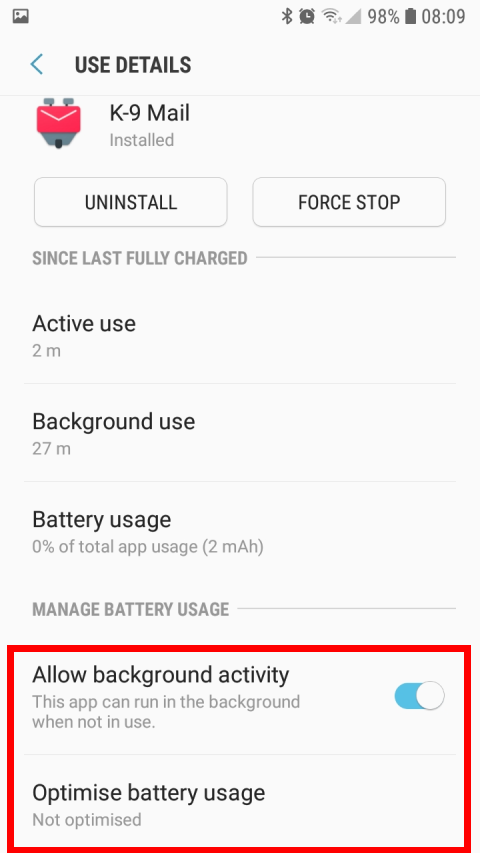
K9 set as non-optmised app:
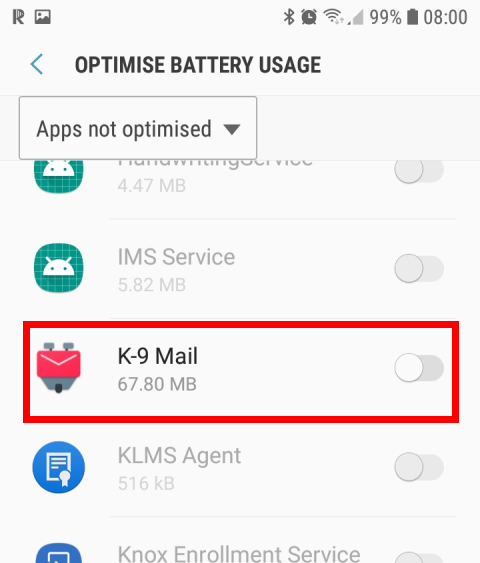
K9 as unmonitored app:

K9 allowing background data usage:

Note: for those that have Data Saver enabled in their phone, it is important to ensure 'Data Saver' is turned off if you are using Data Saver but want the notifications to still work. Otherwise, as the finction says, it will stop K9 from doing background syncing whilst Data Saver is enabled.
and of course...
K9 set to allow Background Sync (within the App Global settings):

I hope this helps.
One more thing I would say is to __check and ensure the mail server you are receiving emails from actually uses push__. Servers such as YAHOO only allow _their_ email client (Yahoo Mail) to receive push notifications even though you are still using IMAP - _K9 will not receive them_ and relies on polling. This is a Yahoo thing and Im sure other providers may do similar. So, double check before concluding it is the fault of K9 (assuming you have all of the above settings).
EDIT:
Over time I have noticed that rare but occasionally (say once a week, if that) it stops bringing in the email and working as expected. But this isn't to do with the settings or setup and turns out to be K9 'getting in a twist'. Simply doing a FORCE STOP of the K9 app and restarting it up again (or alternatively a more long-winded reboot of your phone) sorts it out.
jimimaseye
on 14 Jun 2018
I'm really thinking same way as @jimimaseye . I've used K9 at Samsung S8 (now Oreo updated) over a year perfectly fine with IMAP IDLE. The mail server is Dovecot 2.2.22.
I have configured all those settings like @jimimaseye 's great guide. I have Data saver off globally. Extra settings in K9 I have Update IDLE connection = 24 minutes.
One thing come to my mind is the network connection. Mine is working perfectly with Elisa 4G in Finland and with my own wifi. The Elisa 4G gives IP address from the 100.64.0.0/10 private network. Still IMAP IDLE is working perfectly with Elisa's NAT.
I can see the mobile network could possibly broke the TCP connection before the IMAP IDLE timeout. This could be one reason why it's not working for someone. The other reason could be operator specific firmware. And of course if the email service provider really support IMAP IDLE.
McNobody
on 14 Jun 2018
@jimimaseye and @McNobody, not everyone have Samsung phone, and their implementation is different on different vendor's OS. The problem I've on my phone is not reproducible on other's phone because each vendor implement doze the way they want and most of them think they are clever and also add additional "optimization" on it. On my phone, whatever the setting you set for "escaping" battery optimization (I don't have a data usage specific setting either), the OS will kill K9's process after a given time if it's not in focus, or if it needs memory or because the moon is shining.
In all cases, the only fact that each phone is different and that the dialogs to change the right setting is spread in numerous and hard to reach pages make the thing completely unusable for non-tech savvy users.
There is no other way than to bend to google's will here and use FCM/GCM since it's the only way that's guaranteed to work now and in the future.
@ajweber Can you give more details here ?
Once waken up, can you start K9 via an intent, and does it have network connection ?
If it's too hard to have K9 do what you want, maybe you can create another app that's downloading something upon responding to an intent and try with it first ?
X-Ryl669
on 14 Jun 2018
@jimimaseye How do you get into the real Android battery settings? On my S8+ (SM-G955F, FXXU2CRF7 software version, NEE region), Samsung seems to have ripped them out, only leaving their own... Which makes it impossible to disable optimization, only leaving it as unmonitored, which apparently doesn't help by itself.
 LosD
on 11 Jul 2018
LosD
on 11 Jul 2018
@LosD
SETTINGS - Device Maintenance - Battery - Battery Usage (under the 'estimated life' display) - three dots (menu) - Optimise Battery Usage.
That's the method I am using.
jimimaseye
on 11 Jul 2018
@jimimaseye
Holy hell, they hid that well. Not even a search found it, so I thought it was in the standard/old Android battery settings. Thanks!
LosD
on 11 Jul 2018
Just for the records - after my S7 Edge was updated to Android 8, everything works as expected again!
coogor
on 23 Aug 2018
Under Android 9 ("Pie"), another place to check is: Battery Optimization under Settings (not under Apps), change the dropdown menu from "Optimized Apps" to "All Apps", and change K-9 Mail to "Don't Optimize". Don't forget to restart K-9 (or your entire phone) if it doesn't seem to take effect.
 jamieson99
on 24 Aug 2018
jamieson99
on 24 Aug 2018
SETTINGS - Device Maintenance - Battery - Battery Usage (under the 'estimated life' display) - three dots (menu) - Optimise Battery Usage.
This is horrible! After updating to Android 8 my Push-Notifications didn't work anymore and i started searching. The server logs told me that my phone closed the connection after a few minutes of Screen-Off time. Turning off this optimization solved the issue.
You can't expect users to find such a well hidden menu. DAVdroid does turn off this feature for it's users when first starting up. Maybe K-9 should do the same?
 Draghtnod
on 28 Sep 2018
Draghtnod
on 28 Sep 2018
You can't expect users to find such a well hidden menu. DAVdroid does turn off this feature for it's users when first starting up. Maybe K-9 should do the same?
Conversations does the same.
Btw. one should really create a library to deep link into some vendor-specific app-killer settings (for confusion they're named battery savers). That's also what Conversations does on some phones
marmistrz
on 30 Sep 2018
Turning off battery optimization does solve the issue for some hours, after that the settings revert to optimize. which is quite annoying as push doesn't work anymore
 Michele64
on 14 Oct 2018
Michele64
on 14 Oct 2018
Same as @Michele64. Turning off battery optimization on my stock OnePlus 5T does not solve the problem. K-9 shows "Syncing disabled" message just below where it says Accounts.
Background sync option in K-9 is set to Always.
 haysebeyse
on 20 Nov 2018
haysebeyse
on 20 Nov 2018
After how long does this occur? What OS is it. Thanks
Newbie1980
on 21 Nov 2018
As i said above:
.
.
2, 'Allow background data usage' = Enabled (under Data Usage - Mobile Data usage)
3, 'Allow app while Data saver on' is Enabled (because I also have data saver turned on phone my phone)
(Or whatever your phones equivalent is)
jimimaseye
on 22 Nov 2018
Can I suggest if/when this gets looked at, that the use case of no background syncing is supported, and that no workarounds or other background activity/listeners are used in this case, regardless if the phone is awake or asleep
 lukefor
on 17 Mar 2019
lukefor
on 17 Mar 2019
Any news? Problem still exist and nothing helps
 beerisgood
on 8 Aug 2019
beerisgood
on 8 Aug 2019
Did I read correctly in the very first post that most of these sync problems could be solved by simply having an ongoing notification for a persistent process like *checks* nine other apps already do on my phone, including by somewhat respectable developers like Open Whisper Systems?
Syncing email is mission-critical for many, many people. If the broken functionality can be restored by means of an ongoing notification, please do it.
Context: I'm using Android 9, these ongoing notifications detract approximately 0.0000000001% from my enjoyment of my phone by being ugly, but they are now in 2019 a very standard way of dealing with Android's limitations.
 deutrino
on 4 Dec 2019
deutrino
on 4 Dec 2019
Not having issues on Android 9 here (Galaxy S9) please no persistent notifications. HATE those
On December 4, 2019 10:33:25 AM CST, Deutrino notifications@github.com wrote:
Did I read correctly in the very first post that most of these sync
problems could be solved by simply having an ongoing notification for a
persistent process like *checks* nine other apps already do on my
phone, including by somewhat respectable developers like Open Whisper
Systems?Syncing email is mission-critical for many, many people. If the broken
functionality can be restored by means of an ongoing notification,
please do it.Context: I'm using Android 9, these ongoing notifications detract
approximately 0.0000000001% from my enjoyment of my phone by being
ugly, but they are now in 2019 a very standard way of dealing with
Android's limitations.--
You are receiving this because you were mentioned.
Reply to this email directly or view it on GitHub:
https://github.com/k9mail/k-9/issues/857#issuecomment-561724869
trostc
on 4 Dec 2019
Did I read correctly in the very first post that most of these sync problems could be solved by simply having an ongoing notification for a persistent process like checks nine other apps already do on my phone, including by somewhat respectable developers like Open Whisper Systems?
Syncing email is mission-critical for many, many people. If the broken functionality can be restored by means of an ongoing notification, please do it.
Context: I'm using Android 9, these ongoing notifications detract approximately 0.0000000001% from my enjoyment of my phone by being ugly, but they are now in 2019 a very standard way of dealing with Android's limitations.
@deutrino The functionality is restored by simply telling Android not to optimise it. Maybe better instructions for how to do that is needed, but putting a persistent notification for a problem that can be solved quite easily by the user seems overkill.
LosD
on 4 Dec 2019
davx shows a popup that allows you to easily disable battery optimization for it on first start, maybe you could just copy the code?
 utack
on 4 Dec 2019
utack
on 4 Dec 2019
Did I read correctly in the very first post that most of these sync problems could be solved by simply having an ongoing notification for a persistent process like _checks_ nine other apps already do on my phone, including by somewhat respectable developers like Open Whisper Systems?
Syncing email is mission-critical for many, many people. If the broken functionality can be restored by means of an ongoing notification, please do it.
Context: I'm using Android 9, these ongoing notifications detract approximately 0.0000000001% from my enjoyment of my phone by being ugly, but they are now in 2019 a very standard way of dealing with Android's limitations.@deutrino The functionality is restored by simply telling Android not to optimise it. Maybe better instructions for how to do that is needed, but putting a persistent notification for a problem that can be solved quite easily by the user seems overkill.
Dude have you even read the whole thread this does not fix it for everyone. This thread is years old at this stage and no fix. Its hit or miss from device to device and rom to rom.
Newbie1980
on 4 Dec 2019
On oneplus devices k9 gets killed and/or removed from battery optimization at random intervals. Eventually I gave up and switched to FairEmail.
Michele64
on 4 Dec 2019
@Newbie1980 If you look, it was in it. And it may very well be that some phones (it seems only OnePlus is left) has some weird thing where it disables optimization. For those, it could be made it an option. But there is no need to make a terrible UI for everyone for that.
LosD
on 5 Dec 2019
In the hope it helps, here is a collaborative resource made by other app devs to try to list the issues with each manufacturer. And what devs can do to fix, hack, workaround them.
 tuxayo
on 3 Apr 2020
tuxayo
on 3 Apr 2020
K-9 is very good at disabling itself. How about periodically checking if sync disable is still necessary? If I can restore sync by going into the 'fetching settings', clicking next, and exiting that setup menu, then k-9 should also be able to restore syncing. When k-9 is in the foreground, there is no good reason not to perform this check.
I shouldn't have to let k-9 run loose and chew through my battery to have it function properly when it is in the foreground.
 adamf663
on 27 Aug 2020
adamf663
on 27 Aug 2020
Related issues
 SpatMan05
·
3Comments
SpatMan05
·
3Comments
 digitalcraftsman
·
3Comments
philipwhiuk
·
3Comments
digitalcraftsman
·
3Comments
philipwhiuk
·
3Comments
 farson2003
·
4Comments
farson2003
·
4Comments
 Agno94
·
3Comments
Agno94
·
3Comments
Most helpful comment
This is horrible! After updating to Android 8 my Push-Notifications didn't work anymore and i started searching. The server logs told me that my phone closed the connection after a few minutes of Screen-Off time. Turning off this optimization solved the issue.
You can't expect users to find such a well hidden menu. DAVdroid does turn off this feature for it's users when first starting up. Maybe K-9 should do the same?