Jx: Monocular UI does not display charts, it is waiting forever
Summary
This is the same situation relate with the issue #667 but for some reason is happening again
Steps to reproduce the behavior

Jx version
NAME               VERSION
jx                 1.3.761
jenkins x platform 0.0.3193
Kubernetes cluster v1.11.5-eks-6bad6d
kubectl            v1.13.2
helm client        v2.12.2+g7d2b0c7
helm server        v2.12.1+g02a47c7
git                git version 2.17.2 (Apple Git-113)
Operating System   Mac OS X 10.13.6 build 17G4015
Kubernetes cluster
EKS
Expected behavior
Actual behavior
I ran the command inside the container using
jx rsh jenkins-x-monocular-ui
And inside the container I ran
curl http://jenkins-x-monocular-api/v1/charts
{
  "data": [
    {
      "attributes": {
        "description": "A Helm chart for Kubernetes",
        "home": null,
        "maintainers": null,
        "name": "microservice01",
        "repo": {
          "URL": "http://jenkins-x-chartmuseum:8080",
          "name": "chartmuseum",
          "source": "https://github.com/jenkins-x/jenkins-x-platform"
        },
        "sources": null
      },
      "id": "chartmuseum/microservice01",
      "links": {
        "self": "/v1/charts/chartmuseum/microservice01"
      },
      "relationships": {
        "latestChartVersion": {
          "data": {
            "app_version": null,
            "created": "2019-01-18T00:23:40.186851802Z",
            "digest": "1420f2a95317f5dbbd27cb6e6d0630d8cd0e8e62bfecfdad509710b2d48f2a68",
            "icons": [
              {
                "name": "160x160-fit",
                "path": "/assets/chartmuseum/microservice01/0.0.4/logo-160x160-fit.png"
              }
            ],
            "readme": "/assets/chartmuseum/microservice01/0.0.4/README.md",
            "urls": [
              "charts/microservice01-0.0.4.tgz"
            ],
            "version": "0.0.4"
          },
          "links": {
            "self": "/v1/charts/chartmuseum/microservice01/versions/0.0.4"
          }
        }
      },
      "type": "chart"
    }
  ]
}
 athilaelhuno
All 21 comments
@athilaelhuno Is Monocular UI running properly? Do you see any failures, e.g. Pods not running?
I am not sure if this a jx issue or is more on the Monocular side, since the chart is returned by the Monocular API.
 ccojocar
on 21 Jan 2019
ccojocar
on 21 Jan 2019
Hi @ccojocar
argos:microservice01 efermin$ kubectl get pod
NAME READY STATUS RESTARTS AGE
cm-acme-http-solver-srfnd 1/1 Running 0 3d
jenkins-6697958dd6-6pr62 1/1 Running 0 44m
jenkins-x-chartmuseum-5687695d57-t9lr6 1/1 Running 0 3d
jenkins-x-controllercommitstatus-d9cc9cc-snbtb 1/1 Running 0 4h
jenkins-x-controllerrole-865844fd84-blp7z 1/1 Running 0 4h
jenkins-x-controllerteam-6b477b85dc-pxfxn 1/1 Running 0 4h
jenkins-x-controllerworkflow-5dc86757dc-pnw6r 1/1 Running 0 4h
jenkins-x-gcpods-1548093600-5rf25 0/1 Completed 0 9m
jenkins-x-gcpreviews-1548093600-9l78x 0/1 Completed 0 9m
jenkins-x-heapster-65fd697bb-ttsmm 2/2 Running 0 3d
jenkins-x-mongodb-6bfd5d9c79-2v6d7 1/1 Running 1 3d
jenkins-x-monocular-api-66dd54c74-4nm2t 1/1 Running 0 44m
jenkins-x-monocular-prerender-5848c74fdc-rs64d 1/1 Running 0 3d
jenkins-x-monocular-ui-8486989b9c-7cjfh 1/1 Running 0 44m
jenkins-x-nexus-6c48b55498-b8v59 1/1 Running 0 3d
I upgraded the platform today with jx upgrade platform but now I only see
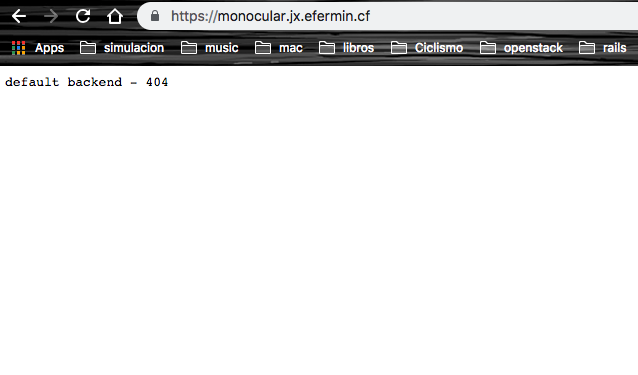
I never can see the charts I don't know why.
athilaelhuno
on 21 Jan 2019
Pls take a look at #2798
Fixed for me
 sn00p
on 22 Jan 2019
sn00p
on 22 Jan 2019
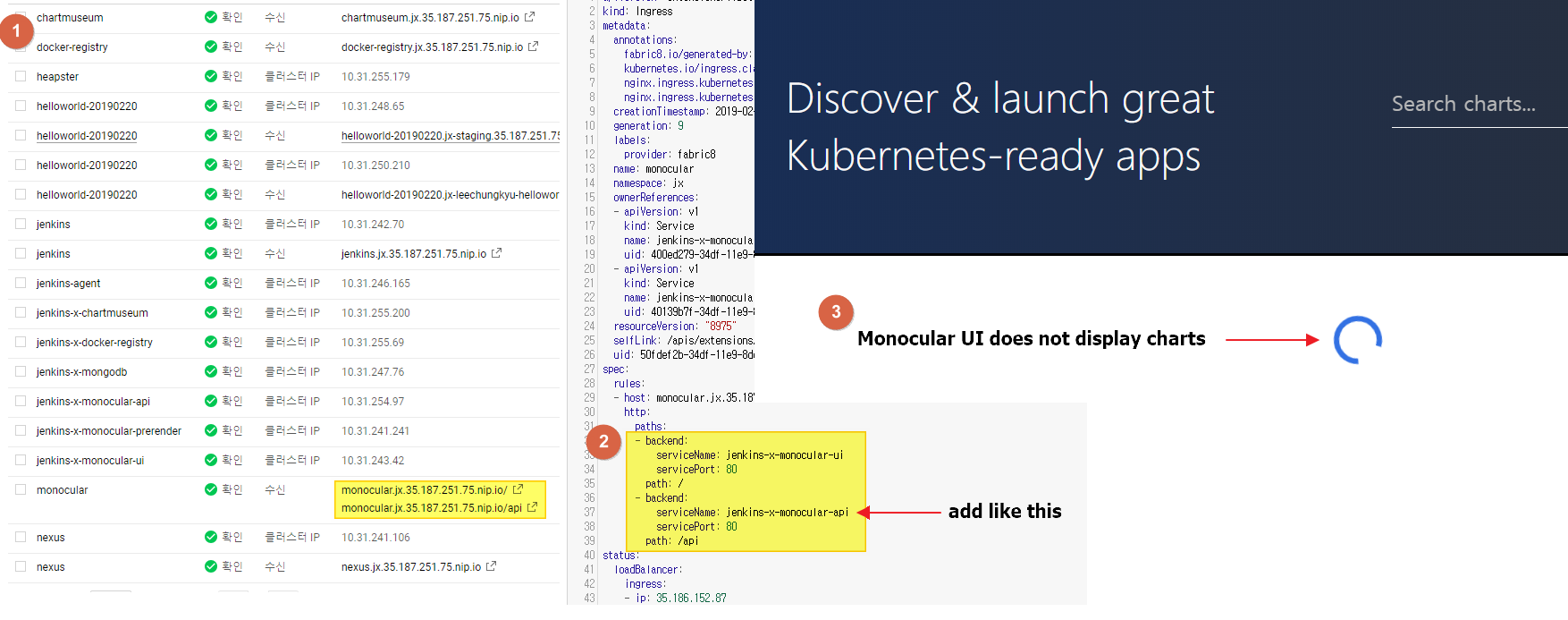
I am in the same situation.
$ jx --version
1.3.904
- GKE install
I just try below command for demo
$ jx create spring -d web -d actuator
 leechungkyu
on 20 Feb 2019
leechungkyu
on 20 Feb 2019
I am running into this problem as well. As far as I can tell, the /api/ backend is not being properly exposed via Ingress because I'm getting the default nginx-ingress-controller 404 message when I hit any /api/ routes. I have updated the Ingress record per the suggestions above.
 n8mellis
on 22 Feb 2019
n8mellis
on 22 Feb 2019
Having the same problem. Running on GKE. Ingress config looks fine, getting default ingress 404 on /api. Can curl from within monocular-ui shell.
jx version
NAME VERSION
jx 1.3.964
jenkins x platform 0.0.3515
Kubernetes cluster v1.11.7-gke.4
kubectl v1.13.2
helm client v2.13.0+g79d0794
helm server v2.13.0+g79d0794
git git version 2.17.1
Operating System Ubuntu 18.04.2 LTS
kubectl describe ingress monocular
Name: monocular
Namespace: jx
Address: 34.76.125.86
Default backend: default-http-backend:80 (10.48.0.9:8080)
TLS:
tls-monocular terminates monocular.jx.wava-it.com
Rules:
Host Path Backends
---- ---- --------
monocular.jx.example.com
/ jenkins-x-monocular-ui:80 (<none>)
/api/ jenkins-x-monocular-api:80 (<none>)
Annotations:
nginx.ingress.kubernetes.io/ingress.class: nginx
nginx.ingress.kubernetes.io/rewrite-target: /
certmanager.k8s.io/issuer: letsencrypt-prod
fabric8.io/generated-by: exposecontroller
kubernetes.io/ingress.class: nginx
kubernetes.io/tls-acme: true
Events: <none>
 wardvl
on 7 Mar 2019
wardvl
on 7 Mar 2019
Same problem using EKS.
NAME VERSION
jx 1.3.1011
jenkins x platform 0.0.3629
Kubernetes cluster v1.11.8-eks-7c34c0
kubectl v1.11.8
helm client v2.12.2+g7d2b0c7
helm server v2.12.2+g7d2b0c7
git git version 2.21.0.windows.1
Operating System Windows 10 Pro 1809 build 17763
 martijnburger
on 25 Mar 2019
martijnburger
on 25 Mar 2019
for me the solution proposed by @mdiez19 on slack is working:
Mark Diez
P.S. if I add the annotation nginx.ingress.kubernetes.io/rewrite-target: / Then the pod always processes the request as just /
 erSitzt
on 26 Mar 2019
erSitzt
on 26 Mar 2019
Check the version of nginx-ingress controller you're using. They made a breaking change starting v0.22.x . You'll need to explicitly state the capture group in your ingress rule.
apiVersion: extensions/v1beta1
kind: Ingress
metadata:
  annotations:
    fabric8.io/generated-by: exposecontroller
    kubernetes.io/ingress.class: nginx
    nginx.ingress.kubernetes.io/ingress.class: nginx
    nginx.ingress.kubernetes.io/rewrite-target: /$1
  name: monocular
  namespace: jx
spec:
  rules:
  - host: monocular.jx.blah.com
    http:
      paths:
      - backend:
          serviceName: jenkins-x-monocular-api
          servicePort: 80
        path: /api/?(.*)
      - backend:
          serviceName: jenkins-x-monocular-ui
          servicePort: 80
        path: /?(.*)
https://kubernetes.github.io/ingress-nginx/examples/rewrite/#rewrite-target
 mdiez19
on 26 Mar 2019
mdiez19
on 26 Mar 2019
@mdiez19 nice, it works for me. Thx a lot.
athilaelhuno
on 26 Mar 2019
@mdiez19 Great! That worked for me as well. Thanks for sharing!
n8mellis
on 27 Mar 2019
Yup! That's the trick.
martijnburger
on 28 Mar 2019
I apologize for the possibly obvious question, but where do I edit the aforementioned file?
 macalinao
on 28 Mar 2019
macalinao
on 28 Mar 2019
@macalinao which one ? The modified Ingress rule by @mdiez19 if you are using nginx v0.22.x or the solution that works with nginx before that breaking change ?
erSitzt
on 28 Mar 2019
I apologize for the possibly obvious question, but where do I edit the aforementioned file?
kubectl edit ingress monocular
martijnburger
on 30 Mar 2019
Same problem after jx upgrade platform, same fix. Thanks! @mdiez19
 martin-patsov
on 10 Jun 2019
martin-patsov
on 10 Jun 2019
Issues go stale after 90d of inactivity.
Mark the issue as fresh with /remove-lifecycle stale.
Stale issues rot after an additional 30d of inactivity and eventually close.
If this issue is safe to close now please do so with /close.
Provide feedback via https://jenkins-x.io/community.
/lifecycle stale
 jenkins-x-bot
on 12 Mar 2020
jenkins-x-bot
on 12 Mar 2020
Stale issues rot after 30d of inactivity.
Mark the issue as fresh with /remove-lifecycle rotten.
Rotten issues close after an additional 30d of inactivity.
If this issue is safe to close now please do so with /close.
Provide feedback via https://jenkins-x.io/community.
/lifecycle rotten
jenkins-x-bot
on 11 Apr 2020
Rotten issues close after 30d of inactivity.
Reopen the issue with /reopen.
Mark the issue as fresh with /remove-lifecycle rotten.
Provide feedback via https://jenkins-x.io/community.
/close
jenkins-x-bot
on 11 May 2020
Rotten issues close after 30d of inactivity.
Reopen the issue with /reopen.
Mark the issue as fresh with /remove-lifecycle rotten.
Provide feedback via https://jenkins-x.io/community.
/close
jenkins-x-bot
on 10 Jun 2020
@jenkins-x-bot: Closing this issue.
In response to this:
Rotten issues close after 30d of inactivity.
Reopen the issue with/reopen.
Mark the issue as fresh with/remove-lifecycle rotten.
Provide feedback via https://jenkins-x.io/community.
/close
Instructions for interacting with me using PR comments are available here. If you have questions or suggestions related to my behavior, please file an issue against the jenkins-x/lighthouse repository.
jenkins-x-bot
on 10 Jun 2020
Related issues
 ysaakpr
·
5Comments
ysaakpr
·
5Comments
 carlossg
·
4Comments
carlossg
·
4Comments
 rudolph9
·
3Comments
rudolph9
·
3Comments
 CobraFlow
·
5Comments
CobraFlow
·
5Comments
 SmartassSkeleton
·
4Comments
SmartassSkeleton
·
4Comments
Most helpful comment
Check the version of nginx-ingress controller you're using. They made a breaking change starting v0.22.x . You'll need to explicitly state the capture group in your ingress rule.
https://kubernetes.github.io/ingress-nginx/examples/rewrite/#rewrite-target