Jx: Docker multi-stage builds not working if JX installed on GKE
Summary
After trying JX with EKS/AWS without luck (#1108) for a while, I'm moving to GKE.
I use multi-stage build for Docker, and it works when JX installed on EKS, but not for the GKE case.
Steps to reproduce the behavior
- Install JX on GKE
jx install --provider=gke - Import a project with Docker multi-stage builds
Jx version
The output of jx version is:
NAME               VERSION
jx                 1.3.163
jenkins x platform 0.0.2082
kubernetes cluster v1.9.7-gke.5
kubectl            v1.9.7
helm client        v2.10.0-rc.2+g5615410
helm server        v2.10.0-rc.2+g5615410
git                git version 2.11.0
Kubernetes cluster
What kind of Kubernetes cluster are you using & how did you create it?
I use a GKE cluster, created using jx.
jx create cluster gke
Operating system / Environment
GCP Cloud Console
Expected behavior
Able to build a multi-stage Dockerfile.
Actual behavior
Fail to build a multi-stage Dockerfile.
+ docker version
Client:
 Version:   17.12.0-ce
 API version:   1.27 (downgraded from 1.35)
 Go version:    go1.9.2
 Git commit:    c97c6d6
 Built: Wed Dec 27 20:05:38 2017
 OS/Arch:   linux/amd64
Server:
 Engine:
  Version:  17.03.2-ce
  API version:  1.27 (minimum version 1.12)
  Go version:   go1.9.2
  Git commit:   f5ec1e2
  Built:    Fri Aug  3 10:29:07 2018
  OS/Arch:  linux/amd64
  Experimental: false

+ docker build -f docker/Dockerfile --target prod -t 10.51.251.196:5000/jenkinsx/mcs-ver2:0.0.0-SNAPSHOT-PR-2532-6 .
EXITCODE   0Sending build context to Docker daemon   54.1MB
Step 1/50 : FROM amazonlinux:2 as b0
Error parsing reference: "amazonlinux:2 as b0" is not a valid repository/tag: invalid reference format
script returned exit code 1
 vochicong
All 12 comments
I've tried
jx install --provider=gke --docker-registry=ecr.io
but it didn't help. The Docker registry keeps being 10.51.251.196:5000.
vochicong
on 11 Aug 2018
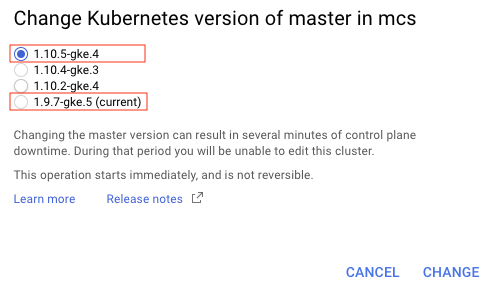
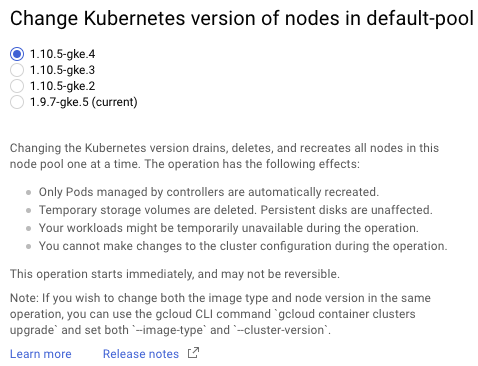
I found that my k8s version is 1.9.7-gke.5, which has Docker 17.03, which doesn't support multi stage builds.
Updating it to k8s 1.10.5-gke.4 to see if it helps.
vochicong
on 11 Aug 2018
Upgrading k8s version didn't help.
Found that docker version in Container-Optimized OS is 17.03
https://cloud.google.com/container-optimized-os/docs/release-notes
Trying Ubuntu instead.
vochicong
on 11 Aug 2018
Switching from Container-Optimized OS to Ubuntu didn't help.
+ docker version
Client:
 Version:   17.12.0-ce
 API version:   1.27 (downgraded from 1.35)
 Go version:    go1.9.2
 Git commit:    c97c6d6
 Built: Wed Dec 27 20:05:38 2017
 OS/Arch:   linux/amd64
Server:
 Engine:
  Version:  17.03.2-ce
  API version:  1.27 (minimum version 1.12)
  Go version:   go1.6.2
  Git commit:   f5ec1e2
  Built:    Tue Nov 21 16:41:54 2017
  OS/Arch:  linux/amd64
  Experimental: false
+ docker info
Containers: 29
 Running: 28
 Paused: 0
 Stopped: 1
Images: 16
Server Version: 17.03.2-ce
Storage Driver: overlay2
 Backing Filesystem: extfs
 Supports d_type: true
 Native Overlay Diff: true
Logging Driver: json-file
Cgroup Driver: cgroupfs
Plugins:
 Volume: local
 Network: bridge host macvlan null overlay
 Log:
Swarm: inactive
Runtimes: runc
Default Runtime: runc
Init Binary: docker-init
containerd version: 4ab9917febca54791c5f071a9d1f404867857fcc
runc version: 54296cf40ad8143b62dbcaa1d90e520a2136ddfe
init version: N/A (expected: 949e6facb77383876aeff8a6944dde66b3089574)
Security Options:
 apparmor
 seccomp
  Profile: default
Kernel Version: 4.15.0-1015-gcp
Operating System: Ubuntu 16.04.5 LTS
OSType: linux
Architecture: x86_64
CPUs: 2
Total Memory: 7.298GiB
Name: gke-mcs-ubuntu-0013f0ce-wnkl
ID: OG5D:WYGH:55MC:LD3R:BBFJ:ZVNJ:XKHA:KNOX:HKTX:SY5B:J3T5:D5SJ
Docker Root Dir: /var/lib/docker
Debug Mode (client): false
Debug Mode (server): false
Registry: https://index.docker.io/v1/
Experimental: false
Insecure Registries:
 10.0.0.0/8
 127.0.0.0/8
Registry Mirrors:
 https://mirror.gcr.io/
Live Restore Enabled: false
WARNING: No swap limit support
yeah - this is a known issue with GKE am afraid :(
our plan is to switch to Kaniko ASAP for building docker images so we are not dependent on the old versions of docker daemon on lots of k8s cluster nodes
 jstrachan
on 14 Aug 2018
jstrachan
on 14 Aug 2018
Thank you for your response. I'll close this issue for now.
vochicong
on 16 Aug 2018
Is there any timeline to support Docker v17.05+ for multi stage builds? I would love to use jx but this is kind of a showstopper since our projects rely on multi-stage builds in docker
 jetzlstorfer
on 31 Aug 2018
jetzlstorfer
on 31 Aug 2018
Currently we're dependent on the host node docker version as we mount the docker socket into the build pod, this is currently still 17.03 https://cloud.google.com/container-optimized-os/docs/release-notes
We are however planning to move to kaniko soon so I wonder if that can support multi stage builds? https://github.com/GoogleContainerTools/kaniko.
Alternatively we could run multiple builds in multiple steps using knative builds which is coming very soon to Jenkins X https://github.com/knative/build
 rawlingsj
on 31 Aug 2018
rawlingsj
on 31 Aug 2018
Thanks!
Do you know if any other cloud provider you support does run Docker v17.05+ on their machines yet?
jetzlstorfer
on 31 Aug 2018
I don't I'm afraid but would also love to know if you find out :)
rawlingsj
on 31 Aug 2018
FYI, EKS/AWS can build multistage Dockerfiles. However, EKS was not stable the last time I used it.
vochicong
on 1 Sep 2018
I created a default cluster jx create cluster gke, I am getting did jx import on scala play project, and it bombed with docker build problem.
Am I running into the same issue, or something else?
```
++ cat VERSION
- export VERSION=0.0.1
- VERSION=0.0.1
- skaffold build -f skaffold.yaml
Starting build...
Building [changeme]...
2018/09/28 01:39:30 No matching credentials found for index.docker.io, falling back on anonymous
Sending build context to Docker daemon
time="2018-09-28T01:39:31Z" level=fatal msg="build step: building [changeme]: build artifact: running build: docker build: error during connect: Post http://%2Fvar%2Frun%2Fdocker.sock/v1.27/build?buildargs=null&cachefrom=null&cgroupparent=&cpuperiod=0&cpuquota=0&cpusetcpus=&cpusetmems=&cpushares=0&dockerfile=Dockerfile&labels=null&memory=0&memswap=0&networkmode=&rm=0&shmsize=0&t=3ba17834b6835f0c91f266a9129f4cba&target=&ulimits=null: creating docker context: getting relative tar paths: file pattern [build/libs/*.jar] must match at least one file"
script returned exit code 1```
 darkn3rd
on 28 Sep 2018
darkn3rd
on 28 Sep 2018
Related issues
 abayer
·
4Comments
abayer
·
4Comments
 shahnewazrifat
·
3Comments
shahnewazrifat
·
3Comments
 igdianov
·
3Comments
igdianov
·
3Comments
 ysaakpr
·
5Comments
ysaakpr
·
5Comments
 tdcox
·
3Comments
tdcox
·
3Comments
Most helpful comment
yeah - this is a known issue with GKE am afraid :(
our plan is to switch to Kaniko ASAP for building docker images so we are not dependent on the old versions of docker daemon on lots of k8s cluster nodes