If the Jenkins pod is restarted it executes the initContainer clearing plugins/settings etc.
I would expect that the settings, plugins and upgrade of Jenkins to be preserved when the pod is restarted from a node restart etc.
 CobraFlow
All 23 comments
Same problem here. Is there any way around it?
Can we use a custom image for jenkins?
 benhei
on 24 Aug 2018
benhei
on 24 Aug 2018
Hi. Is there any status on this issue? We run into the same problem. Any solution to this?
 grabnerandi
on 1 Oct 2018
grabnerandi
on 1 Oct 2018
I think I found a temporary solution for this issue:
Step 1: Run in terminal:
kubectl edit deployment jenkins -n jx
Step 2: Scroll to the 'initContainers' section and change the 'command' to:
      initContainers:
      - command:
        - sh
        - -c
        - sleep 2
        image: jenkinsxio/jenkinsx:0.0.28
        imagePullPolicy: IfNotPresent
        name: copy-default-config
        resources: {}
        terminationMessagePath: /dev/termination-log
        terminationMessagePolicy: File
        volumeMounts:
        - mountPath: /var/jenkins_home
          name: jenkins-home
        - mountPath: /var/jenkins_config
          name: jenkins-config
        - mountPath: /usr/share/jenkins/ref/secrets/
          name: secrets-dir
If the pod gets killed, the configuration remains the same.
 sachsenhofer
on 1 Oct 2018
sachsenhofer
on 1 Oct 2018
Did anyone manage to get this solved? @sachsenhofer's suggestion does not work for me anymore - Jenkins is unable to schedule any agents after restarting with these changes. It feels like part of the script at /var/jenkins_config/apply_config.sh needs to run for Jenkins to initialize successfully. But when running the entire apply_config.sh script, the Jenkins pod looses it's settings, upgrades and plugins.
 juanserra
on 16 Apr 2019
juanserra
on 16 Apr 2019
the configuration of Jenkins comes from Helm which populates ConfigMaps which are used to initialise the pod: https://jenkins-x.io/getting-started/config/
 jstrachan
on 14 May 2019
jstrachan
on 14 May 2019
I'm assuming when you say configuration is lost thats due to modifying things in the Jenkins web UI right?
jstrachan
on 14 May 2019
@jstrachan picking up this conversation, yes that's correct, I just had this happen today. I configured things like my github oauth plugin in the UI. I edited the deployment today to test a new command-line argument, and when it recreated the pod everything was gone.
 ajp-lqx
on 19 Jun 2019
ajp-lqx
on 19 Jun 2019
any updates on this issue, need to debug a problem and would like to retain all my plugins/configurations and need te reboot the node runnign the jenkins container, just tried in test with latest version and all changes have been wiped?
 centrex-ops
on 5 Jul 2019
centrex-ops
on 5 Jul 2019
@centrex-ops if you comment out the apply_config.sh init container it'll keep it from overwriting the previous config.
ajp-lqx
on 6 Jul 2019
@jstrachan Sorry for the tardy response, but yes I update/upgrade/install Jenkins/Plugins via the UI.
CobraFlow
on 11 Aug 2019
@jstrachan @ajp-lqx I am doing the same thing. Updating the Plugins from the UI. I have tried the solution with commenting out the apply_config.sh which retains the plugins but it losing the state of their configuration.
 kapopken
on 16 Aug 2019
kapopken
on 16 Aug 2019
Must be a better way than rebuilding Jenkins image.
 yevgenytrcloudzone
on 18 Aug 2019
yevgenytrcloudzone
on 18 Aug 2019
@yevgenytrcloudzone you can disable the init container in the deployment descriptor. This will prevent it from re-initializing the plugins and the state.
kapopken
on 19 Aug 2019
I have this problem too. It looks like others had it too but found some workaround: https://medium.com/dailymotion/from-jenkins-to-jenkins-x-604b6cde0ce3
 martin-patsov
on 7 Sep 2019
martin-patsov
on 7 Sep 2019
@martin-patsov we have had same issue in jenkins via helm on AKS pods and post restart all config UI changes are lost . whats workaround please .?
 vishalsparmar
on 30 Sep 2019
vishalsparmar
on 30 Sep 2019
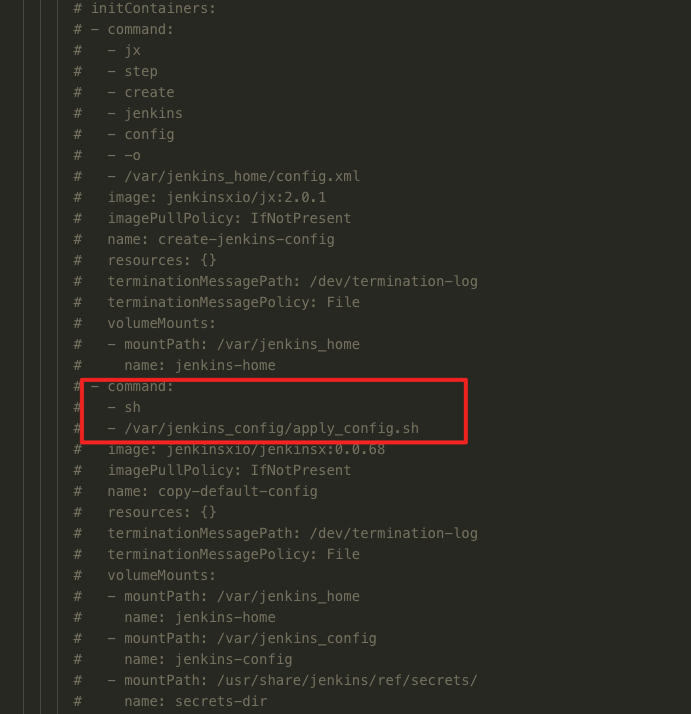
Also encountered this problem, I am now removing this init container after the first deployment
 zjj2wry
on 30 Sep 2019
zjj2wry
on 30 Sep 2019
@vishalsparmar Currently our workaround is to manually reapply a list of changes each time when they are lost (because it does not happen often and they are not too many). I really hope this guy: "Vincent Behar" keeps to his promise: "I won’t go into the details of our setup right now, but don’t worry, it will be the topic of my next blog post!" and will post the workaround he uses somewhere in the future: https://medium.com/dailymotion/from-jenkins-to-jenkins-x-604b6cde0ce3
martin-patsov
on 30 Sep 2019
Thanks Martin
On Monday, 30 September 2019, 12:21:46 BST, martin-patsov notifications@github.com wrote:
@vishalsparmar Currently our workaround is to manually reapply a list of changes each time when they are lost (because it does not happen often and they are not too many). I really hope this guy: "Vincent Behar" keeps to his promise: "I won’t go into the details of our setup right now, but don’t worry, it will be the topic of my next blog post!" and will post the workaround he uses somewhere in the future: https://medium.com/dailymotion/from-jenkins-to-jenkins-x-604b6cde0ce3
—
You are receiving this because you were mentioned.
Reply to this email directly, view it on GitHub, or mute the thread.
vishalsparmar
on 30 Sep 2019
I also have had this issue and would like to know what is the best way besides reapply. I lost my saml configurations and disabled the apply_config.sh. but have to reapply the URL and Identity Meta data for okta integration. Would like to konw if there are any updates, thanks!
 mdcsaenz
on 9 Nov 2019
mdcsaenz
on 9 Nov 2019
Good day! We run into the same problem. It always misses all Global security settings like GitHub Authentication and all installed Jenkins modules .Any solution to this?
I know that the issue with modules I can fix on my own by using custom container, but as I think it not good idea.
 olektretiak
on 15 Nov 2019
olektretiak
on 15 Nov 2019
Are there any updates on this issue? I do not want to workaround this via removing the initContainer because that will prevent my plugins from ever being updated when updating the JenkinsX platform and I will have to manage my plugins updates manually.
Is there any way to update the Jenkinsx platform and the plugins versions but reserve the settings and config of the plugins? For example I want to upgrade Jenkinsx and Github Authenticator plugin to their most recent versions but I also want to preserve my GH Authenticator configurations.
 amy-bachir
on 18 Feb 2020
amy-bachir
on 18 Feb 2020
@CobraFlow, @amy-bachir, static master support in Jenkins-X has been deprecated and now officially removed in versions following 2.1.0 in favor of exclusive support for Tekton pipelines. This will allow community members to focus and much more rapidly to evolve Jenkins X features in favor of cloud native approaches to application development, CI/CD and deployments.
 deanesmith
on 21 Apr 2020
deanesmith
on 21 Apr 2020
I have created storage class and persistent volume claim and started the jenkins pod and I have created a new job from UI, deleted pod (helm del --purge jenkins) and installed the pod again using helm install. It worked like charming :)
I have simply followed this link: https://stackoverflow.com/questions/56266718/how-can-i-use-an-existing-pvc-to-helm-install-stable-jenkins
Thought to share it might help someone in the future because, I couldn't find much information online.
I tried commenting the apply_config.sh but my pod haven't started ( initCrashloopbackoff).
 ramk2020
on 4 Jun 2020
ramk2020
on 4 Jun 2020
Related issues
 ysaakpr
·
5Comments
ysaakpr
·
5Comments
 rudolph9
·
3Comments
jstrachan
·
3Comments
rudolph9
·
3Comments
jstrachan
·
3Comments
 kevinsuperped
·
5Comments
kevinsuperped
·
5Comments
 sourabhg
·
4Comments
sourabhg
·
4Comments
Most helpful comment
I think I found a temporary solution for this issue:
Step 1: Run in terminal:
kubectl edit deployment jenkins -n jxStep 2: Scroll to the 'initContainers' section and change the 'command' to:
If the pod gets killed, the configuration remains the same.