Jx: Provide support for Github's 2 factor authentication on jx promote
I had to disable 2 factor authentication for jx promote
$ jx promote demo --version 0.0.3 --env production
Promoting app demo version 0.0.3 to namespace jx-production
WARNING: Could not discover the git repository info failed to run git commit in  due to exit status 1
WARNING: No $JOB_NAME environment variable found so cannot record promotion activities into the PipelineActivity resources in kubernetes
Using pipeline:  build: #
fatal: remote origin already exists.
No local changes to save
Already on 'master'
Your branch is up to date with 'origin/master'.
Already up to date.
Found remote branch names master, HEAD -> origin/master, master
Switched to branch 'promote-demo-0.0.3'
[promote-demo-0.0.3 8b475ac] Promote demo to version 0.0.3
 1 file changed, 8 insertions(+), 5 deletions(-)
Username for 'https://github.com': sanketjpatel
Password for 'https://[email protected]':
remote: Invalid username or password.
fatal: Authentication failed for 'https://github.com/sanketjpatel/environment-scribeebony-production.git/'
After disabling 2FA
$ jx promote demo --version 0.0.3 --env production
Promoting app demo version 0.0.3 to namespace jx-production
WARNING: Failed to try detect the current Jenkins pipeline for sanketjpatel/jx-spring-demo/feat/demo due to 404 Not Found
WARNING: No $JOB_NAME environment variable found so cannot record promotion activities into the PipelineActivity resources in kubernetes
Using pipeline:  build: #
fatal: remote origin already exists.
No local changes to save
Switched to branch 'master'
Your branch is up to date with 'origin/master'.
Already up to date.
Found remote branch names master, promote-demo-0.0.3, promote-demo-0.0.3-d8b7b8b4-4f50-11e8-a3d9-720008cbbee0, HEAD -> origin/master, master
Switched to branch 'promote-demo-0.0.3-52a16404-4f51-11e8-a5fd-720008cbbee0'
[promote-demo-0.0.3-52a16404-4f51-11e8-a5fd-720008cbbee0 0c845db] Promote demo to version 0.0.3
 1 file changed, 8 insertions(+), 5 deletions(-)
Username for 'https://github.com': sanketjpatel
Password for 'https://[email protected]':
Counting objects: 4, done.
Delta compression using up to 8 threads.
Compressing objects: 100% (4/4), done.
Writing objects: 100% (4/4), 470 bytes | 470.00 KiB/s, done.
Total 4 (delta 2), reused 0 (delta 0)
remote: Resolving deltas: 100% (2/2), completed with 2 local objects.
To https://github.com/sanketjpatel/environment-scribeebony-production.git
? Do you wish to use sanketjpatel as the user name to submit the Pull Request Yes
Created Pull Request: https://github.com/sanketjpatel/environment-scribeebony-production/pull/1

WARNING: Failed to try detect the current Jenkins pipeline for sanketjpatel/jx-spring-demo/feat/demo due to 404 Not Found
WARNING: No $JOB_NAME environment variable found so cannot record promotion activities into the PipelineActivity resources in kubernetes
Using pipeline:  build: #
WARNING: Failed to query the Pull Request last commit status for https://github.com/sanketjpatel/environment-scribeebony-production/pull/1 ref 0c845db8d8587d38aece3232274976c98e637c75 Could not find a status for repository sanketjpatel/environment-scribeebony-production with ref 0c845db8d8587d38aece3232274976c98e637c75
Pull Request https://github.com/sanketjpatel/environment-scribeebony-production/pull/1 is merged at sha 738fb3556d7c1d283f41f4b118435426c73ec7e7
Merge commit has not yet any statuses on repo sanketjpatel/environment-scribeebony-production merge sha 738fb3556d7c1d283f41f4b118435426c73ec7e7
merge status: pending for URL https://api.github.com/repos/sanketjpatel/environment-scribeebony-production/statuses/738fb3556d7c1d283f41f4b118435426c73ec7e7 with target: http://unconfigured-jenkins-location/job/sanketjpatel/job/environment-scribeebony-production/job/master/3/display/redirect description: This commit is being built
merge status: success for URL https://api.github.com/repos/sanketjpatel/environment-scribeebony-production/statuses/738fb3556d7c1d283f41f4b118435426c73ec7e7 with target: http://unconfigured-jenkins-location/job/sanketjpatel/job/environment-scribeebony-production/job/master/3/display/redirect description: This commit looks good
? Do you wish to use sanketjpatel as the user name to comment on issues Yes
Application is available at: http://jx-production-demo.jx-production.k8s.egen.io
 sanketjpatel
All 19 comments
@sanketjpatel if you go to https://github.com/settings/tokens - you can make a token that can be used as a password in that dialog.
However - you ran jx create git token right? so maybe there is some other bug that it didn't keep the credentials handy from that step..
 michaelneale
on 4 May 2018
michaelneale
on 4 May 2018

Yes, I had created the token and it works correctly for other workflows. I'll probably have to dig into jx promote
sanketjpatel
on 4 May 2018
@sanketjpatel so the API token is working for some workflows but not others?
 jstrachan
on 4 May 2018
jstrachan
on 4 May 2018
Yes that is correct. Specifically, jx promote. I will try and reproduce this again. If not, will close the issue
EDIT: Confirmed I was able to reproduce this.
sanketjpatel
on 7 May 2018
Same thing happens to me.
Other workflows work as expected, jx promote asks for credentials (and fails, due to 2FA)
 oren-icx
on 20 Sep 2018
oren-icx
on 20 Sep 2018
I just discovered this also... I think the issue is that jx promote wants to do a git push, which afaict, github tokens don't cover. swapping the origin url to ssh rather than https should correct the situation... I'm going to make that change manually and test.
 brentley
on 2 Oct 2018
brentley
on 2 Oct 2018
it looks like something resets the origin during promotion:
OrganizationAccountAccessRole:~/.jx/environments/brentley/environment-rippermangrove-production (promote-ecsdemo-frontend-latest-1c27d00f-c66b-11e8-938c-0a4bad47105e) $ git remote rm origin

OrganizationAccountAccessRole:~/.jx/environments/brentley/environment-rippermangrove-production (promote-ecsdemo-frontend-latest-1c27d00f-c66b-11e8-938c-0a4bad47105e) $ git remote add origin [email protected]:brentley/environment-rippermangrove-production.git

OrganizationAccountAccessRole:~/.jx/environments/brentley/environment-rippermangrove-production (promote-ecsdemo-frontend-latest-1c27d00f-c66b-11e8-938c-0a4bad47105e) $ git remote -v
oldorigin       https://github.com/brentley/environment-rippermangrove-production.git (fetch)
oldorigin       https://github.com/brentley/environment-rippermangrove-production.git (push)
origin  [email protected]:brentley/environment-rippermangrove-production.git (fetch)
origin  [email protected]:brentley/environment-rippermangrove-production.git (push)
upstream        https://github.com/jenkins-x/default-environment-charts.git (fetch)
upstream        https://github.com/jenkins-x/default-environment-charts.git (push)

OrganizationAccountAccessRole:~/.jx/environments/brentley/environment-rippermangrove-production (promote-ecsdemo-frontend-latest-1c27d00f-c66b-11e8-938c-0a4bad47105e) $ cd -
/home/ec2-user/environment/ecsdemo-frontend

OrganizationAccountAccessRole:~/environment/ecsdemo-frontend (master) $ jx promote
Using helmBinary helm with feature flag: none
? Pick environment: production
Promoting latest version of app ecsdemo-frontend to namespace jx-production
pipeline brentley/ecsdemo-frontend/master
Username for 'https://github.com': brentley
Password for 'https://[email protected]':
error: failed to run 'git push origin HEAD' command in directory '/home/ec2-user/.jx/environments/brentley/environment-rippermangrove-production', output: 'remote: Invalid username or password.
fatal: Authentication failed for 'https://github.com/brentley/environment-rippermangrove-production.git/'': exit status 128

OrganizationAccountAccessRole:~/environment/ecsdemo-frontend (master) $ cd -
/home/ec2-user/.jx/environments/brentley/environment-rippermangrove-production

OrganizationAccountAccessRole:~/.jx/environments/brentley/environment-rippermangrove-production (promote-ecsdemo-frontend-latest-3d872f26-c66b-11e8-b3b9-0a4bad47105e) $ git remote -v
oldorigin       https://github.com/brentley/environment-rippermangrove-production.git (fetch)
oldorigin       https://github.com/brentley/environment-rippermangrove-production.git (push)
origin  https://github.com/brentley/environment-rippermangrove-production.git (fetch)
origin  https://github.com/brentley/environment-rippermangrove-production.git (push)
upstream        https://github.com/jenkins-x/default-environment-charts.git (fetch)
upstream        https://github.com/jenkins-x/default-environment-charts.git (push)
you have to give the token permission to push
michaelneale
on 2 Oct 2018
I experience this same issue with GitHub 2FA enabled and jx promote and jx delete app.
In the meantime I have used the workaround described by @michaelneale
That is, keep 2FA enabled and generate another GitHub token with full repo scope to use as a password when being prompted for GitHub credentials after jx promote.
 connorads
on 27 Oct 2018
connorads
on 27 Oct 2018
Hello @connorads, I've hit this issue too. I'm failing to see what you mean by:
generate another GitHub token with full repo scope to use as a password
 idea360
on 30 Nov 2018
idea360
on 30 Nov 2018
Hi @idea360 did you work it out?
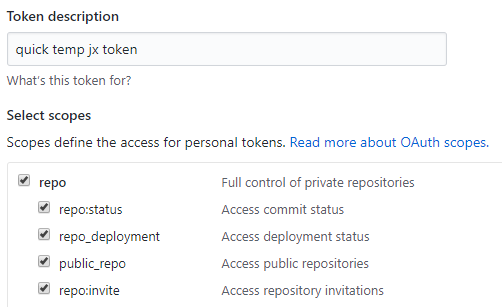
I meant that you need to
- Generate a new personal access token
- Under Select scopes, tick the checkbox for
repo_Full control of private repositories_ - Use the token as your password when prompted after running
jx promote
connorads
on 4 Dec 2018
Issues go stale after 90d of inactivity.
Mark the issue as fresh with /remove-lifecycle stale.
Stale issues rot after an additional 30d of inactivity and eventually close.
If this issue is safe to close now please do so with /close.
Provide feedback via https://jenkins-x.io/community.
/lifecycle stale
 jenkins-x-bot
on 3 Jun 2019
jenkins-x-bot
on 3 Jun 2019
facing the same behaviour,
use @connorads workround to do a manual pormote
jx version is : 2.0.377
 redliu312
on 2 Jul 2019
redliu312
on 2 Jul 2019
@redliu312 you don't need to do manual pushes - you just need to create a github token that the pipeline can use
jstrachan
on 2 Jul 2019
@jstrachan
I thought the document saying that the promote to production environment should be done manually?
Maybe my fault, but in previous comment, I mean a manual promote.
I will change the word I used.
redliu312
on 2 Jul 2019
whether you choose to promote automatically or manually has nothing to do with this issue - how to promote when using 2 factor authentication (which the answer is use a token).
you can choose which environments promote automatically and which are manual: https://jenkins-x.io/developing/promote/
jstrachan
on 2 Jul 2019
Stale issues rot after 30d of inactivity.
Mark the issue as fresh with /remove-lifecycle rotten.
Rotten issues close after an additional 30d of inactivity.
If this issue is safe to close now please do so with /close.
Provide feedback via https://jenkins-x.io/community.
/lifecycle rotten
jenkins-x-bot
on 1 Aug 2019
Rotten issues close after 30d of inactivity.
Reopen the issue with /reopen.
Mark the issue as fresh with /remove-lifecycle rotten.
Provide feedback via https://jenkins-x.io/community.
/close
jenkins-x-bot
on 12 Mar 2020
@jenkins-x-bot: Closing this issue.
In response to this:
Rotten issues close after 30d of inactivity.
Reopen the issue with/reopen.
Mark the issue as fresh with/remove-lifecycle rotten.
Provide feedback via https://jenkins-x.io/community.
/close
Instructions for interacting with me using PR comments are available here. If you have questions or suggestions related to my behavior, please file an issue against the kubernetes/test-infra repository.
jenkins-x-bot
on 12 Mar 2020
Related issues
 shahnewazrifat
·
3Comments
shahnewazrifat
·
3Comments
 renatoaraujoc
·
3Comments
renatoaraujoc
·
3Comments
 SmartassSkeleton
·
4Comments
SmartassSkeleton
·
4Comments
 igdianov
·
3Comments
igdianov
·
3Comments
 empath
·
3Comments
empath
·
3Comments
Most helpful comment
whether you choose to promote automatically or manually has nothing to do with this issue - how to promote when using 2 factor authentication (which the answer is use a token).
you can choose which environments promote automatically and which are manual: https://jenkins-x.io/developing/promote/