The gitea addon mostly works. There are a few pending issues:
- webhooks don't seem to work from pushes to gitea repositories triggering Jenkins. Are the webhook URLs correct?
- the MultiBranchProject created for gitea projects doesn't seem to trigger PR or master branch pipelines correctly. Is there a way to configure them to work correctly? Maybe a gitea plugin is required like the github / gitlab / bitbucket organisation folder plugins?
 jstrachan
All 23 comments
@jstrachan I found the following after doing a jx create git server gitea and jx create spring with the gitea provider:
- The webhook url is fine on the Gitea side but in Jenkins the GItea url and credentials are still defaults:
root@jenkins-7c9c7b5c95-ts9f5:/# cat /var/jenkins_home/org.jenkinsci.plugin.gitea.servers.GiteaServers.xml
       ...
      <serverUrl>http://gitea.changeme.com</serverUrl>
       ...
      <credentialsId>jenkins-x-chartmuseum</credentialsId>
       ...
- I corrected those and the multibranch pipeline scan succeeded, but then Gitea returned a
401when the pipeline ran and tried to update Gitea with the build's status:
[Gitea] Notifying branch build status: PENDING Build started...
ERROR: Could not send notifications
org.jenkinsci.plugin.gitea.client.api.GiteaHttpStatusException: HTTP 401/Unauthorized
 wbrefvem
on 17 Apr 2018
wbrefvem
on 17 Apr 2018
The former issue I've a workaround for; to dynamically generate the git credentials from all the available git pipeline secrets. Am about to release it very soon...
The latter I'm afraid is a bug in the gitea plugin for Jenkins: https://issues.jenkins-ci.org/browse/JENKINS-50459
jstrachan
on 17 Apr 2018
BTW the jx create git server gitea cannot modify the Jenkins configuration - there's no REST API for that - so we have to add new git servers before install today - or manually configure them in the Jenkins UI. I'm hoping to move ASAP to the configuration-as-code plugin so that we can add new git servers on the fly after install!
jstrachan
on 17 Apr 2018
hey folks - what is status of this?
 michaelneale
on 15 Jun 2018
michaelneale
on 15 Jun 2018
@michaelneale unfortunately we're still blocked on this jenkins plugin issue: https://issues.jenkins-ci.org/browse/JENKINS-50459 which means build results never get updated in gitea, so we can't do promotion
jstrachan
on 15 Jun 2018
@jstrachan oh good one - yeah that plugin looks like it won't get much maintanence unless we take it on (just stephen in spare time). They can be annoying mostly as it is hard to test in an automated fashion that would pick up things like this (and apis change in ways that can be subtle). There isn't an active community around this, so may have to make it just osmething we take on? Not a lot of code probably..
michaelneale
on 15 Jun 2018
ok I looked into https://issues.jenkins-ci.org/browse/JENKINS-50459 a bit.
So I think the problem may be that an Auth token is used, but it is not configured as an auth token in the credentials:
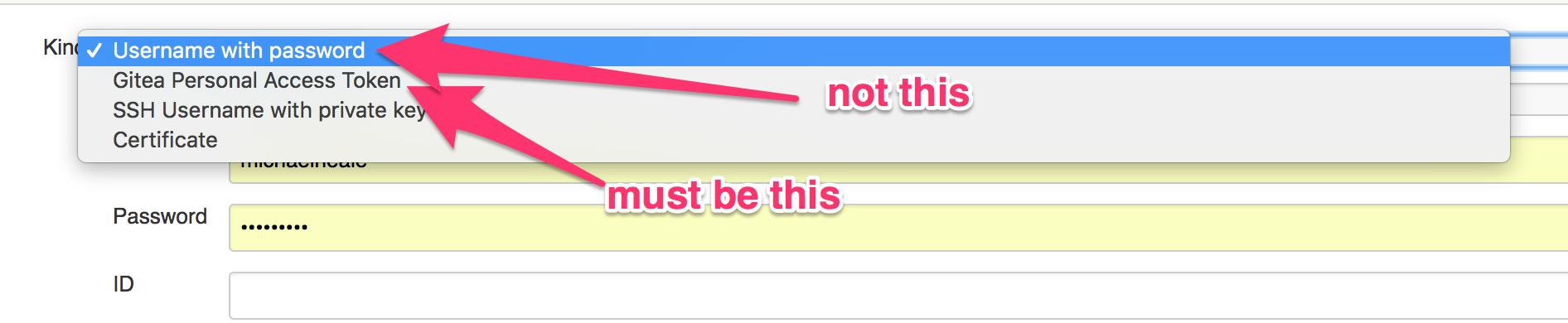
Note that Gitea plugin contributes its own "Personal access token" credential type in the above image.
The code is pretty simple:
https://github.com/jenkinsci/gitea-plugin/blob/master/src/main/java/org/jenkinsci/plugin/gitea/credentials/PersonalAccessToken.java
however, note that the auth token is treated specially: https://github.com/jenkinsci/gitea-plugin/blob/master/src/main/java/org/jenkinsci/plugin/gitea/client/impl/DefaultGiteaConnection.java#L826
With the token header. If you set it up as a password (see drop down above) vs the specific type of credentail for gitea token, it will fail as it assumes it is a username+password.
Github is kinda different as it lets you basically drop in the access token instead of password, but that is not the case here (at least according to that code).
So perhaps Jenkins X needs to setup the access token as the right type of credential and then it should just work? that is what worked for me locally.
if @stephenc is driving by, he may confirm or deny my theory here..
michaelneale
on 18 Jun 2018
@michaelneale awesome find thanks!!!
We are using Secrets for all our credentials with the kubernetes-credential-provider-plugin. So I wonder which is gonna be easiest:
- change kubernetes-credential-provider-plugin so that it can create a Gitea Personal Access Token credential (and then change Jenkins X to ensure we always make those kinds of
Secretsfor gitea) - change the gitea plugin to handle UserPassword credentials too
jstrachan
on 18 Jun 2018
@jstrachan the plugin can handle user name/password right now but it has to be a username password, not an application token (as gitea calls them). It has to treat it differently (as gitea api requires it) AFAICT, so it has to know it is a token vs a password, which seems to be the complication.
michaelneale
on 18 Jun 2018
I wonder if there's a way to create a gitea persona access token credential via the kubernetes-credential-provider plugin via this annotation? https://github.com/jenkinsci/kubernetes-credentials-provider-plugin/blob/master/docs/examples/username-pass.yaml#L8
jstrachan
on 18 Jun 2018
ah probably not right now but we could try add a custom converter:
https://github.com/jenkinsci/kubernetes-credentials-provider-plugin/tree/0e8df31d06d97753abaa0b5b3a5a96742cc93351/src/main/java/com/cloudbees/jenkins/plugins/kubernetes_credentials_provider/convertors
jstrachan
on 18 Jun 2018
Iirc you cannot checkout using the personal access token either, it needs a change in the git plugin to enable that, so for now you need to checkout using ssh if you use an access token (unsure if it is gitea that has this issue, but one of the git based scm sources does)
 stephenc
on 18 Jun 2018
stephenc
on 18 Jun 2018
@jstrachan I think checkout was working ok as it was right? was just updating the status via the api etc.
michaelneale
on 18 Jun 2018
So what I remember is that one of the SCM providers needs you to treat the token as a username without password for git checkout and as a bearer token for API.
So we just stuff it in, but the secret is not redacted, so anyone that can view the logs can view the access token and basically grab it.
We are waiting on a change in the Git plugin (to use the authentication tokens API) to allow us to redact the secret from the logs
stephenc
on 18 Jun 2018
@michaelneale
Hi,i have changed the password to really password(not the token now) in the secret jx-pipeline-git-gitea-gitea and i got 401 too.
 livelyRyan
on 27 Jul 2018
livelyRyan
on 27 Jul 2018
I think the gitea plugin requires a custom Credential implementation for gitea. So I think we may need to hack the kubernetes credential provider to be able to create gitea Credentials; then hack jx to be able to create the Secrets with the right annotations so that the kubernetes credentials provider can turn into gitea credentials
jstrachan
on 30 Jul 2018
Just been jumping in here, but is there strong reason to actually deal with the proprietary gitea token auth?
Looks like plain basic auth everywhere should be working just fine.
SignedInID (which is using the the token auth) is only called from
SignedInUser and the latter will also check and use basic auth when present.
 deas
on 8 Sep 2018
deas
on 8 Sep 2018
Issues go stale after 90d of inactivity.
Mark the issue as fresh with /remove-lifecycle stale.
Stale issues rot after an additional 30d of inactivity and eventually close.
If this issue is safe to close now please do so with /close.
Provide feedback via https://jenkins-x.io/community.
/lifecycle stale
 jenkins-x-bot
on 4 Jun 2019
jenkins-x-bot
on 4 Jun 2019
hey, what is the status?
 Alps86
on 2 Jul 2019
Alps86
on 2 Jul 2019
Stale issues rot after 30d of inactivity.
Mark the issue as fresh with /remove-lifecycle rotten.
Rotten issues close after an additional 30d of inactivity.
If this issue is safe to close now please do so with /close.
Provide feedback via https://jenkins-x.io/community.
/lifecycle rotten
jenkins-x-bot
on 1 Aug 2019
is there any hope of development on this topic still?
 robertschulze
on 2 Dec 2019
robertschulze
on 2 Dec 2019
Rotten issues close after 30d of inactivity.
Reopen the issue with /reopen.
Mark the issue as fresh with /remove-lifecycle rotten.
Provide feedback via https://jenkins-x.io/community.
/close
jenkins-x-bot
on 12 Mar 2020
@jenkins-x-bot: Closing this issue.
In response to this:
Rotten issues close after 30d of inactivity.
Reopen the issue with/reopen.
Mark the issue as fresh with/remove-lifecycle rotten.
Provide feedback via https://jenkins-x.io/community.
/close
Instructions for interacting with me using PR comments are available here. If you have questions or suggestions related to my behavior, please file an issue against the kubernetes/test-infra repository.
jenkins-x-bot
on 12 Mar 2020
Related issues
 vgallissot
·
5Comments
vgallissot
·
5Comments
 igdianov
·
3Comments
igdianov
·
3Comments
 shahnewazrifat
·
3Comments
shahnewazrifat
·
3Comments
 empath
·
3Comments
empath
·
3Comments
 CobraFlow
·
5Comments
CobraFlow
·
5Comments
Most helpful comment
BTW the
jx create git server giteacannot modify the Jenkins configuration - there's no REST API for that - so we have to add new git servers before install today - or manually configure them in the Jenkins UI. I'm hoping to move ASAP to the configuration-as-code plugin so that we can add new git servers on the fly after install!