Justenoughitems: (1.13.2) JEI NoSuchMethod errors in dev environment
I'm getting errors like this when trying to load JEI in my IDE
https://gist.github.com/TyrellPlayz/a04b285f138a9f3baf2dd68ffd54b5fc
 TyrellPlayz
All 19 comments
Thanks for the report!
I tried it out and got the same error.
 mezz
on 17 Mar 2019
mezz
on 17 Mar 2019
This seems to be an issue with the options we have for setting up mod dependencies in ForgeGradle.
I can't really get deobfuscation using gradle to work, and the runtime deobfuscation for mods in the mods folder has been removed in 1.13.
mezz
on 17 Mar 2019
Does it still work with the libs folder? That's the way I typically add non-maven dependencies. I don't recall whether that deobfuscates or just copies to the mods folder
 KnightMiner
on 17 Mar 2019
KnightMiner
on 17 Mar 2019
Using https://dvs1.progwml6.com/files/maven/ as the maven url seems to work with deobf, at least for me.
https://github.com/MinecraftForge/ForgeGradle/issues/571#issuecomment-473668106
 Tamaized
on 17 Mar 2019
Tamaized
on 17 Mar 2019
Confirmed that adding a trailing slash to the repository url makes deobf work. Thanks!
mezz
on 17 Mar 2019
I have submitted a fix for the maven url issue to ForgeGradle here: https://github.com/MinecraftForge/ForgeGradle/pull/576
mezz
on 18 Mar 2019
I made cpw aware of the AT issues and he will look into them when he finds some time to (probably in the next few weeks).
mezz
on 18 Mar 2019
Still having issues here's some more information.
build.gradle
error log
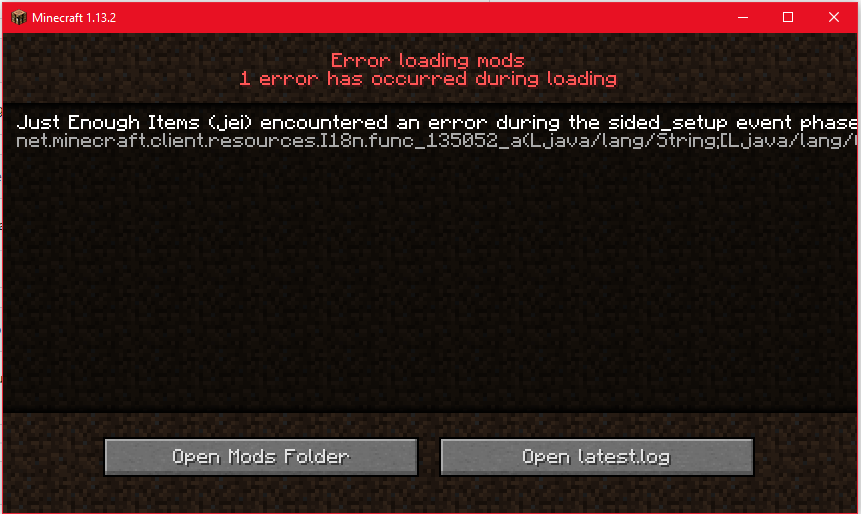
TyrellPlayz
on 19 Mar 2019
Having some issues with the build servers but I will try to get a potential fix for this out soon.
mezz
on 25 Mar 2019
Please try with JEI version 5.0.0.11, it should be fixed.
mezz
on 25 Mar 2019
Still getting the same error. I think it's something on forges side or something wrong with my setup.
https://gist.github.com/TyrellPlayz/66f2b7ee315460e2f3a5c728e21b6494
TyrellPlayz
on 25 Mar 2019
Hmm, thanks.
It's working for players now, but Forge is still missing something that lets ATs from other mods work in the developer environment.
mezz
on 25 Mar 2019
Well that's nice. I thought I would need to add it to my AT for it to work but don't have a full understanding of how to add to the AT.
TyrellPlayz
on 25 Mar 2019
The hacky workaround for now is to just copy everything from JEI's file AT into your AT file, then refresh your project so they get applied.
You can find JEI's AT file here: https://github.com/mezz/JustEnoughItems/blob/1.13/src/main/resources/META-INF/accesstransformer.cfg
mezz
on 25 Mar 2019
Didn't work, got the same error
TyrellPlayz
on 25 Mar 2019
You may not have set up the dependency correctly, you will want to use deobf like this:
deobf "mezz.jei:jei-${project.mcversion}:${project.jeiversion}"
mezz
on 25 Mar 2019
deobf "mezz.jei:jei-${project.minecraft_version}:${project.jei_version}"
did not work
Here's my build.gradle if you want to look
TyrellPlayz
on 25 Mar 2019
Leave out the compile line entirely for now and if you crash, please paste the new crash log to gist and link it here.
mezz
on 25 Mar 2019
That worked
TyrellPlayz
on 25 Mar 2019
Related issues
 NullSector76
·
4Comments
NullSector76
·
4Comments
 bookerthegeek
·
5Comments
bookerthegeek
·
5Comments
 Wodong77
·
3Comments
Wodong77
·
3Comments
 gendalv
·
4Comments
mezz
·
5Comments
gendalv
·
4Comments
mezz
·
5Comments
Most helpful comment
I have submitted a fix for the maven url issue to ForgeGradle here: https://github.com/MinecraftForge/ForgeGradle/pull/576